Now's the time to get tweaked.
If you want lower input delay and higher FPS for the new Fortnite season, get tweaked by @KutaTweaks.
All services are discounted to their lowest prices ever.
Join the Discord and get optimized.
Discord: https://t.co/mt30JCVPXR
Want MORE Gaming Performance?
You can now SAFELY tune Physical/Hidden Intel + AMD BIOS Settings DIRECTLY from Windows within minutes.
PTU uses AMISCE/Scewin to modify Performance values with a 1 of 1 Algorithm dedicated to applying the BEST performance settings.
Link Below👇
@LobRonaldo13821 You can do this command to revert it:
reg add "HKLM\SYSTEM\CurrentControlSet\Control\PriorityControl" /v Win32PrioritySeparation /t REG_DWORD /d 2 /f
@LobRonaldo13821 Run cmd as admin and paste this in and press enter:
reg add "HKLM\SYSTEM\CurrentControlSet\Control\PriorityControl" /v Win32PrioritySeparation /t REG_DWORD /d 38 /f
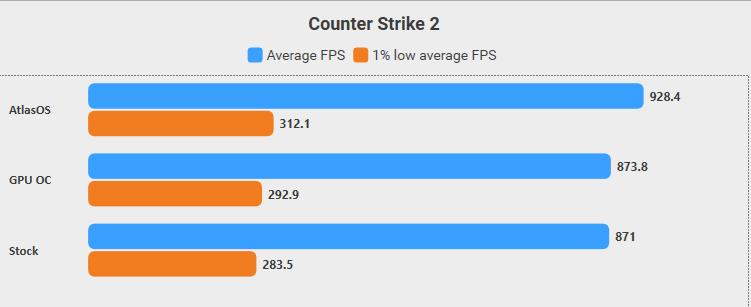
You can improve your CS2 1% lows by up to 10% in a few simple steps:
- Install the AtlasOS Playbook and MSI Afterburner
- In Afterburner, test different GPU OC settings and keep the one that’s fully stable on your system.
I tested this on my setup (9800X3D + RTX 5070) using the Dust2 FPS Benchmark Map.
⚠️ Important: While Installing AtlasOS, Prefer to select Windows Defender Enabled.
🛠️ CS2 Video Settings:
- Reflex Enabled
- 1280x960
- MSAA 2x
- AO Medium
- Anisotropic 16x
- HAGS and Game Mode was Enabled
- Windows 11 Pro 25H2 (26200.8524)
- NVIDIA Driver 596.36