Anthropic engineers just showed how they build a full app from scratch, using a loop of agents
40 minutes from the team behind Claude Code
they used three agents: one to plan, one to build, one to judge, cycling until the app actually works
the winners won't have the smartest model, they'll have the best loop
watch it, then read the full guide on how to actually use loops below
Perplexity just open-sourced the tool they use internally to keep their own developers safe. 😨
It's called Bumblebee. It runs quietly on a developer's laptop and checks for any sneaky code, suspicious browser plugins, or AI tools that might be silently leaking access to your data.
It covers Claude Code, Codex, Cursor, all of it.
Here is why this matters now.
For the last six months, hackers have been quietly slipping malicious code into the free building blocks that almost every app in the world is built on.
When a developer installs one of these poisoned pieces, the attacker gets a backdoor into everything that developer touches.
Including their AI tools and the keys that unlock them.
Most security tools defend the finished product. Bumblebee defends the person building it.
An independent security researcher read through the entire code and confirmed it is clean.
No hidden tracking. No data collection. No backdoors.
For two years, AI coding tools shipped with zero security defenses around them. Perplexity just shipped one. Free.
Worth installing if you build anything with AI.
Really nice GitHub Copilot CLI cheat sheet site created by @prasadhonrao! 📋
Covers commands, what they are, why you'd use them, and even shows commands in action. Filter by command type as well.
https://t.co/oz7pzfAYNE
How to enable full observability and automatic analytics for your LLM-based application.
It takes one library + one line of code, and you get a ton of information for free.
This is a no-brainer.
Your Copilot tokens now have a price tag 🤑
June 1: GitHub Copilot moves to usage-based billing.
Code completions stay free. Chat, agents, code review = credits.
Output costs 5× more than input.
Quick win: Add "Code only, no explanation" to your Copilot instructions.
Full breakdown ↓
https://t.co/zYbQGUeBg4
ANTHROPIC JUST PROVED MOST PEOPLE HAVE NO IDEA HOW TO PROMPT CLAUDE.
Their applied AI team dropped a 24 minute free workshop.
Not a creator who reverse engineered it.
Not a Reddit thread.
ANTHROPIC.
The people who wrote the weights.
And what they showed is uncomfortable.
There are 6 elements to a properly structured Claude prompt.
Most people are using 1.
Maybe 2.
That is not a skill issue.
That is an information issue.
And it has been quietly costing you every single day.
The outputs that felt slightly off.
The responses you had to rewrite 4 times.
The prompts that worked once and never again.
All of it traces back to the same 6 missing elements.
The people who watch this 24 minute workshop tonight will understand something about Claude that most daily users still do not know exists.
The people who skip it will keep getting 30% of what the tool is actually capable of and wonder why the results never quite land.
I watched it twice.
Then I built a Claude Skill that applies all 6 elements to every prompt automatically.
No more thinking about structure.
No more guessing what Claude needs.
The framework runs in the background every single time.
Full breakdown and skill setup is below.
Bookmark this now.
Watch the workshop first.
Then read the guide.
This is the one that compounds.
Follow @cyrilXBT for the exact prompt architecture, Claude skills, and systems I use to get outputs most people do not believe came from one person working alone.
The Head of Claude Code at Anthropic said he hasn’t written code by hand in months.
In 2 days he shipped 49 full features. All written 100% by AI.
He just dropped a 30 min talk on exactly how he does it.
Worth more than any $500 vibe coding course. Bookmark it:
a masterclass in coding agents from the head of anthropic.
there’s still a tonne of leverage in knowing how to use these systems optimally and this is the best i’ve seen.
make sure to bookmark so you can watch again and again chat
If you missed today's session kicking off our GitHub Copilot CLI Hands-On series you can watch it here:
https://t.co/dYqgl2j0lX
Tomorrow's session will cover chapter 3 & 4 of the GitHub Copilot CLI for Beginners course. Sign up for the upcoming sessions here. Hope to see you tomorrow!
👉 https://t.co/pSKvOIeSnK
Complete AI Agent customization has landed in @code!
🤖 Custom Agents
📖 Prompts
✅ Instructions
🪝 Hooks
🌎 MCP
⛹️♂️ Skills
🔌 Plugins
Manage, create, generate, organize with chat customizations.
I break it all down: https://t.co/47wQx4ysk9
#vscode#githubcopilot
There's an interesting study by GitHub on coding agents!
They analyzed 2,500+ custom instruction files across public repos to understand what separates effective agent setups from weak ones.
Effective setups give agents a specific persona, exact commands to run, defined boundaries, and examples of good output. Weak ones are vague helpers with no clear job description.
This points to the core friction with coding agents today, which is that they don't have a capability problem but rather a context problem.
A raw agent can write code, but it doesn't know the team's naming conventions, the specific linting setup, or preferred framework patterns.
Without that context, the first PR is often off-target and requires multiple rounds of correction.
Getting this right requires structured context, and GitHub Copilot implements a smart, layered customization system that does exactly this.
> At the repo level, a `.github/copilot-instructions .md` file defines project-wide rules like coding conventions, naming standards, security defaults, and prohibited patterns. The agent reads this before generating any code.
> For granular control, instruction files in .github/instructions/ can target specific file paths using applyTo frontmatter. A TypeScript-specific instruction file only activates when the agent works on .ts files.
> The most interesting addition is custom agents. These are `.agent .md` files in `.github/agents/` that define specialized personas with their own tool access and MCP server connections.
For instance, a security auditor agent can be configured with only read access and run linters before flagging issues. A test writer agent can follow specific testing patterns defined by the team. Each agent has defined boundaries for what it can and cannot do.
These custom agents can also be defined at the organization level in a .github-private repo and inherited across all repositories. Frontend conventions, backend patterns, and security policies apply everywhere without duplicating config files.
But the customization doesn't stop at DIY setups. There's more 👇
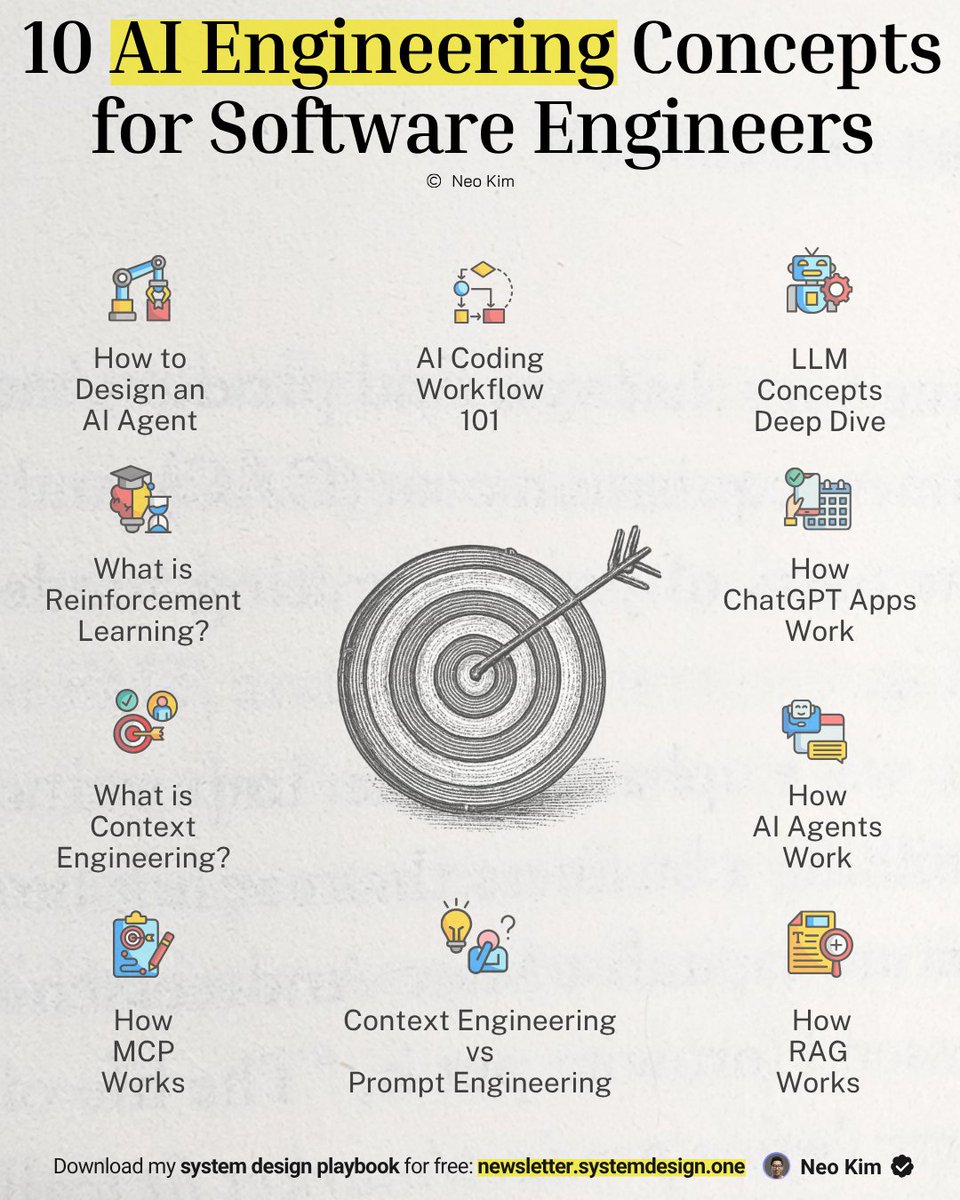
I struggled with AI engineering until I learned these 10 concepts (not joking):
1 How RAG Works
↳ https://t.co/cGmunPTUlb
2 LLM Concepts - A Deep Dive
↳ https://t.co/5lCKxq2g4N
3 How to Design an AI Agent
↳ https://t.co/JvnPd9773A
4 What is Reinforcement Learning
↳ https://t.co/AVpl9j1oit
5 Context Engineering vs Prompt Engineering
↳ https://t.co/9h8q9F2i57
6 Context Engineering 101
↳ https://t.co/OMkiZhkODL
7 AI Coding Workflow 101
↳ https://t.co/paIf9ksIU9
8 How ChatGPT Apps Work
↳ https://t.co/BJTYYnAwO1
9 How AI Agents Work
↳ https://t.co/tk3zkCjRvg
10 How MCP Works
↳ https://t.co/wgf8gHnnkn
What else should make this list?
——
👋 PS - Want my System Design Playbook for FREE?
Join my newsletter with 200K+ software engineers:
→ https://t.co/ByOFTtOihX
———
💾 Save this for later & RT to help others learn AI engineering.
👤 Follow @systemdesignone + turn on notifications.
The @GitHub Copilot CLI has a feature called "autopilot" that is essentially its version of a Ralph loop.
But how does it hold up to an actual Ralph Loop?
Let's find out...