Drowning in sticky notes and scattered docs across multiple tools? Here’s how I streamline my design thinking process 👇
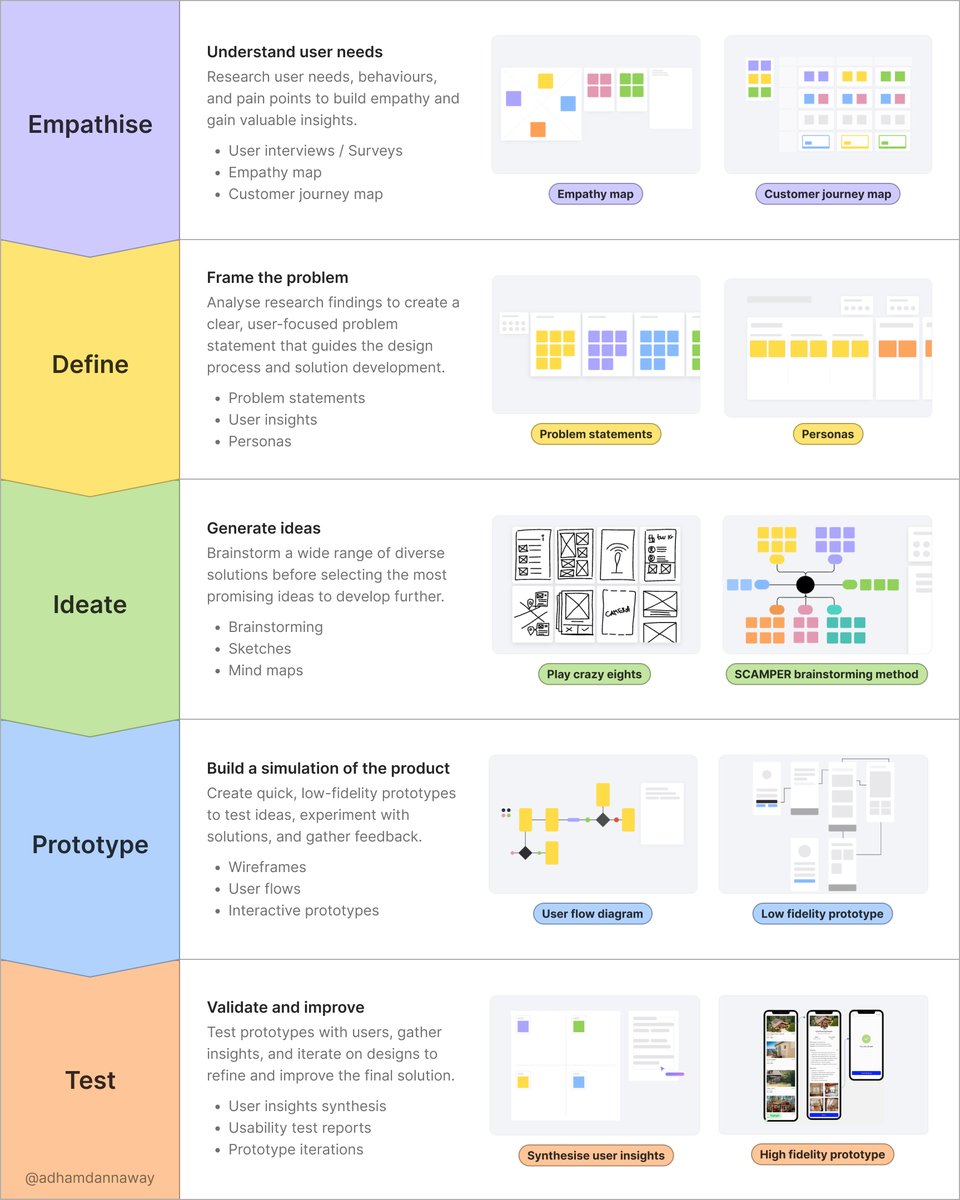
The design thinking process is a cyclical, user-centered approach to problem-solving, broken into five stages:
1️⃣ Empathise - understand user needs
2️⃣ Define - frame the problem
3️⃣ Ideate - generate ideas
4️⃣ Prototype - build a simulation of the product
5️⃣ Test - validate and improve
During each stage of the process, I create various artifacts, including empathy maps, problem statements, mind maps, user flows, and more.
I used to juggle multiple tools to create these artifacts, which got super messy and disorganised. Now, I use @MiroHQ to do it all. Their new Spaces feature is especially good at organising all project artifacts into a single dashboard that’s easy to navigate.
It’s my go-to product design tool for the entire design thinking process, with a tonne of templates to help speed up your workflow.
Give Miro a try today 👇
https://t.co/3DXQMgTtwX
🔁 Repost if you found this helpful
#ad #ux #uxdesign #miro #miropartner
Are your business users struggling to access and leverage your data effectively? Discover how Databricks and Microsoft Fabric work together to create a scalable, accessible, and business-friendly analytics ecosystem. #ImWithSlalom https://t.co/OQ64RKeJwp