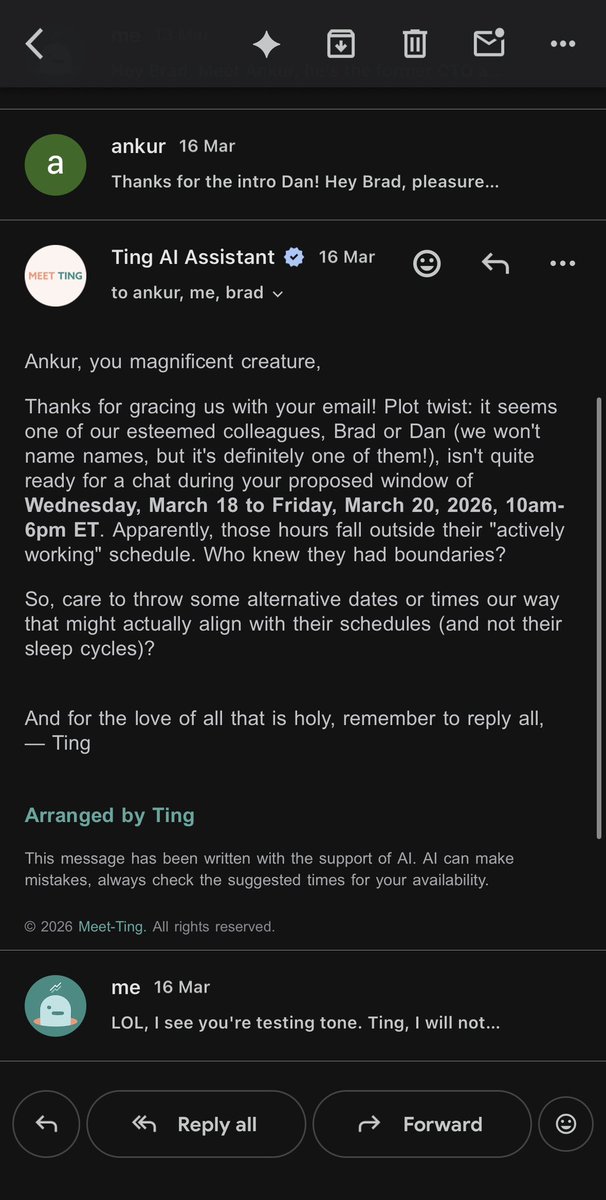
AI availability agent. Works directly in email + text. Builds memory over time, automates calendar decisions and meeting booking. Thousands use Ting every week.
Welcome to the world of availability agents. AI that learns what you value and manages your time for you - because you’re too busy.
Ting learns what you care about by managing your calendar end to end - proactively shaping your week and handling the full meeting lifecycle: planning, booking, invites, pre-call briefs, even no-show recovery.
It works where you do: Gmail, Outlook, WhatsApp, soon ChatGPT.
Live in US, UK + Brazil, rolling out to France, Germany, Italy + Spain.
Start for free: https://t.co/nMyRLAaIdh
Ting Dev Update - 27 Apr 2026 📅
Week 39: Connecting model to prototype.
*Shipped / Fixed*
- Continued rollout of time suggestion system (building on last week’s release).
- Backend progress on new endpoints + DB entity for time suggestions.
- Added support for date ranges (e.g. week-based suggestions) in the model.
- Aligning frontend + backend to support structured suggestion flows.
*In Progress*
- Connecting Time Suggestion UI to live model outputs.
- Continuing to refine how suggestions behave across real scheduling scenarios.
👽
Ting Dev Update - 22 Apr 2026 📅
Week 38: New scheduling UI for special project taking shape.
*Shipped / Fixed*
- Focus this week on prototype for special project 👀
- Released new Time Suggestion page with initial structure in production.
- New page includes: initial UI flow live + autofill functionality working.
- Backed by new user preference flag + API setup.
- Currently running with mock data, moving towards full integration next.
- Fixed issue where Ting wasn’t properly re-added to threads after sidebaring.
- Continued progress on Ting’s own model, preparing for use with the new prototype.
Fully shipped MCP collaboration with @SimploraAI 🤝
*In Progress*
- Connecting Time Suggestion UI to real scheduling logic and model outputs.
- Refining the core scheduling experience in the new UI direction.
👽
Google should have made this. When you talk on a call, agent hears, pulls up your schedule, offers to book for you live, all automatically. https://t.co/zB9z50eaVz
You know that awkward moment when you're trying to coordinate a follow-up meeting?
Yeah, we fixed that.
With @SimploraAI x @justccting, scheduling now happens during the conversation.
Scheduling intent is detected → your availability appears → the meeting is booked.
It's that easy.
Most people talk about agent-to-agent like it’s agents endlessly messaging each other. The real magic is simpler: people just talk, agents coordinate the work.
@justccting x @SimploraAI
Ting Dev Update - 17 Apr 2026 📅
Week 37: Special project focus and bug fixing...
*Shipped / Fixed*
- Fine tuning own model, including retraining, multi-user evaluation, and building a backlog of experiments.
- Added graceful fallback for WhatsApp onboarding when users hit unsupported steps.
- Removed outdated sign-in link from signup flow.
- Continued work on MCP integrations (e.g. Simplora).
- Ongoing focus on making scheduling flows more reliable end-to-end.
*In Progress*
- Active development of the new scheduling UI for special project.
- Continue to train own model.
- Partnership launch with @SimploraAI next week...!
👽
Ting Dev Update - 10 Apr 2026 📅
Week 36: Focusing on the basics and improving scheduling intelligence.
*Shipped / Fixed*
- Fixed issue where block time could use the wrong day of the week.
- Improved override logic so Ting handles “book it anyway” scenarios more reliably.
- Fixed missing translations across parts of the product.
- Cleaner handling of HTML formatting in emails.
- Continued small UX improvements based on onboarding feedback.
*In Progress*
- Developing Ting’s own scheduling model (major ongoing focus).
- Improving how Ting handles multiple or conflicting time signals (e.g. “mid-May” vs “next week”).
- Continued work on MCP integrations (e.g. Simplora).
- Ongoing work to make core scheduling flows more reliable and predictable end-to-end.
Stay tuned for some *news* soon... 👽
Ting Dev Update - 2 Apr 2026 📅 (early for Easter)
Week 35: focusing on the brilliant basics and bug squashing... 👾
*Shipped / Fixed*
- Ting can now update meeting location if asked in group thread.
- Updated skip button in onboarding to improve visibility and usability, and reduce churn.
- Implemented fix for cases where meeting links weren’t showing for guests (tied to async Google Calendar updates).
- Improved language detection, especially for English vs French edge case.
- Improved memory logic so one-off requests don’t overwrite long-term preferences.
- Fixed cases where Ting didn’t always call tools when it should, improving reliability.
*In Progress*
- Secret project work continues... 👽
- Continuing to tighten reliability around email generation and edge-case handling.
- Focusing on making the core flows better so end to end experience improves.
If you're celebrating Easter, wishing you a great break 🐰
Ting Dev Update - 26 Mar 2026 📅
Week 34: A week of bug and reliability focus.
*Shipped / Fixed*
- Fixed issues so meeting titles are more reliable when data is missing.
- Improved the ignore check so Ting doesn't miss setting up meetings ever.
- Fixed returning Zoom links for Microsoft events, improving cross-platform compatibility.
- Investigated some leaked reasoning in an edge case.
*In Progress*
- Adding support for Calendly links for non-Ting users.
- Continued rollout of WhatsApp improvements and a direct onboarding flow.
- Exploring usage patterns to better align limits and monetisation behaviour.
We *may* be working on something big at the same time... 👽
Ting Dev Update - 20 Mar 2026 📅
Week 33: WhatsApp templates, scheduling fixes, and memory updates...
*Shipped / Fixed*
- Week Ahead updates now coming to WhatsApp from Sunday.
- Pre-meeting messages also rolling out on WhatsApp.
- Added support for updating blocked time directly, including title, description, and time.
- Improved timezone handling in threads, so Ting is better at spotting the right timezone and explaining it in a more natural way.
- Improved the ignore flow again, so Ting is less likely to reply when it should stay out of the thread.
- Reduced over-confirmation in long threads, especially in messy “book it anyway” situations.
- Added a line to calendar events showing which email address created the meeting if the user has multiple calendar connections and creates a meeting with non-primary.
- Fixed the signed-out upgrade flow so people can upgrade when they hit the 10 booked meeting limit.
- Added more message context into memory handling, so requests like “make it 2 hours” are understood as a meeting change, not a personal preference.
- Fixed an in-person location bug.
- Default buffer time is now 0, which simplifies scheduling behaviour.
*In Progress*
- A first version of memory extraction during onboarding shipped behind a feature flag so Ting gets to know you faster. Improving onboarding memory quality before turning the feature flag fully on.
- Added a first version of Calendly link availability checking for non-Ting users.
- More work on WhatsApp onboarding and template rollout.
Now, back to work... 🏗️
I spent years running marketing at TikTok and adidas. Now I'm marketing a 3-person startup with no budget. Here's what works - plus some free tools: https://t.co/kn6dkS67HJ
I didn't know no-shows waste 15-40% of every sales team's calendar until I met a stranger at @WebSummit.
I was standing by our booth when someone wandered over and started asking about what we're building at @justccting. I assumed he was just curious.
Then he mentioned his company loses a lot of time to no-shows across his sales team. I asked how many.
"We get 10,000 inbound demos a month."
He walked off eventually, and someone came over to me and said: "Do you know who that was?". Turns out he was head of sales at a EU unicorn.
We stayed in touch. And that conversation became a feature!
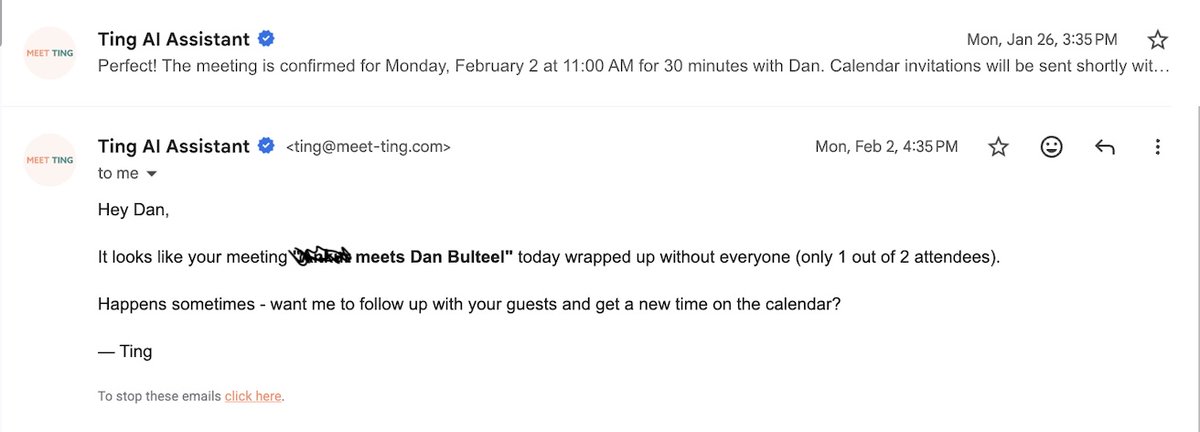
We call it 'No Show Recovery'.
Ting watches your calendar. If it notices the other person didn't show up, it asks if you want help rescheduling - automatically, inside the same thread.
When you're running 10k sales calls a month and 15-40% don't show, recovering even 1-5% is hundreds of meetings saved and potential $$$s.
Other lesson, talk to people as if you want and expect nothing in return. I hate it when I feel people are working me over.
Try it now anyway at https://t.co/c8a0VewkCS 🍿
Ting Dev Update - 13 Mar 2026 📅
Week 32: better scheduling decisions, cleaner emails, and more WhatsApp work...
*Shipped / Fixed*
- New serendipity feature to reconnect you with “people you haven’t met in a while”, while staying within the 90-day data retention limit.
- Week Ahead and pre-call briefs now available in WhatsApp as well as email.
- Landing pages were updated, including pricing and business, better email and WhatsApp demo visibility.
- Improved awkward email wording so Ting is better at using “you” instead of sounding confused about who it’s addressing.
- Added a line in calendar events showing which email address created the meeting.
- Fixed edge case for meetings starting too close to the current time by improving how Ting filters and ranks near-term slots.
- Reduced unnecessary over-confirming in long threads and allow guests to confirm for others.
- Removed the optional participant filter in calendar event creation to simplify the flow.
- Fixed meeting attendance emails so Ting now respects the user’s settings before sending them.
- Fixed Microsoft calendar rescheduling/declining issues by pulling the organiser info properly before deciding what to do.
- Added stronger email matching so if a guest later becomes a Ting user, we can recognise them correctly.
- Fixed time slot ranking so Ting is less likely to send a “no availability” email when ranking fails. It now handles those errors more clearly instead of failing silently.
- Removed an old thread-matching fallback that was causing Ting to group messages into the wrong thread.
*In Progress*
- ChatGPT MCP app review in submission.
- More WhatsApp rollout work, including template approvals and onboarding flow.
- Continued work on cold-start memories for onboarding flow so Ting can know you from day zero.
A week full of 'boringly reliable', next week back to work on the big features 👽