Stalwart 1.2 adds Microsoft Exchange protocol compatibility, allowing organizations to replace Exchange Server while keeping Outlook.
https://t.co/zg98eUTxUF
#OpenSource
If you manage #Linux servers and want to build a career in #DevOps, mastering Linux is one of the most important skills you can develop.
We're building a comprehensive 54-chapter Linux for DevOps course, and the first 10 chapters are now complete!
The course is designed to take you from Linux fundamentals to real-world DevOps skills, covering system administration, networking, security, automation, troubleshooting, and production infrastructure.
📚 Explore the course:
https://t.co/rB7mIdIoMn
#Linux #DevOps #SysAdmin #LinuxAdministration #DevOpsEngineer
In today's lesson, I'll teach you everything you need to know to run containers with @Podman_io. I'll show you how to install and manage it, and also how it differs from @Docker https://t.co/7f5ZLMKYun #podman@RedHat
Armbian 26.11 brings fresh Linux experiences to🍓Pi!
🖥️ GNOME, KDE Plasma & AI-assisted Hyprland
📦 Debian Trixie / Forky & Ubuntu Resolute
🐧 Linux 7.3 & 6.18 LTS
🛡️ Weekly security updates with CVE backports
From familiar desktops to modern workflows, choose how you want to run Linux on your Pi.
🚀 Explore the new images:
https://t.co/QPKMzId6dG
More platforms coming soon!
#Armbian #RaspberryPi #Linux
Ubuntu, Arch, Fedora and Gentoo all run the same kernel. Run uname on any of them and you get the same answer: Linux.
Everything that makes them feel different sits on top of it. The kernel handles the hardware, memory and filesystems. Your network setup, your shell, your package manager and your desktop are all userspace programs that somebody chose and packaged for you.
That's what a distro is: kernel + a curated userspace. Ubuntu makes most of those choices up front, and Arch hands most of them to you.
The best way to see the boundary is to build the smallest possible one yourself: a kernel, a tiny init, a shell, then networking, all booting in QEMU.
https://t.co/EOP8mQQPRU
What would you put in yours?
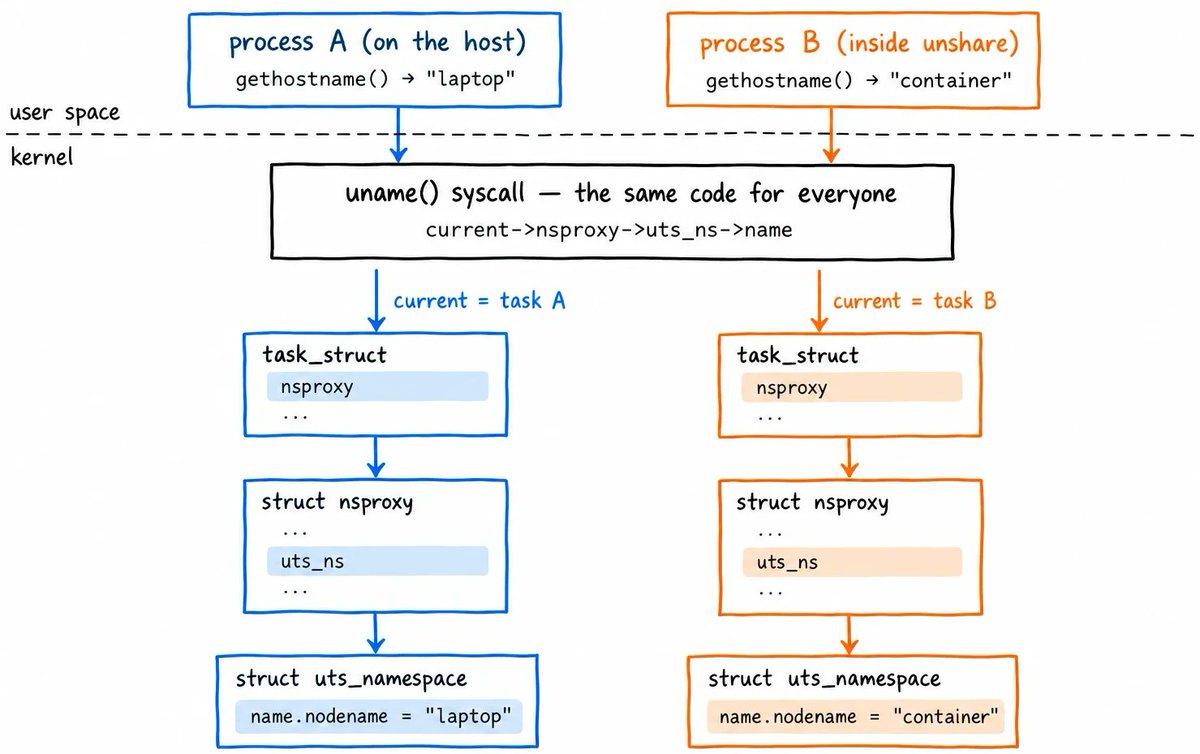
Here's a simple way to understand (some) Linux namespaces:
When a process calls gethostname(), libc can use the uname() syscall. The kernel runs the same code for every process but retrieves the hostname from a namespace-specific data structure.
A similar idea applies to a whole bunch of other syscalls: getpid(), open(), bind(), etc. Their results or behavior depend on the namespace of the calling process or the target object (e.g., a socket).
So containers really are just Linux processes. They interact with the same kernel through the same syscalls, but namespaces give them different views of the system.
The diagram is from this good read by Jesús Espino: https://t.co/GslySScHKF
As per CAG report, various Indian states spent a total of Rs 6.67 lah crore on various Freebies.
Rs 6.67 Lakh crore
In an alternate universe, this Rs 6.67 Lakh cr could have gotten us
1. A High Speed rail network of 1500 Kms
2. An RRTS network of 2000 kms
3. A canal network that can irrigate 1.5 cr hectares and provide drinking water for 9 cr people.
4. 1.2 lakh electric buses for public transportation
5. 1000 Tejas or 275 Rafales fighter jets
6. Modern weapons, kevlar armour and helmets for the whole of our Indian army.
7. Upgrade all 3.5 lakh primary govt schools
8. CT Scan, MRI, X-Ray and other advanced medical equipment for all our primary health care centres.
9. 120 Mega desalination plants.
10. 3 lakh latest Nvidia GPUs, the Data Centres, the Solar power panels needed to power them, with enough money left over to build 4 Foundational AI Models.
If you want to know the full detailing of Freebies, visit
https://t.co/RpkDbiN0oX
🐧 @PipewireP is changing the way #Linux manages audio and video!
@morrolinux explains how PipeWire combines the strengths of #PulseAudio & #JACK in a unified framework, offering pro-level performance with everyday simplicity.
Read more: https://t.co/Hgu9CITrQH
#FOSS
A Hands-On Introduction to TCP Sockets
Sockets are everywhere. You start a server, and it creates a socket. You send an HTTP request, and it travels over a socket.
Learn how TCP sockets actually work by building a tiny server and client from scratch.
https://t.co/9VzdxjTv5t
Google is sabotaging their OEM partners by making a growing number of features and updates exclusive to Pixels. At the same time, Google is trying to convince OEM partners not to support GrapheneOS or even bootloader unlocking. They're also trying to harm GrapheneOS directly.
How to become a better server-side/Cloud/DevOps engineer using iximiuz Labs?
Based on my own experience and hearing back from hundreds of engineers who actually achieved their learning goals, a sequence that has traditionally led to the most solid understanding and the most transferable knowledge is:
Linux → Networking → Containers → {Kubernetes, Cloud}
Jumping straight into learning the higher-level components, such as AWS VPC, Security Groups, Internet Gateways, or even Kubernetes, is not uncommon, but in my experience, it often results in longer mastering time and the need to "re-learn" from scratch after switching from AWS to Azure or from Kubernetes to Nomad or AWS ECS.
In contrast, when you first learn about LANs (L2 broadcast domains, typical switch topologies, etc.), then L3 routing, iptables, and NAT, understanding what VPC and Security Group actually are becomes much easier.
One more great thing about this approach is that focusing on fundamentals makes the knowledge transferable sideways, too.
For instance, container networking (Docker's typical bridge network) and Kubernetes' Node and Pod networking rely on the same L2 broadcast domains, L3 routing, and iptables concepts from above, even if some of the primitives will be virtualized (e.g., a Linux bridge is a virtual switch and a network namespace is an analog of an isolated network node).
This is why at iximiuz Labs, we focus on the fundamentals of the server-side tech and avoid covering topics like "5 ways to configure AWS NAT Gateway in 2026" 🤦♂️
Finally, I want to emphasize that iximiuz Labs is not a single course but a holistic learning and experimentation platform. One of the key features of iximiuz Labs is its Playgrounds. In essence, they are remote, preconfigured Linux VMs that are ideal for practicing Linux, networking, Docker, or Kubernetes in a safe, controlled environment. Most of the platform's learning materials embed a playground on the side to help you practice what you've just read, but you can (and should) use standalone playgrounds for your learning tasks, too.
A typical example: while studying system design, you may want to explore the traditional 3-tier architecture of web applications, and the best way to do it is to actually deploy an API server, a database, and a client app yourself using a multi-VM Linux playground.
- Explore our content catalog https://t.co/xyWo8OdzxB
- Find a suitable playground https://t.co/x9Q3BQUIK8
Docker the Hands-On Way: Container Networking 🐳
After weeks of intense work, by far the most elaborate module of my Docker roadmap is finally ready - with 32 realistic problems and over 50 diagrams.
To celebrate, I'm making it free for the next month: https://t.co/g4HCN5EpBg
Why to Learn Computer Networking 101
If you keep wondering what "bridge" really is while going through container or Kubernetes networking materials, you need to take a step back and learn how networking is done on real (physical) servers.
Free course: https://t.co/iFpJilvcZE
Upgrading to Ubuntu 26.04? Check your cgroup setup before you start.
If the server still boots with cgroup v1, the upgrade can be blocked. Older scripts, Docker setups, and Kubernetes nodes may also need changes before they work cleanly with cgroup v2.
This practical guide walks through the migration step by step, including testing everything before the final upgrade.
👉 https://t.co/QSy0YNCyJe
#Linux #Ubuntu #cgroupv2 #SysAdmin #DevOps
In today's #Linux#tutorial, I'll show you how to de-bloat your #Ubuntu install. For those of you that prefer a stock GNOME desktop, this tip is for you. https://t.co/E2TpXY8Wn1
In Chapter 11 of our #Linux for #DevOps course, you'll debug failed systemd services with journalctl, fix a restart loop and a hung timer job, and test fixes with systemd-run.
Read the chapter: https://t.co/OrZyLezIFl
Follow @tecmint to get notified whenever a new chapter is released.