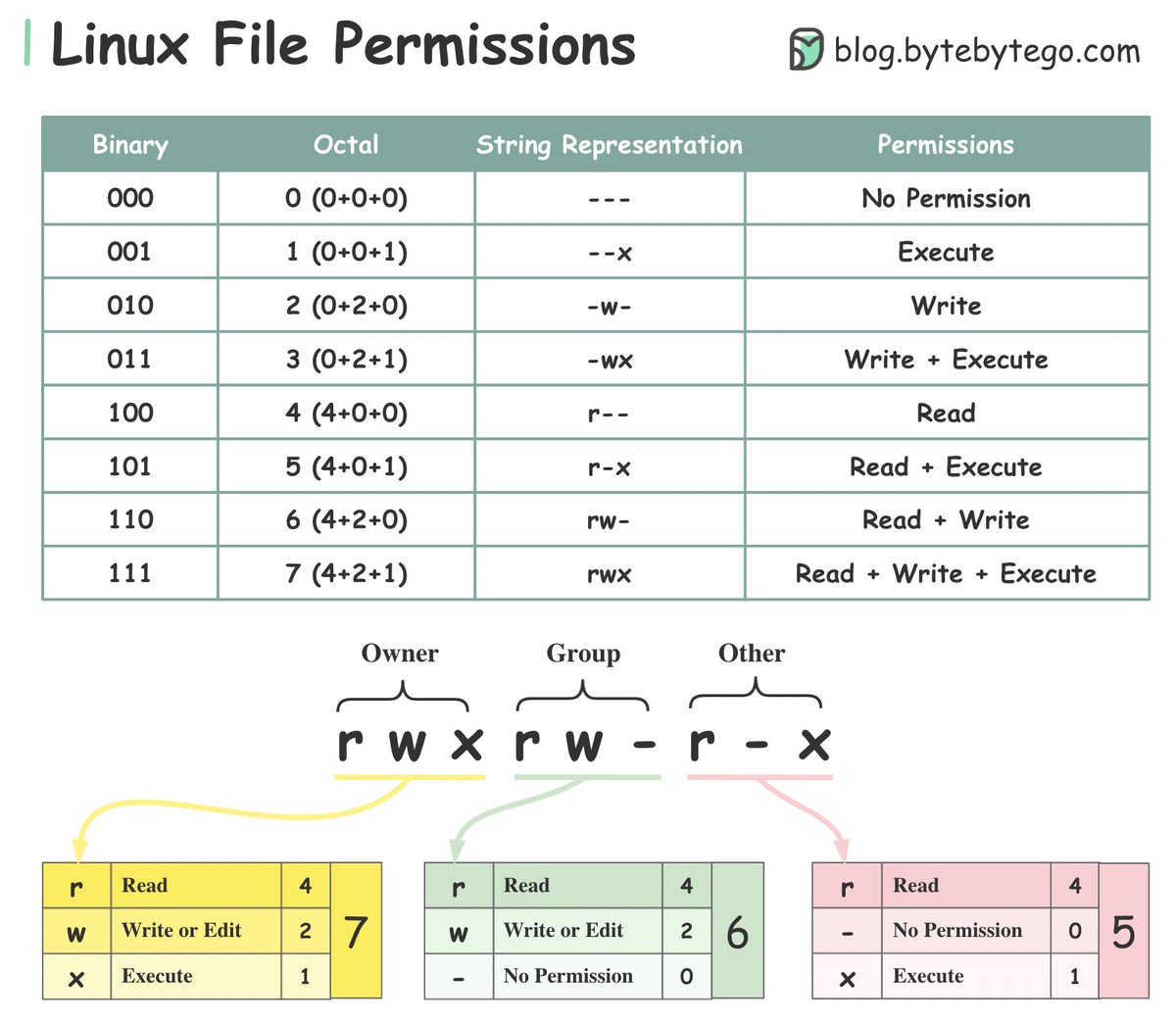
Linux file permission illustrated.
To understand Linux file permissions, we need to understand Ownership and Permission.
𝐎𝐰𝐧𝐞𝐫𝐬𝐡𝐢𝐩
Every file or directory is assigned 3 types of owner:
🔹Owner: the owner is the user who created the file or directory.
🔹Group: a group can have multiple users. All users in the group have the same permissions to access the file or directory.
🔹Other: other means those users who are not owners or members of the group.
𝐏𝐞𝐫𝐦𝐢𝐬𝐬𝐢𝐨𝐧
There are only three types of permissions for a file or directory.
🔹Read (r): the read permission allows the user to read a file.
🔹Write (w): the write permission allows the user to change the content of the file.
🔹Execute (x): the execute permission allows a file to be executed.
Over to you: what are some of the commonly used Linux commands to change file permissions?
—
Subscribe to our weekly newsletter to get a Free System Design PDF (158 pages): https://t.co/FIzCeaWsZV