📢Our May Webinar is just around the corner! Get ready to unveil the NEW Canvas Templates for the upcoming school year. 🎨 We'll guide you through the fresh design and help you set up master courses before teachers head off for the summer break. https://t.co/YiWa4x7DIs
📢Webinar incoming! Join us next Wednesday for a Canva-themed BINGO game at 8:10 AM or 2:40 PM on 4/3 and delve into the dynamic features of @Canva! Register here https://t.co/e8LKGXZneG #teachingwithtech 🚀💻
📢 Join our Wednesday Webinars tomorrow! We'll delve into the exciting topic of ✨Transforming Paper Assignments to Digital.💻🗓March 6th from 8:10-8:40 AM, and 2:40-3:10 PM. Don't miss out—register now! https://t.co/klpumFvdKl 🚀 #TeachingWithTech
🚨 NEW Question Type: Word Cloud 🚨
☁️ Word Cloud is a sunny way to check the temperature of your class as an icebreaker or during a lesson. Ask your class questions like…
How are you feeling today?
Try this ready-made quiz and find out:
https://t.co/aoXSQnfwCP
Attention students and teachers! Protect yourself against phishing with our latest infographic.🎣🐟🐠 Learn how to spot phishing scams and keep your personal information safe. Check it out now! #phishingawareness#onlinesecurity https://t.co/wI9HxpviH0
🎶 Teachers, are you tired of searching for classroom-friendly music on YouTube? Give the Lo-Fi Radio Chrome extension a spin! 📚🍎 Create the perfect ambiance for your class without the hassle. 🎧✨ #TeachingWithTech Picture Credit: Chrome Web Store
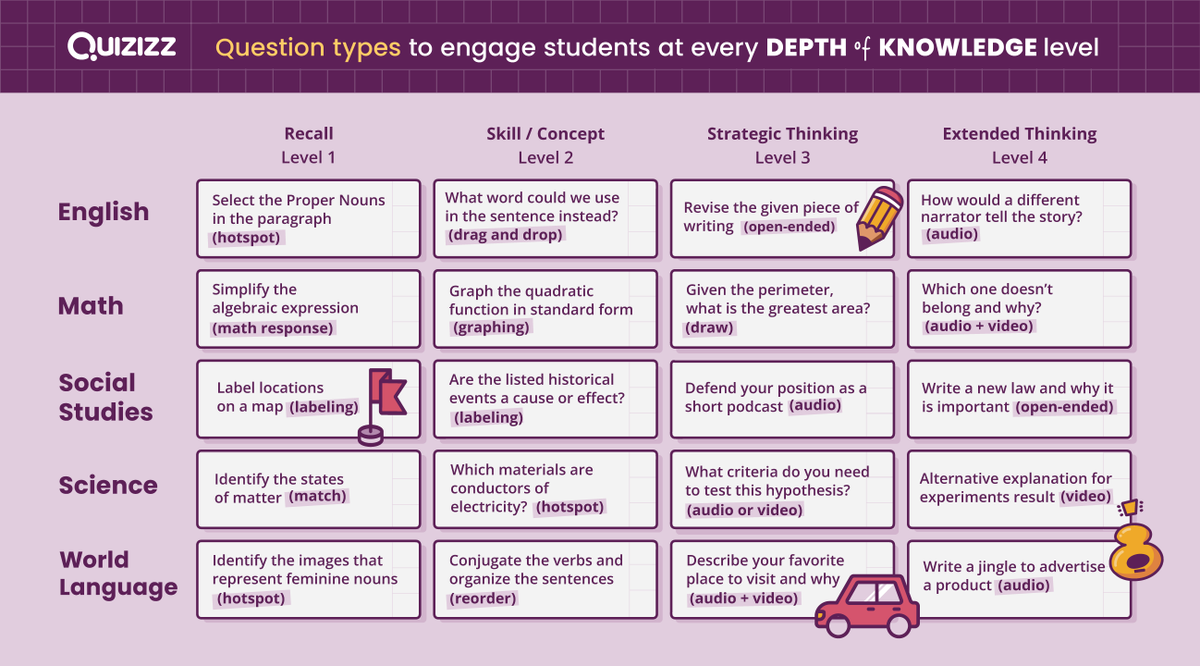
NEW! Our DOK one-sheet is a shortcut to finding the best Question Types to use for your quiz questions. ✅
What are you teaching next? Our handy guide can make it easier! Here's a preview. Download it ⬇️:
https://t.co/pdQSJu3nYy
Today is Wednesday, which means it's webinar day! 🚀 Join us for an insightful session to enhance your knowledge and skills. Don't miss out on the opportunity to learn and grow. 📕📚#TeachingWithTech Register here: https://t.co/EwAWzYGUZd
📢Join us on January 16 at 4:15 on Teams to learn how to create a Canva assignment in Canvas and access student projects to see live updates as they work. 👏
Sign up here:
https://t.co/iMprMsTH6U
Ensure students receive instructions before they jump into an activity by converting Lumio pages while in Delivery mode. Keep students from working ahead until you’re ready!
Today we presented Tech Tools “80s Movie Style.” I am thankful to have such a fun group of leaders that are all in to make things fun! 🎥🎬 @spartan_speak #7LJHpride
January 10th will be the next Wednesday Webinar! Empower your teaching journey with AI! 🚀Let AI handle the routine, so you can focus on what truly matters – inspiring and shaping young minds! 📚💡 #AIinEducation#TeachingWithTech https://t.co/EwAWzYHsOL
January 10th will be the next Wednesday Webinar! Empower your teaching journey with AI! 🚀Let AI handle the routine, so you can focus on what truly matters – inspiring and shaping young minds! 📚💡 #AIinEducation#TeachingWithTech https://t.co/EwAWzYGUZd
🌟📅Day 6: 🎨 Looking to add some flair to your design projects? Check out @Flaticon! 🚀 They offer a library of icons and illustrations, making your creative process a breeze. Create a free account for more access. #TechTheHalls#TeachingWithTech https://t.co/iTUIrXDjMr