Go deep and you learn where every button is, which feature to reach for, and when, until it becomes muscle memory.
Depth beats breadth.
Which ONE AI tool would you keep?
If you think you're not tech-savvy, you don't need more AI tools. You need muscle memory.
I've taught 300+ adult learners at SMU Academy. The ones who struggle aren't less smart. They're spread across too many tools. 🧵
My advice:
→ Pick 1 to 3 AI tools. That's it.
→ Use them every day, on real work.
→ Learn what each is great at, and where it falls short.
→ Only switch when you know exactly what you're missing.
@britt_joiner SQL queries converted to charts, squeezed into gslides. Hour long meetings to explain what happened and why… nope, not going back to that life ever again!
When I'm not building products, I teach AI at SMU Academy. This is what I shared with my class this week:
How an MCP turns AI from something you chat with into something that works with your data. 🧵
🔁 PostHog measures whether it worked, and the loop starts again.
I built the site with Claude Code, and PostHog plugs straight into it. Build, measure, improve, all in one place.
If your AI could plug into one tool you use every day, which would you pick?
My example, on CheckHowMuch(dot)sg:
→ Track: PostHog records every visit.
→ Ask: "which pages do people visit and spend time on?" Only 17% leave my valuation page after 1 page. Other pages: 81 to 88%.
→ Change: Claude Code links them to the valuation tool, and I push it live.
Now the loop handles UI and basic front end only, with QA that checks only that. Data accuracy gets its own QA and UAT phase.
One job per loop. One set of checks per job.
How are you scoping your agent loops?
I build products for a living, but here's a mistake I made last week.
I let a Claude agent loop run for almost a whole day, and it burned 25% of my weekly token limit, but still didn't fix all the bugs.
After a while the session ran out of room and started compressing its memory. That's when it started hallucinating.
The lesson: an agent loop is only as good as the scope you give it. Give it checks outside its job, and it will chase them forever.
The lesson:
Speed before customers is a superpower.
Speed after customers, without a foundation, turns into drag.
Once a product has paying customers, I'm building the design system first.
Especially if you're design conscious like me.
I build products for a living, but here's a mistake I made last week.
I shipped a simple feature enhancement.
It broke layouts on pages I never touched.
We went from prototype to paying customers fast, so we kept building on the prototype.
Never stopped to create a design system. No component library. No single source of truth.
It felt like speed. Now every small tweak needs a check across the whole product.
Coffee chat at 9am sharp.
Did my homework. Had questions ready. Took notes the night before.
Bro spent 45 minutes telling me about his last startup.
I asked nothing.
I said "wow nice" eleven times.
Came home, deleted my notes.
"So sorry yaar, crazy day!"
22 minutes late. No heads up. No message.
I smiled and said "no worries at all."
We've all been here.
We all say "no worries."
It's always fine.
It is never fine.
Today is a big day! We're launching a ~ new ~ version of Claude Code in the desktop app. It's been redesigned from the ground up for parallel work and is a lot faster.
It's been my main way to use Claude Code for the last few weeks.
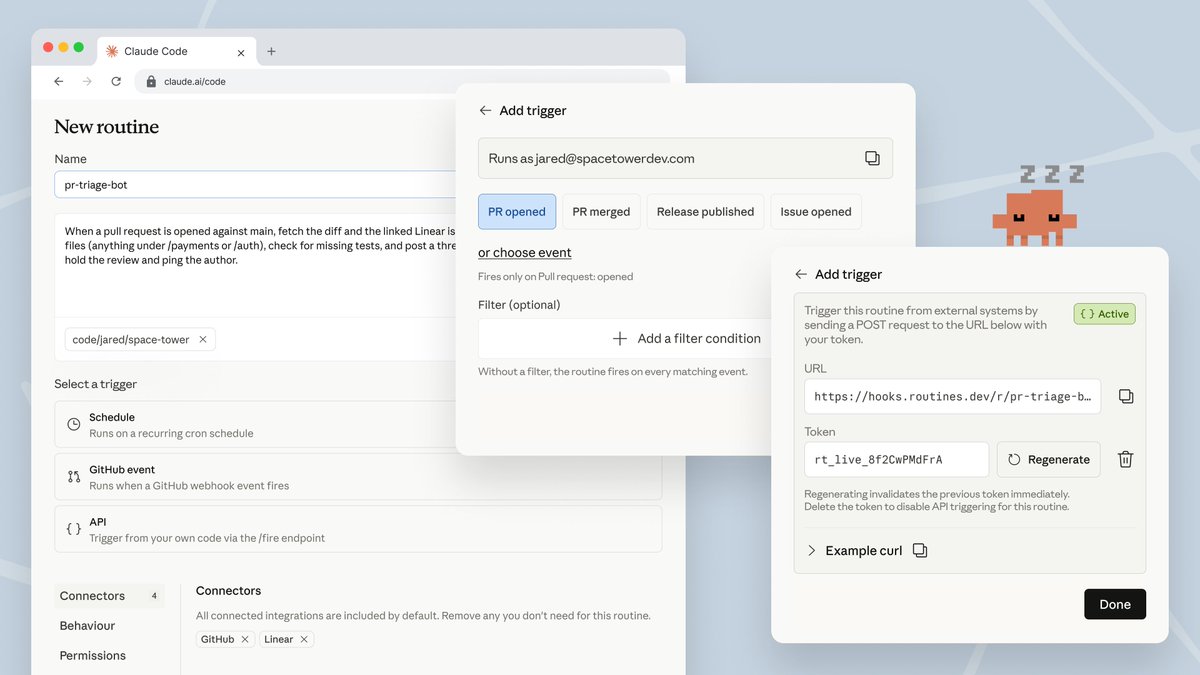
Now in research preview: routines in Claude Code.
Configure a routine once (a prompt, a repo, and your connectors), and it can run on a schedule, from an API call, or in response to an event.
Routines run on our web infrastructure, so you don't have to keep your laptop open.