EG Nodes (iPad / iPhone Giveaway)
Elliott Garage Nodes is out! I have free copies of this - or any other Elliott Garage app available for Twitter followers to win, details can be found below!
🟧Some info:
Nodes looks like it will be extremely popular, and can be used on iPad / iPhone as a powerful midi tool inside host apps like AUM, Loopy, Logic Pro etc, but can also be used as a host, in which case you can load AUv3 instruments and audio and midi FX into it. It can launch clips, record automation, recall scenes. Beautiful UI and seems pretty intuitive from my brief play with it.
🟧AppStore Link:
https://t.co/fe7q9hSS4o
🟧Features:
The feature list is huge, here are some key features:
Built-In MIDI Generator: This includes various nodes for different musical functions:
•Note/Chord Node: Generates single notes or chords.
•Arpeggio Node: Creates chord arpeggios with options like swing, randomization, and arpeggio direction.
•Sequencer Node: For playing note sequences with features like scale quantization and various controllers.
•Rhythm Node: Designed to control drums and rhythmic instruments with controllers like swing, ratchet, and velocity.
•Piano Roll Node: A classic editor for writing complex MIDI parts, with import and recording capabilities.
•Generative Node: generative sequencing that evolves over time
•Load 3rd Party Midi FX in Nodes
AUv3 Support as mentioned above, when used standalone, as a host
Scenes & Automations: Up to 8 main scenes can be saved and recalled, controlling song structure and node combinations, allows parameter automation.
Node Controls: eg probability, frequency, and randomization settings.
MIDI Learn
Modular Sequencer: EG Nodes can be loaded in other DAW/Hosts as a MIDI FX generator, enhancing MIDI sequence creation. This makes it a really interesting modular midi tool.
🟧Some of the many additional Features:
•Undo/Redo history.
•MIDI scale transposition.
•Chord inversions and selection in Nodes.
•Individual clip length, speed, and steps control.
•Multiple MIDI input sources.
•Import/Export presets and performance recording.
•Ableton link
•Flexible internal MIDI routing and external MIDI processor hosting.
🟧WALKTHROUGH:
Andrea, the dev (yes, Elliott Garage is not his name, lol) has made a detailed walkthrough video:
https://t.co/Co602m3mSJ
🟩GIVEAWAY:
2 of my Twitter followers will win the Elliott Garage app of their choice, and will be picked at random and DMed within 2 days of this tweet. To have a chance to win:
✅Make sure you are following me on Twitter
✅Like this Tweet
✅Retweet or Quote Tweet
✅Write a comment below, any comment
Remember that winners will be able to pick the app of their choice by Elliott Garage, so if you want to go ahead and buy this now, you can still have a chance to win one of the dev’s other apps.
MuseBud - New App by Cem Olcay, Now Out (AUv3 for iPad/iPhone/Silicon Macs)
I have copies of ANY Cem Olcay app to give away to a few lucky Twitter followers, details below. There are also giveaways on YouTube and Insta. First some info about the app:
Website with info is here: https://t.co/3vz3LrtMQX
🟧 INFO & REVIEW:
Cem Olcay’s new AUv3, MuseBud, is a MIDI generator app which allows you to customize individual possibilities for note, octave, duration, velocity, gate length, and ratchet counts of the output midi and whch ialso has a built-in midi looper/sequencer.
The main selling point of the app is its fairly fine level of control over randomisation. For example, for duration, you have probability sliders for values from 1/64 to 4 bars (strangely though, no dotted or triplet values) and you can set any probability from 0-100% for each value.
Notes can be chromatic or you can set limitations by scale, mode etc, with a vast list of scales to chose from. Octave values can be from -1 to +9, for velocity you have 15 different sliders for various velocity ranges, there are 12 different sliders for a range of gate times, for ratchets you have 4 sliders to set the chances of 1, 2, 3 or 4 ratchets, and so on.
There is also a looper where you can record sequences within the app and then play them back. During playback you can vary the start/end times of the looper, you can delete/edit steps in the looper by pressing them, and can modify every property of each step, from note and octave to duration, velocity, gate length, and ratchet count. Each pattern comes with its own buffer, allowing you to create an unlimited number of loops by generating new patterns.
Like all Cem’s apps, you can easily set up patterns to switch between.
All in all, another handy tool, but I would like to see more values for note length.
🟧 MY WORKFLOW HERE:
All this is done inside AUM on iPad, as usual. My 40-min spken AUM walkthrough, ‘Almost Everything You Need to Know About AUM’ is worth a watch (See my YouTube). One instance of MuseBud is being used, in chromatic scale, to sequence vocal samples in Elf Audio Koala, with some processing by Bleass Slow Machine and GS DSP Magic Delay. I have done vids on both of those, also. 2 other instances of MuseBud are sequencing 1 instance of Korg Module, with another MuseBud sequencing yet another instance of Module. The Module sounds are from the Far North pack, which I have done a demo video on. One of these instances is being processed by Quantovox RealPhase - fantastic. Not in view, but also used, are FAC Medusa, FAC Alteza and Toneboosters ReelBus (have done a detailed walkthrough of that too!).
🟧 Links:
Website with info is here:
https://t.co/3vz3LrtMQX
Appstore link:
https://t.co/0v9u9o5pYj
🟪 GIVEAWAY:
There are separate giveaways on YT and Twitter, by the way (you can find me there by searching for Gavinski’s Tutorials), meaning a total of 5 winners. Here on Twitter, I have 2 copies of ANY Cem Olcay app to give away. The winners will be picked within 2 days and notified by reply to their comment here, as well as by DM on Twitter. To have a chance to win:
✅ Make sure you’re following me on Twitter
✅ Give this post a thumbs up
✅ Quote tweet or retweet this
✅ Write a comment below, any comment
Good luck!
@cem_olcay #musebud #auv3 #midi #ipadmusic #iphonemusic #iOSmusic #macmusic #generativemidi
🟧Riffler Flow 5 min silent YT video demo & giveaway
Riffler Flow is the new app by the Riffler dev, aimed at a wider range of genres than the original Riffler app, and based on progressions rather than scales or modes. All details, appstore link, giveaway details of how to win either Riffler Flow or the original Riffler app etc are in the pinned YT comment as usual.
The vid is just 5 mins long, but should give you a nice idea of what the new Riffler Flow app is capable of. I really like it so far.
https://t.co/b069mhJl0v
Insta giveaway will be up later today, you can find me on Insta by searching for Gavinski’s Tutorials there, cheers! Gav
Extra chance to win on Twitter!:
✅Follow me
✅Like this post
✅Quote Tweet / RT
The winner on Twitter of the Igor Vasiliev app giveaway: @r_o_y_o_r, congrats! The Insta and YouTube giveaways for that are still open btw, at the time of writing, as is the Twitter giveaway below for any Oliver Greschke (Elastic Drums dev) app 🔥
NIKOLOZI (MELA DEV) GIVEAWAY (MAC / iPHONE / iPAD: See below for details👇)
Mela 4 by @Nikolozi is a really fantastic sounding synth that is constantly getting new features. Unlike previous versions of Mela, which were all polyphonic on release, Mela 4 was mono but is just about to get an update making it polyphonic. That update should be dropping any minute.
Nikolozi’s video on the new Mela 4 update:
https://t.co/ENlWjXN38q
Appstore Link:
https://t.co/7tBtgYcM88
Note that Mela 4 works on iPhone and iPad (iOS / iPadOS 16.0 or later) and also on Macs (MacOS 13.0 or later), either standalone or inside hosts that support AUv3. 1 purchase covers all platforms.
🟪 GIVEAWAY:
To have a chance to win a free copy of ANY Nikolozi app here on Twitter, simply:
✅ Follow me
✅ Like this post
✅ Quote Tweet or Retweet
✅ Write a comment, any comment. The winner will be picked at random in 2 days. If you win I will DM you to ask which Nikolozi app you want. Good luck!🍀
PS: I also have a massive giveaway with a chance to win Geoshred Pro and all the IAPs, check out that tweet from earlier today if you missed it.
More about Mela:
Mela allows users to create custom synths, audio effects, and MIDI processors. Its presets consist of modules on lanes that handle audio and MIDI signals, using buses for signal interconnectivity. Users can modulate any parameter across lanes with modulator modules. You can easily add, remove and rearrange lanes and modules to adjust complexity. Modules are regularly updated with new additions, covering MIDI processors (like arpeggiators and chord generators), synth components (like oscillators and filters), modulators (like LFOs and envelope generators), audio effects (like chorus and distortion), and utilities (like oscilloscopes and MIDI loggers). Mela can be loaded in host apps like Logic Pro or AUM as an Instrument, Audio Effect, or MIDI Processor).
Don’t forget to drop the dev a review on the AppStore if you like and use the app! Cheers, Gav
Absolutely Bonkers Geoshred Giveaway (See below 👇)
GeoShred Play is currently free and all the Naada & GeoSWAM collections are discounted 33% til November 19.
In this little 30-second video I’m playing one of the Naada instruments, the Sitar, with Geoshred loaded in AUM with no other fx used, so this could also have been done in standalone.
https://t.co/cczK9mbmjI
🟪GIVEAWAY:
Pat and Nick, the Geoshred devs, have been very kind in offering an insane giveaway to my Twitter followers (I will post another separate giveaway on Instagram later, you can follow me there by searching for Gavinski’s Tutorials).
This giveaway will allow one of my Twitter followers (and later also an Insta follower, so that means a total of 2 winners) to win Geoshred Pro plus ALL THE IAPs. That’s a total of 33 different physically modeled instruments like sax, cello, sitar, pipa, bansuri, erhu and many others, and don’t forget that even without the IAPs Geoshred has a lot of very cool modeled sounds. And all these capable of being played expressively on the iPhone or iPad screen without an external MPE controller. Even at the current bundle sales prices, this giveaway is worth a few hundred bucks.
The Twitter winner will be picked at random 2 days from now and there are 4 simple things you need to do to enter:
✅Follow me on X/Twitter if you aren’t yet doing so
✅Give this post a thumbs up
✅Write a comment, any comment, on this post
✅Quote tweet or retweet this post
Good luck!
#geoshred @GeoShred #physicalmodeling #auv3 #iosmusic #synth #mpe
GREAT GEOSHRED APPS & IAP SALE
Geoshred (iPhone/iPad) currently has a killer sale, see the attached photo for full details. Being able to get all 3 Naada packs - that's 24 instruments - for just $120 is insane value for money, and the Geoshred keyboard allows you to play them expressively on your touch device without needing a separate mpe keyboard.
The Naada instruments are models, not samples, of Indian and Chinese instruments, but there are a few other ethnic instruments in there too like the Duduk (Armenian, reminiscent of the oboe). Being modeled, they take up a tiny amount of space.
This current sale price on the Naada packs means that, if buying all 3 packs, you're paying just $5 per instrument.
Highly recommended.
Tips:
I always adjust the slide settings on these instruments to get more seamless bends even though that requires more precise playing. I generally adjust that globally in the app settings so it carries across all presets.
A lot of videos of these emphasise virtuosic playing and I think this can put people off. You don't need to be able to play fast to play these well, playing them well is mostly a matter of taste and technique, and often less is more (easy on that tremolo and vibrato now!).
Even if you're not interested in emulating traditional physical instruments (I'm not) these still have a beautiful tone which can then be taken in interesting developments by adding your own fx chains.
Many have duophonic modes, check those out!
Experiment with whether you prefer using finger expression or the xy pad. For monophonic instruments I found, to my surprise, that I often prefer the xy pad.
Geoshred is a deep app and it is worth reading the manual or watching some instructional videos to learn at least the basics.
If you don't have and don't know Geoshred, you should at a minimum acquaint yourself with the differences between the different versions of the app before purchasing (though note that you can upgrade from the Play or Control versions to the functionality of the Geoshred Pro app and that the Play version is currently free). Read the appstore descriptions of the different apps to familiarise yourself with the differences.
Link for your convenience:
https://t.co/cczK9maOua
Ps: also a reminder, if you have already bought any of these, to give the devs some love by leaving a review on the appstore, Pat from Geoshred gives probably the best customer support I know of in the whole iOS music app scene ✌️
Some of my fave Naada packs: #veena
#pipa #erhu #sitar
#auv3 @GeoShred@Jcrudess
#geoshred #naada #MPE
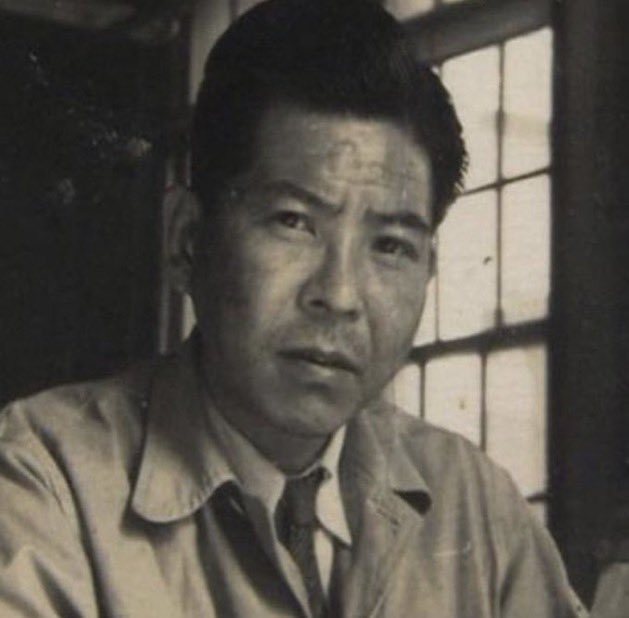
This is Tsutomu Yamaguchi, the man who survived the dropping of two atomic bombs. Tsutomu was a 29-year-old engineer at Mitsubishi who was working as a draftsman, designing oil tankers.
August 6, 1945, was supposed to be his last day in Hiroshima before going back home to his wife and infant son. At 8:15 AM, an American B-29 bomber flew over the city and dropped the first atomic bomb. Tsutomu was less than two miles away from ground zero. The blast ruptured his eardrums and burned his upper torso.
"I didn't know what had happened. I think I fainted for a while. When I opened my eyes, everything was dark, and I couldn't see much. It was like the start of a film at the cinema before the picture has begun when the blank frames are just flashing up without any sound," he told The Times, a British newspaper. The city was leveled, and 80,000 people were dead.
After spending the night in a bomb shelter, Tsutomu continued his travel back home to Nagasaki, despite his injuries. On the morning of August 9, he returned to work. When Tsutomu told his boss about what happened, he was labeled as "crazy" for thinking a single bomb could destroy an entire city. As his boss was grilling him, "...the same white light filled the room. "I thought the mushroom cloud had followed me from Hiroshima," he said. 40,000 people were killed instantly. Six days later, Japan surrendered.
Tsutomu and his family survived the second atomic bomb; however, they suffered from chronic health problems. Tsutomu's daughter described how her mother had been "soaked in black rain and was poisoned," and she believed that she passed the poison on to them, revealing that her brother had died of cancer at age 59 and how her sister has been chronically ill since birth.
Tsutomu remained healthy. Later in life, he spoke out against the use of atomic weapons and called for its abolishment. Despite his experience during the war, he always tried to keep a positive outlook on his life, saying, "I could have died on either of those days. Everything that follows is a bonus." He died at the age of 93 in 2010.
Girl emerges from a bomb shelter after the bombing of Nagasaki which took place August 9, 1945. 75 years ago today.
On August 9, 1945, a second atom bomb was dropped on Japan by the United States, at Nagasaki, resulting finally in Japan's unconditional surrender.
The devastation wrought at Hiroshima on August 6th (three days previously) was not sufficient to convince the Japanese War Council to accept the Potsdam conference's demand for unconditional surrender. The U.S. had already planned to drop their second atom bomb, nicknamed "Fat Man," on August 11 in the event of such recalcitrance, but bad weather expected for that day pushed the date up to August 9th.
Nagasaki was a shipbuilding center, the very industry intended for destruction. The bomb was dropped at 11:02 a.m., 1,650 feet above the city. The explosion unleashed the equivalent force of 22,000 tons of TNT.
The number killed is estimated at anywhere between 60,000 and 80,000 (exact figures are impossible of being calculated).
FEEDBACK FRIDAYS
Today a user on the Audiobus Forum had a great idea. Basically his idea was to have a day in the week where people would remember to go and leave a review on the App Store, or at least a rating. Thinking about this I thought, why not call it Feedback Fridays.
Every Friday go and give a rating and if possible write a review for any apps that you have bought and enjoyed in the preceding week, and maybe even some old ones that you remember you have never bothered to leave a review of. The review needn't be long. 'Love it!!'. '♥️'.
You can then begin your weekend with the warm fuzzy glow of someone who has just done something nice for another person. Enjoy!
#app #apple #appstore #dev
Now we’re talking! #Salome getting a grid controller, so you won’t need several instances, as you currently do, to play the same note latched on different octaves 🔥
🔥Giveaway! 3 free lifetime subscriptions (each $25 value) to AppRaven. Details below. 👇
🟨AppRaven is an app that can help you find out when apps are on sale, and also when IAPs are on sale (the app is free, but this IAP-monitoring feature and some other features are available to subscribers only).
🟨When you download the free version you can see for yourself which features are free and which require a subscription or lifetime unlock. See the video below, where I quickly check which music apps and IAPs are currently discounted. This latter feature makes it much more useful than, for example, Appsliced, which cannot show you at a glance all apps whose IAPs are on sale.
🟨It has other features I find useful too - you can set email or notification alerts for specific developers to find out when they release a new app or update an app, make wishlists, browse other people’s recommended app lists, easily see charts that track price changes over time so you can predict when an app is likely to next go on sale, etc. The app has a rating of 4.8 on the App Store, with hundreds of reviews, so people seem pretty satisfied with it.
🟨 Although I don’t like subscriptions, I find it fair that an app like this is subscription, and the lifetime purchase will quickly pay for itself if you are a regular app-buyer. Even a one-off purchase of an expensive IAP could easily be worth the lifetime subscription price.
🟨 Be careful, btw, if you want to trial the app, as only the monthly subscription offers a trial (note that that trial period is 7 days, not 1 month), there is currently no trial for the annual subscription, but you can always get a monthly trial, unsubscribe immediately to make sure you aren’t charged, then when the trial expires, decide whether the free version is enough, or whether you want a monthly / annual / lifetime license.
🟧 https://t.co/TIxoJWrRmR
🟪 GIVEAWAY DETAILS:
3 people will win a lifetime license for AppRaven ($25 value each, currently), picked at random 1 day from now. This giveaway is only open to people who are following me, so to have a chance to win:
✅Follow me on Twitter if you aren’t doing so already
✅Give this post a thumbs-up
✅Quote tweet or retweet this tweet
If you win, I will @ you here and DM you a promo code tomorrow. Good luck!
@appraven #apple #app #appstore #appraven