You don't need a Kubernetes cluster to get good at Kubernetes 😎
Found a repo with 50 hands-on Kubernetes labs you can run directly in your browser:
→ kubectl instead of just reading docs
→ Pods, Deployments, StatefulSets, DaemonSets
→ HPA, scheduling, taints & tolerations
→ RBAC, Secrets, namespaces & quotas
→ Services, Ingress & real troubleshooting
You get a real Kubernetes environment in the browser, with labs built around actually doing the work.
Just open a lab and start breaking things.
Repo: https://t.co/0C4dEqYONg
Completed the Linux Skill Tree on LabEx and got my certificate! Check it out: https://t.co/vppJ9nwDoL #LabExAchievement#SkillUp#CertificateEarned 🎓🚀 https://t.co/vppJ9nwDoL
The best learning environments give you something rare: permission to be bad at it first.
That's exactly what hands-on Linux labs did for me. No judgment, no broken systems-just endless opportunities to try, fail, and try again.
Deep gratitude to @WeAreLabEx and @iximiuz for creating spaces where beginners don't stay beginners for long. 🌱💪
Low-key websites every Network Engineer should know
1. https://t.co/AZvlIHFC1V
Not just for software developers. It also has a Networking roadmap that gives you a structured path from fundamentals to advanced networking. Great if you're learning networking without feeling lost.
2. https://t.co/K5uaKZqUN4
The official Wireshark documentation and display filter reference. Whether you're analyzing packets, troubleshooting protocols, or learning how different network traffic behaves, this is one of the best resources to have bookmarked.
3. https://t.co/6eTo79S2sG
Instantly look up any public IP address to see its ASN, ISP, geolocation, hostname, and more. Useful when troubleshooting traffic or investigating suspicious IPs.
4. https://t.co/6ky4Q7auPT
See how networks connect to the internet through BGP. You can explore ASNs, prefixes, peers, and routing paths. A must-know if you're interested in ISP or internet routing.
5. https://t.co/9F6FmeKV34
One of the best tools for checking DNS, MX records, blacklist status, SMTP, and other email-related issues. Incredibly useful when something "works on my machine" but nowhere else.
6. https://t.co/aXYPsIceJh
Network APIs often return huge JSON responses. This visualizes them as an easy-to-follow tree instead of a wall of text.
7. https://t.co/bAzM4cNYWA
Whether you're filtering logs, parsing configs, or writing firewall rules, regex eventually shows up. This makes learning and debugging it much less painful.
8. https://t.co/gF6vZv9rFz
Runs detailed internet diagnostics beyond just speed tests, including latency, jitter, packet loss, and connection quality.
9. https://t.co/aXeq0SkkjD
Check DNS propagation from servers around the world. Saves a lot of guessing after changing DNS records.
10. https://t.co/KLoU2dnWVV
Quickly find domain registration details, nameservers, registrar information, and ownership history. Very handy during troubleshooting or security investigations.
👉 Which one of these do you already use, and which one did you just discover today?
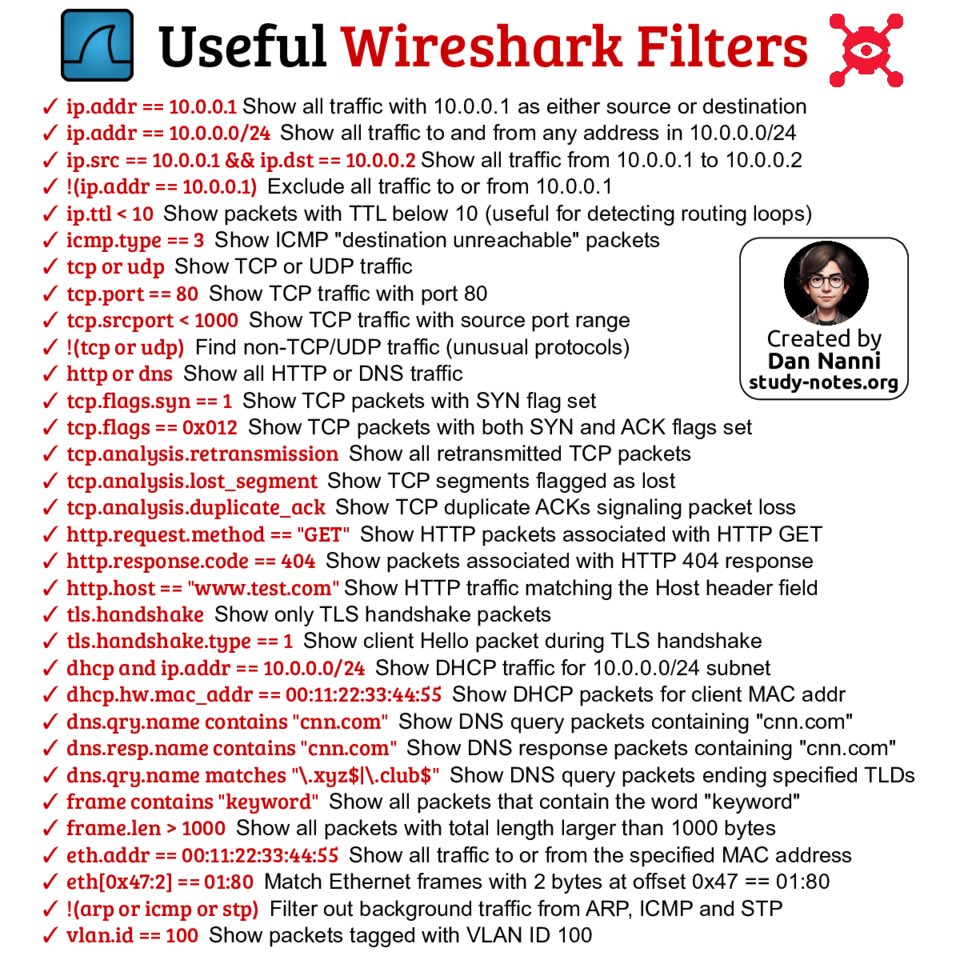
Wireshark filters cut through the noise so you can focus on the traffic that matters. Here are useful Wireshark filter examples 😎👇
Find high-res pdf ebooks with all my #Linux and #cybersecurity related infographics at https://t.co/3t6LHw8TIY
#pentesting#networkengineer
A recognized Linux certification can help validate your expertise and make your resume stand out. Here are popular Linux certifications from major certification providers 😎👇
Find pdf books with all my #Linux infographics at https://t.co/3t6LHw8TIY
#upskill#techjob
A practical DevOps roadmap:
1. Learn a scripting or programming language such as Python, Go, Bash, or JavaScript.
2. Understand operating systems basics, including Linux, Unix, server management, processes, and permissions.
3. Learn networking and security concepts, including DNS, TCP/IP, SSH, HTTPS, firewalls, and encryption.
4. Get comfortable with version control systems like Git, and platforms such as GitHub and GitLab, including branching, pull requests, and release workflows.
5. Study Infrastructure as Code tools like Terraform, Pulumi, Docker, Kubernetes, and Ansible.
6. Add monitoring and logging with Prometheus, Grafana, Loki, and Elasticsearch.
7. Build CI/CD pipelines using GitHub Actions, Jenkins, GitLab CI, or CircleCI.
8. Understand cloud platforms such as AWS, Azure, Google Cloud, and DigitalOcean.
Day 1/30 Kubernetes Learning Series
What is Kubernetes?
Kubernetes is a platform used to run and manage containers.
When you have one container, Docker is enough.
But when you have many containers running in production, you need something to manage them.
Kubernetes helps you:
- start containers
- restart failed containers
- scale applications
- update applications with less downtime
- manage networking between services
Linux Architecture — Full Beginner-Friendly Video
https://t.co/7TA2LLaKbY
Linux Architecture
1. The Basic Linux Architecture
2. User Space vs Kernel Space
3. What Is the Linux Kernel?
4. Process Scheduler
5. Memory Management
6. Virtual File System
7. Device Drivers
8. Linux Networking Stack
9. IPC — Inter-Process Communication
10. Linux Security
11. What Is Shell?
12. System Calls
13. Example — What Happens When You Run “ls”
14. Why Linux Is So Powerful
15. Conclusion
On Linux, /etc/passwd keeps basic user account details. Password hashes are in /etc/shadow, which is readable only by root. Here is how to interpret the /etc/shadow 😎👇
Find pdf ebooks with all my #Linux infographics at https://t.co/3t6LHw8TIY
#kalilinux#sysadmin#infosec
A new batch of hands-on Kubernetes challenges by Omkar Shelke 👏
If you're preparing for CKA/CKAD/CKS exams, solving them is a great way to practice:
- Validate CSI Storage Performance Using FIO and a Kubernetes Job https://t.co/VmdYDMiIL8
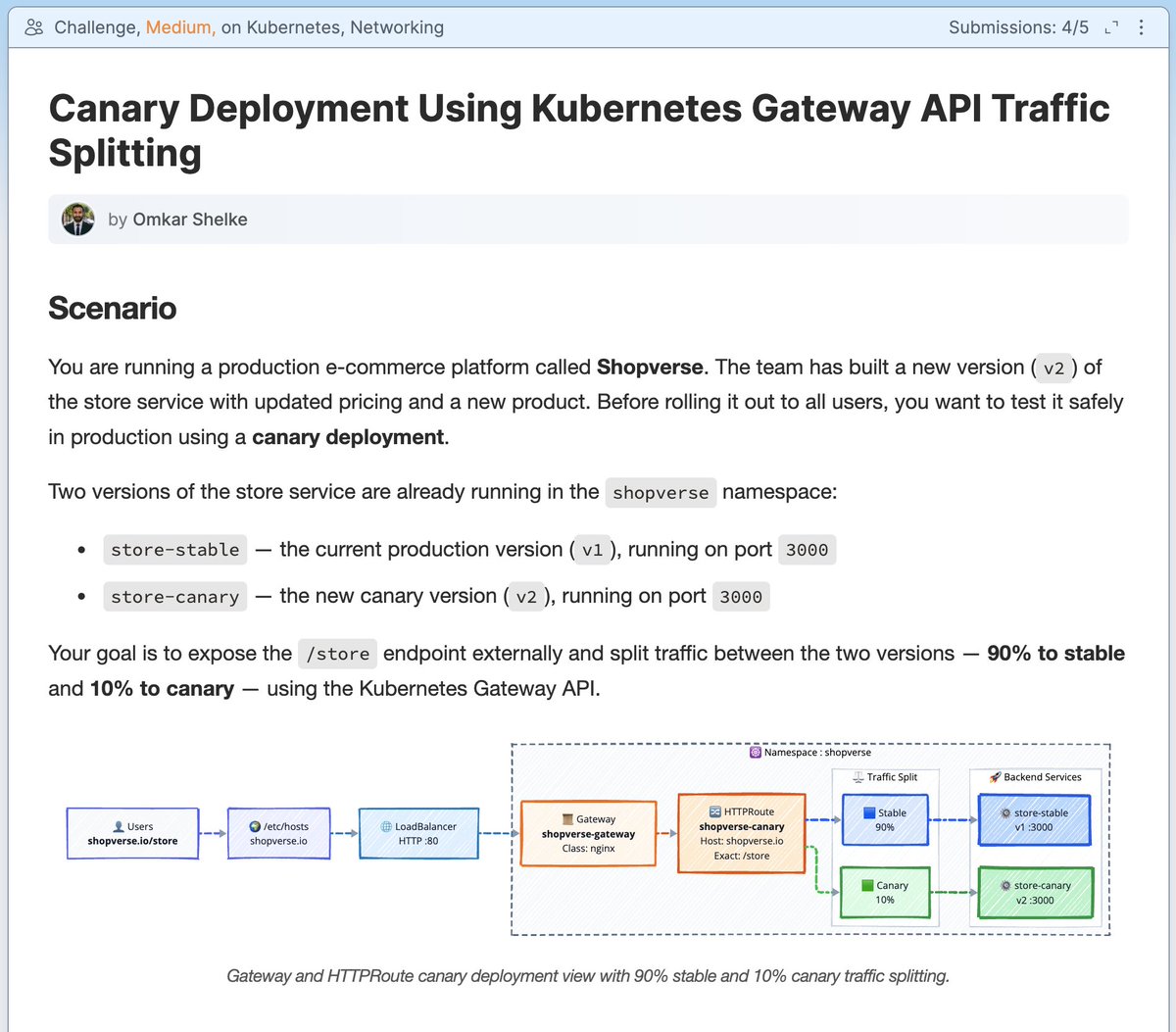
- Canary Deployment Using Kubernetes Gateway API Traffic Splitting https://t.co/sPQ4c8bt6W
- Verify Kernel Isolation Between Kata Containers and runc Using RuntimeClass https://t.co/ssxO4A2a5J
- Disable API Server NodePort and Configure kube-scheduler Resource Requests https://t.co/7pzGAu4dUt
- Troubleshoot CrashLoopBackOff Caused by a Missing TLS Secret https://t.co/QdjenccO78
- Add a Sidecar Log Tailer to an Existing Deployment https://t.co/Aip04gma0M
- Cross-Namespace Gateway and HTTPRoute Binding with Kubernetes Gateway API https://t.co/lBt2eP6D9K
- Deploy a Pod with a Sidecar Log Shipper Using Init Container Pattern https://t.co/wPBrOWyIrx
- Customize nginx Startup Behavior with a postStart Lifecycle Hook https://t.co/09g1Igw63J
- Switch Live Traffic from Blue to Green Using Kubernetes Services https://t.co/wMQZU3VGXA
- Exclude a Sidecar from VPA Using Per-Container Resource Policy https://t.co/4Lq0i4veW4
- Provision Dynamic NFS CSI Storage to Restore Stuck Deployments https://t.co/SDgbfHZcao
- Create and Apply a Kubernetes Job with Completions and Parallelism https://t.co/4SsdVZBokU
Happy hacking!
Your Kubernetes cluster is probably insecure right now.
Here's how I know:
❌ Secrets stored as base64 in etcd
❌ No Network Policies (all pods talk freely)
❌ Running containers as root
❌ Using :latest image tags in production
❌ No Falco for runtime threat detection
Fix all 12 attack surfaces with this visual 👇
These 12 concepts that actually matter in production:
🔑 RBAC → who can do what
🛡️ Pod Security Admission → privileged vs restricted
🔒 Secrets → Vault, not base64
🌐 Network Policies → zero trust between pods
🤝 mTLS → Istio/Linkerd handle this for free
📦 Image Security → Trivy + Cosign in your CI
🚪 API Server → Authentication → RBAC → Admission → etcd
⚙️ Security Contexts → runAsNonRoot always
🗄️ etcd → encrypt at rest, block port 2379
🧩 Admission Controllers → OPA + Kyverno
💻 Node Security → CIS Benchmark via kube-bench
👁️ Runtime Security → Falco on every node
Retweet to save a fellow engineer's cluster 🙏
#Kubernetes #K8sSecurity #DevSecOps #CloudNative #DevOps #CloudSecurity #SRE #Platform
Kubernetes started as a scheduler layer on top of a set of single-host Docker daemons, which means that for a long time, Kubernetes pods were just "semi-fused" groups of Docker containers.
Eventually, a Container Runtime Interface (CRI) was introduced, enabling the swapping and tweaking of container runtimes. Most clusters moved from the bloated Docker to the more-focused containerd as the "higher-level" runtime, while the lower-level OCI runtime (runc) stayed unchanged.
However, the need for more isolated pods kept growing, and "alternative" (to Docker-style containers) implementations followed - most notably gVisor and Kata Containers.
gVisor runs containers atop a trimmed user-land kernel (written in Go), and Kata Containers wrap traditional Linux containers with microVMs for extra isolation.
Naturally, a need to specify a container runtime on the pod level emerged. And that's how the RuntimeClass resource was introduced.
With a RuntimeClass, you can tell Kubernetes which container runtimes cluster nodes support, enabling the cluster to run both traditional Linux container-based pods and more isolated gVisor or Kata Container pods.
```
kubectl apply -f - <<EOF
apiVersion: v1
kind: Pod
metadata:
name: nginx-kata-qemu
spec:
runtimeClassName: kata-qemu
containers:
- name: nginx
image: nginx:alpine EOF
```
Learn how to register new Runtime Classes and schedule pods with arbitrary runtime class names in this hands-on tutorial by Márk Sági-Kazár: https://t.co/U4pGKJGZxJ
There are lots of Docker tutorials and courses out there. And ChatGPT and Claude know it well. So what's the point of creating yet another Docker Roadmap?
In my opinion, the important part is the story it tells. The information has always been available - Docker's official docs are solid. But it's not enough for efficient learning. For the best experience, the learning materials should:
- Get the dosage of theory & practice right
- Line up topics into a consistent learning path
- Connect the dots between Docker's functionality and real-world problems
- Keep you in the flow and help preserve the momentum
On top of that, I'm also a strong believer in learning by doing. Tutorial hell is real, but you're not risking getting stuck in it if you start with practice right away and only add the theory when absolutely needed.
Last but not least - quality visual materials. Nobody likes a wall of text, so combining textual explanations with good-looking diagrams makes the overall learning experience so much more pleasant.
This is what I hope differentiates iximiuz Labs' way of learning Docker: https://t.co/mO28eR5xZL