Everyone talks about Claude Code.
Almost nobody uses it beyond basic prompts.
I spent 3 months going from beginner to power user.
Here's what separates the top 1% from everyone else in one cheatsheet:
☑️ 1. THE 5 BUILDING BLOCKS
Most people only know slash commands. There are 5 systems:
CLAUDE. md → Your project memory.
Slash Commands → Type / to trigger.
Skills → Auto-activate.
Hooks → Guaranteed execution.
Subagents → Parallel workers with isolated context.
The progression: Manual → Automatic → Guaranteed → Delegated.
☑️ 2. CONTEXT MANAGEMENT (The #1 Skill Nobody Talks About)
Context is fuel. Waste it, and Claude gets dumb.
→ Run /context to see your usage as a visual grid
→ Run /compact at 60K tokens to compress and stay fast
→ Run /clear between completely unrelated tasks
→ Offload exploration to subagents (keeps your main thread clean)
→ Never say "investigate everything", always scope the search
☑️ 3. CUSTOM COMMANDS & PLUGINS
Which slash commands do you use daily? Make them permanent.
Create in .claude/commands/:
.claude/commands/review. md
→ Description: "Review code quality."
→ Allowed tools: Read, Glob
→ Prompt: "Review this code for security and performance."
→ Usage: /review
Plugins bundle everything (commands + agents + skills + hooks + MCP servers) into a shareable package.
Browse: /plugin Create: Ask Claude to "Build me a plugin for code review."
✅ THE POWER USER CHECKLIST
Complete all 10, and you're in the top 1%:
□ Set up CLAUDE. md in every project
□ Create 3 custom slash commands you use daily
□ Install at least 2 MCP servers (GitHub + Slack)
□ Write 1 hook that auto-formats your code
□ Build a skill for your most repeated workflow
□ Use subagents for exploration, main thread for decisions
□ /compact at 60K tokens, /clear between unrelated tasks
□ Use Haiku for cheap subagents, Opus for hard problems
□ Try headless mode in one CI/CD pipeline
For more cheatsheets like this: 👇
→ Go to https://t.co/rnjW2PWRtc
→ Subscribe to my free newsletter (don't pay anything)
→ Get more free and daily Cheatsheets
♻️ Repost to help a developer in your network
🎯26 Claude Code Commands
Master the essential commands used for project setup, session management, code operations, and agent workflows.
SESSION CONTROL
🔸 /clear — Clears conversation history
🔸 /resume — Resumes previous session
🔸 /branch — Creates new conversation from current point
🔸 /rewind — Go back to a previous point in conversation
🔸 /rename — Rename current conversation session
🔸 /export — Export conversation data
MODEL & USAGE
🔸 /model — Show or change the active Claude model
🔸 /cost — View current session cost estimates
🔸 /usage — View model and cost usage summary
🔸 /extra-usage — Detailed breakdown of usage data
PROJECT SETUP
🔸 /init — Initialize Claude Code in a directory
🔸 /memory — Configure or view project memory
🔸 /add-dir — Index additional project directories
🔸 /config — View or update configuration settings
CODE OPERATIONS
🔸 /diff — Show current changes relative to codebase
🔸 /security-review — Run security analysis on code
🔸 /plan — Generate project or task plan
🔸 /permissions — Manage file read/write permissions
🔸 /compact — Compress project data for context
AGENT LAYER
🔸 /agents — List available specialized agents
🔸 /skills — View or manage agent skills
🔸 /plugin — Manage system plugins
🔸 /reload-plugins — Reload installed plugins
🔸 /mcp — Integrate with Model Context Protocol
INTERFACE
🔸 /theme — Change terminal interface theme
🔸 /color — Modify terminal color scheme
❤️ Like
🔁 Retweet
🔖 Bookmark
Follow @sonalshukla3377 for more such posts
How to set up Claude Code so it runs like a full dev team:
5 folders. That's the entire system.
1. CLAUDE.md → Memory.
Your repo's constitution. Naming rules, structure, expectations. One global file for all projects, one local file per repo.
2. skills/ → Knowledge.
Reusable workflows Claude auto-invokes by matching the task description. No slash commands. It just knows.
3. hooks/ → Guardrails.
Shell scripts that run before and after every tool call. Block dangerous commands. Auto-lint on save. Ping Slack on deploy. Deterministic. Not AI.
4. subagents/ → Delegation.
Isolated agents with their own context window. A code reviewer that only sees the diff. A test runner with custom permissions. Keeps your main session clean.
5.plugins/ → Distribution.
Bundle the whole system into one install. Every teammate gets the same skills, same hooks, same agents. Aligned from day one.
This is the Agent Development Kit. Five layers, one stack.
To learn how and get the full Claude guide:
1. Go to https://t.co/xViEAXTX7v
2. Subscribe free by just writing your email.
3. Open my welcome email and get the free resources.
Repost ♻️ to help someone in your network.
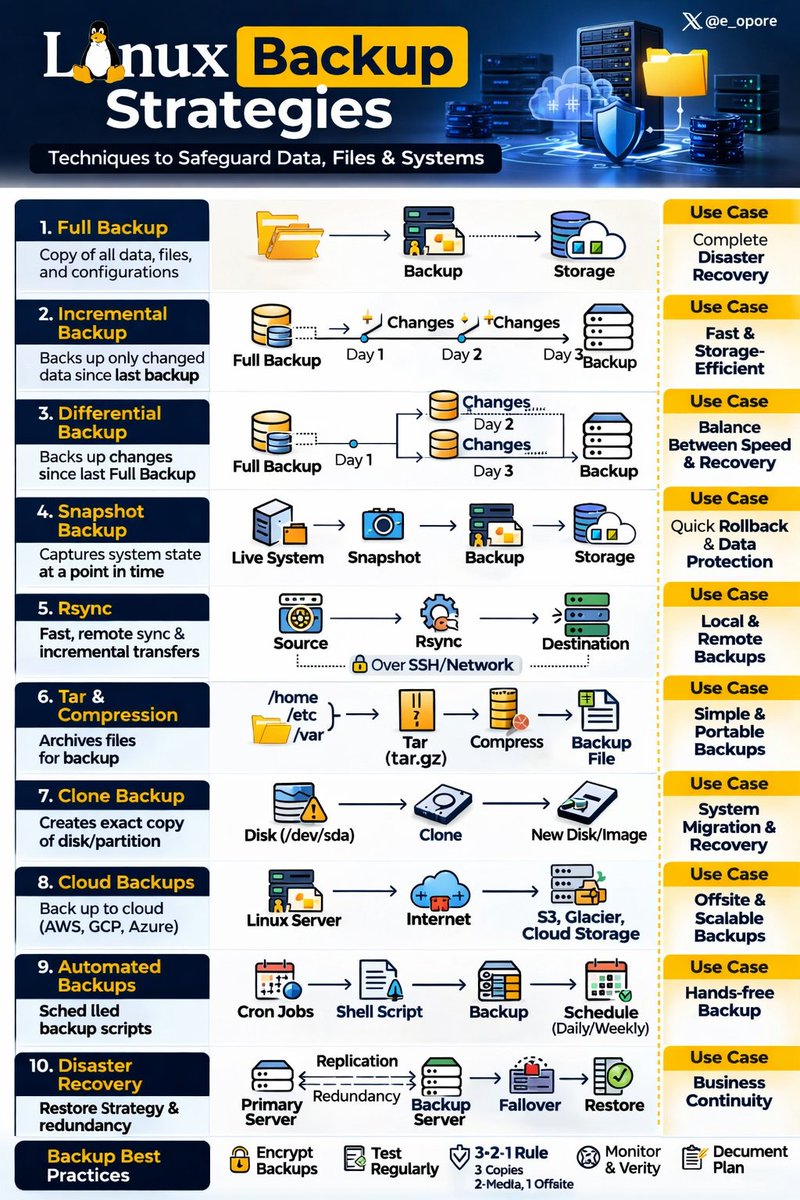
Linux Backup Strategies
1. Introduction
→ Backup strategies protect Linux systems from data loss due to hardware failure, human error, cyberattacks, or corruption.
→ A proper backup plan ensures business continuity and disaster recovery.
→ Backups must be reliable, automated, and tested regularly.
2. Why Backups Are Critical
→ Prevent permanent data loss.
→ Recover from ransomware attacks.
→ Restore systems after hardware crashes.
→ Maintain regulatory compliance.
→ Ensure minimal downtime in production systems.
3. Types of Backups
→ Full Backup
→ Copies all selected data.
→ Simplest recovery process.
→ Requires more storage and time.
→ Incremental Backup
→ Copies only data changed since the last backup.
→ Faster and storage-efficient.
→ Restoration requires full backup + all incremental backups.
→ Differential Backup
→ Copies data changed since the last full backup.
→ Faster restore than incremental.
→ Uses more storage than incremental.
4. Backup Methods in Linux
→ 1. File-Level Backup
→ Backs up individual files and directories.
→ Common tools:
→ rsync
→ cp
→ tar
→ Example:
→ rsync -av /home /backup
→ 2. Image-Based Backup
→ Creates a complete system image.
→ Useful for full system restoration.
→ Tools include:
→ dd
→ Clonezilla
→ 3. Snapshot-Based Backup
→ Uses filesystem snapshots to capture system state.
→ Efficient and fast.
→ Common with:
→ LVM snapshots
→ Btrfs
→ ZFS
→ 4. Database Backups
→ Required for MySQL, PostgreSQL, etc.
→ Tools include:
→ mysqldump
→ pg_dump
5. Backup Storage Strategies
→ Local Backups
→ Stored on the same machine or local network.
→ Fast recovery.
→ Risky if hardware fails completely.
→ Remote Backups
→ Stored on another server via SSH.
→ Protects against hardware failure.
→ Cloud Backups
→ Stored in cloud storage providers.
→ Scalable and geographically distributed.
→ Ideal for disaster recovery.
6. The 3-2-1 Backup Rule
→ 3 Copies of data.
→ 2 Different storage types.
→ 1 Offsite backup.
→ This strategy reduces risk of total data loss.
7. Automation of Backups
→ Use cron jobs for scheduled backups.
→ Example:
→ crontab -e
→ Automate rsync or tar scripts.
→ Ensures consistent backup without manual intervention.
8. Backup Security
→ Encrypt backup files.
→ Restrict access permissions.
→ Regularly verify backup integrity.
→ Test restoration process frequently.
9. Disaster Recovery Planning
→ Define Recovery Time Objective (RTO).
→ Define Recovery Point Objective (RPO).
→ Document recovery procedures.
→ Regularly simulate recovery scenarios.
10. Best Practices
→ Automate backups.
→ Monitor backup logs.
→ Store backups in multiple locations.
→ Test restore process regularly.
→ Keep backup strategy simple and documented.
11. Tip
→ Linux provides powerful tools for reliable backups.
→ Choose full, incremental, or differential based on needs.
→ Follow the 3-2-1 rule for safety.
→ Automation and testing are critical for success.
→ Backup strategy is essential for system reliability and business continuity.
📘 Linux Mastery Ebook
→ Master Linux internals, backup strategies, system monitoring, logging, process scheduling, and IPC in depth.
🔗Grab the Linux Mastery Ebook
https://t.co/mCaIRlvD0A
🔥 Firedrop $HOT cho 100 dân làng nhanh tay!
🔥 Điều kiện duy nhất là bạn cần join Telegram nhóm NEAR Việt Nam Hub: nearvietnamofficial
🔥 Bấm vào link này để nhận: https://t.co/vAgJttFB2x
2000 new wallets have been added to the beta!
This will be the final round for adding to the beta whitelist!
The remaining beta whitelist allocation will be distributed to our ecosystem partners, so keep an eye on our partners and turn on notifications.
It's all about $MOON!
The $NEAR ecosystem has EXPLODED with new token launches💥
This means #airdrop szn is coming… 🪂
So we created a step-by-step guide on how to launch an NEP-141 token airdrop 🚀
Best part? 👀
We’re giving you the ‘Neko Gatling Gun’ airdrop tool for FREE 😻
Watch now 👇