Learning never ends here!
Follow us to get ahead with monthly tasks that get you closer to your dream IT career.
Check this thread for our monthly tasks:
Resources available in the link in bio 🔗
Have you seen? Microsoft just completely restructured their fundamental security guidance, and it's awesome! ✨
This guidance serves as a perfect starting point for those aiming to better protect their M365 tenants! As well as this, I've also written some guidance for you on how you can practically benchmark your tenant against secure and practical baselines, which serve as a fundamental building block to a strong security strategy!
Check it out here > https://t.co/KgoodbPzuu
#Entra #Microsoft365 #Security
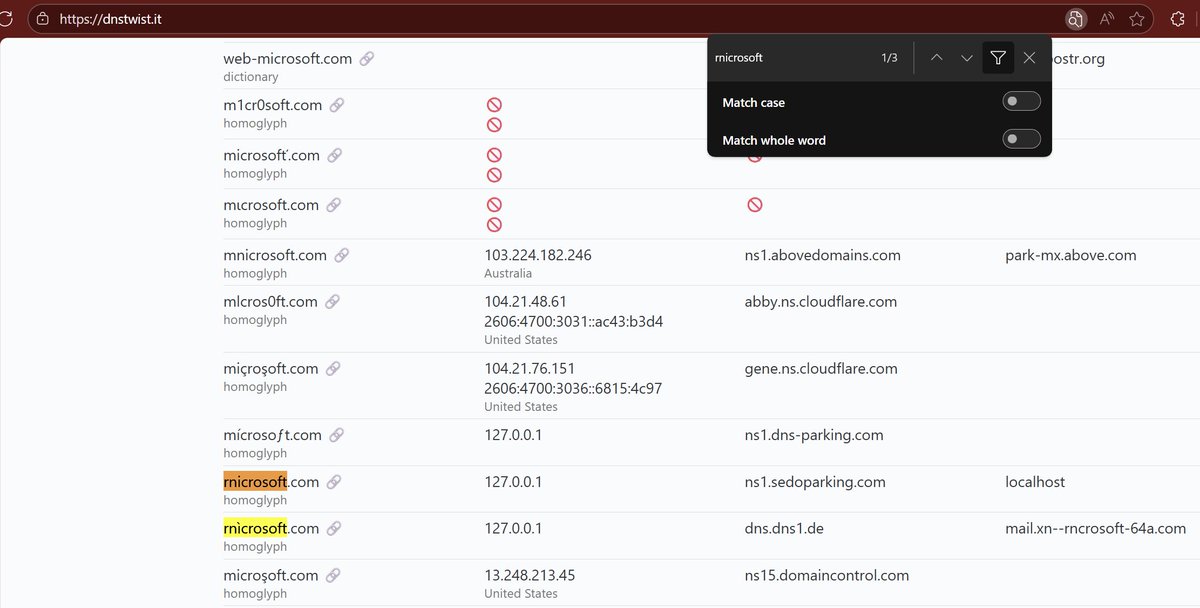
To be fair, Microsoft may have already filed a dispute on this domain (and a bunch of others there), but whois doesn't reflect that currently
If you do find anyone impersonating your domains, you can file a dispute with ICANN too:
https://t.co/JhzqcQcTzQ
Insane because Microsoft uses a tool like dnstwist to find lookalike domains in Defender for Office 365... but you have to pay for it
The good news is this tool is FREE, so everyone can and should monitor for lookalike domains:
https://t.co/AolV8QhQWH
https://t.co/5L7RlswD0I
Free Microsoft Certification Vouchers!
The good news? If you attend, you can grab free or discounted exam vouchers for some of their most in-demand certifications. 🚀
Here are the certifications currently open:
AZ-305: Azure Solution Architect
GH-300: GitHub Copilot...
SC-200: Security Operations Analyst
🔗 Event Links to register:
👉 Azure Security & Identity Events: https://t.co/x9LK8Oapbt
👉 AI & Data Events: https://t.co/bFL9BYLXPy
PS - Register ASAP because spots usually fill up fast, and Microsoft may not run these again soon.
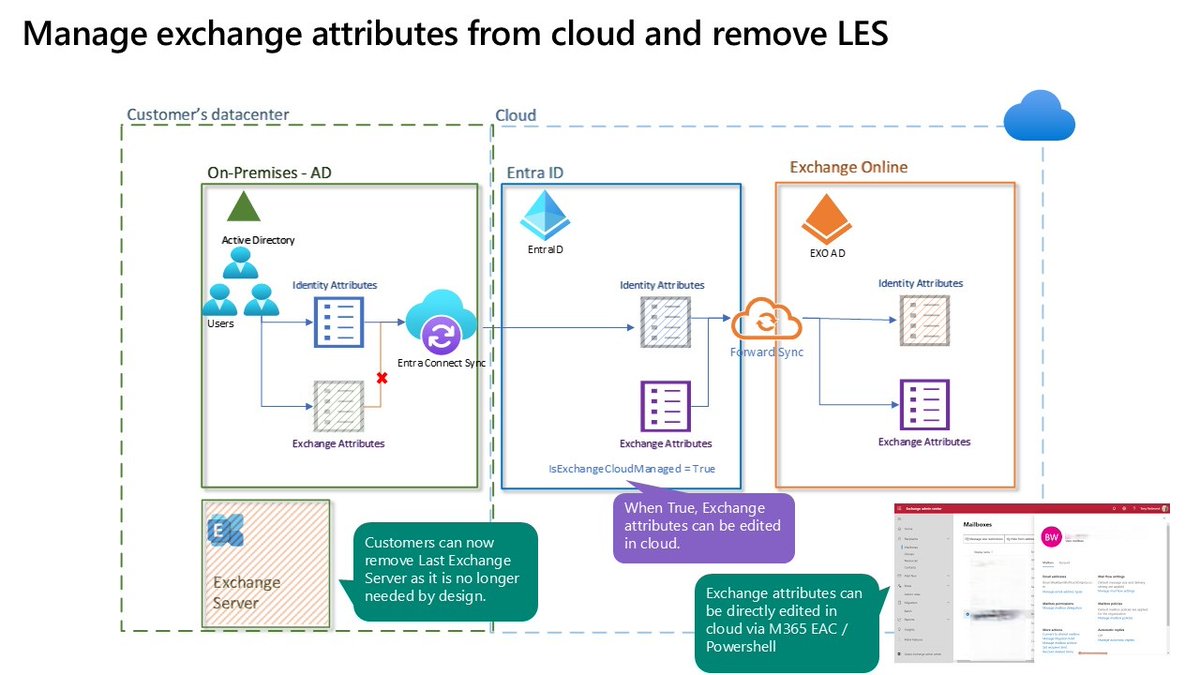
Removing the Last Exchange Server is now FINALLY possible!
A new capability in Exchange Online now allows administrators to manage Exchange attributes for directory-synchronized users with mailboxes hosted in the cloud.
With this update, the Source of Authority (SOA) for Exchange-specific attributes can be transferred to the cloud, while the SOA for identity-related attributes remains under the control of the on-premises Active Directory.
After moving the SOA for Exchange attributes to the cloud, these details can be managed using EXO PowerShell, the Microsoft 365 Admin Center, or the Exchange Admin Center, whereas identity attributes are still modified through on-premises Active Directory only.
Read more: https://t.co/XqnRs2gzoK
#Microsoft365 #ExchangeOnline #ExchangeServer #Hybrid #MicrosoftEntra #EntraID #ActiveDirectory #Microsoft
ACTIVE DIRECTORY: RESET THE DSRM PASSWORD
Got the DSRM password for each DC documented somewhere? It's surprising how many folks we've encountered that are in a pickle and have no clue what the DSRM password is!
In an elevated CMD for a local DC:
ntdsutil
set dsrm password
reset password on server null
q
q
For a remote DC:
ntdsutil
set dsrm password
reset password on server SERVERNAME
q
q
Now that we've done that it's documented right? The Disaster Recovery Plan documentation is updated if the DSRM location isn't indicated?
Acronyms
DSRM = Directory Services Restore Mode
Remote Desktop Services RemoteApps RSS: The Seamless and Secure User Experience
RDS has a RSS Feed built-in (pic 1). That feed is virtually device agnostic meaning _any_ device with a RDS App can hook into them.
The RSS feed gets updated automatically at midnight every day. All app changes are sync'd with subscribers. If there's a need we can have the user manually update the feed for immediate access to the changes.
For users on-premises within Active Directory or Windows users who are not connected to AD the apps appear as a folder on the Start Menu (pic 2).
For on-premises subscribers, or Session Host Desktop users, RD Single Sign-On set up in Group Policy means that all the user needs to do is click on the RemoteApp on their Start Menu and the app starts with no prompt. After all, they're already authenticated right? ;-)
For all subscribed users the apps all behave like they are on the _local_ machine. To the user they're looking at a windowed, or maximized, app on their desktop.
Security for this setup is layered as it should be.
1: Active Directory - Delimits access to various RD Collections
2: Group Policy - Single Sign-On configured
3: ARR + URLReWrite - HTTPS Layer Protection
4: Router/Firewall - Incoming Rules Delimited
5: Data remains on-premises and backed up
6: Remote user's device loss can be replaced quickly
We've been using essentially dumb Windows Desktop operating system machines for over a decade since RemoteApps got introduced with Windows Server 2008.
All of our clients utilize them extensively especially accounting firms that need to be on-site for on-premises audits at their client sites.
OPINION: Any remote work where sensitive data is involved should be on-premises, not in the cloud, and delivered to remote users via RemoteApp.
1: AD and GPO Secured
2: RD Gateway Protected
3: DUO 2FA for _all_ RD Gateway connections
4: Router/Firewall rules to protect incoming
5: Data remains on-premises
6: Backed up and Disaster Recovery Covered!
And the bonus? No mystery cloud bills. ;-)
ACRONYMS
AD - Active Directory
ARR - Application Request Routing
GPO - Group Policy Object
RD - Remote Desktop
RDS - Remote Desktop Services
RSS - Really Simple Syndication
Delegated permissions in Active Directory: silent but deadly 💩💨🤢
For example: Some random user with “FullControl” of the Domain Controllers OU
Nessus didn’t find it…
The IT team didn’t know it was there…
It wasn’t discovered on past pentests…
🧵I found it almost immediately...
In the past, you had to:
phish a user, drop malware, escalate privileges, pivot to servers, evade EDR, dump creds, move laterally, exfiltrate quietly, clean up, leave a backdoor.
Today, you just:
phish a user, steal an OAuth token, access everything from anywhere.
Cloud breaches aren’t hacks. They’re logins.
We've been doing a deep dive into threat modeling recently.
You should check this out if you're starting out in threat modeling.
https://t.co/K5n4Mnbsmd
Please ask all your admins to watch! Microsoft will be rolling out the policy as Microsoft Managed soon. This is not like AITM. It doesn't not matter if users have phishing resistant auth. Federation does not matter. This provides long term persistent access without MFA.