How to master Claude in 60 minutes:
(even if you've never opened it)
1. Start here: https://t.co/jw2qdIbLxJ
☑ The right way to set up Claude from day 1.
☑ How to prompt it so it actually works.
☑ The full ecosystem, in one sitting.
2. Level up with Cowork: https://t.co/uWTpOI3oyE
☑ The next level after regular Claude chat.
☑ Use projects inside Cowork.
☑ It takes a bit to set up, but worth every minute.
3. Stop prompting. Build Skills: https://t.co/6cHYYfjpP2
☑ Prompts Claude, remember for repeatable tasks.
☑ Set Claude up so it runs on rules, not prompts.
☑ Two clicks, 10× better outputs - forever.
4. Roll it out to your team: https://t.co/qxlcqheAme
☑ Setting up Claude for a team is a different game.
☑ The cleanest 7-day rollout plan I could write.
☑ No more "we have Claude but nobody uses it."
5. Never hit Claude limits: https://t.co/j5fEzSGxlT.
☑ 23 tricks to use Claude without paying more.
☑ Stretch the free & Pro plans way beyond.
☑ Start shipping work without breaking the flow.
6. Claude Design: https://t.co/ZY8Fg5CuoC
☑ Websites, decks & animated videos from prompts
☑ Upload DESIGN .md - it auto-applies your brand.
☑ Copy any brand from getdesign .md.
7. Bonus (to go even deeper).
☑ Claude for Excel: https://t.co/mfcXYSA57j
☑ Claude interactive chart: https://t.co/ebCHGZqgPt
☑ Claude Code for non-coders: https://t.co/UgE9xBXnm6
☑ Slides with https://t.co/L0bPMgWEsy: ppt, but 2026.
All of this is available, for free, to people who subscribe today to my newsletter "How to AI".
1. Go to https://t.co/psB7XxAv8w. Add your work email.
2. A pop-up will ask you to pay. Do not pay for it.
3. Open my welcome email & enjoy the free guides.
Instead of watching Netflix tonight.
Spend a day mastering Claude here: https://t.co/Vn60ElPZ2i
→ Level 1 - 24 min: The basics.
Claude For Dummies: https://t.co/HNa5MrCLVU
Claude Setup: https://t.co/jw2qdIcjnh
→ Level 2 - 1 hour: Real workflows.
Claude Cowork: https://t.co/uWTpOI3Woc
Claude for teams: https://t.co/qxlcqhf8bM
Claude Design: https://t.co/ZY8Fg5D2ea
Cowork + Projects: https://t.co/Q7AN9CZAbO
Claude for slides: https://t.co/L0bPMgXci6
Claude Skills: https://t.co/6cHYYfjXEA
→ Level 3 - 3.5 hours: The pro moves.
Avoid sycophancy: https://t.co/5i8xSJBGUl
Claude Code: https://t.co/UgE9xBXVbE
Claude 101: https://t.co/OvBmlvnVqL
Stop hitting Claude limits: https://t.co/j5fEzSH5br
Stop Prompting: https://t.co/j1LATSJiat
→ Level 4 - 8 hours: Expert mode.
Claude Computer: https://t.co/TxYuHPjgbV
Build with Claude API: https://t.co/RcCbfNjlzz
Pro tip: Don't binge it. Do one level per sitting.
Actually apply each guide before moving to the next
Don't pay $100/month for the Claude Max plan.
These 12 hacks save your tokens (and your wallet):
——
(read all 23 token hacks: https://t.co/vIxppppoGi)
———
1: You upload PDFs raw. One page = 3,000 tokens.
Fix: Paste the text into a Google doc. Download as .md format. Under 200 tokens.
2: You use Opus for a grammar check.
Fix: Haiku for quick tasks. Sonnet for writing & coding. Opus for deep reasoning only.
3: You leave Search & Connectors on by default.
Fix: Default everything off. Turn features on per task, not per account.
4: You build files inside Cowork too early.
Fix: Plan in Chat (cheap). Build the final output in Cowork (expensive).
5: You write 500-word prompts.
Fix: Write 29 words instead: "I want to [task] to [goal]. Ask me questions using AskUserQuestion before you start."
6: You send 3 separate messages for 3 tasks.
Fix: One message, three tasks. "Summarize this, list the points, suggest a headline."
7: You type "No, I meant," stacking on the history.
Fix: Click 'Edit' on your original message. Fix it. Regenerate. History replaced, not stacked.
8: You say "redo the whole thing" to correct part 3.
Fix: "Only redo section 3. Keep everything else. No commentary. Just the output."
9: You never restart. Your chat hits 30 messages.
Fix: Every 15-20 messages → summarize, copy the brief, start a fresh session.
10: You keep 3 topics in 1 chat. It re-reads all of it.
Fix: New topic = new chat. Always. Dead context is dead tokens.
11: You skip Personal Preferences
Fix: Settings → Personal Preferences. Set your tone and style once. It persists forever. Don't waste 3-5 setup messages per chat.
12: You upload the same PDF to 5 different chats.
Fix: Use Projects. Upload once. Every new chat references it without re-burning tokens.
-----
To download all of my Claude infographics:
Step 1. Go to https://t.co/psB7XxB2Y4.
Step 2. Subscribe for free. Don't pay anything.
Step 3. Open my welcome email (most skip this).
Step 4. Hit the automatic reply button inside.
Step 5. Download my infographics from my Notion.
Bonus. Enjoy my best copy-paste prompts, too.
How to set up Claude Skills completely in 1 hour:
(duplicate my exact folder, skills, and prompts)
1. Open the Claude desktop app.
2. Click the Cowork tab at the top.
3. You need a Pro plan ($20/mo). Worth it.
4. Start with this (free) guide: https://t.co/6cHYYfjpP2
-----
→ 0-10 min: Open Cowork. Find the skill-creator.
Select your folder. Opus 4.6 + Extended thinking.
Prompt: "Use the skill-creator to help me build a skill for [your most repeated task]."
→ 10-25 min: Answer the interview. Build the Skill.
The skill-creator asks you questions. Be specific.
Useless: "I write reports."
Skill that works: "Weekly reports, headline metric first, 3 sections max, next steps at the end."
It generates a folder + SKILL .md with your trigger & instructions. (Be specific or it won't fire)
→ 25-35 min: Run the evaluation.
Claude creates an eval to validate your Skill.
Click "View the eval results" to test before downloading. (Write this once. It runs every time)
→ 35-45 min: Install and test.
Save the Skill folder.
Go to Settings → Capabilities → Skills → Upload.
Type a request that should trigger the Skill.
Download my skills hacks here: https://t.co/6cHYYfjpP2
→ 45-55 min: Iterate and debug.
Try 5 phrasings. Does the Skill fire each time?
Try 3 unrelated requests. Does it stay quiet?
Ask: "When would you use this skill?" It quotes the description back. (You instantly see what's broken)
→ 55-60 min: Browse plugins. Download more Skills
Desktop app → Customize → Personal plugins → Browse plugins.
A plugin = a bundle of Skills. Download & test.
Or go to makemyskill .com.
Describe it, download it and upload it.
Pro tip: Always add "Do NOT use for…" lines to your description. Negative triggers matter more than positive ones. Skills are portable. Same SKILL .md works on Claude, Gemini, ChatGPT.
To download all of my other Claude infographics:
Step 1. Go to https://t.co/psB7XxAv8w.
Step 2. Subscribe for free. Don't pay anything.
Step 3. Open my welcome email (most skip this).
Step 4. Hit the automatic reply button inside.
Step 5. Download my infographics from my Notion.
Bonus. Enjoy my best copy-paste prompts, too.
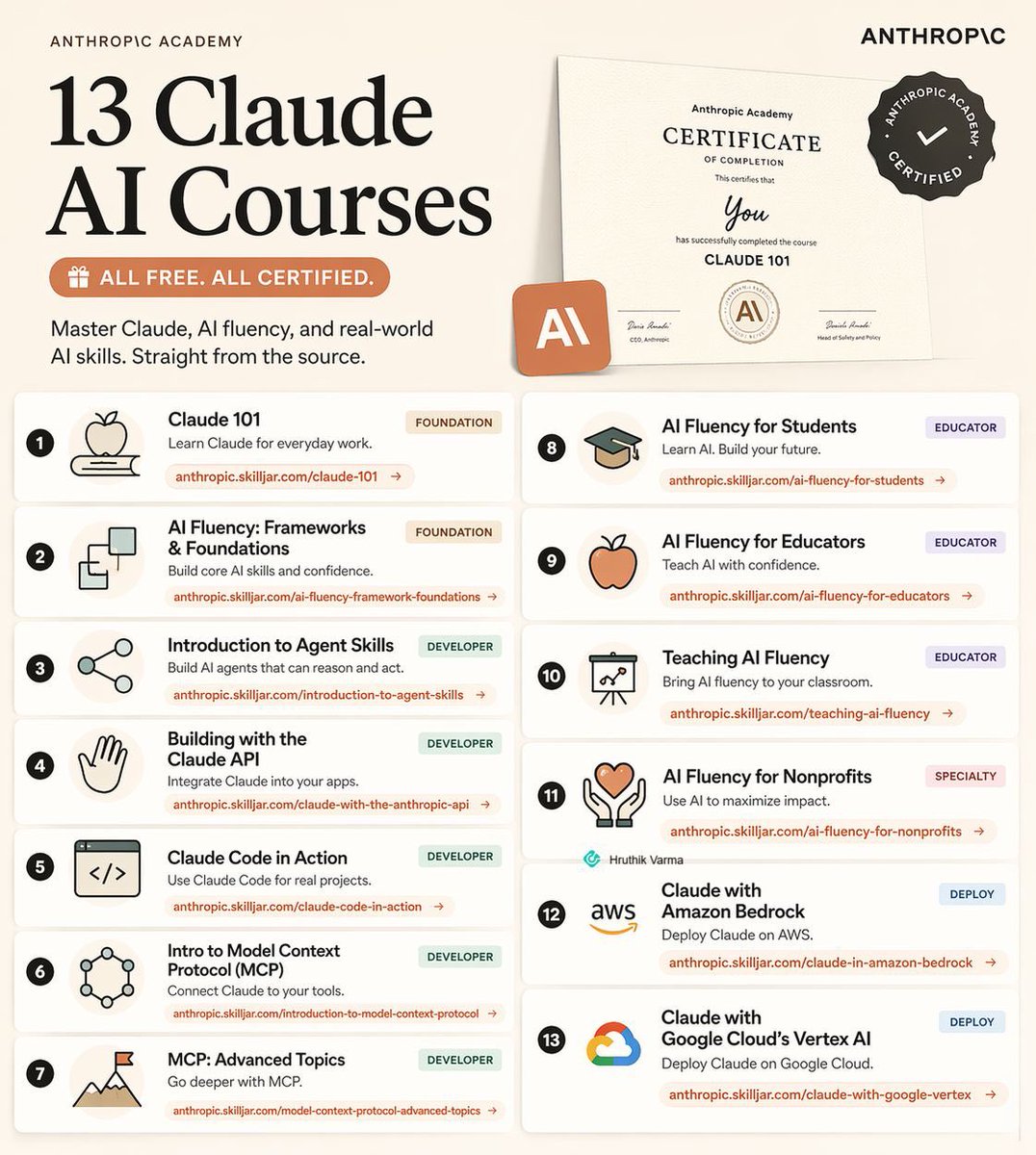
Claude just dropped 13 free AI courses (with certificates).
No $500 course needed.
No “guru” required.
Just real skills, straight from Anthropic.
Here’s the full list:
1. Claude 101
https://t.co/9bQ7NlWwmL
2. AI Fluency: Frameworks & Foundations
https://t.co/2H6Wr4eOWN
3. Introduction to Agent Skills
https://t.co/qozyrdLwyV
4. Building with the Claude API
https://t.co/60bwB2FFQ0
5. Claude Code in Action
https://t.co/88VdISzLIi
6. Introduction to Model Context Protocol
https://t.co/EQrdwEQZdQ
7. MCP: Advanced Topics
https://t.co/3pDv4Bpdgk
8. AI Fluency for Students
https://t.co/nLWu1PbxVa
9. AI Fluency for Educators
https://t.co/kRz3G2gMOp
10. Teaching AI Fluency
https://t.co/8MLctE9O4L
11. AI Fluency for Nonprofits
https://t.co/qGuWQiV5lI
12. Claude with Amazon Bedrock
https://t.co/HCPSbQ72nv
13. Claude with Google Vertex AI
https://t.co/0NKyFoZ1a6
If you go through even half of these, you’ll be ahead of 95% of people using AI.
Most people won’t.
Because they’re still watching random YouTube videos, buying overpriced courses, or “learning AI” without actually building.
Don’t be that person.
Do this instead:
1. Bookmark this post (you’ll come back)
2. Pick 1 course and start today
3. Share it with someone who needs this
👇Comment "Course" for more resources.
Free. Practical. No excuses.


![rubenhassid's tweet photo. Don't pay $100/month for the Claude Max plan.
These 12 hacks save your tokens (and your wallet):
——
(read all 23 token hacks: https://t.co/vIxppppoGi)
———
1: You upload PDFs raw. One page = 3,000 tokens.
Fix: Paste the text into a Google doc. Download as .md format. Under 200 tokens.
2: You use Opus for a grammar check.
Fix: Haiku for quick tasks. Sonnet for writing & coding. Opus for deep reasoning only.
3: You leave Search & Connectors on by default.
Fix: Default everything off. Turn features on per task, not per account.
4: You build files inside Cowork too early.
Fix: Plan in Chat (cheap). Build the final output in Cowork (expensive).
5: You write 500-word prompts.
Fix: Write 29 words instead: "I want to [task] to [goal]. Ask me questions using AskUserQuestion before you start."
6: You send 3 separate messages for 3 tasks.
Fix: One message, three tasks. "Summarize this, list the points, suggest a headline."
7: You type "No, I meant," stacking on the history.
Fix: Click 'Edit' on your original message. Fix it. Regenerate. History replaced, not stacked.
8: You say "redo the whole thing" to correct part 3.
Fix: "Only redo section 3. Keep everything else. No commentary. Just the output."
9: You never restart. Your chat hits 30 messages.
Fix: Every 15-20 messages → summarize, copy the brief, start a fresh session.
10: You keep 3 topics in 1 chat. It re-reads all of it.
Fix: New topic = new chat. Always. Dead context is dead tokens.
11: You skip Personal Preferences
Fix: Settings → Personal Preferences. Set your tone and style once. It persists forever. Don't waste 3-5 setup messages per chat.
12: You upload the same PDF to 5 different chats.
Fix: Use Projects. Upload once. Every new chat references it without re-burning tokens.
-----
To download all of my Claude infographics:
Step 1. Go to https://t.co/psB7XxB2Y4.
Step 2. Subscribe for free. Don't pay anything.
Step 3. Open my welcome email (most skip this).
Step 4. Hit the automatic reply button inside.
Step 5. Download my infographics from my Notion.
Bonus. Enjoy my best copy-paste prompts, too.](https://pbs.twimg.com/media/HGWmYOIbMAEQ7Pt.jpg)
![rubenhassid's tweet photo. How to set up Claude Skills completely in 1 hour:
(duplicate my exact folder, skills, and prompts)
1. Open the Claude desktop app.
2. Click the Cowork tab at the top.
3. You need a Pro plan ($20/mo). Worth it.
4. Start with this (free) guide: https://t.co/6cHYYfjpP2
-----
→ 0-10 min: Open Cowork. Find the skill-creator.
Select your folder. Opus 4.6 + Extended thinking.
Prompt: "Use the skill-creator to help me build a skill for [your most repeated task]."
→ 10-25 min: Answer the interview. Build the Skill.
The skill-creator asks you questions. Be specific.
Useless: "I write reports."
Skill that works: "Weekly reports, headline metric first, 3 sections max, next steps at the end."
It generates a folder + SKILL .md with your trigger & instructions. (Be specific or it won't fire)
→ 25-35 min: Run the evaluation.
Claude creates an eval to validate your Skill.
Click "View the eval results" to test before downloading. (Write this once. It runs every time)
→ 35-45 min: Install and test.
Save the Skill folder.
Go to Settings → Capabilities → Skills → Upload.
Type a request that should trigger the Skill.
Download my skills hacks here: https://t.co/6cHYYfjpP2
→ 45-55 min: Iterate and debug.
Try 5 phrasings. Does the Skill fire each time?
Try 3 unrelated requests. Does it stay quiet?
Ask: "When would you use this skill?" It quotes the description back. (You instantly see what's broken)
→ 55-60 min: Browse plugins. Download more Skills
Desktop app → Customize → Personal plugins → Browse plugins.
A plugin = a bundle of Skills. Download & test.
Or go to makemyskill .com.
Describe it, download it and upload it.
Pro tip: Always add "Do NOT use for…" lines to your description. Negative triggers matter more than positive ones. Skills are portable. Same SKILL .md works on Claude, Gemini, ChatGPT.
To download all of my other Claude infographics:
Step 1. Go to https://t.co/psB7XxAv8w.
Step 2. Subscribe for free. Don't pay anything.
Step 3. Open my welcome email (most skip this).
Step 4. Hit the automatic reply button inside.
Step 5. Download my infographics from my Notion.
Bonus. Enjoy my best copy-paste prompts, too.](https://pbs.twimg.com/media/HGR8vIKbEAAM1H1.jpg)