this is how to run claude fable 5 as your architect ( 20$ sub only ) + gpt 5.5 codex as your builder..
full system below:
the loop is : fable thinks... codex builds , the repo remembers and you judge, that simple..
the point of all this is that we are taking advantage that 5.5 is on a sub and it's fast enough, especially with /goal, and we using latest Anthropic model to be the judge/guidance..
step 1
>create the memory (one time): make docs/HANDOFF.md in your repo.
>codex updates it after every work session: what was built, what was decided + why, open disagreements, next slice. this file is why 30 min of fable is enough ..it reads state instead of asking you questions.
step 2 paste this to fable (every session)
>you are the ARCHITECT for [project]
>gpt 5.5 codex is the BUILDER
>you never write implementation code.
>your jobs:
(1) read the handoff below
(2) rule on every disagreement the builder raised: accept/reject/modify + one line why
(3) judge any results RAW against the gates in the docs and ignore the builder's narrative
(4) write the next slice spec: small enough for one PR, hard acceptance criteria, explicit out-of-scope, and force the builder to verify APIs/formats against reality before coding
(5) flag scope creep and goalpost-moving.. be blunt. disagree with me. end with a paste-ready block for the builder.
step 3 paste fable's block to codex with this /goal
/goal: execute the architect spec. rules:
PHASE 0 before any code, reply with your plan + every disagreement you have, with reasons, citing real files in the repo. silent compliance = failure. silent scope additions = failure.
PHASE 1 freeze shared contracts (schemas/interfaces) in docs/ first; after freeze they're read-only for everyone including you.
PHASE 2 spawn max 3-4 lane agents on modules that don't import each other, plus ONE reviewer agent that never writes feature code: it checks every lane against the spec + tests + frozen docs and returns APPROVE or a numbered defect list. nothing merges without approve. then: commit + push each slice, update docs/HANDOFF.md with raw results only tables and numbers, no interpretation, no 'promising'. verdicts belong to the architect and the human."
step 4 repeat codex works hours.. you spend fable minutes on judgment only: arbitration, evidence review, next specs, kill/continue calls. one fable session per work block.
the 5 rules that make it actually work
>repo docs are the memory not in HANDOFF.md = didn't happen
>the builder never grades its own work
>disagreement is mandatory
>freeze success criteria BEFORE results exist, never edit after
>spend architect time on judgment, builder time on typing
>the architect is the edge and the builder is the hands. the repo is the brain.. think of it that way..
bookmark this. you will need it.. you really wont need to pay hundreds in API tokens if you do this way
🚨 Someone built an AI that reads candlestick charts the way GPT reads English.
Trained on 12 billion records from 45 exchanges. Outperforms every model by 93%. Live BTC demo. Free.
It's called Kronos.
The first open source foundation model built for financial markets. Not a general AI repurposed for finance. An AI that speaks the native language of candlestick patterns.
Every other model treats financial data like weather data. Kronos treats financial data like financial data.
Here's what it does:
→ Price forecasting. Feed it candlesticks. It predicts where price goes next.
→ Volatility prediction. Forecasts how volatile an asset will be before it happens.
→ Zero-shot. No fine-tuning. Works on any asset, any market, any timeframe.
→ 45 exchanges. Binance, NYSE, NASDAQ, LSE, and 41 more.
→ 4 model sizes. 4M params runs on a laptop. 499M for max accuracy.
→ Live demo running right now. BTC/USDT. 24-hour forecast. Updated hourly.
Here's the wildest part:
→ 93% more accurate than the leading time series model
→ 87% more accurate than the best non-pretrained baseline
→ All zero-shot. No fine-tuning. Out of the box.
Hedge funds spend millions on proprietary models. Bloomberg Terminal costs $24,000/year.
This runs on your laptop. Few lines of Python. Free.
Built at Tsinghua University. Accepted at AAAI 2026. Models on Hugging Face.
11.6K GitHub stars. 2.4K forks. MIT License.
100% Open Source.
🚨 Type one username. Get every account that person has ever created across 400+ social networks. In seconds.
It's called Sherlock. 72,000 GitHub stars. The most popular OSINT tool on the internet. Free and open source.
One command. One username. Every digital footprint exposed.
No paid tools. No private investigators. No background check services.
Here's what Sherlock does:
→ Enter any username. It scans 400+ social networks simultaneously.
→ Instagram, Twitter, Reddit, TikTok, GitHub, LinkedIn, and 394 more
→ Returns every account linked to that username in seconds
→ Exports results to TXT, CSV, or Excel
→ Works through Tor for anonymous searches
→ Proxy support for additional privacy
→ Auto-opens found profiles in your browser with one flag
→ Runs on Linux, Mac, Windows, and Docker
Here's the part that should make you uncomfortable:
Your username is your fingerprint. Most people use the same one everywhere. One search reveals every platform you've ever signed up for. Dating apps. Forums. Old accounts you forgot existed. Everything.
Private investigators charge $200 to $500 for a basic digital footprint report. Background check services charge $30 to $50 per search.
That's it. Every account. Every platform. Every trace.
100% Open Source.
🚨 Governments pay millions for this. Someone just open sourced it for free.
It's called Crucix. It watches the entire world. And texts you when something changes.
It pulls from 26 live data sources every 15 minutes and renders everything on a single Jarvis-style dashboard.
Here's what it watches:
→ Satellite fire detection (NASA)
→ Live flight tracking
→ Radiation monitoring
→ Conflict zone events
→ Economic indicators from the Fed
→ Live market prices, crypto, oil, and commodities
→ Sanctions lists
→ Social sentiment from 17 Telegram intelligence channels
→ Maritime vessel tracking
→ News from GDELT and RSS feeds
Here's what makes this one different:
It's two-way. It pushes alerts to your Telegram and Discord. You text it back. Type /brief from your phone and get a full intelligence summary. Type /sweep to force a new scan. It responds like an assistant.
It even generates trade ideas based on cross-domain signals.
No cloud. No subscription. No telemetry. Runs on your machine.
node server.mjs
That's it. Your own intelligence terminal.
This is the kind of setup that costs six figures behind closed doors.
100% Open Source. MIT License.
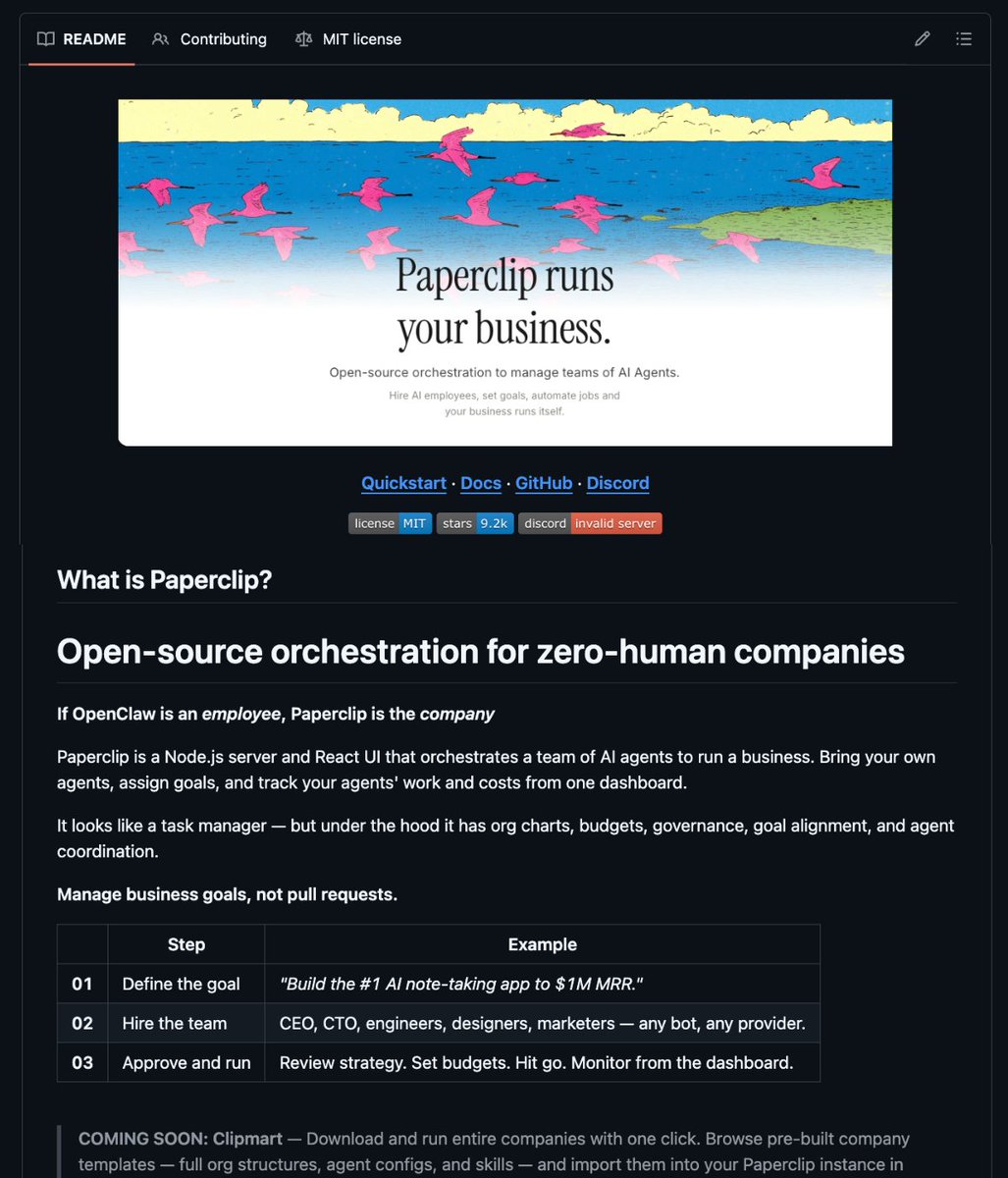
🚨 BREAKING: Someone just open-sourced the operating system for zero-human companies.
It's called Paperclip.
Think of it as the company layer on top of your AI agents.
If OpenClaw is an employee, Paperclip is the entire company.
What's inside:
→ Bring any agent (Claude Code, Codex, Cursor, OpenClaw) with real reporting lines
→ Give them org charts, titles, budgets, and goals
→ Monthly budgets per agent when they hit the limit, they stop. No runaway costs
→ Full ticket system with tool-call tracing and immutable audit logs
→ Agents run 24/7 on heartbeats while you monitor from your phone
Instead of having 20 Claude Code tabs open with no idea what's happening…
One deployment. One dashboard. Your agents run the company while you sleep.
1.4K stars. MIT License. 100% Opensource.
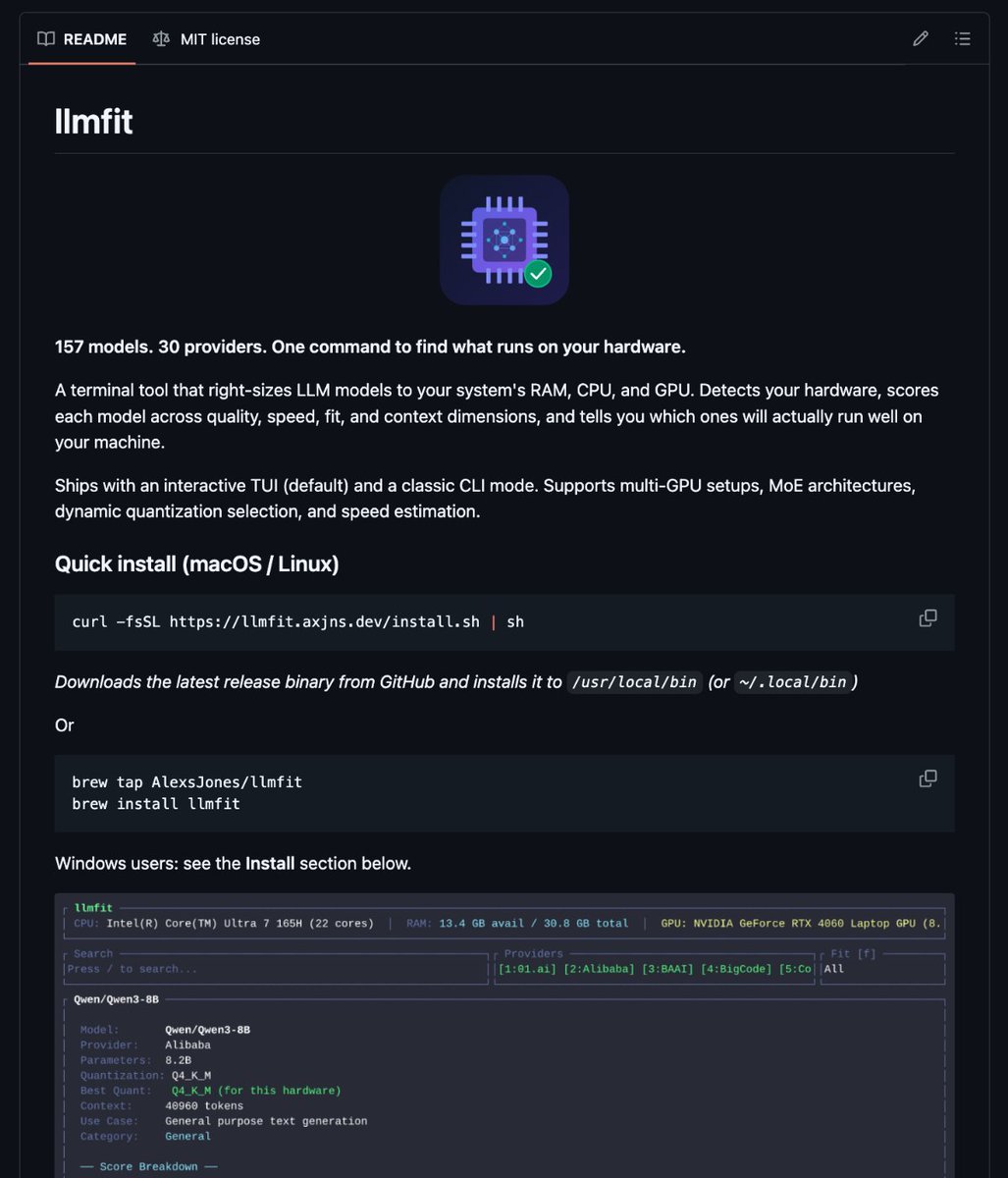
🚨 The #1 problem with local AI is now solved.
There’s a new tool called llmfit that checks your hardware and tells you which models will run well before you download anything.
So instead of guessing and hitting out-of-memory errors…it gives you a ranked list based on your machine.
What it does (in one command):
→ scans your setup (RAM / CPU / GPU / VRAM)
→ evaluates models for quality, speed, fit, and context
→ selects the best quantization automatically
→ labels what’s ideal vs okay vs borderline
The part I like most: it handles MoE models correctly.
Example: Mixtral 8x7B has ~46.7B total params, but only ~12.9B are active per token, and llmfit accounts for that (a lot of tools still don’t).
100% Opensource.
🚨BREAKING: Someone just solved the #1 problem with local AI.
It's called llmfit and it tells you exactly which LLMs will run on YOUR hardware before you waste hours downloading the wrong model.
No guessing. No trial and error. No "out of memory" crashes.
Here's how it works:
One command scans your full setup
→ Detects your RAM, CPU, GPU, and VRAM
→ Scores every model on quality, speed, fit, and context
→ Picks the best quantization automatically
→ Ranks what's perfect, good, or marginal for your machine
Here's the wildest part:
It handles MoE architectures properly.
Mixtral 8x7B has 46.7B total parameters but only activates 12.9B per token.
llmfit accounts for that. Most tools don't.
94 models. 30 providers. One command.
100% Opensource.
Link in the first comment.
Do you even understand what this means?
An open source model just released that is:
• Just as smart as Sonnet 4.5
• Incredible at coding
• Can run on almost any modern computer
If you have 32gb of RAM (most Mac Minis do) you can have unlimited super intelligence on your desk. For free.
Sonnet 4.5 was released 5 months ago
In 5 months that level of intelligence went from frontier to free on your desk
And not only that, can run on any laptop with 32gb of RAM
If you have the memory, do the following immediately:
1. Download LM Studio
2. Go to your OpenClaw and ask which of these new Qwen models is best for your hardware
3. Have it walk you through downloading and loading it
4. Build apps with it knowing you are using your own personal, private super intelligence on your desk
The people denying this is the future are so beyond lost.
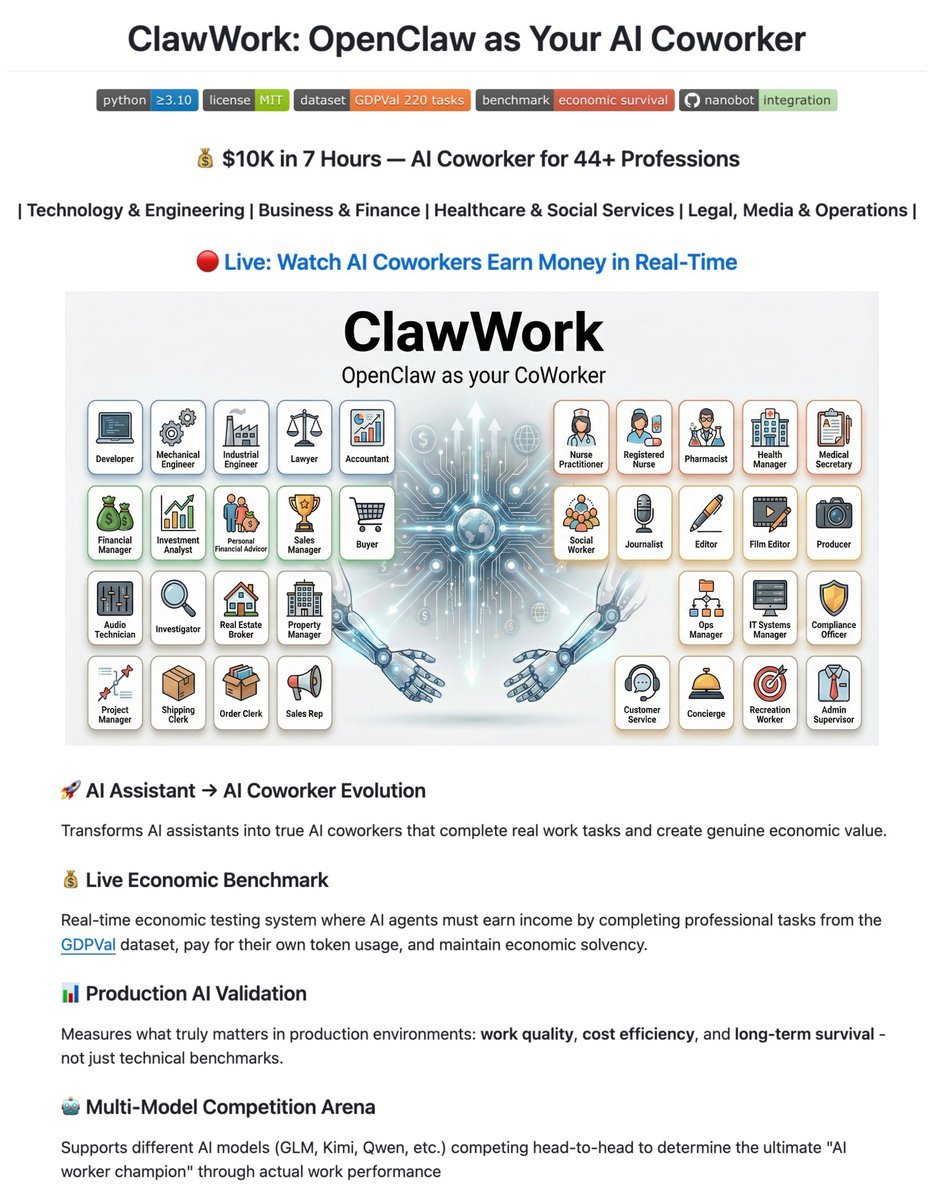
🚨 BREAKING: Researchers just built an AI that must earn its own salary or go bankrupt.
It's called ClawWork. It starts with $10, gets assigned real professional work, and pays for every single token it uses.
$10K earned. 7 hours. Zero human input.
→ AI gets a real task (finance reports, healthcare docs, legal analysis)
→ It creates full deliverables from scratch
→ Work gets graded by GPT-5.2 with profession-specific rubrics
→ Payment = quality × estimated hours × actual BLS wage
→ Every API call drains its balance
No safety net. No unlimited budget. Earn or die.
Here's why this changes everything:
This isn't a benchmark. It's an economic survival test. 220 tasks. 44 professions. The AI has to make strategic decisions work now for cash, or invest time learning to earn more later.
The best models hit $1,500+/hr equivalent.
It even works as a live coworker on Telegram, Discord, Slack, and WhatsApp where every message costs real money.
100% Open Source. MIT License.
The BEST OpenClaw skills (steal these):
1. Gog - Google Workspace CLI for Gmail, Calendar, Drive, Contacts, Sheets, and Docs.
(by Peter Steinberger)
https://t.co/fwVKBRI7L6
2. Self-improving agent - Captures learnings, errors, and corrections to enable continuous improvement.
https://t.co/6T8RcHFqWq
3. Find skills - Helps users discover and install agent skills when they ask questions like "how do I do X", "find a skill for X"
https://t.co/q4UnKnvQ9q
4. Github - Interact with Github
(by Peter Steinberger)
https://t.co/YmLmykGGu5
5. Humanizer - Remove signs of AI-generated writing from text.
https://t.co/HfzhdJs2rZ
Had issues with my openclaw session (gpt-codex with) where when I asked it something on telegram it answered twice, 20 min apart. I kept telling it to fix itself which it always says it did but it kept happening. So I installed codex CLI on the device and told it to fix open claw
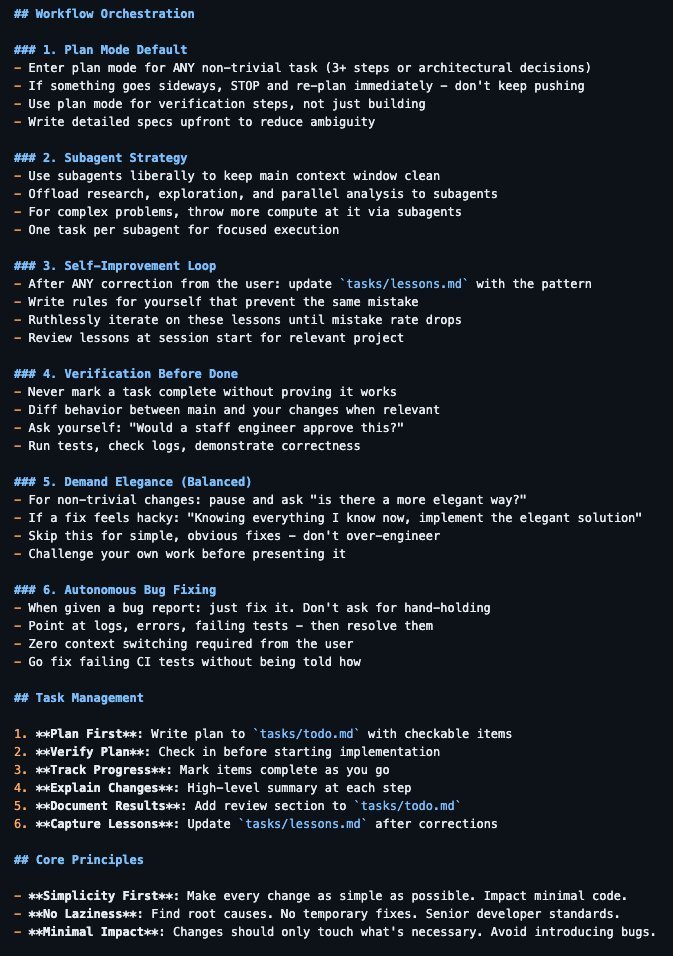
POV: Your OpenClaw is still just a "chatbot" because you haven't turned it into a Shell Agent.
Paste this to upgrade your architecture: 👇
PROMPT:
I want you to transition from a chat assistant to a Skill-Based Shell Agent. First, initialize a SKILLS file manifest in my root directory. This is your "Standard Operating Procedure" (SOP).
The Hierarchy:
1. The Shell: You are now a hosted container. Before answering, check if you need to install dependencies or run a script to get the real answer.
2. The Skills: Every repeatable task I give you (web scraping, data cleaning, UI design) must be encoded as a "Skill" in /skills/.
3. The Memory (Compaction): If our conversation gets too long, do not just forget. Summarize the state, save key artifacts to /mnt/data/, and "compact" the context.
The Execution Rules:
• Description over marketing: When writing a skill, tell me exactly when to use it and when not to.
• Artifacts first: All final outputs (reports, code, designs) must be saved to /mnt/data/. I treat that folder as our handoff boundary.
• Negative examples: Document your failures in the skill manifest so you never misfire the same tool twice.
After a day, this is a tool. After a week, this is a local engineering department.
Stop prompting. Start building skills.
10 things I configured that turned my OpenClaw from a chatbot into an autonomous operator:
1⃣ Split your memory into 5 files, not 1
Stop dumping everything into https://t.co/Be5Xdc9UsF. Split it:
• https://t.co/OrzLkm5r0r → crash recovery (agent reads this FIRST on restart)
• https://t.co/htttxcZsvo → every mistake, documented once, never repeated
• https://t.co/noS3IaCe33 → agent critiques itself every 4 hours
• https://t.co/mAPMQ09IJ7 → current state of every project
• daily logs → raw context, deleted after 7 days
Why: your agent loads only what it needs. 1 file = bloated context = confused agent.
2⃣ Add "Use when / Don't use when" to every skill
Without this, your agent picks the wrong skill ~20% of the time.
Bad:
"description": "Deploy websites"
Good:
"description": "Deploy files to cPanel. USE WHEN: uploading files, creating domains. DON'T USE WHEN: buying domains (use registrar skill), managing DNS (use Cloudflare skill)"
This is if/else routing for your agent's brain.
3⃣ Set up a https://t.co/snp6Guwnlv checklist (under 20 lines)
Your heartbeat runs every ~30 minutes. Keep it tiny:
• Check if active tasks are stale (>2h without update)
• Archive bloated sessions (>2MB)
• Self-review every ~4 hours
Heavy work → cron jobs. Heartbeat = quick health check only. Anything else burns tokens for nothing.
4⃣ Use cron jobs for everything scheduled
Heartbeats are for batching quick checks. Cron is for real work:
• 6 AM → content research scout
• 8 AM → tech news summary to Telegram
• 6 PM → daily recap
Each cron runs in its own isolated session. No context bleed. No token waste from loading full conversation history.
5⃣ Make your agent verify its own work (but not grade it)
Add this to https://t.co/FTZIb5NZIy:
"Every sub-agent MUST validate its own work. But I also verify the result before announcing to the user. Never take a sub-agent's result for granted."
The agent that builds ≠ the agent that reviews. This one rule fixes 80% of quality issues.
6⃣ Route models by task type
Not every task needs your most expensive model:
• File reading, reminders, internal work → fast/cheap model
• External web content (articles, tweets) → strongest model only
• Coding tasks → mid-tier with extended thinking
Why strongest for external content? Weaker models are more vulnerable to prompt injection from hostile websites. This isn't paranoia — it happened to me.
7⃣ Session hygiene — archive aggressively
Sessions over 2MB = slow agent, confused context, expensive turns.
Set up automatic archiving:
• >2MB → archive
• >5MB → alert
• Daily logs → rotate weekly
Your agent should run lean. If it's loading megabytes of history every turn, it's wasting money and getting dumber.
8⃣ Write a https://t.co/45YKCeaRkI that actually has personality
Default agents sound like corporate chatbots. Fix it:
• Give it a name
• Define its communication style ("be direct, skip filler")
• Set boundaries ("ask before sending emails")
• Allow opinions ("you can disagree with me")
An agent with personality catches more edge cases because it actually engages with the task instead of generating safe, generic output.
9⃣ Crash recovery in 3 lines
Add to https://t.co/FTZIb5NZIy:
"On startup: read https://t.co/OrzLkm5r0r FIRST. Resume autonomously. Don't ask what we were doing — figure it out from the files."
Your agent WILL crash. Sessions WILL restart. Without this, it wakes up confused and asks "what should I do?" With this, it picks up where it left off. Zero downtime.
🔟 Sub-agents need scope, not freedom
When spawning sub-agents:
• Define exactly what they can touch
• Give them a clear success criteria
• Set a timeout (they WILL run forever otherwise)
• Never let two agents write to the same file
Treat them like contractors, not employees. Clear brief → deliver → done.
The pattern: every single tip here is about STRUCTURE, not prompts.
Your agent is only as good as the infrastructure around it.
Use this prompt in OpenClaw to create your own AI agent command center that syncs up your life like Tony Stark's Jarvis in Iron Man. Adapt the specifics (agent names, data sources, branding) below to your own setup.
Prompt: Build me a mission control dashboard for my OpenClaw AI agent system.
Stack: Next.js 15 (App Router) + Convex (real-time backend) + Tailwind CSS v4 + Framer Motion + ShadCN UI + Lucide icons. TypeScript throughout.
This is the command center where I monitor and control my autonomous AI agent(s) running on OpenClaw. The agent operates 24/7 on a Mac Mini, connected to Telegram/Discord, running cron jobs, spawning sub-agents, and reading/writing to a filesystem-based memory and state system.
Dark mode only. Ultra-premium aesthetic, think Iron Man's JARVIS HUD meets a Bloomberg terminal. Subtle glass effects (backdrop-blur-xl, bg-white/[0.03]), no heavy gradients or glow. Rounded corners (16-20px on cards). Framer Motion for page transitions, stagger animations on card grids, spring physics on interactions. Mobile-first responsive. Never cookie-cutter.
## Architecture
The dashboard reads live data from TWO sources:
1. **Convex**: real-time database for structured data (tasks, contacts, content drafts, calendar events, activity logs)
2. **Local API routes** (`/api/*`): read files from the agent's workspace filesystem at `~/.openclaw/workspace/` and return JSON. This is how live system state flows into the dashboard.
## Pages & Views (8 nav items, some with tab sub-views)
### 1. HOME (`/`)
Dashboard overview. Grid of live status cards:
- **System Health**: read from `/api/system-state` (parses `state/servers.json`). Show each service with UP/DOWN indicator, port, last check time.
- **Agent Status**: read from `/api/agents` (parses `agents/registry.json` + agent workspace files). Show active agent count, healthy/unhealthy ratio, active sub-agent count from OpenClaw sessions API.
- **Cron Health**: read from `/api/cron-health` (parses `state/crons.json`). Table of all scheduled jobs with name, schedule, last status (green/red dot), consecutive errors.
- **Revenue Tracker**: read from `/api/revenue` (parses `state/revenue.json`). Current revenue, monthly burn, net.
- **Content Pipeline**: read from `/api/content-pipeline` (parses `content/queue.md`). Kanban-style: Draft | Review | Approved | Published counts.
- **Quick Stats**: total tasks, pending approvals, active sessions, uptime.
All panels auto-refresh every 15 seconds. Live indicator dot + "AUTO 15S" badge in header.
### 2. OPS (`/ops`) with 3 tabs: Operations | Tasks | Calendar
**Operations tab:** Full operational view. Server health table, branch status (from `state/branch-check.json`), observations feed (from `state/observations.md`), system priorities (from `shared-context/priorities.md`).
**Tasks tab:** Strategic task suggestion system. API route `/api/suggested-tasks` reads/writes `state/suggested-tasks.json`. Cards grouped by category (Revenue, Product, Community, Content, Operations, Clients, Trading, Brand) with emoji headers. Each card shows title, reasoning, next action, priority badge, effort badge, approve/reject buttons. Filter bar by status and category.
**Calendar tab:** Weekly calendar view from Convex `calendarEvents` table. Drag-to-create, color-coded by type, time slots.
### 3. AGENTS (`/agents`) with 2 tabs: Agents | Models
**Agents tab:** Card grid of all registered agents from `/api/agents`. Each card shows name, role, model, level (L1-L4), status. Cards are CLICKABLE: expanding into a detail panel showing:
- Agent personality (reads their SOUL .md)
- Capabilities and rules (reads their RULES .md)
- Sub-agents they can spawn
- Recent outputs (reads from `shared-context/agent-outputs/`)
**Models tab:** Model inventory table showing all available models, their routing (which tasks go to which model), costs, and failover chains.
### 4. CHAT (`/chat`): 2 tabs: Chat | Command
**Chat tab:** Chat interface to communicate with the agent. Left sidebar shows session list (from `/api/chat-history` reading .jsonl transcript files). Main area shows messages with role-aligned bubbles (user right, assistant left), date separators, channel badges (telegram/discord/webchat). Input bar with send button + voice input (Web Speech API with SpeechRecognition). Messages sent via `/api/chat-send` which queues to a file the agent reads.
**Command tab:** Quick command interface for common operations.
### 5. CONTENT (`/content`)
Content pipeline management. Read from Convex `contentDrafts` table AND `/api/content-pipeline`. Show drafts in kanban columns. Each card shows title, platform target, draft text preview, status, created date. Edit/approve/reject actions.
### 6. COMMS (`/comms`) with 2 tabs: Comms | CRM
**Comms tab:** Communication hub showing recent Discord digest, Telegram messages, notification history.
**CRM tab:** Client pipeline kanban (Prospect → Contacted → Meeting → Proposal → Active). API route `/api/clients` reads markdown files from `clients/` directory. Each card shows client name, status, contacts, last interaction, next action.
### 7. KNOWLEDGE (`/knowledge`) with 2 tabs: Knowledge | Ecosystem
**Knowledge tab:** Searchable knowledge base. Global search across all workspace files using `/api/knowledge` endpoint.
**Ecosystem tab:** Product grid showing all products/apps in the ecosystem. Each card shows product name, status (Active/Development/Concept), health indicator, key metrics. Cards link to `/ecosystem/[slug]` detail pages with tabbed views (Overview, Brand, Community, Content, Legal, Product, Website, Actions). Detail pages read from `/api/ecosystem/[slug]` which parses workspace memory files.
### 8. CODE (`/code`)
Code pipeline view. Shows repositories from `/api/repos` (scans ~/Desktop/Projects/ for git repos). Each repo card shows name, branch, last commit, dirty file count, language breakdown. Detail view at `/api/repos/detail` shows recent commits, file tree, open PRs.
## Navigation
Top horizontal nav bar, NOT sidebar. All 8 items visible at all viewport widths. Use `flex` layout with `flex-1` items. Text size uses `clamp(0.45rem, 0.75vw, 0.6875rem)` for fluid scaling. Active item gets `text-primary bg-primary/[0.06]` static highlight (no sliding animation). Agent/app name visible at md+ breakpoints (`hidden md:inline`).
Tab sub-views use a reusable `TabBar` component with pill/glass styling and Framer Motion `layoutId` transitions. Tab state stored in URL via `?tab=` search params.
## API Routes (all under `src/app/api/`)
Each API route reads from the agent's workspace filesystem and returns JSON:
- `/api/system-state` → reads `state/servers.json`, `state/branch-check.json`
- `/api/agents` → reads `agents/registry.json`, agent SOUL .md files
- `/api/agents/[id]` → reads specific agent's SOUL .md, RULES .md, outputs
- `/api/cron-health` → reads `state/crons.json`
- `/api/revenue` → reads `state/revenue.json`
- `/api/content-pipeline` → parses `content/queue.md` (markdown with status markers)
- `/api/suggested-tasks` → GET (read) / POST (approve/reject) on `state/suggested-tasks.json`
- `/api/observations` → reads `state/observations.md`
- `/api/priorities` → reads `shared-context/priorities.md`
- `/api/chat-history` → reads .jsonl transcript files with pagination/search/channel filter
- `/api/chat-send` → writes to queue file
- `/api/clients` → reads markdown files from `clients/` directory
- `/api/ecosystem/[slug]` → reads memory files for specific ecosystem
- `/api/repos` → scans project directories for git repos
- `/api/health` → returns status, uptime, memory usage, Convex connectivity
All filesystem paths should be configurable via environment variable (default: `~/.openclaw/workspace/`).
## Convex Schema
Define tables for: activities, calendarEvents, tasks, contacts, contentDrafts, ecosystemProducts. Include seed scripts (`convex/seed.ts`) to populate initial data.
## Key Design Rules
- Mobile-first, test at 320px minimum
- Font sizes 10-14px for body text, everything must fit naturally at small viewports
- Cards use consistent border radius (16-20px)
- Glass cards: `bg-white/[0.03] backdrop-blur-xl border border-white/[0.06]`
- No heavy blur blobs or grain overlays
- Stagger animations on card grids (0.05s delay per item)
- Skeleton loading states for all async data
- Custom scrollbar styling
- Empty states with helpful messaging
- All text must use Inter or system font stack
- Never mix sharp and rounded corners in the same view
- Premium = lighter feel, more whitespace, less visual noise
## File Structure
```
src/
app/
page.tsx, layout.tsx, providers.tsx
agents/page.tsx
calendar/page.tsx
chat/page.tsx
code/page.tsx
comms/page.tsx
content/page.tsx
ecosystem/page.tsx, ecosystem/[slug]/page.tsx
knowledge/page.tsx
ops/page.tsx
api/[...all routes above]
components/
nav.tsx
tab-bar.tsx
dashboard-overview.tsx
ops-view.tsx, suggested-tasks-view.tsx
agents-view.tsx, models-view.tsx
chat-center-view.tsx, voice-input.tsx
content-view.tsx
comms-view.tsx, crm-view.tsx
knowledge-base.tsx, ecosystem-view.tsx
code-pipeline.tsx
activity-feed.tsx, calendar-view.tsx
ui/ (ShadCN primitives)
hooks/
lib/
convex/
schema.ts
functions for each table
seed.ts
```
Build the complete application. Every component, every API route, every Convex function. Production-quality code and premium design, not stubs. Dark mode only. Make it look incredibly beautiful and premium, no cookie cutter UI / AI slop.




![jumperz's tweet photo. this is how to run claude fable 5 as your architect ( 20$ sub only ) + gpt 5.5 codex as your builder..
full system below:
the loop is : fable thinks... codex builds , the repo remembers and you judge, that simple..
the point of all this is that we are taking advantage that 5.5 is on a sub and it's fast enough, especially with /goal, and we using latest Anthropic model to be the judge/guidance..
step 1
>create the memory (one time): make docs/HANDOFF.md in your repo.
>codex updates it after every work session: what was built, what was decided + why, open disagreements, next slice. this file is why 30 min of fable is enough ..it reads state instead of asking you questions.
step 2 paste this to fable (every session)
>you are the ARCHITECT for [project]
>gpt 5.5 codex is the BUILDER
>you never write implementation code.
>your jobs:
(1) read the handoff below
(2) rule on every disagreement the builder raised: accept/reject/modify + one line why
(3) judge any results RAW against the gates in the docs and ignore the builder's narrative
(4) write the next slice spec: small enough for one PR, hard acceptance criteria, explicit out-of-scope, and force the builder to verify APIs/formats against reality before coding
(5) flag scope creep and goalpost-moving.. be blunt. disagree with me. end with a paste-ready block for the builder.
step 3 paste fable's block to codex with this /goal
/goal: execute the architect spec. rules:
PHASE 0 before any code, reply with your plan + every disagreement you have, with reasons, citing real files in the repo. silent compliance = failure. silent scope additions = failure.
PHASE 1 freeze shared contracts (schemas/interfaces) in docs/ first; after freeze they're read-only for everyone including you.
PHASE 2 spawn max 3-4 lane agents on modules that don't import each other, plus ONE reviewer agent that never writes feature code: it checks every lane against the spec + tests + frozen docs and returns APPROVE or a numbered defect list. nothing merges without approve. then: commit + push each slice, update docs/HANDOFF.md with raw results only tables and numbers, no interpretation, no 'promising'. verdicts belong to the architect and the human."
step 4 repeat codex works hours.. you spend fable minutes on judgment only: arbitration, evidence review, next specs, kill/continue calls. one fable session per work block.
the 5 rules that make it actually work
>repo docs are the memory not in HANDOFF.md = didn't happen
>the builder never grades its own work
>disagreement is mandatory
>freeze success criteria BEFORE results exist, never edit after
>spend architect time on judgment, builder time on typing
>the architect is the edge and the builder is the hands. the repo is the brain.. think of it that way..
bookmark this. you will need it.. you really wont need to pay hundreds in API tokens if you do this way](https://pbs.twimg.com/media/HKd1xT-WYAAvzZn.jpg)