Got your hands on Claude Fable 5?
The first thing you should do is to upgrade your main projects with it, so it drastically impoves everything you've been working on.
Run this Audit & Project Improvement Prompt on each repo that's important to you (simply copy-paste it):
Repo Audit & Improvement Plan:
Prompt made by Claude Fable 5
You are a world-class principal-level software engineer and technical auditor. Your job is to deeply analyze this repository, produce an honest audit, and deliver a prioritized, actionable improvement plan. Work in the four phases below, in order. Do not skip ahead.
Ground every claim in actual files: cite file paths and line numbers. If you can't verify something, say so explicitly rather than guessing.
Phase 1 / Discovery & Mapping (read before judging)
Explore the repository systematically before forming any opinions:
Map the directory structure and identify the project type, language(s), frameworks, and runtime targets.
Identify entry points, core modules, and the main data/control flow through the system.
Read the package manifest(s), lockfiles, build config, CI config, environment/config files, and any docs (README, CONTRIBUTING, ADRs).
Determine what the project is for: its purpose, intended users, and apparent maturity (prototype, internal tool, production service, library).
Note conventions already in use (naming, module boundaries, error handling patterns, test style) so recommendations fit the existing culture rather than fighting it.
Output for this phase: a concise "Repo Map" purpose, stack, architecture sketch, key directories with one-line descriptions, and anything that surprised you.
Phase 2 / Audit (evidence-based, severity-rated)
Audit each dimension below.
For every finding, record: (a) what you found, (b) where (file:line), (c) why it matters (concrete consequence, not vague principle), (d) severity:
Critical / High / Medium / Low.
• Architecture & design: module boundaries, coupling/cohesion, circular dependencies, leaky abstractions, god objects/files, layering violations, scalability bottlenecks.
• Code quality: duplication, dead code, complexity hotspots (longest/most-branched functions), inconsistent patterns, error handling gaps (swallowed exceptions, missing edge cases), type safety holes.
• Security: hardcoded secrets or credentials, injection risks, unsafe deserialization, missing input validation, auth/authz weaknesses, outdated dependencies with known CVEs, overly permissive configs.
• Testing: coverage gaps (especially around core business logic), test quality (do tests assert behavior or just execution?), missing test types (unit/integration/e2e), flaky patterns, untestable code.
• Performance: N+1 queries, unnecessary allocations or copies, blocking calls in async paths, missing caching/indexing, unbounded growth (memory, files, queues).
• Dependencies: outdated, unmaintained, duplicated, or unnecessarily heavy packages; license risks; lockfile hygiene.
• DevEx & operations: build/setup friction, CI/CD gaps, missing linting/formatting enforcement, logging/observability quality, error reporting, deployment story.
• Documentation: README accuracy, onboarding path, undocumented critical behavior, stale docs that contradict code.
Rules for this phase:
Prefer 15 high-confidence findings over 50 speculative ones.
Distinguish facts ("this function has no error handling: src/api/client.ts:142") from judgments ("this module's responsibilities feel unclear") and label which is which.
Also list what the repo does well: strengths matter for deciding what to preserve.
Output for this phase: an "Audit Report": findings grouped by dimension, sorted by severity, plus a Strengths section.
Don't forget to mention all the ugly parts that need utmost priority.
Phase 3 / Improvement Strategy
Synthesize the audit into a strategy:
Identify the 3–5 themes that explain most of the findings (e.g., "no enforced boundaries between layers," "error handling is ad hoc").
For each theme, propose a target state and the principle behind it.
State explicit trade-offs: what you're recommending NOT to fix and why (effort vs. payoff, risk, project maturity).
Define what "done" looks like — measurable signals (e.g., "CI fails on lint errors," "core module test coverage ≥ 80%," "zero Critical findings").
Phase 4 / Detailed Task Plan
Convert the strategy into an execution plan:
Break work into discrete tasks. Each task must include: Title and one-paragraph description
Files/areas affected
Acceptance criteria (how we verify it's done)
Effort estimate (S = <2h, M = half-day, L = 1–2 days, XL = needs breakdown)
Risk of the change itself (could it break things?)
Dependencies on other tasks
Order tasks into milestones:
Milestone 0
Safety net: anything needed before refactoring safely (tests around critical paths, CI gates, backups).
Milestone 1
Critical fixes: security and correctness issues.
Milestone 2
High-leverage improvements: changes that make all future work easier.
Milestone 3
Quality & polish: remaining medium/low items worth doing.
Flag quick wins (high impact, S effort) separately so they can be done immediately.
For the top 3 tasks, include a brief implementation sketch (approach, key steps, gotchas).
Final Deliverable Format
• Produce a single document with these sections:
• Executive Summary (≤10 sentences: overall health grade A–F with justification, top 3 risks, top 3 opportunities)
• Repo Map
• Audit Report
• Improvement Strategy
• Task Plan (milestones + task table + quick wins)
• Open Questions: anything you need from a human to decide (product intent, deprecation candidates, performance targets)
Constraints
Do NOT modify any code during this audit. Analysis only.
Do not pad the report. If a dimension is healthy, say so in one sentence and move on.
Calibrate to the project's maturity. Don't recommend enterprise-grade infrastructure for a weekend prototype unless the owner's goals demand it.
Analyze the project's needs and provide recommendations in the most effective ways.
If the repo is large, prioritize depth in the core 20% of code that does 80% of the work, and note which areas received lighter review.
Working your hips and quads with a mini loop is more than a basic exercise. It keeps your muscles engaged the entire time, maintaining steady tension from beginning to end.
🇬🇧 British actor Laurence Fox at the Southampton protest for Henry Nowak:
"If this was a young black man, the country would be on fire."
He's pointing at something real. Legacy media doesn't cover all deaths equally, and everyone knows it.
https://t.co/e2C0Rne6Wm
Le vieux du quartier m’a dit : « N’oublie pas que la boussole a été inventée avant l’horloge parce que la direction est plus importante que le temps. »
TikTok's algorithm doesn't know she's not real.
It just sees a video about jelly bras getting clicks, watch time, and purchases.
$75,000 in revenue. From one AI-generated video copying the most profitable TikTok Shop post ever made.
Watch until 0:26. That's where he shows the number.
The original made $1.4 million. He took the blueprint and rebuilt it with Higgsfield, ElevenLabs, and Claude.
$50-$150/month in tools. $75,000 in commission.
TikTok Shop GMV hit $66 billion in 2026. The winning products pay up to 20% commission.
Find the top-performing video in a niche. Recreate it with an AI model. Test 10 hook variants. Post.
The algorithm rewards what works.
It doesn't ask who made it.
How to never hit your Claude usage limits ever again.
I use Claude for 4+ hours every single day, and I never hit my rate limits.
These are the tips that nobody is talking about, and I wish I had known them a few months ago:
(works especially well with the new Opus 4.8 model)
• Spend more time planning - use Plan Mode in Claude
Code (Shift + Tab twice or /plan)
• Start new chats instead of continuing long ones. Long chats BURN tokens due to context bloat.
• Add this to your project instructions: "Be cognisant of token usage. Be concise and advise me when to start a new chat."
• When switching chats, prompt: "Give me a prompt to restart this session without losing context."
• Build an Instructions.MD + Memory.MD folder so Claude never forgets your preferences
• Escalate models: Haiku → Sonnet → Opus. Don't start at the top of the funnel (aka Opus)
• Turn off Extended/Adaptive Thinking unless you specifically need it
• Switch your Style to "Concise" (click "+" on Homepage)
• Take advantage of "Low" effort in Claude Code for most tasks
• Use Claude Design tokens for visuals. Don't waste Claude Code tokens on anything visual
These tips have genuinely changed the game for me.
If you found them helpful, bookmark this post and copy this entire tweet into Claude so it can help you start saving money.
Instead of rewriting Claude's drafts (by hand) today.
Steal my 7-step setup to make it sound like you:
1. Open Cowork (the Claude desktop app)
The desktop app. Not claude .ai in your browser.
Create a folder named "Claude Cowork".
Cowork reads your folder before every single task.
2. Download anti-ai-writing-style .md file.
Go to https://t.co/psB7XxB2Y4. Don't pay anything.
Follow the steps in the welcome email.
Grab the anti-ai-writing-style .md.
3. Build your about-me .md file.
Who you are. How you think. What are your cringes.
Open a chat. Run a 100-question interview prompt.
Copy the prompt: https://t.co/LyV7feh2TK
90 minutes of voice answers. One compressed file.
4. Save both files in your Cowork folder
In Cowork, point Claude to that folder.
It only reads where you point it.
Both files now run on every single chat. Forever.
5. Set your Global Instructions
Go to Settings → Cowork → Global Instructions.
Paste this prompt: "Before any task, read about-me & anti-ai-style."
6. Write the prompt (one line)
Paste: "I want to [TASK] for [SUCCESS CRITERIA]."
That single line covers 80% of your work.
Claude already knows your voice. Just give it a task.
7. Audit the output
After getting the first draft. Follow up with this: "Audit it against the anti-ai-writing-style .md". Claude rewrites in your voice. No AI tells left.
Copy my exact folder & download my 2 .md files:
Step 1: Subscribe for free at https://t.co/psB7XxB2Y4
Step 2: You will have two choices: free or paid.
Step 3: Choose the free tier. Don't pay for anything.
Step 4: Open your welcoming email. Reply to it.
Step 5: Trace the Notion link. Open '.md files' folder.
Step 6: Download both the .md files.
Step 7: Send this image to your team's channel.
DROPSHIPPING 2016: Unlimited opportunity. Almost nobody doing it. First movers built empires.
DROPSHIPPING 2019: Saturated. Margins gone. Too late.
CLIPPING 2026: Unlimited opportunity. Almost nobody doing it systematically. First movers building empires right now.
We are absurdly early to this.
Meanwhile in 1990
- No Maps plastered in Hellish Red or even Black
- No Headlines every 10 minutes stating the World is on fire
- Nobody saying to stay inside because of the Sun
- No relentless Climate Change Hoax Scam Propaganda
Just the normal Weather on a reasonably hot day.
El dolor lumbar no es por debilidad, es por sobrecarga. Si tus caderas se bloquean, tu espalda baja paga el pato.
¿Sabías que el 80% de este dolor viene de la falta de movilidad torácica?
Abre el hilo para ver la solución exacta 👇
• Escorpión dinámico: Rotación prona lenta para activar tu sistema nervioso.
• Rotación 90/90: Devuelve el giro real a tu pelvis.
• Cachorro elevado: Libera tu espalda alta y quita carga lumbar.
Menos estirar a lo loco y más control. ¿Cuál es tu postura clave al entrenar?
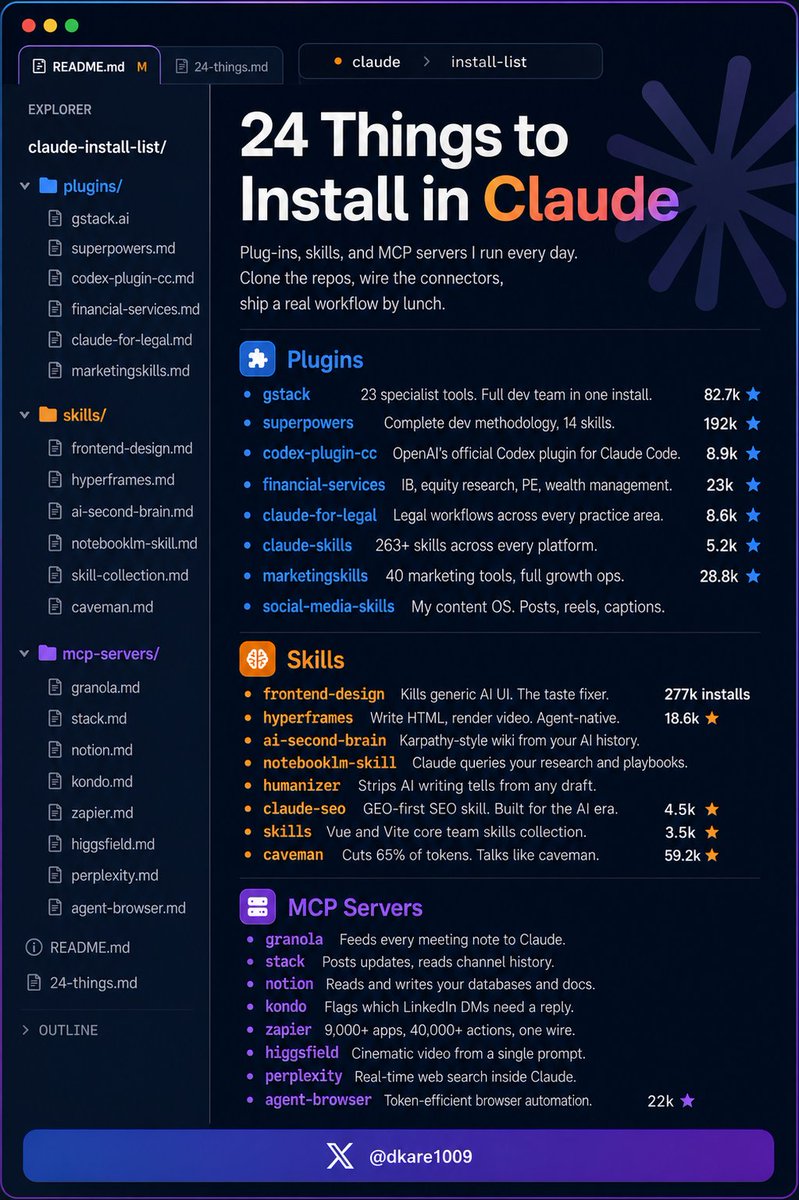
You install Claude Code and stop there.
Here are 24 things (actually) worth adding:
If you're totally new to Claude Code:
Start here: https://t.co/anqXrH7023
Then read: https://t.co/rLIC8yh90e
Plug-Ins (bundled tools, agents, and commands)
gstack — 23 specialist dev tools in one install
Install → https://t.co/vuqqtNf2tr (82.7k★)
superpowers — complete dev methodology, 14 skills
Install → https://t.co/x2Jz14cYY8 (192k★)
codex-plugin-cc — OpenAI's official Codex plugin
Install → https://t.co/iCSxJ0glm5 (8.9k★)
financial-services — IB, PE, equity, wealth
Install → https://t.co/jPb9r63pMN (23k★)
claude-for-legal — legal workflows, every practice area
Install → https://t.co/bCzJdc8WzM (6.6k★)
claude-skills — 263+ skills across every platform
Install → https://t.co/62p22Wd18G (5.2k★)
marketingskills — 40 marketing tools, full growth ops
Install → https://t.co/FPY9dXG929 (28.8k★)
social-media-skills — my content OS. Posts, reels
Install → https://t.co/DOc68CfxJa
Skills (specialist instruction Claude loads on demand)
frontend-design — kills generic AI UI
Install → https://t.co/fRegzmoq96 (277k installs)
hyperframes — write HTML, render video, agent-native
Install → https://t.co/tvY90QlFJL (18.6k★)
ai-second-brain — Karpathy-style wiki, AI history
Install → https://t.co/mebUAilN9u
notebooklm-skill — Claude queries your research
Install → https://t.co/sAxeEGpzyy
humanizer — strips AI writing tells from any draft
Install → https://t.co/zadJrx1BVe (2.9k★)
claude-seo — GEO-first SEO skill, built for the AI era
Install → https://t.co/8mhcDiM7uq (4.5k★)
antfu-skills — Vue and Vite core team skills
Install → https://t.co/mmdjG21aJ5 (3.5k★)
caveman — cuts 65% of tokens, talks like caveman
Install → https://t.co/WruteJgNW4 (59.2k★)
MCP Servers (live connections to your apps)
granola — meeting notes fed to Claude
Install → https://t.co/P6nWgUShBA
slack — reads channels, posts updates
Install → https://t.co/USdCGuACdH
notion — reads and writes your docs
Install → https://t.co/4z1XL34D3c
kondo — triages your LinkedIn DMs
Install → https://t.co/CjPiBbvdmX
zapier — 9,000+ apps, one connection
Install → https://t.co/pyxD0brsoi
higgsfield — cinematic video from a prompt
Install → https://t.co/X0y90vVW4B
perplexity — live web search for Claude
Install → https://t.co/hpDE0w2rR0
agent-browser — browser automation, fewer tokens
Install → https://t.co/AKqEWoENFX (22k★)
Save this. Come back when you set up Claude Code properly.
Repost ♻️ to help someone in your network.
P.S. Which one are you installing first?
A girl is clearing $20,000 a month from AI kids videos on YouTube.
She spends 20 minutes on it. Then her day is free.
Opens YouTube, finds what kids are watching on repeat that week. Doesn’t copy it. Just understands the energy.
Brings that idea to Claude. Gets back a full concept character, colors, mood, movement. Everything mapped out in seconds.
Takes it straight into Picsart to build the visual style. Then drops the final prompt into Sora 2.
A bright, smooth, cinematic kids video comes out the other side. Dancing characters. Vivid colors. The kind of thing a child will watch six times without blinking.
No camera. No editing app. No team. No studio.
Just a phone and three apps that do the heavy lifting while she handles the creative direction in plain English.
Posts it. Algorithm does the rest.
Kids loop it. Parents leave it running. Watch time goes through the roof. YouTube keeps pushing it to new screens.
$20,000 a month from a workflow that fits inside a lunch break.
She’s not grinding. She’s not hustling. She built a system once and now it just produces.
Most people are still trying to figure out what AI can do.
She already cashed the check.
Save this.




![rubenhassid's tweet photo. Instead of rewriting Claude's drafts (by hand) today.
Steal my 7-step setup to make it sound like you:
1. Open Cowork (the Claude desktop app)
The desktop app. Not claude .ai in your browser.
Create a folder named "Claude Cowork".
Cowork reads your folder before every single task.
2. Download anti-ai-writing-style .md file.
Go to https://t.co/psB7XxB2Y4. Don't pay anything.
Follow the steps in the welcome email.
Grab the anti-ai-writing-style .md.
3. Build your about-me .md file.
Who you are. How you think. What are your cringes.
Open a chat. Run a 100-question interview prompt.
Copy the prompt: https://t.co/LyV7feh2TK
90 minutes of voice answers. One compressed file.
4. Save both files in your Cowork folder
In Cowork, point Claude to that folder.
It only reads where you point it.
Both files now run on every single chat. Forever.
5. Set your Global Instructions
Go to Settings → Cowork → Global Instructions.
Paste this prompt: "Before any task, read about-me & anti-ai-style."
6. Write the prompt (one line)
Paste: "I want to [TASK] for [SUCCESS CRITERIA]."
That single line covers 80% of your work.
Claude already knows your voice. Just give it a task.
7. Audit the output
After getting the first draft. Follow up with this: "Audit it against the anti-ai-writing-style .md". Claude rewrites in your voice. No AI tells left.
Copy my exact folder & download my 2 .md files:
Step 1: Subscribe for free at https://t.co/psB7XxB2Y4
Step 2: You will have two choices: free or paid.
Step 3: Choose the free tier. Don't pay for anything.
Step 4: Open your welcoming email. Reply to it.
Step 5: Trace the Notion link. Open '.md files' folder.
Step 6: Download both the .md files.
Step 7: Send this image to your team's channel.](https://pbs.twimg.com/media/HJKb205aYAATSsH.jpg)