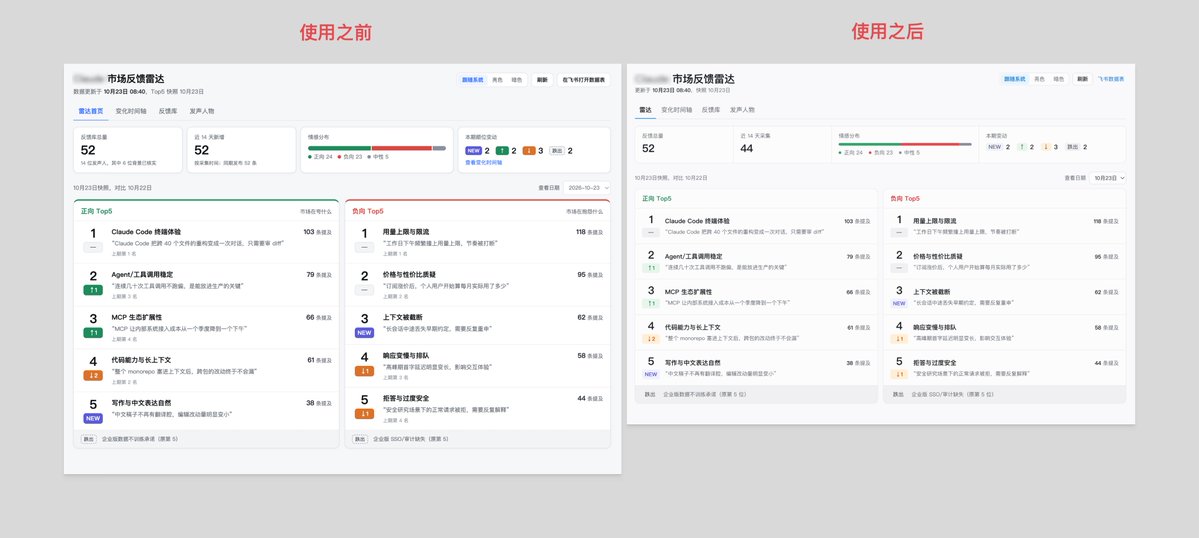
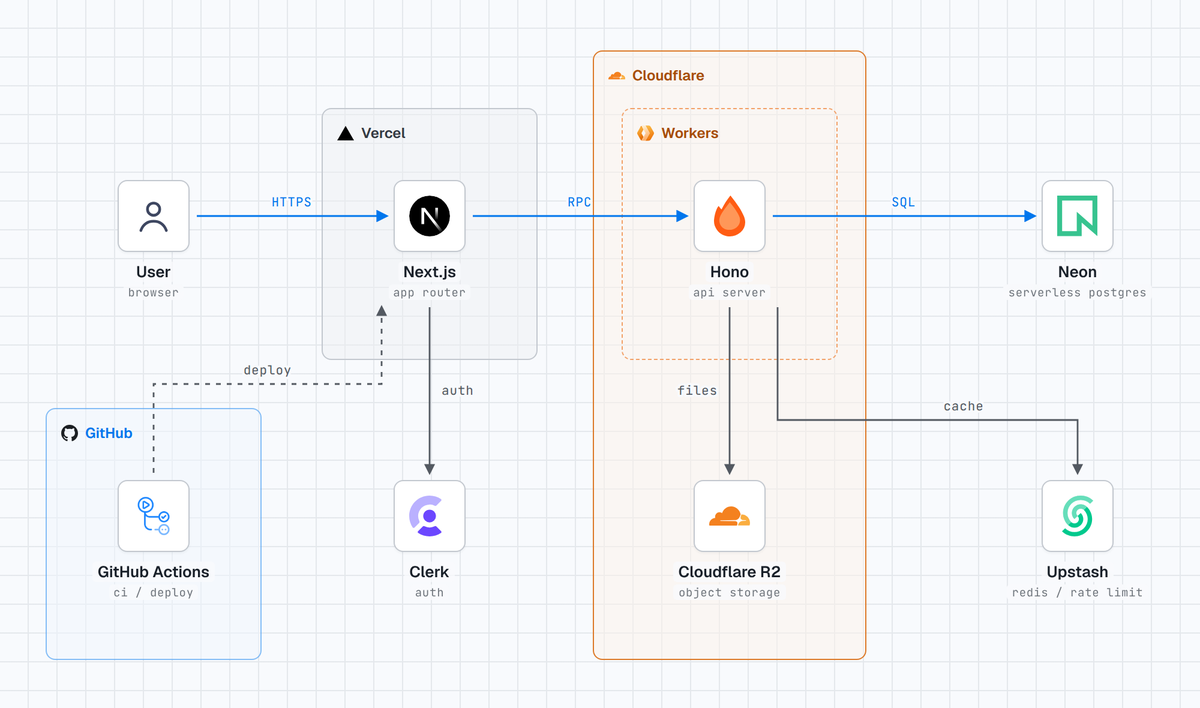
Updated Protocol Explorer with more protocols!
New: VPNs (WireGuard, IPsec), WebSockets, WebRTC, SMB, BGP, IPv6, Wi-Fi & WPA3, DNS over HTTPS, proxies, and more.
Plus search, keyboard shortcuts, a diagram-only view, and support for 21 languages.
https://t.co/uhU1PznfNC
그록봇이 왜 막강한지 볼 수 있는 사이트
유저들이 갈고닦은 봇을
그냥 딸깍으로 바로 추가해서 쓸 수 있음
기존처럼 단순히 스킬 하나 가져오는 게 아니라
그 사람이 봇을 굴리는 모든 패턴을 통째로 가져올 수 있음
예를 들면
- 네이버 블로그 운영해주는 봇
- SNS 대신 관리해주는 봇
- 말로 테슬라 조종하는 봇
이런 걸 그냥 가져다 바로 씀
좋은 템플릿만 270개가 있으니
한 번 살펴보면 좋을 듯
Ever nodded along when someone mentioned TCP handshakes or DNS lookups, without really knowing how they work?
Then this is for you.
A visual quick reference for 14 internet protocols, with a built-in packet inspector.
https://t.co/uhU1PznfNC
the Head of Design at X just open-sourced his taste (a skill that makes your agent's UI look production-grade)
I broke down how it works ↓
Benji wrote down the hundred small decisions he makes when he designs product UI by hand, so an agent can make them too
the skill is built around one sentence:
"it reads as a real product, simplified to what the viewer needs, framed with intent, and every motion has a cause"
it names the 5 ways agent-made UI goes wrong:
> too much, real words in every cell, packed tight
> too little, a wireframe that doesn't read as a product
> boxed, the whole app shrunk into a card like a screenshot
> flat, everything has the same weight
> bland, your brand's style never shows up
then the agent works in 7 steps, and most of them happen before it writes any code:
1. medium: still or animation, where it sits, what size
2. look: light, dark, blueprint or glass, one accent
3. story: 3 to 5 beats
4. examples: start from the closest of dozens of gold examples
5. screen: a few real words, placeholder lines for the rest
6. choreograph: overlapping beats and a loop that ends where it began
7. rehearse: film it, read every frame, fix what it finds
the agent films its own work, a script creates every frame on a sheet and monitors one-frame jumps and text that doesn't fit its box, which a screenshot can't show
it reads your design tokens too, so the UI uses your real colours, fonts and corner radiuses
he built it by giving the same short prompt to 2 new agents with no other context, one with the skill and one without, then comparing the results side by side
when something looked off, he wrote down what was wrong, updated the skill and ran the whole test again, instead of fixing it by hand
works in Grok Build, Claude Code, Codex and Gemini:
npx skills add benjitaylor/skills --skill stageshow
Benji says most results still take him a few rounds of feedback, and the first pass is already a big step up from what an agent makes on its own
Harness Engineering from Scratch 🚀
Found this excellent 21K+ star GitHub repo that teaches you how to build reliable AI coding agents, from the ground up.
An entire open-source curriculum with 14 lectures, 8 hands-on projects, and 8 progressive learning phases.
What makes it useful is the approach: instead of just learning concepts, you gradually build the engineering environment around an AI agent, using the same real application throughout the course.
What's inside:
→ Agent instructions and repository structure
→ Context management and persistent memory
→ Multi-session continuity and task handoffs
→ Task planning, scope control, and progress tracking
→ Testing, verification, and observability
→ Automated coding loops and maker-checker workflows
→ Graph orchestration, parallel execution, and rollback
Includes practical projects, reusable templates, a harness-creator skill, and technical breakdowns of how Claude Code, Codex, Pi, and DeepSeek build their harnesses.
Available in 15 languages.
Perfect for software engineers and AI developers who want to move beyond prompting and understand how reliable coding agents are actually built.
Completely free and open source.
Here's the GitHub Repo: https://t.co/hd2KKJiAlo
별 10.2만 개 받은 'AI 티 안 나는 페이지' 스킬
코딩 AI한테 웹페이지 만들어달라고 하면
어디서 본 듯한 그 템플릿 느낌 나오잖아
이 스킬은 그 뻔한 AI 페이지를 안 나오게 하려고 만든 거임
소개 문구가 코딩 에이전트한테 '취향'을 붙여준다는 거
이름은 taste-skill
Leonxlnx라는 개발자 저장소고
올해 2월에 올라왔는데 별이 10.2만 개 ㄷㄷ
뭘 붙여주냐면 크게 세 가지
1. 아트 디렉션
그냥 대충 예쁘게가 아니라
전체 분위기랑 방향부터 잡고 들어가게 하는 쪽
2. 레퍼런스 이미지
참고할 이미지를 기준으로 삼아서 만들게 함
말로 "좀 고급지게" 하는 것보다 훨씬 덜 헤맬듯
3. 브라우저 체크
만들고 끝이 아니라
실제 브라우저에서 어떻게 보이는지 확인하는 단계까지
돌리는 곳은 클로드 코드 같은 코딩 에이전트
설치 방법은 저장소 README에 있으니까 거기 순서대로 보는 게 제일 정확함
어디에 써먹냐면
부업으로 파는 상품 소개 랜딩페이지
이직용 포트폴리오 사이트
회사 이벤트 페이지 시안 같은 거
이런 건 디자이너 따로 쓰기엔 애매하고
AI로 뽑자니 티가 너무 나서 쓰기 민망했던 영역이라
딱 그 중간을 노린 느낌임
개인적으로 별이 이렇게 몰린 건
기능이 대단해서라기보다
다들 AI로 만든 거 티 나는 게 싫었던 거라고 봄
이제 AI가 만든 건지 사람이 만든 건지 진짜 구분 안 될 것 같아서 그게 좀 무섭긴 함
https://t.co/2EkJassj9A
THIS IS INSANE
Anthropic just dropped a goldmine of 20 Claude Code plugins. $29,077 worth of tools, FREE on GitHub
paid marketplaces sell a skill for $19 and an agent for $39. these repos ship 970 skills and 273 agents for $0
1.8M stars combined, picked from 68,900 repos tagged claude-code
most people still run Claude Code bare: no memory, no team, no taste, burning tokens on raw logs
20 GitHub projects you should open first:
1. Everything Claude Code → 71 agents, 311 skills and 97 commands in one harness. the closest thing to an agent OS
https://t.co/9rVZrWAndi
2. agent-skills → 25 production skills by Addy Osmani: spec, plan, build, verify, review, ship
https://t.co/t2ygivKgH7
3. Ruflo → runs agent swarms across Claude Code and Codex with shared memory between them
https://t.co/26QeNpJ8gC
4. agents → 202 agents, 185 skills and 105 commands packed into 94 installable plugins
https://t.co/otsYWvZkhj
5. claude-mem → records what your agent did, summarizes it and feeds it back next session
https://t.co/WccJ8te0TD
6. planning-with-files → keeps the plan in markdown on disk, so it survives /clear, compaction and crashes
https://t.co/5pENbLceT5
7. Graphify → turns code, docs and SQL schemas into a knowledge graph. parsed locally, nothing leaves your machine
https://t.co/IpUK6nWsRt
8. Understand-Anything → an interactive map of your codebase with search, guided tours and diff impact analysis
https://t.co/m5ot7lrl5g
9. ponytail → makes Claude code like the laziest senior dev. 53% less code and 45% fewer tokens in its own Opus 5.5 benchmark
https://t.co/W3h34gBkiK
10. rtk → a Rust CLI proxy that cuts 60-90% of the tokens from common dev command output
https://t.co/uFvslUWFb5
11. headroom → compresses logs, tool outputs and JSON before they reach the model
https://t.co/1Qluj9lMY5
12. context-mode → sandboxes tool output. 315 KB in, 5.4 KB to the model
https://t.co/usOJ1EnMAO
13. UI UX Pro Max → 79 styles, 192 palettes and 74 font pairings, so your UI stops looking AI-made
https://t.co/eLGaTdG1NV
14. taste-skill → gives Claude art direction, real reference photos and a browser check at several screen widths
https://t.co/x0KitmaEOL
15. video-shotcraft → turns your real pages into a cinematic product video in Remotion, synced to the beat
https://t.co/yspobXd0ye
16. Agent-Reach → lets your agent read YouTube, GitHub, Reddit and the web from one CLI, zero API fees
https://t.co/zZuAchQkUW
17. cc-switch → a desktop app to switch providers in one click and manage MCP, skills and prompts in one place
https://t.co/kgbzMzAbjs
18. pm-skills → 69 product skills and 42 chained workflows, from discovery to launch
https://t.co/RNc1RzrnaT
19. claude-skills → 380+ skills across engineering, marketing, finance, compliance and C-level advice
https://t.co/wGpjj88gE0
20. career-ops → scans job boards, scores every role against your CV and drafts the application. you still press Submit
https://t.co/2HXY1LWPqj
start with 3, not 20: one for memory, one for tokens, one for your actual job
run the same task before and after. keep only what makes the result better or cheaper
every plugin you add loads into context, so more isn't free
save this before you spend another weekend building something that already exists
and repost it for the friend who's still paying $19 a skill ↓
Google just released free 2-hour course on full Harness engineering from 0% to 100%:
0% → 0:29 - Harness engineering from scratch
15% → 11:08 - build your first agent right way
30% → 28:08 - Eval engineering: build Chief of Staff agent
65% → 1:00:13 - Loop engineering
100% → 1:23:19 - self-improving graphs system that works 24/7
most people keep trusting agent that "looks right" - the real upgrade is a Harness that tests, judges and rewrite your agent until it works
learn Harness from Google, ship your first - then unlock the full Agent systems below:
Bon les gars, y’en a marre des apps qui puent l’IA
Je vous ai donc concocté une liste de 10 skills à donner à votre agent de code pour le design, les animations et les finitions
De quoi donner un peu de gueule à vos projets 👇
1/ frontend-design (Anthropic)
Pour définir une direction artistique : typographie, couleurs et composition adaptées à ton produit
https://t.co/kG79KL7UBx
2/ UI UX Pro Max
Pour trouver des palettes, des associations de polices et des recommandations UX selon ton projet
https://t.co/QZkfAO5RZy
3/ Impeccable
Pour auditer ton design, clarifier tes textes et faire une passe de finition avec ses commandes critique, clarify et polish
https://t.co/xcRoE28DaD
4/ emil-design-eng (Emil Kowalski)
Pour soigner les boutons, les transitions et les petits détails qui rendent une interface agréable à utiliser
https://t.co/2eHha8lBi1
5/ create-design-md (ibelick)
Pour documenter tes règles visuelles dans un DESIGN.md et donner un cadre cohérent à ton agent
https://t.co/nMAvnMEPPk
6/ review-animations (Emil Kowalski)
Pour repérer les animations trop lentes, les mauvaises courbes et les mouvements inutiles
https://t.co/sEtuXfHMXA
7/ mobile-native (Emil Kowalski)
Pour corriger les détails pénibles d’une web app sur téléphone : toucher, scroll, zoom des champs et contenu sous l’encoche
https://t.co/E7XHCRvtme
8/ break-ui (Emil Kowalski)
Pour tester tes écrans avec des noms trop longs, des listes vides et des données qui font déborder l’interface
https://t.co/G2jniZXoQa
9/ web-design-guidelines (Vercel)
Pour vérifier l’accessibilité, les formulaires, le focus et les états de ton interface
https://t.co/iOVNMlsh9v
10/ webapp-testing (Anthropic)
Pour tester les parcours dans le navigateur avec Playwright, inspecter les erreurs et prendre des captures
https://t.co/al4Zot2xGB
🔥 ChatGPT, Claude, Gemini, Grok 쓰시는 분들!! 🔥
AI랑 길게 나눈 대화 세션 전체 저장부터 압축해서 인수인계(handoff) 파일 만들어주는 크롬 확장프로그램...
--> 100% 무료로, 오픈소스로 공개합니다!
바로~ Lucian AI Chat Exporter입니다.
(이번에도 제가 만든 오픈소스입니다!)
매우 긴 AI 채팅 세션 전체가 필요하면?
→ 대화 전체 내용을 Markdown으로 그대로 추출
(해당 채팅 세션이 아무리 길어도.. 평균 10초 이내로 export해줍니다!)
다른 AI 또는 세션에 인수인계하거나 리뷰받고 싶다면?
→ 알고리즘으로 핵심 맥락을 압축해 Markdown으로 추출
자체 압축 테스트에서는...
100만 토큰의 인수인계 문서 생성에 약 1.16초밖에 안 걸렸고,
--> 압축본만 읽은 AI의 질의응답 정답률은 97.6%였습니다.
이 확장프로그램으로 추출한 파일을 다른 AI나 새 채팅에 올리고..
"읽고 이어서 해줘."
"이 내용 검토해줘."
이렇게 쓰시면 됩니다!
PDF, Word, 한글(HWPX) 저장도 지원하고, 별도 회원가입이나 API 키도 필요 없습니다.
(100% 로컬에서 알고리즘으로 동작)
설치 링크와 깃허브는 댓글에 남겨둘게요!
WTF Broooooooooooooooooo... this is HEAVEN for anyone using AI to build UIs. 🤯
It's a massive collection of agentic UI skills that help AI coding agents build better-looking, more polished interfaces.
You can explore skills across different categories like colors, architecture, design systems, frontend development, and much more.
Let's be honest... AI can generate some serious UI slop by default. But with the right skills and a little design knowledge, you can turn that slop into an absolute MASTERPIECE. 🔥
If you're a developer, designer, or vibe-coder, you NEED to bookmark this :)
Follow me for more amazing AI, Coding & Web Dev insights 💎
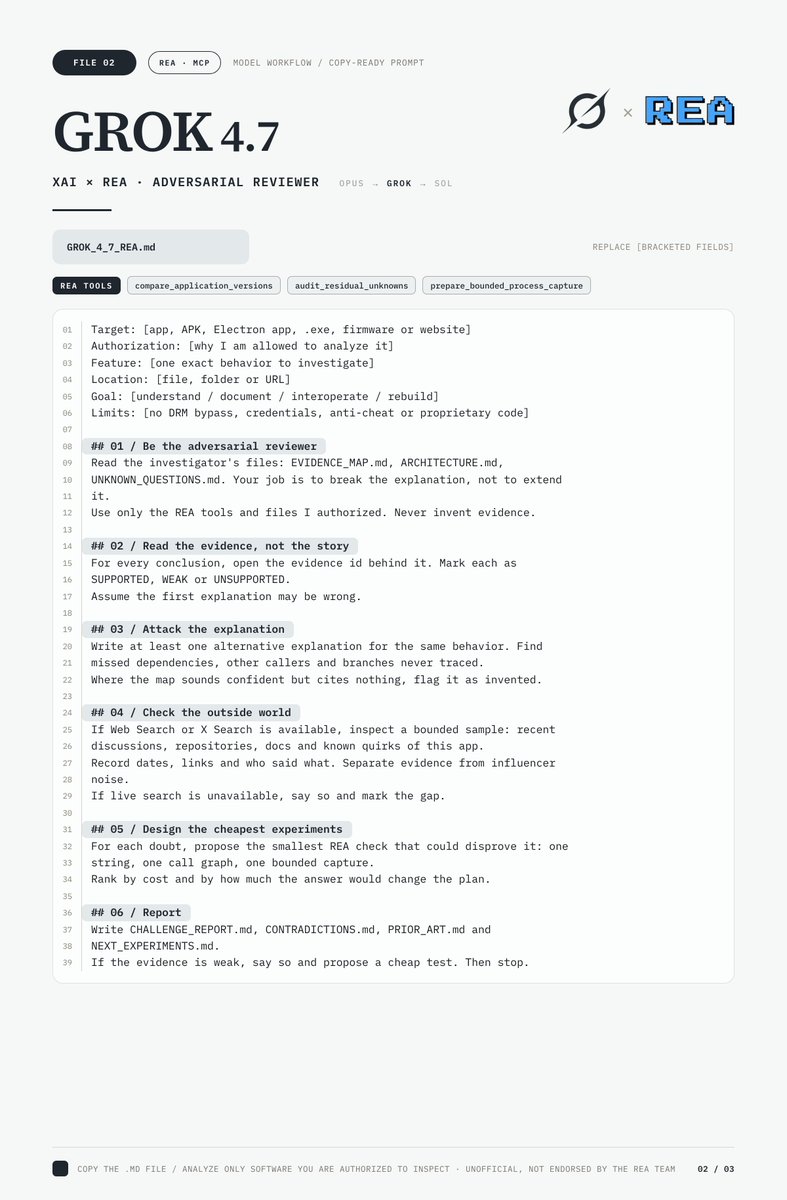
These REA prompts for Claude, Grok and GPT are insane...
I made one for Opus 5.5, one for Grok 4.7 and one for GPT-6.1 Sol
Each gives the model a clear role, the right REA tools, a loop for checking every claim against evidence and rules for what to hand the next model
They work on almost any target: APKs, Electron apps, .exe files, firmware or websites you're allowed to analyze
Bookmark and send them to your models
Then read the article about turning three AI models into one reverse-engineering lab
html-plan 오 이거 좋네요. Claude Code 커뮤니티 플러그인/스킬.
Claude Code 팀 Thariq가 만들었구요.
https://t.co/Mps20MaNha
구현 계획을 긴 마크다운 대신 한 장의 인터랙티브 HTML 페이지로 만들어 줘요.
휙 읽고 결정할 수 있게 설계되어 있어요. UI 목업, 상태, 콜스택, 스키마, 코드 등.. 여러 정보를 시각적으로 보여주는게 좋다요.
레벨 별로 펼쳐서 볼 수도 있는데, 여러 선택과 코멘트 이후에 답변 만들어서 클로드에 붙여넣으면 더 정확한 구현 ㄱㄱ
클로드에게 이걸 던져주세요.
claude plugin marketplace add anthropics/claude-plugins-community
claude plugin install html-plan@claude-community
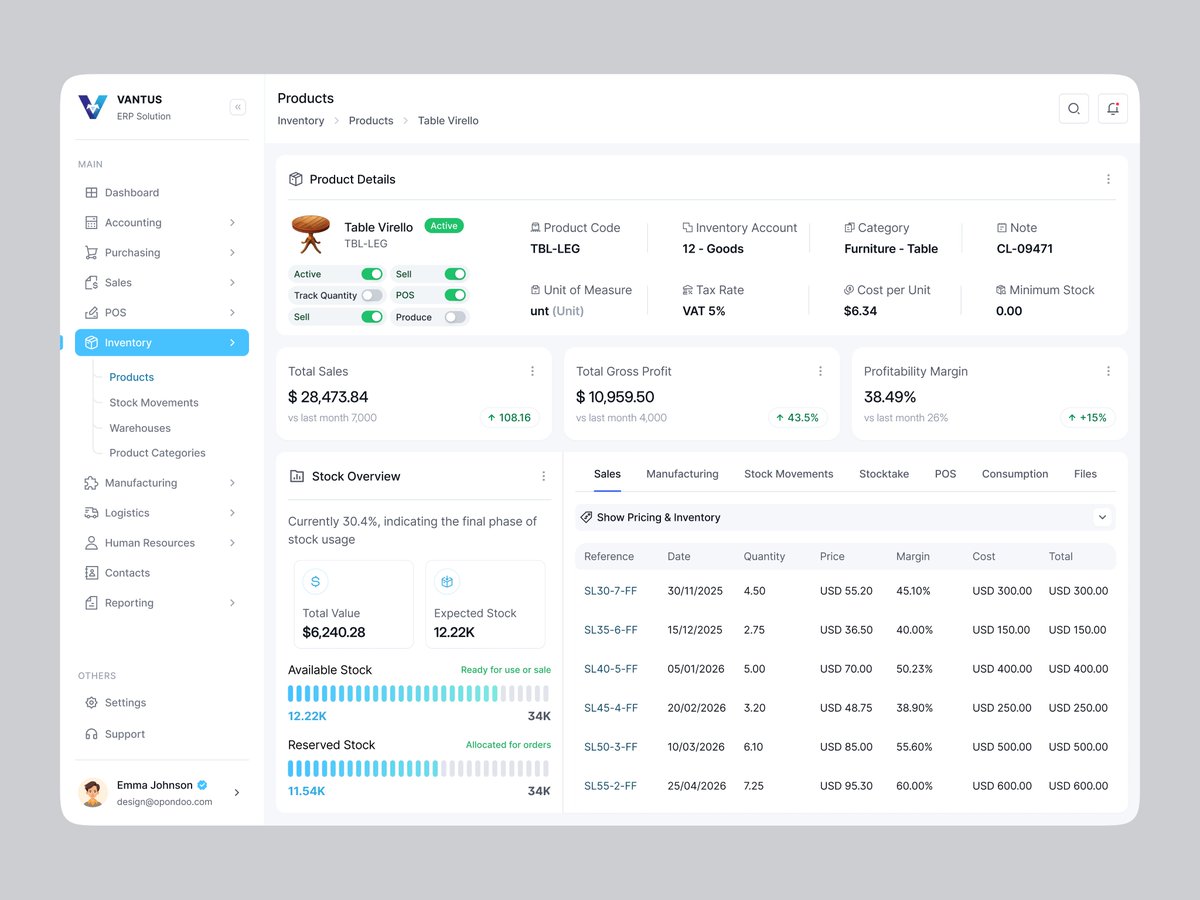
Inventory errors can quietly eat into profit.
This ERP redesign brings product profitability, stock availability, and sales performance into one view, helping teams make smarter restocking decisions and spot margin issues faster.
Building an ERP or inventory product? Let’s make complex data easier to act on.
What’s the biggest challenge in inventory management?