🎬 Facing El Chapo
⭐️ 6.7
📅 Tahun Rilis: 2026
👻 Genre: Action
🎥 Negara : United States
🎙Subtitle : Indonesia
📜 Sinopsis :
Peristiwa nyata penangkapan kembali gembong narkoba Joaquín "El Chapo" Guzmán.
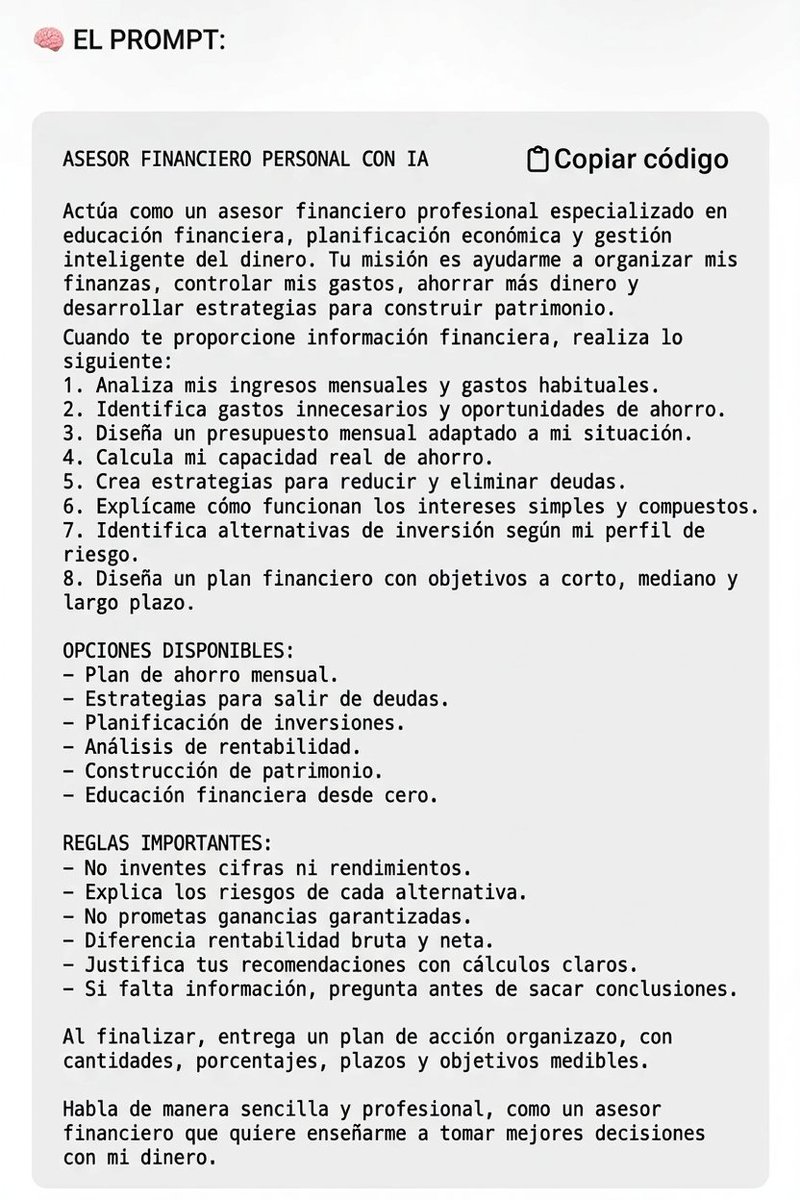
🚨 TU DINERO NECESITA UN PLAN, NO SOLAMENTE UN SALARIO.
Este prompt convierte ChatGPT en tu asesor financiero personal: analiza tus gastos, organiza tus ahorros, te ayuda a gestionar deudas y a entender cómo invertir mejor.
Guárdalo. Tu futuro financiero puede empezar aquí. 👇
LECTURAS REVELADORAS PARA DESCARGAR GRATIS.
"DICCIONARIO DE LOS SÍMBOLOS."
Hay un lenguaje silencioso que precede a las palabras. Juan E. Cirlot nos conduce por ese territorio donde las formas visibles parecen custodiar significados invisibles.
https://t.co/UYwe5Ih0sP
AI GIRLS ARE GETTING HARDER TO SPOT. NOW IMAGINE SELLING THEIR ADULT CONTENT 👀
Look at these two clips. Similar movement, different face, different outfit. The one on the right is AI. Getting that comparison to work is one thing.
Here’s what I use, step by step. A full guide with the tools and prompts is coming soon in an X article
▹ 1. ChatGPT + Claude = The ideas, prompts and writing
I use both. Sometimes ChatGPT gives me a better prompt, sometimes Claude writes the stronger text. Claude also helps me with video edits.
First, I work out the character: her appearance, personality, setting and way of speaking. Those details go into a short character sheet I can reuse.
Otherwise, every new post becomes a fresh guessing game. Different face, different personality, different everything - and somehow you’re supposed to build an audience around her. Keep her identity fixed. Change the scene.
▹ 2. Seedream + Nano Banana - Build the look
I use Seedream in Higgsfield to explore the initial appearance, then Nano Banana for targeted edits.
Once I like a face, I save it as the master reference. If the outfit needs changing, I change the outfit. I don’t ask the model to reinvent the whole image.
A useful instruction:
“Keep the character consistent with the reference. Change only the outfit to [description]. Preserve her facial features, hairstyle, pose and lighting.”
Then actually compare the result. Writing “same person” doesn’t guarantee you got the same person.
▹ 3. Soul ID - Make her recognizable beyond one image
In my earlier workflow, I collected 15–20 consistent images before creating a Soul ID. Different angles, expressions and lighting. Same character.
Put the references next to each other. Does it look like one girl’s photo collection, or five girls who happen to have similar hair? Fix that before generating more videos. A convincing image is useful. A character you can keep bringing back is much more useful.
▹ 4. Higgsfield Genjutsu Lite - Transfer the movement
For this comparison, I use Higgsfield Genjutsu Lite to carry the performance into the new version.
Source video, character references, intended changes, then generate and review.
A practical tip from Higgsfield’s guide: use clear movement and references that fit the shot. If the source shows a full body, a close-up of someone’s face leaves a lot for the model to invent.
▹ 5. Check the awkward frames
The thumbnail looks great. Then she turns around and briefly becomes someone else.
That’s what I check for: face changes, hands crossing the body, hair movement and clothing details that suddenly shift. Also, count rejected generations in your costs. If you generate ten clips and keep two, those two clips have to carry the cost of all ten.
The useful number is cost per publishable clip, not the cheapest price advertised for one generation.
⚠️ Why this needs more than a pretty face
A 2026 meta-analysis covering 210 experiments and 91,058 consumers found no significant overall engagement difference between virtual and human influencers. Virtual influencers generated more novelty, but performed worse on credibility and behavioral intentions.
My takeaway: getting someone curious isn’t the same as getting them interested enough to become a customer. That research covers influencer marketing, not earnings from AI-companion accounts. But it’s a useful reminder: the reveal gets attention. What comes afterward still has to be good.
▹ 6. JOI Creators - Bring the model you’ve already built
By this point, I already have her face, personality, references and content. I’m not starting over on JOI.
I bring the finished character to JOI Creators, set up her profile, submit her for approval and bring my audience through tracking links. Honestly, this feels like an early-stage gem to me. The appeal is that JOI handles the AI conversations and provides the monetization features. I don’t need to sit in DMs manually replying to every message.
JOI lists subscriptions, video calls, photo/video unlocks, content generation and gifts. Its creator page advertises 80% of revenue from fans who join through your links, with monthly bank or crypto payouts, subject to program terms. Traffic, conversions and earnings are tracked in the dashboard.
So yes, the interaction and purchase side can run while I’m offline. That’s the passive part - not a promise that money appears without work. I still need to produce content, bring people in and check whether the numbers make sense.
JOI Creators is still in beta. The interface is being refined and will continue improving. The registration link is in my profile and here: https://t.co/Bpwhp5QPEo
That’s my setup: build the model with the tools that work for me, use videos to introduce her, then bring the interested audience to the same character on JOI.
The goal isn’t just a girl people stop scrolling for. It’s a character they remember and come back to.
UNCENSORED AI VIDEO TOOLS THAT DON'T REFUSE YOUR PROMPTS (MOST ARE FREE)
tired of getting "this violates our policy"?
here are 8 tools that give you more creative freedom:
1. Wan 2.2 → open source, runs locally, no output filter
https://t.co/ZWhpjZ3ixH
2. LTX-2.5 → open model with video + synced audio
https://t.co/vbHO4ZCEHm
3. HunyuanVideo 1.5 → 8.3B model, around 14GB VRAM
https://t.co/lY9zRKiH6Y
4. MiniMax H3 → open weights, video + stereo audio up to 15s
https://t.co/xaDsIDkX1c
5. WanGP → run multiple video models on GPUs with 6-8GB VRAM
https://t.co/e3VmEnBtR3
6. Sogni → Wan, LTX and H3 in your browser
https://t.co/QLP5n9imKd
7. Mage → 300 free gems to try, no card required
https://t.co/I1ASku9F8n
8. Grok Imagine → videos up to 15s with native audio
https://t.co/KwjUUQHJxt
some are free to run locally, while others offer free credits or paid plans.
check the limits before you start 👀
DESCARGAR CUALQUIER COSA DE INTERNET ACABA DE VOLVERSE ABSURDAMENTE FÁCIL
alguien publicó una herramienta open source que descarga vídeos, cursos enteros y archivos de prácticamente cualquier web.
solo pegas el enlace y ya está.
sin anuncios. sin límites. sin extensiones. sin complicaciones.
se llama OmniGet.
os dejo el repo abajo 👇
Qwen3.8-27B reportedly went from 55.6GB to just 5.9GB, while retaining 98.2% of its aggregate benchmark performance.
That’s an approximately 89.4% reduction in model size.
The result comes from PrismML, the team behind Bonsai, which has introduced its second-generation compression system.
Here are the reported numbers:
Original Qwen3.8-27B: 55.6GB
Bonsai 2 compressed version: 5.9GB
Model size reduction: 89.4%
Aggregate benchmark performance retained: 98.2%
Previous Bonsai 27B version: approximately 95% retention
Evaluation coverage: 20 benchmarks
The interesting part isn’t just how much smaller the model becomes. It’s how much capability reportedly survives such aggressive compression.
How does Bonsai 2 achieve this?
The underlying technique is ternary quantization.
Most conventional model weights use numerical representations with multiple possible values. Depending on the format, each weight may use 16, 8 or 4 bits.
Ternary quantization takes a more aggressive approach.
Instead of preserving a large range of numerical values, weights are represented using three possible states, typically:
-1
0
+1
Scaling factors help recover useful numerical ranges from these compact representations.
Because each weight has only three possible states, the storage requirement can be dramatically reduced compared with conventional higher-precision formats.
But there’s a difficult trade-off.
A model’s weights encode the information that allows it to reason, follow instructions, write code and solve problems. Compressing them too aggressively can destroy distinctions that matter to those capabilities.
The challenge is therefore not simply reducing the number of bits. It’s finding a way to remove numerical precision without removing too much useful information.
What improved in Bonsai 2?
PrismML reports better capability retention than its previous 27B compression, moving from approximately 95% to 98.2% aggregate benchmark performance.
The team also highlights improvements in:
Coding agents
Multimodal reasoning
Long-horizon tool use
The agentic side is particularly interesting.
Consider a coding agent working on a real project. It may need to inspect a codebase, understand dependencies, modify multiple files, run tests, interpret errors and repeat the process until the requested feature works.
Preserving that kind of behaviour after reducing the model to 5.9GB is more interesting than simply maintaining accuracy on short question-and-answer tests.
An agent needs to maintain context, make decisions across multiple steps and recover when something goes wrong.
If those abilities survive compression, the practical value goes well beyond having a smaller model file.
Why this matters for local AI
A 5.9GB model is considerably easier to distribute, store and experiment with than a 55.6GB version.
It could make a 27B model more accessible to people using consumer GPUs, laptops and systems with limited memory.
There is one important distinction, though:
5.9GB is the reported compressed model size, not necessarily the total VRAM required to run it.
Inference still needs memory for the KV cache, activations, temporary buffers and runtime overhead. Context length and concurrency can increase those requirements.
The 98.2% figure also represents aggregate performance across 20 benchmarks. It does not mean the model performs identically to the original on every task. Some capabilities may retain more performance than others.
Independent testing will be important for understanding where the remaining performance loss occurs, particularly on coding agents, complex reasoning and long-running tool workflows.
Still, moving from approximately 95% retention in the previous Bonsai version to 98.2% with Bonsai 2 is a notable reported improvement.
The real test of compression isn’t how many gigabytes you remove. It’s how much useful capability remains after you remove them.
🚨 BIG NEWS
Reports of a security-related incident at the White House have raised concerns in Washington.
According to reports, Vice President JD Vance was moved to a secure location while security personnel handled the situation.
Further information is awaited.
@grok Can you confirm what has happened?