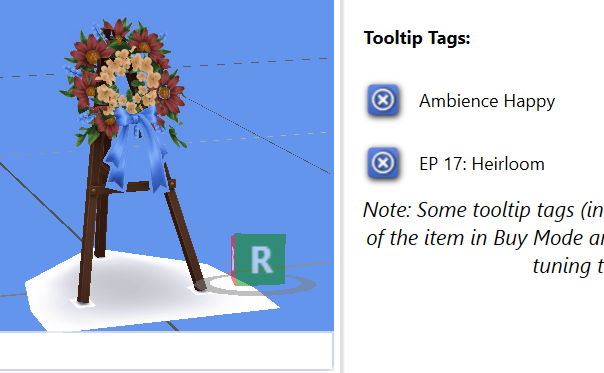
Okay, so I did a little Googling and found out that in some countries, wreaths like this aren't necessarily associated with mourning. And hey, I LOVE a good multipurpose decoration! 😂
But since this particular wreath came with the Life & Death expansion pack, I still think it should give off a sad emotional aura.
So I quickly made an override for the original EA wreath, giving it a Sadness +3 emotional aura.
Download FREE
https://t.co/8nmAxsHYc9
And I also made a separate version for occasions that are a little less... depressing. 😂❤️
Download FREE
https://t.co/MIQLkacyEt
Tooltip Tag: Ambience Happy
We have an old joke in Ukraine:
"When my mother-in-law died, we celebrated so hard we wore out TWO accordions at her funeral!" 😂
Well, I guess someone wasn't too sad to see their mother-in-law go... 🤣
@EA
It's a funeral wreath. A mourning wreath. FOR A FUNERAL!!! And here we've been wondering why on earth our Sims are so happy at funerals... Well, I guess we found our answer! 🤦♀️
Tooltip Tag: Ambience Happy
We have an old joke in Ukraine:
"When my mother-in-law died, we celebrated so hard we wore out TWO accordions at her funeral!" 😂
Well, I guess someone wasn't too sad to see their mother-in-law go... 🤣
@EA
It's a funeral wreath. A mourning wreath. FOR A FUNERAL!!! And here we've been wondering why on earth our Sims are so happy at funerals... Well, I guess we found our answer! 🤦♀️
@SaltyWenchMedia Oh, no, definitely not! ❤️ Madlen is a very experienced creator who really knows his craft. Sure, the quality of his CC can be a little inconsistent sometimes, but I have a lot of respect for his skills. I really can't imagine him letting something like that slip through!
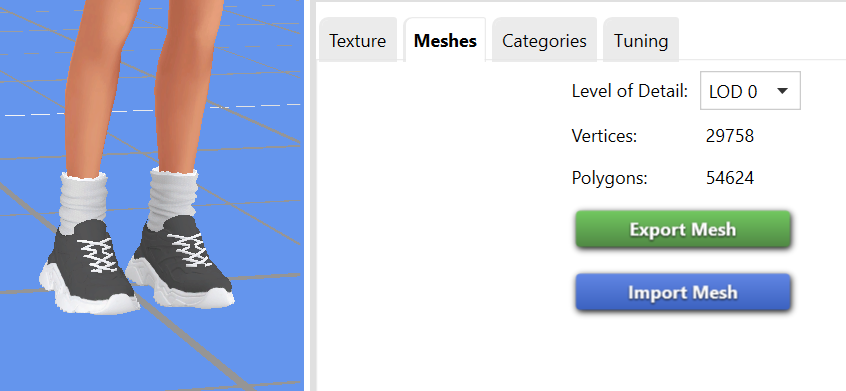
Anyone want a pair of sneakers that could absolutely TANK your FPS? 🙃
54,624 POLYGONS.
For a single pair of SNEAKERS. 😭
For context, that's an extremely high polygon count for such a small CAS item. High-poly CC increases the workload on your GPU, and using lots of items like this can cause FPS drops, stuttering, longer loading times, and increased GPU memory usage.
Will these sneakers actually kill your graphics card? No. But they can put unnecessary strain on your system, especially if you're using multiple high-poly CC items at once.
Please be careful with what you download! ❤️
And if you're downloading AI-generated CC, pay particular attention to the mesh quality and polygon count. A pretty preview doesn't necessarily mean the content is optimized for gameplay.
Your Sims deserve cute shoes. Your GPU deserves better optimization. 😭
I just downloaded some CC that Joliebean released today, and look at these numbers! 3,786 polygons for LOD 0 and 1, and only 1,892 for LOD 2 and 3.
That's perfectly reasonable! And the quality is AMAZING. 😍 You can actually see the texture of the embroidery on the little flowers! And somehow, all that detail is still visible even at LOD 2 and 3!
I know Joliebean's Maxis Match style isn't everyone's cup of tea, especially if you prefer Alpha CC.
But I'm sure there are plenty of talented Alpha creators who know how to make gorgeous, detailed CC without making everyone's FPS suffer.
Beautiful CC doesn't have to come at the expense of performance! ❤️
Exactly!
And since creators aren’t always setting reasonable limits on their CC, it’s up to us as players to look after our Mods folders, our games, and our computers.
Sometimes that means simply choosing NOT to download poorly optimized CC, no matter how pretty it looks.
At the end of the day, we get to decide what goes into our games. We always have a choice! ❤️
I usually only use things like that for one event, so I don’t bother keeping them in my Mods folder afterward.
As for letting NPCs randomly wear CC, I’ve turned that off completely. 😭
I’ve complained about incorrect tags on Build/Buy CC before, but honestly, CAS CC is just as much of a mess! SO many items have the wrong tags, age restrictions, or outfit categories. You’ll find things like winter coats tagged as swimwear. 😭
I tried enabling CC for randomly generated NPC outfits a few times, but every time I saw the chaos it caused in my save, I immediately regretted it. 😂
I just can’t deal with my townies walking around in completely ridiculous outfits! 😭
@SpiritWasLost Yep. This happens to me all the time.
That’s why I try to talk to people around me as much as possible, so my brain has something new to process instead of endlessly chewing on the same old thoughts it dug up from somewhere inside me.
@saltsig This is literally me and my Sims 4.
I’m an adult, probably way too old to still be playing with pixel dolls.
But with the war still going on here in Ukraine, this game is the one thing that’s keeping me going… 😔
My personal polygon guidelines for Maxis Match CC are:
👟 Shoes: 2,000–2,500 polygons
👗 Clothing: around 5,000 polygons
💍 Accessories: up to 1,000 polygons
💇♀️ Hairstyles: 10,000–15,000 polygons
These are the limits I generally try to stick to, although they’re definitely not strict rules!
There’s no single “safe” polygon count for every piece of CC. It depends on the type of content, how complex the mesh is, and how much detail it needs. Alpha CC usually has higher polygon counts than Maxis Match because of that extra detail. And even with Maxis Match, some items naturally need more polygons than others.
Another important thing to check is the LODs (Levels of Detail)!
LOD 1 should have fewer polygons than LOD 0. That’s the whole point of having different LODs: the game can use simpler meshes when objects are farther away, reducing the rendering workload.
Lately, I’ve also been paying attention to how quickly Sims 4 Studio opens an object and whether loading it causes a noticeable spike in my computer’s resource usage.
It’s not a proper performance benchmark, but it gives me another clue when deciding whether to keep something in my game.
And of course, I make exceptions! 😂
If I fall in love with a gorgeous wedding dress that has 20,000 polygons, my Sim bride is ABSOLUTELY wearing it! ❤️
But the wedding guests? Oh, they’re getting a dress code with a strict polygon budget! 😂
The goal isn’t to avoid beautiful, detailed CC. It’s to be mindful of how much of it you’re using at once. ❤️
These moving and storage box recolors by StellaLikable are SO cute! 😍
And they're FREE!
(And yes, they have the CORRECT tags, for those who know what I'm talking about! 😂)
https://t.co/2by18hzbdH
Better Simology Panel v1.2.5 is out now! I made sure everything plays nice with the latest game update and cleaned up a few old errors.
Both the standard and UI Cheats compatible versions are available to download for free!
I’ve tried this app!
The earlier versions had some lag when rendering CC in 3D, but the latest version works great!
I LOVE how easy it is to find all the CC used in a save and browse households and lots.
Previewing CAS CC is really convenient too, although you might need to adjust the scene lighting to suit your monitor.
It’s also super handy for fixing CC tags, since creators unfortunately don’t always assign them correctly.
And browsing Tray files is AMAZING!
I asked the creator on Patreon if they could add the ability to rename lots in my Tray library and assign custom tags.
I’m really hoping I’ll finally be able to get that whole library organized! 😻
Oh, my beloved Sims 4! 😍
We’ve had our ups and downs, but I love you to pieces!
No cars, no open world, and bugs that never seem to go away…
You’re far from perfect, but honestly, what is?
And somehow, all those little imperfections just make you feel that much more alive. ❤️
There are Discord communities for creators and the Sims 4 Studio forum, both full of useful information for beginners. But finding answers takes time, patience, and a little effort with Google or forum searches. Unfortunately, not everyone is willing to put that effort in. (And I’m NOT talking about the console creator from my screenshot!)
But something else makes me sad, too.
It feels like creators aren’t as willing to share their knowledge anymore. 😔
Back in the Tumblr days, when most Sims content was free, people loved sharing discoveries, tutorials, and tips to help others learn.
Now everything feels so monetized…
There’s absolutely nothing wrong with earning money from your work! But keeping your knowledge to yourself just to avoid helping potential competitors? That’s a different story.
I think this lack of knowledge-sharing contributes to the flood of poorly made AI-generated CC. There are so few new tutorials for beginners!
I’m not an expert in CC creation myself, and I know some wonderful creators still patiently help newcomers and answer their questions. But unfortunately, they seem to be few and far between… 😔
CC creators, can we PLEASE talk about proper tagging? 😭
I genuinely appreciate the time and effort that goes into creating CC. As a modder myself, I KNOW how much work it takes, and I would never dismiss that.
But there's one issue I keep running into that I really wish more creators would pay attention to: incorrect or outdated object tags.
When catalog tags are missing or incorrect, objects don't appear in the right Build/Buy categories.
When color tags are missing, objects don't show up properly when filtering by color.
These things are frustrating, but I can live with them.
Functional tags, however, are a much bigger concern. They can affect how the game recognizes and handles objects, so getting them right really matters.
Here's a specific example:
The top screenshot shows a CC video game console that was updated on CurseForge TODAY.
The bottom screenshot shows an EA video game console using the same tuning.
But when you compare their tags, the CC console is actually categorized as a SCULPTURE, not a video game console!
It also still uses the outdated tag BuyCatEE_VideoGameConsole_OLD.
And the frustrating part is that this is relatively easy to check and fix!
You can extract the corresponding EA object using Sims 4 Studio, examine its current tags, and use those as a reference when assigning tags to your CC.
I understand that mistakes happen, especially when EA changes things between patches. But checking functional tags should really be part of the basic quality-control process before publishing or updating an object.
As someone who plays with a LOT of CC, I already spend so much time checking downloaded content for potential problems. Having to inspect nearly every object individually just to make sure it's configured correctly is exhausting.
I'm not asking creators to be perfect. I'm asking for a little more attention to the technical details that affect how our games function.
Your creations deserve to work just as beautifully as they look. ❤️