OpenAI and Azure OpenAI recently released “realtime” APIs.
Let’s experiment! Can we build a new kind of voice-based UI experience?
https://t.co/8IXtk3DtCI
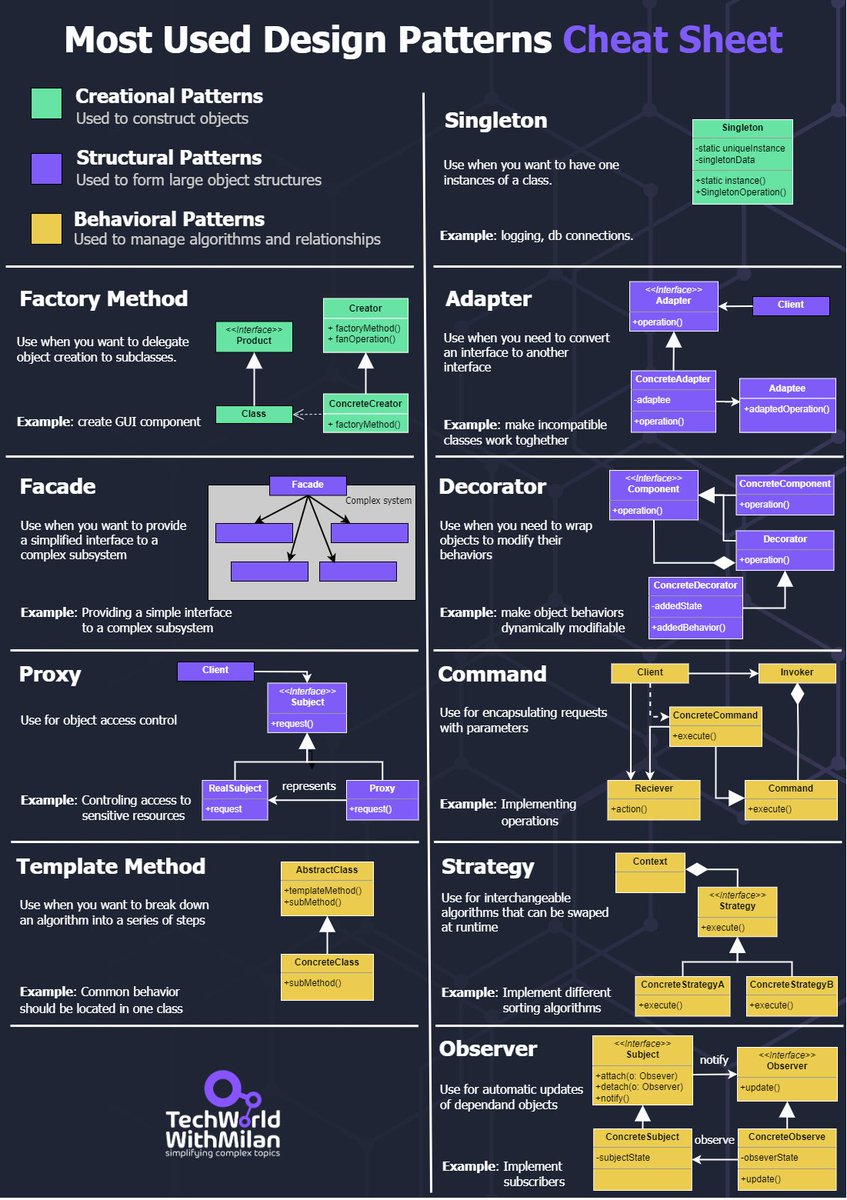
𝗗𝗼 𝗬𝗼𝘂 𝗡𝗲𝗲𝗱 𝗧𝗼 𝗞𝗻𝗼𝘄 𝗔𝗹𝗹 𝗗𝗲𝘀𝗶𝗴𝗻 𝗣𝗮𝘁𝘁𝗲𝗿𝗻𝘀?
The answer is no. Even though we have 23 design patterns, around 10 are mostly used in everyday development. Knowing which patterns exist overall is good, but you need to know these very well.
Design patterns can be divided into three main types:
𝟭. 𝗖𝗿𝗲𝗮𝘁𝗶𝗼𝗻𝗮𝗹 𝗣𝗮𝘁𝘁𝗲𝗿𝗻𝘀
These design patterns deal with object creation mechanisms, trying to create objects in a manner suitable to the situation.
Important patterns in this group are:
🔹𝗙𝗮𝗰𝘁𝗼𝗿𝘆: This pattern allows delegating the instantiation logic to factory classes. The Factory Method creates objects without exposing the instantiation logic to the client.
🔹𝗦𝗶𝗻𝗴𝗹𝗲𝘁𝗼𝗻: The Singleton pattern ensures that a class has only one instance and provides a global point of access to it. It's useful when exactly one object is needed to coordinate actions across the system.
𝟮. 𝗦𝘁𝗿𝘂𝗰𝘁𝘂𝗿𝗮𝗹 𝗣𝗮𝘁𝘁𝗲𝗿𝗻𝘀
These patterns deal with the composition of classes and objects that form larger structures.
Important patterns in this group are:
🔹𝗔𝗱𝗮𝗽𝘁𝗲𝗿: This pattern works as a bridge between two incompatible interfaces. It wraps an existing class with a new interface to become compatible with the client's interface.
🔹𝗙𝗮𝗰𝗮𝗱𝗲: The Façade pattern provides a unified interface to a set of interfaces in a subsystem. Façade defines a higher-level interface that makes the subsystem easier to use.
🔹𝗗𝗲𝗰𝗼𝗿𝗮𝘁𝗼𝗿: This pattern dynamically adds/overrides behavior in an existing method of an object. This pattern provides a flexible alternative to subclassing for extending functionality.
🔹𝗣𝗿𝗼𝘅𝘆: The Proxy pattern provides a surrogate or placeholder for another object to control access to it. In its most general form, a proxy is a class functioning as an interface to something else.
𝟯. 𝗕𝗲𝗵𝗮𝘃𝗶𝗼𝗿𝗮𝗹 𝗣𝗮𝘁𝘁𝗲𝗿𝗻𝘀
These patterns are specifically concerned with communication between objects and how they interact and distribute work.
Important patterns in this group are:
🔹𝗖𝗼𝗺𝗺𝗮𝗻𝗱: The Command pattern encapsulates a request as an object, thus allowing users to parameterize clients with queues, requests, and operations.
🔹𝗧𝗲𝗺𝗽𝗹𝗮𝘁𝗲 𝗠𝗲𝘁𝗵𝗼𝗱: This pattern defines the program skeleton of an algorithm in a method called template method, which defers some steps to subclasses.
🔹𝗦𝘁𝗿𝗮𝘁𝗲𝗴𝘆: The Strategy pattern defines a family of algorithms, encapsulates each one, and makes them interchangeable. Strategy lets the algorithm vary independently from clients that use it.
🔹𝗢𝗯𝘀𝗲𝗿𝘃𝗲𝗿: This pattern defines a one-to-many dependency between objects so that all its dependents are notified and updated automatically when one object changes state.
#technology #softwareengineering #programming #techworldwithmilan #developers
Our System Design 101 GitHub repo has just reached 18,000 stars in 4 days. It's probably one of the fastest-growing repos in history.
Thanks to everyone who has starred, forked, or contributed to the repository!
What's included in the GitHub repository:
- 100 byte-sized system concepts with visuals.
- Real-world case studies.
- Tips on how to prepare for system design interviews.
Topics included (and many many more):
- SOAP vs. REST vs. GraphQL vs. RPC
- HTTP 1.0 -> HTTP 1.1 -> HTTP 2.0 -> HTTP 3.0 (QUIC)
- CI/CD Pipeline Explained in Simple Terms
- 8 Data Structures That Power Your Databases
- Top caching strategies
- What does a typical microservice architecture look like?
If you like our content, consider starring the repo: https://t.co/wB7lUh2Gol
𝗧𝗼𝗽 𝟭𝟬 𝗔𝗿𝗰𝗵𝗶𝘁𝗲𝗰𝘁𝘂𝗿𝗮𝗹 𝗣𝗮𝘁𝘁𝗲𝗿𝗻𝘀
𝗦𝗼𝗳𝘁𝘄𝗮𝗿𝗲 𝗮𝗿𝗰𝗵𝗶𝘁𝗲𝗰𝘁𝘂𝗿𝗲 is the process of designing the structure and behavior of a software system, which includes making decisions about components, modules, interfaces, and the system's organization.
𝗦𝗼𝗳𝘁𝘄𝗮𝗿𝗲 𝗮𝗿𝗰𝗵𝗶𝘁𝗲𝗰𝘁𝘂𝗿𝗲 𝗽𝗮𝘁𝘁𝗲𝗿𝗻𝘀 are important because they provide reusable solutions to common problems in software design. They capture best practices and proven solutions for designing reliable, scalable, maintainable, and extensible software systems.
There are many software architecture design patterns to know, but some of the most important ones are:
𝟭. 𝗟𝗮𝘆𝗲𝗿𝗲𝗱 𝗔𝗿𝗰𝗵𝗶𝘁𝗲𝗰𝘁𝘂𝗿𝗲: This pattern is based on dividing the application into logical layers, where each layer has a specific responsibility and interacts with the layers above and below it.
𝟮. 𝗠𝗶𝗰𝗿𝗼𝘀𝗲𝗿𝘃𝗶𝗰𝗲𝘀 𝗔𝗿𝗰𝗵𝗶𝘁𝗲𝗰𝘁𝘂𝗿𝗲: This pattern is based on decomposing the application into small, independent services that communicate through well-defined APIs.
𝟯. 𝗘𝘃𝗲𝗻𝘁-𝗗𝗿𝗶𝘃𝗲𝗻 𝗔𝗿𝗰𝗵𝗶𝘁𝗲𝗰𝘁𝘂𝗿𝗲: This pattern uses events to communicate between different components or services, where events trigger actions or reactions in the system.
𝟰. 𝗦𝗽𝗮𝗰𝗲-𝗯𝗮𝘀𝗲𝗱 𝗮𝗿𝗰𝗵𝗶𝘁𝗲𝗰𝘁𝘂𝗿𝗲 (𝗦𝗕𝗔): is a software design method that centers the system's structure around the idea of "spaces," which are independent and autonomous units.
𝟱. 𝗠𝗶𝗰𝗿𝗼𝗸𝗲𝗿𝗻𝗲𝗹 𝗮𝗿𝗰𝗵𝗶𝘁𝗲𝗰𝘁𝘂𝗿𝗲: this is an approach where the kernel provides minimal functionality and services are implemented as separate modules outside the kernel.
𝟲. 𝗣𝗲𝗲𝗿 𝘁𝗼 𝗣𝗲𝗲𝗿 𝗮𝗿𝗰𝗵𝗶𝘁𝗲𝗰𝘁𝘂𝗿𝗮𝗹 𝗽𝗮𝘁𝘁𝗲𝗿𝗻: this is a decentralized model where nodes in a network can act as both clients and servers, allowing for distributed sharing of resources and information without a central authority.
𝟳. 𝗖𝗹𝗼𝘂𝗱 𝗻𝗮𝘁𝗶𝘃𝗲 𝘀𝗼𝗳𝘁𝘄𝗮𝗿𝗲 𝗮𝗿𝗰𝗵𝗶𝘁𝗲𝗰𝘁𝘂𝗿𝗲: this is a pattern where applications are developed and deployed to run on cloud platforms, leveraging cloud services and infrastructure for scalability, reliability, and agility.
𝟴. 𝗖𝗤𝗥𝗦 (𝗖𝗼𝗺𝗺𝗮𝗻𝗱 𝗤𝘂𝗲𝗿𝘆 𝗥𝗲𝘀𝗽𝗼𝗻𝘀𝗶𝗯𝗶𝗹𝗶𝘁𝘆 𝗦𝗲𝗴𝗿𝗲𝗴𝗮𝘁𝗶𝗼𝗻): This pattern separates the command and query responsibilities of an application's model, making it easier to scale and optimize the application.
𝟵. 𝗛𝗲𝘅𝗮𝗴𝗼𝗻𝗮𝗹 𝗔𝗿𝗰𝗵𝗶𝘁𝗲𝗰𝘁𝘂𝗿𝗲: This pattern separates the application into an inner and outer layer, where the inner layer contains the business logic and the outer layer contains the interfaces with the outside world.
𝟭𝟬. 𝗖𝗹𝗲𝗮𝗻 𝗔𝗿𝗰𝗵𝗶𝘁𝗲𝗰𝘁𝘂𝗿𝗲: This pattern emphasizes separating concerns and decoupling components, making it easier to maintain and change an application over time.
#technology #softwareengineering #softwaredesign #techworldwithmilan #softwarearchitecture
𝗠𝗼𝘀𝘁 𝗖𝗼𝗺𝗺𝗼𝗻 𝗦𝗼𝗳𝘁𝘄𝗮𝗿𝗲 𝗔𝗿𝗰𝗵𝗶𝘁𝗲𝗰𝘁𝘂𝗿𝗲 𝗦𝘁𝘆𝗹𝗲𝘀
Software architecture styles are the foundational blueprints for constructing various software systems, ensuring they meet specific requirements and quality attributes.
By adhering to a suitable architecture style, organizations can ensure that their software systems are built to align with their strategic goals, accommodate future changes, and are resilient in the face of evolving technological landscapes and user demands.
Here are the most common styles:
𝟭. 𝗠𝗼𝗻𝗼𝗹𝗶𝘁𝗵𝗶𝗰: Builds the entire application as a single unit, where all functionalities and components are managed and served from one place.
𝟮. 𝗦𝗲𝗿𝘃𝗶𝗰𝗲-𝗢𝗿𝗶𝗲𝗻𝘁𝗲𝗱 (𝗦𝗢𝗔): Divides a system into individual services, each providing specific functionalities and allowing them to communicate and interact, promoting reusability and easier management of each service independently.
𝟯. 𝗖𝗼𝗺𝗽𝗼𝗻𝗲𝗻𝘁-𝗕𝗮𝘀𝗲𝗱: The software is built using different modular components, each providing a specific functionality, and these components can be easily replaced, updated, or modified without affecting the entire system.
𝟰. 𝗗𝗶𝘀𝘁𝗿𝗶𝗯𝘂𝘁𝗲𝗱 𝗦𝘆𝘀𝘁𝗲𝗺𝘀: Divides and manages the software components across multiple machines or networks to provide a unified service, enhancing scalability and reliability.
𝟱. 𝗘𝘃𝗲𝗻𝘁-𝗗𝗿𝗶𝘃𝗲𝗻: Designed to respond to events or messages, where components perform actions in response to receiving specific notifications, making the system reactive and capable of handling asynchronous operations.
𝟲. 𝗜𝗻𝘁𝗲𝗿𝗽𝗿𝗲𝘁𝗲𝗿: Involves translating high-level code into machine code line by line, executing it directly rather than compiling it first, providing flexibility but often at the cost of performance.
𝟳. 𝗗𝗮𝘁𝗮-𝗰𝗲𝗻𝘁𝗿𝗶𝗰: Prioritizes the management and utilization of data, ensuring that data integrity, storage, and retrieval are optimized, and the system’s functionalities are built around efficient data processing.
Each architectural style offers unique advantages and may be chosen based on the specific needs, challenges, and context of the software being developed.
#technology #softwareengineering #softwarearchitecture #techworldwithmilan #softwaredesign
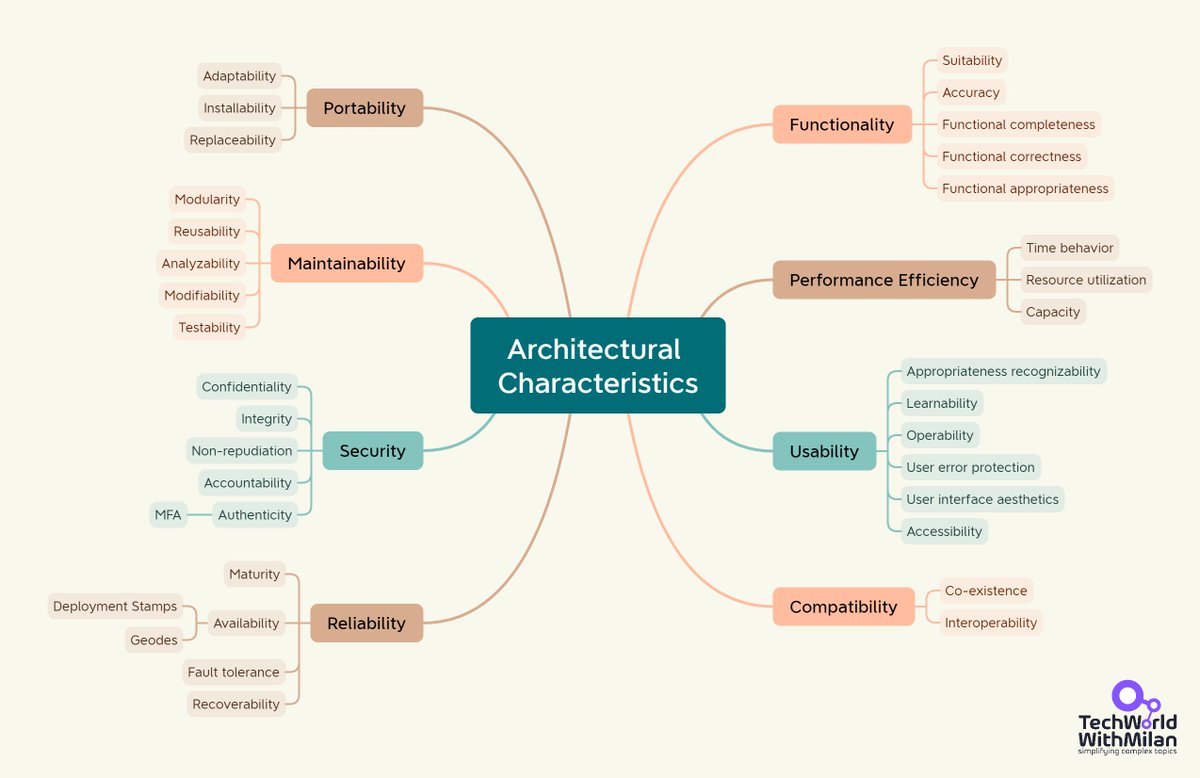
𝗪𝗵𝗮𝘁 𝗔𝗿𝗲 𝗔𝗿𝗰𝗵𝗶𝘁𝗲𝗰𝘁𝘂𝗿𝗮𝗹 𝗖𝗵𝗮𝗿𝗮𝗰𝘁𝗲𝗿𝗶𝘀𝘁𝗶𝗰𝘀?
ISO/IEC 25010 is a standard that defines a model for software product quality and provides a set of quality characteristics. It is part of the ISO/IEC 25000 series concerned with software product quality. The model introduced in ISO/IEC 25010 is known as 𝘁𝗵𝗲 𝗦𝘆𝘀𝘁𝗲𝗺 𝗮𝗻𝗱 𝗦𝗼𝗳𝘁𝘄𝗮𝗿𝗲 𝗤𝘂𝗮𝗹𝗶𝘁𝘆 𝗠𝗼𝗱𝗲𝗹.
The most important architectural characteristics defined by ISO/IEC 25010 are:
𝟭. 𝗙𝘂𝗻𝗰𝘁𝗶𝗼𝗻𝗮𝗹𝗶𝘁𝘆: This refers to the set of attributes that bear on the existence of a group of functions and their specified properties. The parts are those that meet stated or implied needs.
🔹 𝗦𝘂𝗶𝘁𝗮𝗯𝗶𝗹𝗶𝘁𝘆: Appropriateness of functions for specified tasks.
🔹 𝗔𝗰𝗰𝘂𝗿𝗮𝗰𝘆: The degree to which a system provides the correct results with the needed degree of precision.
🔹 𝗙𝘂𝗻𝗰𝘁𝗶𝗼𝗻𝗮𝗹 𝗰𝗼𝗺𝗽𝗹𝗲𝘁𝗲𝗻𝗲𝘀𝘀: The degree to which the set of functions covers all the specified tasks and user objectives.
𝟮. 𝗣𝗲𝗿𝗳𝗼𝗿𝗺𝗮𝗻𝗰𝗲 𝗘𝗳𝗳𝗶𝗰𝗶𝗲𝗻𝗰𝘆: This pertains to the performance relative to the resources used under stated conditions.
🔹 𝗧𝗶𝗺𝗲 𝗯𝗲𝗵𝗮𝘃𝗶𝗼𝗿: Degree to which a product or system's response, processing times, and throughput rates meet requirements when performing its functions.
🔹 𝗥𝗲𝘀𝗼𝘂𝗿𝗰𝗲 𝘂𝘀𝗲: The degree to which the amounts and types of resources a product or system uses meet requirements when performing its functions.
🔹 𝗖𝗮𝗽𝗮𝗰𝗶𝘁𝘆: Degree to which a product's or system parameter's largest limits meet requirements.
𝟯. 𝗖𝗼𝗺𝗽𝗮𝘁𝗶𝗯𝗶𝗹𝗶𝘁𝘆: The capability of two or more systems or components to exchange information and perform their required functions while sharing the same hardware or software environment.
🔹 𝗖𝗼-𝗲𝘅𝗶𝘀𝘁𝗲𝗻𝗰𝗲: Degree to which a product can perform its functions efficiently while sharing a common environment and resources without detrimental impact on any other product.
🔹 𝗜𝗻𝘁𝗲𝗿𝗼𝗽𝗲𝗿𝗮𝗯𝗶𝗹𝗶𝘁𝘆: Degree to which two or more systems, products, or components can exchange information and use the information that has been exchanged.
𝟰. 𝗨𝘀𝗮𝗯𝗶𝗹𝗶𝘁𝘆: The degree to which specified users can use a product or system to achieve goals with effectiveness, efficiency, and satisfaction in a specified context.
🔹 𝗔𝗽𝗽𝗿𝗼𝗽𝗿𝗶𝗮𝘁𝗲𝗻𝗲𝘀𝘀 𝗿𝗲𝗰𝗼𝗴𝗻𝗶𝘇𝗮𝗯𝗶𝗹𝗶𝘁𝘆: The degree to which users can recognize whether a product or system is appropriate for their needs.
🔹 𝗟𝗲𝗮𝗿𝗻𝗮𝗯𝗶𝗹𝗶𝘁𝘆: The degree to which specified users can use a product or system to achieve the goals of learning to use the product or system with effectiveness, efficiency, freedom from risk, and satisfaction in a specified context of use.
To read more about these characteristics, subscribe to my newsletter (in the comments or the link in my bio).
#softwareengineering #softwarearchitecture #techworldwithmilan #softwaredesign
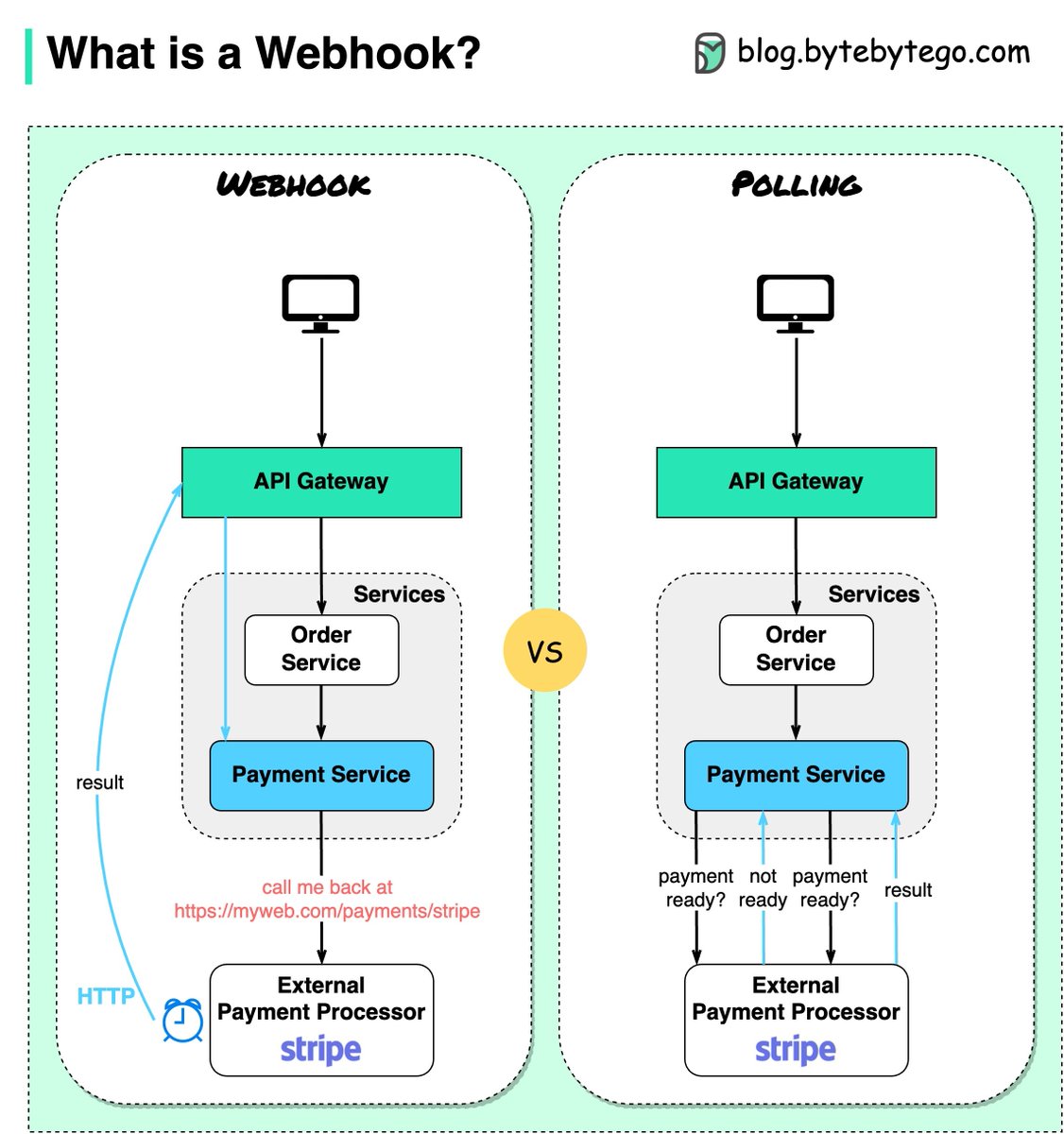
What is a webhook?
The diagram below shows a comparison between polling and webhook.
Assume we run an eCommerce website. The clients send orders to the order service via the API gateway, which goes to the payment service for payment transactions. The payment service then talks to an external payment service provider (PSP) to complete the transactions.
There are two ways to handle communications with the external PSP.
🔹 1. Short polling
After sending the payment request to the PSP, the payment service keeps asking the PSP about the payment status. After several rounds, the PSP finally returns with the status.
Short polling has two drawbacks:
1) Constant polling of the status requires resources from the payment service.
2) The External service communicates directly with the payment service, creating security vulnerabilities.
🔹 2. Webhook
We can register a webhook with the external service. It means: call me back at a certain URL when you have updates on the request. When the PSP has completed the processing, it will invoke the HTTP request to update the payment status.
In this way, the programming paradigm is changed, and the payment service doesn’t need to waste resources to poll the payment status anymore.
What if the PSP never calls back? We can set up a housekeeping job to check payment status every hour.
Webhooks are often referred to as reverse APIs or push APIs because the server sends HTTP requests to the client. We need to pay attention to 3 things when using a webhook:
1) We need to design a proper API for the external service to call.
2) We need to set up proper rules in the API gateway for security reasons.
3) We need to register the correct URL at the external service.
–
Subscribe to our weekly newsletter to get a Free System Design PDF (158 pages): https://t.co/90RMwmA3Mu
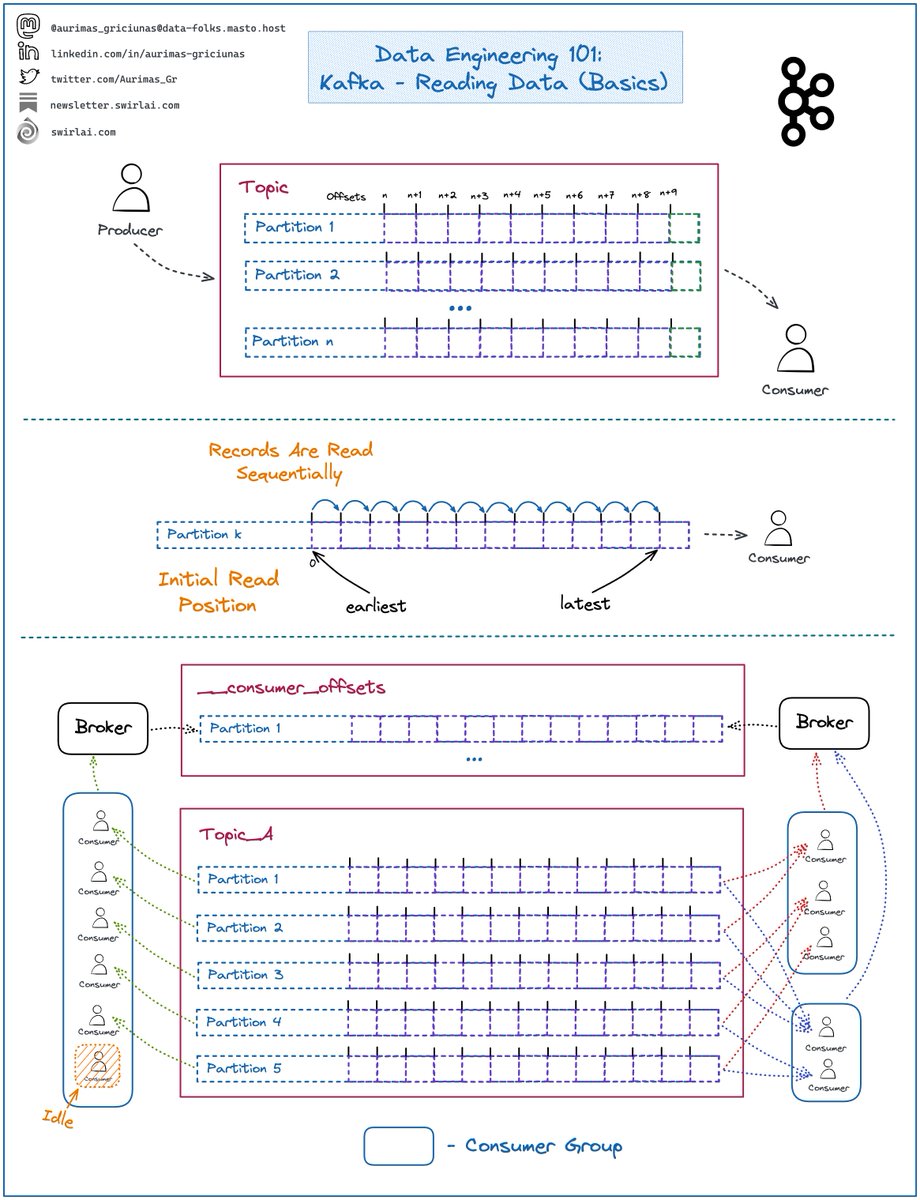
Some thoughts on 𝗥𝗲𝗮𝗱𝗶𝗻𝗴 𝗗𝗮𝘁𝗮 from 𝗞𝗮𝗳𝗸𝗮.
Kafka is an extremely important 𝗗𝗶𝘀𝘁𝗿𝗶𝗯𝘂𝘁𝗲𝗱 𝗠𝗲𝘀𝘀𝗮𝗴𝗶𝗻𝗴 𝗦𝘆𝘀𝘁𝗲𝗺 to understand, last time we covered Writing Data.
𝗦𝗼𝗺𝗲 𝗿𝗲𝗳𝗿𝗲𝘀𝗵𝗲𝗿𝘀:
➡️ Clients writing to Kafka are called 𝗣𝗿𝗼𝗱𝘂𝗰𝗲𝗿𝘀.
➡️ Clients reading the Data are called 𝗖𝗼𝗻𝘀𝘂𝗺𝗲𝗿𝘀.
➡️ Data is written into 𝗧𝗼𝗽𝗶𝗰𝘀 that can be compared to tables in Databases.
➡️ Messages sent to 𝗧𝗼𝗽𝗶𝗰𝘀 are called 𝗥𝗲𝗰𝗼𝗿𝗱𝘀.
➡️ 𝗧𝗼𝗽𝗶𝗰𝘀 are composed of 𝗣𝗮𝗿𝘁𝗶𝘁𝗶𝗼𝗻𝘀.
➡️ Each 𝗣𝗮𝗿𝘁𝗶𝘁𝗶𝗼𝗻 is a combination of and behaves as a write ahead log.
➡️ Data is written to the end of the 𝗣𝗮𝗿𝘁𝗶𝘁𝗶𝗼𝗻.
➡️ Each 𝗥𝗲𝗰𝗼𝗿𝗱 has an 𝗢𝗳𝗳𝘀𝗲𝘁 assigned to it which denotes its order in the 𝗣𝗮𝗿𝘁𝗶𝘁𝗶𝗼𝗻.
➡️ 𝗢𝗳𝗳𝘀𝗲𝘁𝘀 start at 0 and increment by 1 sequentially.
𝗥𝗲𝗮𝗱𝗶𝗻𝗴 𝗗𝗮𝘁𝗮:
➡️ Data is read sequentially per partition.
➡️ 𝗜𝗻𝗶𝘁𝗶𝗮𝗹 𝗥𝗲𝗮𝗱 𝗣𝗼𝘀𝗶𝘁𝗶𝗼𝗻 can be set either to earliest or latest.
➡️ Earliest position initiates the consumer at offset 0 or the earliest available due to retention rules of the 𝗧𝗼𝗽𝗶𝗰 (more about this in later episodes).
➡️ Latest position initiates the consumer at the end of a 𝗣𝗮𝗿𝘁𝗶𝘁𝗶𝗼𝗻 - no 𝗥𝗲𝗰𝗼𝗿𝗱𝘀 will be read initially and the 𝗖𝗼𝗻𝘀𝘂𝗺𝗲𝗿 will wait for new data to be written.
➡️ You could codify your consumers independently, but almost always the preferred way is to use 𝗖𝗼𝗻𝘀𝘂𝗺𝗲𝗿 𝗚𝗿𝗼𝘂𝗽𝘀.
𝗖𝗼𝗻𝘀𝘂𝗺𝗲𝗿 𝗚𝗿𝗼𝘂𝗽𝘀:
➡️ 𝗖𝗼𝗻𝘀𝘂𝗺𝗲𝗿 𝗚𝗿𝗼𝘂𝗽 is a logical collection of clients that read a 𝗞𝗮𝗳𝗸𝗮 𝗧𝗼𝗽𝗶𝗰 and share the state.
➡️ Groups of consumers are identified by the 𝗴𝗿𝗼𝘂𝗽_𝗶𝗱 parameter.
➡️ 𝗦𝘁𝗮𝘁𝗲 is defined by the offsets that every 𝗣𝗮𝗿𝘁𝗶𝘁𝗶𝗼𝗻 𝗶𝗻 𝘁𝗵𝗲 𝗧𝗼𝗽𝗶𝗰 is being consumed at.
➡️ 𝗦𝘁𝗮𝘁𝗲 of 𝗖𝗼𝗻𝘀𝘂𝗺𝗲𝗿 𝗚𝗿𝗼𝘂𝗽𝘀 is written by the 𝗕𝗿𝗼𝗸𝗲𝗿 (more about this in later episodes) to an internal 𝗞𝗮𝗳𝗸𝗮 𝗧𝗼𝗽𝗶𝗰 named __𝗰𝗼𝗻𝘀𝘂𝗺𝗲𝗿_𝗼𝗳𝗳𝘀𝗲𝘁𝘀.
➡️ There can be multiple 𝗖𝗼𝗻𝘀𝘂𝗺𝗲𝗿 𝗚𝗿𝗼𝘂𝗽𝘀 reading the same 𝗞𝗮𝗳𝗸𝗮 𝗧𝗼𝗽𝗶𝗰 having their own independent 𝗦𝘁𝗮𝘁𝗲𝘀.
➡️ Only one 𝗖𝗼𝗻𝘀𝘂𝗺𝗲𝗿 per 𝗖𝗼𝗻𝘀𝘂𝗺𝗲𝗿 𝗚𝗿𝗼𝘂𝗽 can be reading a 𝗣𝗮𝗿𝘁𝗶𝘁𝗶𝗼𝗻 at a single point in time.
𝗖𝗼𝗻𝘀𝘂𝗺𝗲𝗿 𝗚𝗿𝗼𝘂𝗽 𝗧𝗶𝗽𝘀:
❗️ If you have a prime number of 𝗣𝗮𝗿𝘁𝗶𝘁𝗶𝗼𝗻𝘀 in the 𝗧𝗼𝗽𝗶𝗰 - you will always have at least one 𝗖𝗼𝗻𝘀𝘂𝗺𝗲𝗿 per 𝗖𝗼𝗻𝘀𝘂𝗺𝗲𝗿 𝗚𝗿𝗼𝘂𝗽 consuming less 𝗣𝗮𝗿𝘁𝗶𝘁𝗶𝗼𝗻𝘀 than others unless number of 𝗖𝗼𝗻𝘀𝘂𝗺𝗲𝗿𝘀 equals number of 𝗣𝗮𝗿𝘁𝗶𝘁𝗶𝗼𝗻𝘀.
✅ If you want an odd number of 𝗣𝗮𝗿𝘁𝗶𝘁𝗶𝗼𝗻𝘀 - set it to a 𝗺𝘂𝗹𝘁𝗶𝗽𝗹𝗲 𝗼𝗳 𝗣𝗿𝗶𝗺𝗲 𝗡𝘂𝗺𝗯𝗲𝗿.
❗️ If you have more 𝗖𝗼𝗻𝘀𝘂𝗺𝗲𝗿𝘀 in the 𝗖𝗼𝗻𝘀𝘂𝗺𝗲𝗿 𝗚𝗿𝗼𝘂𝗽 then there are 𝗣𝗮𝗿𝘁𝗶𝘁𝗶𝗼𝗻𝘀 in the 𝗧𝗼𝗽𝗶𝗰 - some of the 𝗖𝗼𝗻𝘀𝘂𝗺𝗲𝗿𝘀 will be 𝗜𝗱𝗹𝗲.
✅ Make your 𝗧𝗼𝗽𝗶𝗰𝘀 large enough or have less 𝗖𝗼𝗻𝘀𝘂𝗺𝗲𝗿𝘀 per 𝗖𝗼𝗻𝘀𝘂𝗺𝗲𝗿 𝗚𝗿𝗼𝘂𝗽.
--------
Follow me to upskill in #MLOps, #MachineLearning, #DataEngineering, #DataScience and overall #Data space.
Also hit 🔔to stay notified about new content.
𝗗𝗼𝗻’𝘁 𝗳𝗼𝗿𝗴𝗲𝘁 𝘁𝗼 𝗹𝗶𝗸𝗲 💙, 𝘀𝗵𝗮𝗿𝗲 𝗮𝗻𝗱 𝗰𝗼𝗺𝗺𝗲𝗻𝘁!
Join a growing community of Data Professionals by subscribing to my 𝗡𝗲𝘄𝘀𝗹𝗲𝘁𝘁𝗲𝗿.