Software development is undergoing a renaissance in front of our eyes.
If you haven't used the tools recently, you likely are underestimating what you're missing. Since December, there's been a step function improvement in what tools like Codex can do. Some great engineers at OpenAI yesterday told me that their job has fundamentally changed since December. Prior to then, they could use Codex for unit tests; now it writes essentially all the code and does a great deal of their operations and debugging. Not everyone has yet made that leap, but it's usually because of factors besides the capability of the model.
Every company faces the same opportunity now, and navigating it well — just like with cloud computing or the Internet — requires careful thought. This post shares how OpenAI is currently approaching retooling our teams towards agentic software development. We're still learning and iterating, but here's how we're thinking about it right now:
As a first step, by March 31st, we're aiming that:
(1) For any technical task, the tool of first resort for humans is interacting with an agent rather than using an editor or terminal.
(2) The default way humans utilize agents is explicitly evaluated as safe, but also productive enough that most workflows do not need additional permissions.
In order to get there, here's what we recommended to the team a few weeks ago:
1. Take the time to try out the tools. The tools do sell themselves — many people have had amazing experiences with 5.2 in Codex, after having churned from codex web a few months ago. But many people are also so busy they haven't had a chance to try Codex yet or got stuck thinking "is there any way it could do X" rather than just trying.
- Designate an "agents captain" for your team — the primary person responsible for thinking about how agents can be brought into the teams' workflow.
- Share experiences or questions in a few designated internal channels
- Take a day for a company-wide Codex hackathon
2. Create skills and AGENTS[.md].
- Create and maintain an AGENTS[.md] for any project you work on; update the AGENTS[.md] whenever the agent does something wrong or struggles with a task.
- Write skills for anything that you get Codex to do, and commit it to the skills directory in a shared repository
3. Inventory and make accessible any internal tools.
- Maintain a list of tools that your team relies on, and make sure someone takes point on making it agent-accessible (such as via a CLI or MCP server).
4. Structure codebases to be agent-first. With the models changing so fast, this is still somewhat untrodden ground, and will require some exploration.
- Write tests which are quick to run, and create high-quality interfaces between components.
5. Say no to slop. Managing AI generated code at scale is an emerging problem, and will require new processes and conventions to keep code quality high
- Ensure that some human is accountable for any code that gets merged. As a code reviewer, maintain at least the same bar as you would for human-written code, and make sure the author understands what they're submitting.
6. Work on basic infra. There's a lot of room for everyone to build basic infrastructure, which can be guided by internal user feedback. The core tools are getting a lot better and more usable, but there's a lot of infrastructure that currently go around the tools, such as observability, tracking not just the committed code but the agent trajectories that led to them, and central management of the tools that agents are able to use.
Overall, adopting tools like Codex is not just a technical but also a deep cultural change, with a lot of downstream implications to figure out. We encourage every manager to drive this with their team, and to think through other action items — for example, per item 5 above, what else can prevent a lot of "functionally-correct but poorly-maintainable code" from creeping into codebases.
This is how Lebanon went from being a prosperous Christian country to being ruled by Islamists. Pay close attention!
“As Christians, we opened our doors to Muslims, and welcomed them into our country. We wanted to be inclusive and even made them part of the government.
But due to having several wives and many children, Muslims became the majority. Once they were the majority, they thought they could do whatever they wanted, and began massacring the Christians who welcomed them.”
Man Wai Vivian Kong is an Olympic champion! 🥇
Hong Kong wins its first gold medal of the Games 🇭🇰
-
Man Wai Vivian Kong est championne olympique ! 🥇
Hong Kong décroche sa première médaille d'or des Jeux 🇭🇰
#Paris2024
Users, developers, and validators can engage with the testnet through Galxe's Quest platform. The Galxe Quest platform will feature activities involving the core chain, its enshrined applications, and projects building in the ecosystem.
https://t.co/uZtGRKa6TJ
🚨Giveaway Alarm!
Thanks to our friends at @SCSsoftware we are giving you a KEY for the BRAND NEW WEST BALKANS DLC, releasing Thursday!
To enter:
🚚 Follow @TruckersFM
🚛 Follow @SCSsoftware
🔀 Repost this post!
For a bonus entry, comment saying what you love most about TFM!
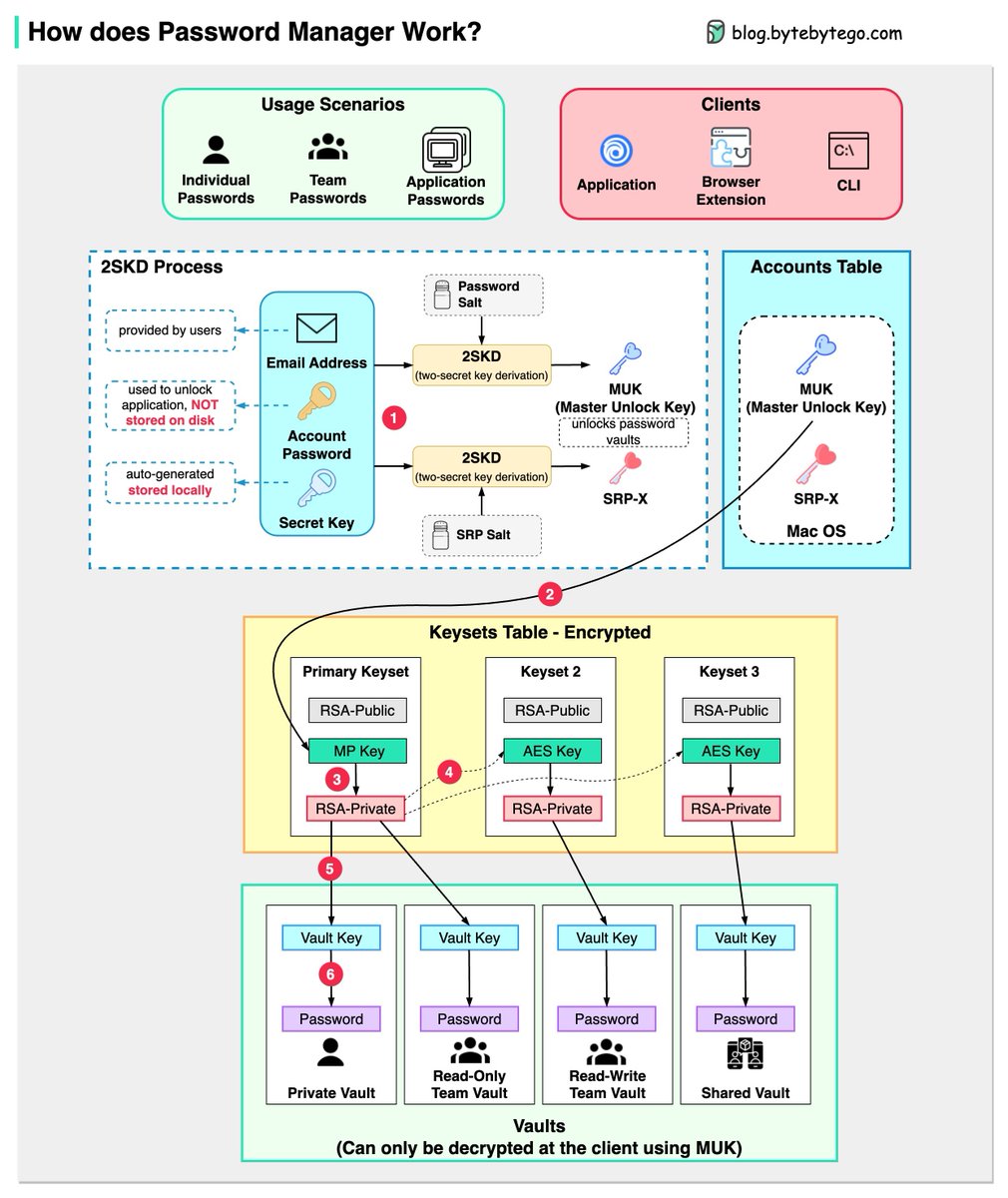
How does a Password Manager such as 1Password or Lastpass work? How does it keep our passwords safe?
The diagram below shows how a typical password manager works.
A password manager generates and stores passwords for us. We can use it via application, browser extension, or command line.
Not only does a password manager store passwords for individuals but also it supports password management for teams in small businesses and big enterprises.
Let’s go through the steps.
Step 1: When we sign up for a password manager, we enter our email address and set up an account password. The password manager generates a secret key for us. The 3 fields are used to generate MUK (Master Unlock Key) and SRP-X using the 2SKD algorithm. MUK is used to decrypt vaults that store our passwords. Note that the secret key is stored locally, and will not be sent to the password manager’s server side.
Step 2: The MUK generated in Step 1 is used to generate the encrypted MP key of the primary keyset.
Steps 3-5: The MP key is then used to generate a private key, which can be used to generate AES keys in other keysets. The private key is also used to generate the vault key. Vault stores a collection of items for us on the server side. The items can be passwords notes etc.
Step 6: The vault key is used to encrypt the items in the vault.
Because of the complex process, the password manager has no way to know the encrypted passwords. We only need to remember one account password, and the password manager will remember the rest.
Over to you: Which password manager have you used?
–
Subscribe to our weekly newsletter to get a Free System Design PDF (158 pages): https://t.co/uc5M7CdXXC
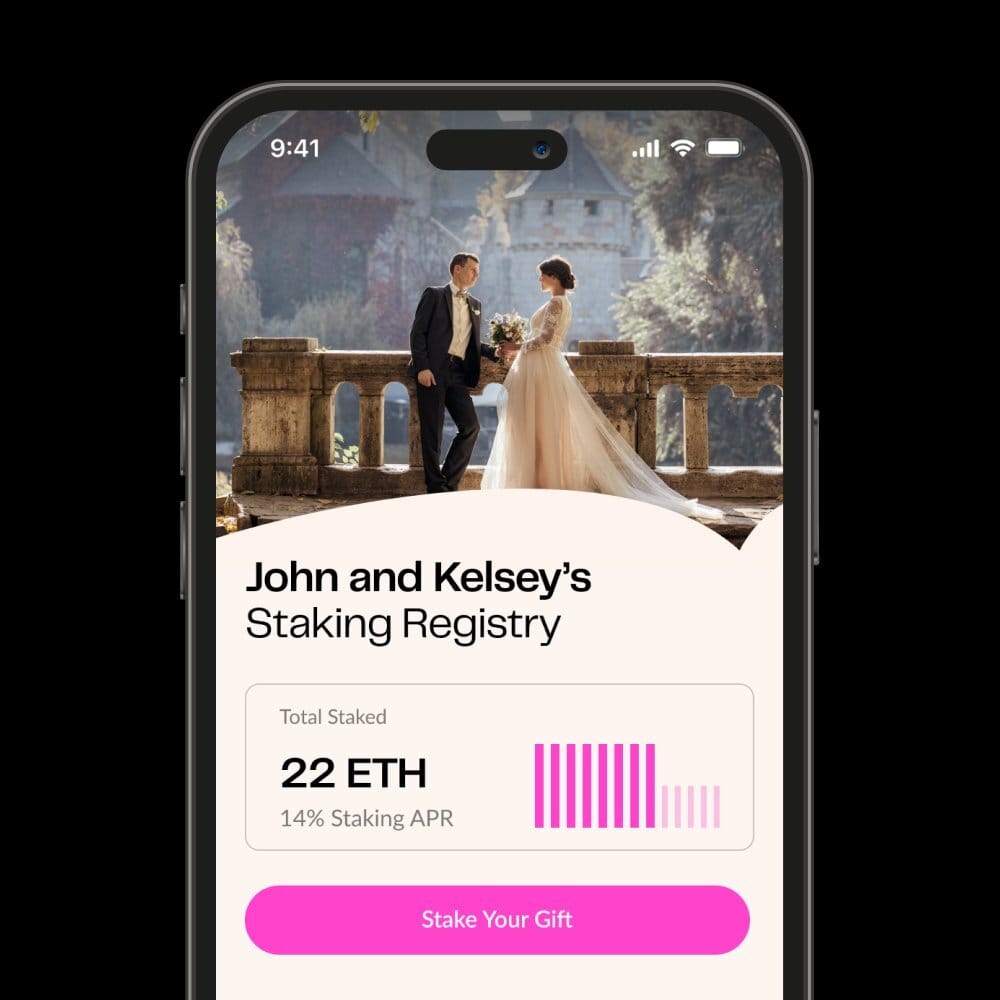
An interesting web3 concept for weddings: Staking Registry
How it works:
• Friends and family can stake ETH as a wedding gift.
• As long as the couple stays married, they get to keep the rewards.
• If the couple gets divorced, the ETH and rewards get redistributed to friends and family.
(h/t @0xDesigner)
🚀Prepare for the exciting unveiling of BaseNS Elite Grand I, our inaugural #Base Mainnet event to join hands with @buildonbase!
🤩Grab your chance to win the 10,000 USD worth of Prize Pool!
🫱Join the campaign NOW at: https://t.co/t4704e7EhS
#BaseNS#Layer2#DID
⚡Calling all adventurers!
🏝Traverse the multichain DeFi world with PancakeSwap's Treasure Islands Adventure on @Galxe!
🗺Unveil new islands, earn exclusive NFTs, and maximize your earning potential with PancakeSwap v3.
⛵️Join the expedition now and set sail for an incredible adventure!: https://t.co/Vn6M1mUVbm
📚More details:
https://t.co/eWhacCzj7P
#PancakeSwapTraverse