🚀 Visualize & flex your @Polymarket trades.
Introducing Shareable P&L Cards on @lashiapp_ !
Turn your portfolio performance into a clean, visual story. Track your wins, analyze your strategy, and share your trading journey with the community — all in one click.
Perfect for recaps, insights, or just showing off a green candle.
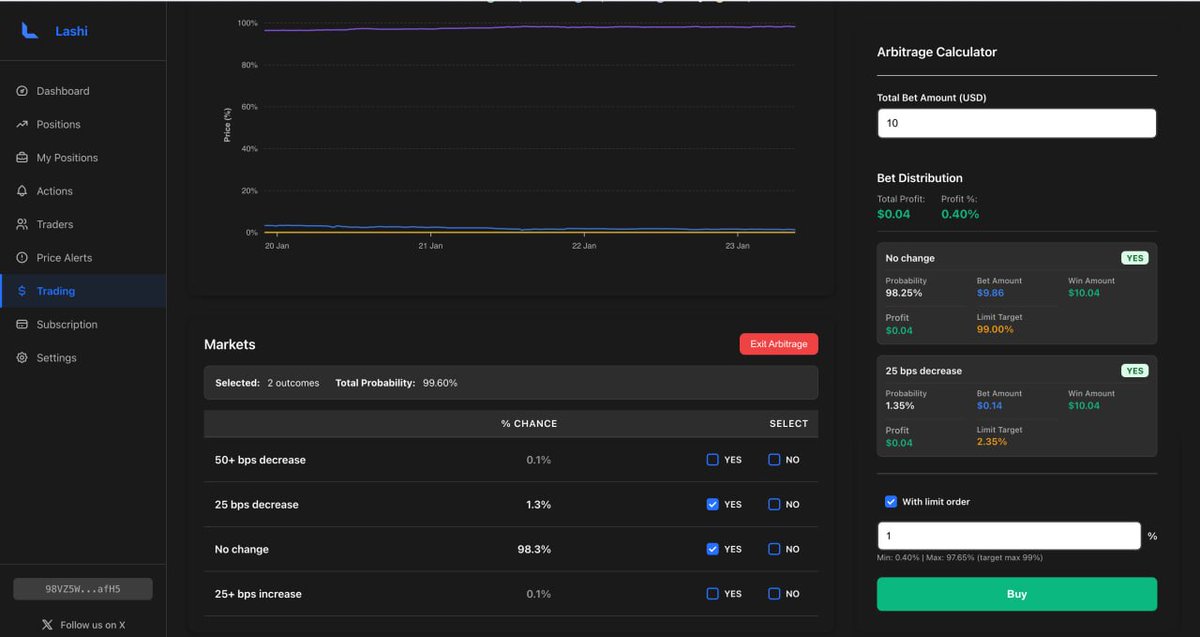
This is a solid step forward for Arbitrage Mode.
You can now batch into multiple outcomes, lock in the guaranteed arb, and automatically place limit exits for higher targets — all in one flow.
The idea is simple: secure the spread first, then stay positioned to capture extra upside if prices move your way, without sitting there managing orders.
Better execution, less manual work, and more room for profit when the market gives it
🚀 Batch Orders for Arbitrage Mode @lashiapp_ !
We've added orders to arbitrage mode - now you can batch buy multiple outcomes AND automatically set limit sell orders for higher profits.
✨ How it works:
1. Select multiple outcomes in arbitrage mode
2. Enter your total investment
3. Enable "Limit Order" option
4. Set your target profit percentage (e.g., +10%)
5. Execute - we'll buy all positions AND set limit sell orders automatically
💡 Why this is powerful:
Example scenario:
• You find an arbitrage opportunity: $100 investment → guaranteed $105 return (5% profit)
• Instead of waiting, set limit orders at +10% above entry price
• If prices move up, limit orders execute automatically
• Result: You get 10% profit instead of just 5%!
📊 Real example:
Arbitrage: Buy YES at 40¢, NO at 55¢
Guaranteed profit: 5% ($105 on $100)
With limit orders at +10%:
→ Sell YES at 44¢, NO at 60.5¢
→ Potential profit: 10%+ ($110+ on $100)
This means you can:
✅ Lock in guaranteed arbitrage profit
✅ Capture additional upside if prices move favorably
✅ Automate your exit strategy
✅ Maximize returns without manual monitoring
@Polymarket@PolymarketBuild
Prediction markets generate a lot of data, but very little clarity.
Lashi doesn’t try to hype outcomes or predict the future.
It focuses on structure — organizing chaos into something you can actually reason about.
Just better structure around chaotic markets.
Good tools don’t tell you what to think.
They help you see what the market is already saying.
Lashi is built to surface probabilities, flows, and inefficiencies —
so decisions are yours, not the UI’s.
We’re working on an update to Arbitrage Mode.
We’re refining how opportunities are detected, improving route selection, and cutting down false positives — especially in fast, volatile markets.
The goal is simple: clearer opportunities, better execution, and less noise.
More soon.
Instead of chasing reprices, you define your level upfront.
With Lashi Limit Orders, you can place bids below fair value when liquidity thins,
and set sells where conviction usually peaks.
Once it’s live, the order waits for the market to come to you —
even through late moves, news spikes, and thin books.
That’s how you trade Polymarket on your terms.
Lashi’s trading page just got an upgrade.
A cleaner, faster interface — plus a powerful new feature: AI Suggests.
One click, and our AI scans every Polymarket market on the page to surface high-potential opportunities you might otherwise miss.
Less noise. More edge. Trade smarter, faster.
Most mistakes don’t happen on big bets.
They happen on unnecessary ones.
Overtrading is rarely about strategy.
It’s about discomfort with doing nothing.
That’s why we built tools that surface real change —
aggregating price, liquidity, and conviction
so decisions are driven by signal, not motion.
Prediction markets are quietly becoming a trusted news layer.
Not driven by narratives or headlines — but by real capital, real incentives, and constantly updating beliefs.
Lashi exists to make that signal readable.
To turn market behavior into insight, so you’re not just watching the news — you’re reading reality form in real time.
Limit Orders just went live on Lashi.
Stop reacting to price movement. Start defining it.
Choose where you want to enter. Decide where you want to exit. The system handles the rest.
Place bids below market. Secure sells at your target.
Your Polymarket strategy now runs nonstop, even when you’re not watching.
Execution, upgraded.
Trading, finally on your terms.
tools shouldn’t make decisions for you.
they’re not here to replace judgment.
good tools give you context, reduce blind spots, and slow you down just enough to think clearly.
the goal isn’t automation for the sake of it.
it’s making better decisions easier, and bad ones harder.
One underrated skill in prediction markets is knowing when not to interact.
Some markets exist to absorb curiosity, not conviction.
Watching how long a market stays indecisive often tells you more than trying to force a position inside it.
Patience is information too.
One of the strangest things about Polymarket
is how often the correct trade feels uncomfortable.
If it feels obvious, it’s probably priced in.
If it feels awkward, lonely, or boring —
that’s usually where the edge is.
We’re now top 50 weekly and top 26 daily on Polymarket Builders.
This came straight from organic usage.
Really appreciate everyone using it.
More building ahead.
https://t.co/BH7mYRhVFn
One thing we kept running into on Polymarket was this gap between seeing a setup and actually being able to act on it at the right moment.
Price moves late. Liquidity shifts earlier.
The Action Layer in Lashi is built around that gap — watching depth, participation, and pressure until the market actually tips, not just looks like it will.
Lashi’s latest update makes getting funds into Polymarket simpler than ever.
One click to deposit — or just send SOL to your Lashi deposit address.
Bridging and crediting to your Polymarket wallet happens automatically.
When infrastructure fades into the background, performance goes up.
Gas-free trading and automatic bridging aren’t nice-to-haves — they’re table stakes.
This is how Lashi moves.
The first dev note of the year for @lashiapp_ :
- Tested and released the Gas-free client
- Created a migration tool from the old client to the new one
- Implemented autobridge deposits
How deposits work now:
1) Send Sol to the appropriate deposit address
2) Sol is automatically bridged and swapped to USDC.e on Polygon
3) USDC.e is credited to your @Polymarket wallet for trading
Profit!
@PolymarketBuild
Past 30 days on Lashi:
-Action Layer + real trading terminal (execution, history, event pages, infinite scroll, search)
-Orders rewritten to the official Polymarket client
-AI strategy suggestions + market undervaluation scoring
-Arbitrage calculator
-SOL → USD.e top-ups via LIFI
-Telegram deep-links into live markets
-Chrome extension
-Price alerts
-Major database + performance optimizations
What’s next: pushing the system further.
More execution, more leverage, less manual work.