The List-Unsubscribe header: why it's essential in 2026?
If you send marketing emails without this header, your sender reputation will suffer.
📧 What is it exactly?
→ A hidden email header (RFC 2369, since 1998)
→ Allows webmail clients to display a standardized "Unsubscribe" button
→ Goal: prevent subscribers from clicking "Report as spam"
🌐 Who supports it?
• Gmail (sometimes displays it even without the header for certain brands)
• Apple Mail (since iOS 10)
• Microsoft https://t.co/9GmzdaXmHe
���️ The 2 versions
1. List-Unsubscribe (mailto:)
→ Sends an email to unsubscribe
→ Essential for Apple Mail users
2. List-Unsubscribe-Post (RFC 8058)
→ POST request to your server
→ More secure (bots don't make POST requests)
→ The future of the standard
🎯 The mistake to avoid
Don't implement only the POST version. You'd lose opt-outs from Apple Mail users.
💡 Pro tip: Don't fear the unsubscribe. Subscribers come and go. Trying to lock them down will only harm your reputation. Make list growth part of your strategy.
Full article :
https://t.co/tPAhTzP3ZH
#EmailMarketing #Deliverability #ListUnsubscribe #BestPractices #Emailing
Does your "From" and "Reply-to" need to match in 2026?
Not necessarily, but they MUST both be functional.
📧 The 2 recurring questions
1. My "From" isn't routable, but my "Reply-to" is. Is that enough?
→ No. Both must accept emails.
2. Can my From and Reply-to domains be different?
→ Yes, but avoid free webmail addresses (Gmail, Yahoo).
⚠️ What's changed
• Microsoft now requires sender addresses to exist AND accept mail
• "No-reply" addresses are an outdated configuration in 2026
• Spam filters watch for inconsistencies between From and Reply-to
🎯 Pitfalls to avoid
• Using a free webmail address (spam signal)
• Ignoring replies sent to the From address
• Assuming no one will reply to From if a Reply-to exists
💡 Pro tip: People WILL reply to your From address, even with a Reply-to configured. Make sure both lead to a real inbox.
Full article
https://t.co/rdzYGSO7ST
#EmailDeliverability #EmailMarketing #DMARC #BestPractices #Emailing
How much does email marketing really cost in 2026?
Spoiler: anywhere from $0 to $10,000+/month. It all depends on your approach.
💸 The 3 options
1. DIY with a platform
→ $0 to $1,099/month
→ You handle everything (templates, automation, sends)
→ Ideal for SMBs and creators
2. Freelancer
→ $10–200/h or $50–5,000/project
→ Flexible, focused on specific tasks
→ Downside: variable availability, no big-picture strategy
3. Agency
→ $2,500–10,000+/month
→ Full strategy, analytics, dedicated support
→ Best for large lists and bigger budgets
⚙️ What drives the price
• List size (tiered pricing)
• Email volume/month
• Automation level
• Custom vs ready-made templates
• Basic vs premium support
📈 Is email marketing still worth it?
In 2024, 47% of marketers doubled their ROI.
Projected industry revenue: $15.8 billion in 2026.
Unlike social media: no algorithm, direct inbox access.
💡 Pro tip: clean your list regularly - no point paying for inactive contacts.
Full breakdown here 👇
https://t.co/uPYtx50h9d
#EmailMarketing #DigitalMarketing #MarketingTips #EmailStrategy #ROI
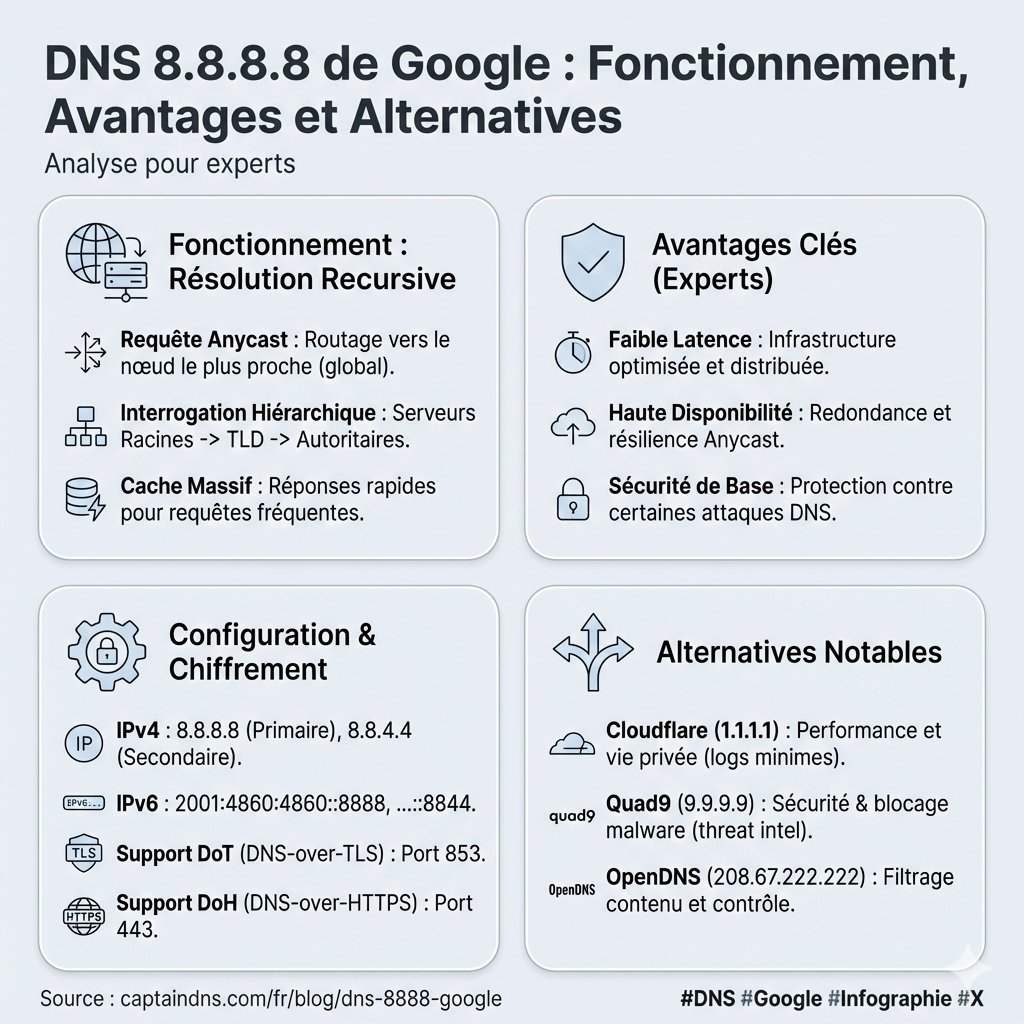
Why does everyone use 8.8.8.8 as their DNS?
This address is Google Public DNS: a free resolver, open to everyone since 2009. Over a trillion queries handled per day. Yes, trillion.
But what does it actually do?
DNS is the Internet's phonebook. When you type "https://t.co/FHwFKpVdMN", your device asks a DNS server to translate that name into an IP address. By default, your ISP handles this. But you can choose another resolver - like 8.8.8.8.
✅ Advantages of Google DNS 8.8.8.8
• Speed: worldwide anycast infrastructure (your query hits the nearest server)
• Reliability: almost never down, Google handles 30% of global DNS traffic
• Clean answers: no ad redirects on non-existent domains (unlike some ISPs)
• Supports DNSSEC, DNS over HTTPS, DNS over TLS
• IPv6 ready: 2001:4860:4860::8888
⚠️ Drawbacks to know
• Privacy: all your queries go through Google (even if logs are limited)
• No filtering: 8.8.8.8 blocks neither malware, adult sites, nor phishing
• Centralization: relying on a single player for such a critical service is worth questioning
🔄 Alternatives based on your needs
🔒 More privacy
→ Cloudflare 1.1.1.1 (logs purged in 24h, audited by KPMG)
🛡️ Automatic threat blocking
→ Quad9 9.9.9.9 (Swiss foundation, filters malware/phishing)
👨👩👧 Built-in parental control
→ OpenDNS Family Shield (blocks adult content with zero config)
🚫 Block ads and trackers
→ AdGuard DNS
⚙️ Full customization
→ NextDNS (a Pi-hole in the cloud)
🖥️ How to configure 8.8.8.8?
On Windows 11:
Settings → Network → Ethernet/Wi-Fi → DNS servers → Manual → 8.8.8.8 / 8.8.4.4
On your router:
Admin interface (usually 192.168.1.1) → Primary DNS: 8.8.8.8 / Secondary: 8.8.4.4
➡️ Your whole network benefits automatically
On Android:
Settings → Private DNS → https://t.co/KvJ5iW9WX3
On iPhone:
Wi-Fi → (i) on your network → Configure DNS → Manual → 8.8.8.8
I broke it all down with a comparison chart of public resolvers here 👇
https://t.co/HDMPSR7ori