Best OpenClaw use case of the day: Role-aware AI coworkers in Slack
I read a story about Kuse putting OpenClaw into their workspace, and the first thing that broke was trust. OpenClaw was built like a personal assistant, so if it had access to company data, it could answer whoever asked. Useful right up until someone asks the wrong thing in Slack.
What Kuse did next is the part I actually like. They reworked it so the AI employees understand roles, permissions, and relationships inside the company. Who is allowed to see finance, who isn't, who can assign what, who should just get a polite no. That is much more interesting to me than the usual agent demo where one founder gives the bot full access and calls it the future.
Apparently they even ended up making a human-only Slack channel to get away from the AI coworkers for a bit, which is funny, but also kind of proves the point.
Best OpenClaw use case of the day: Overnight decision engine
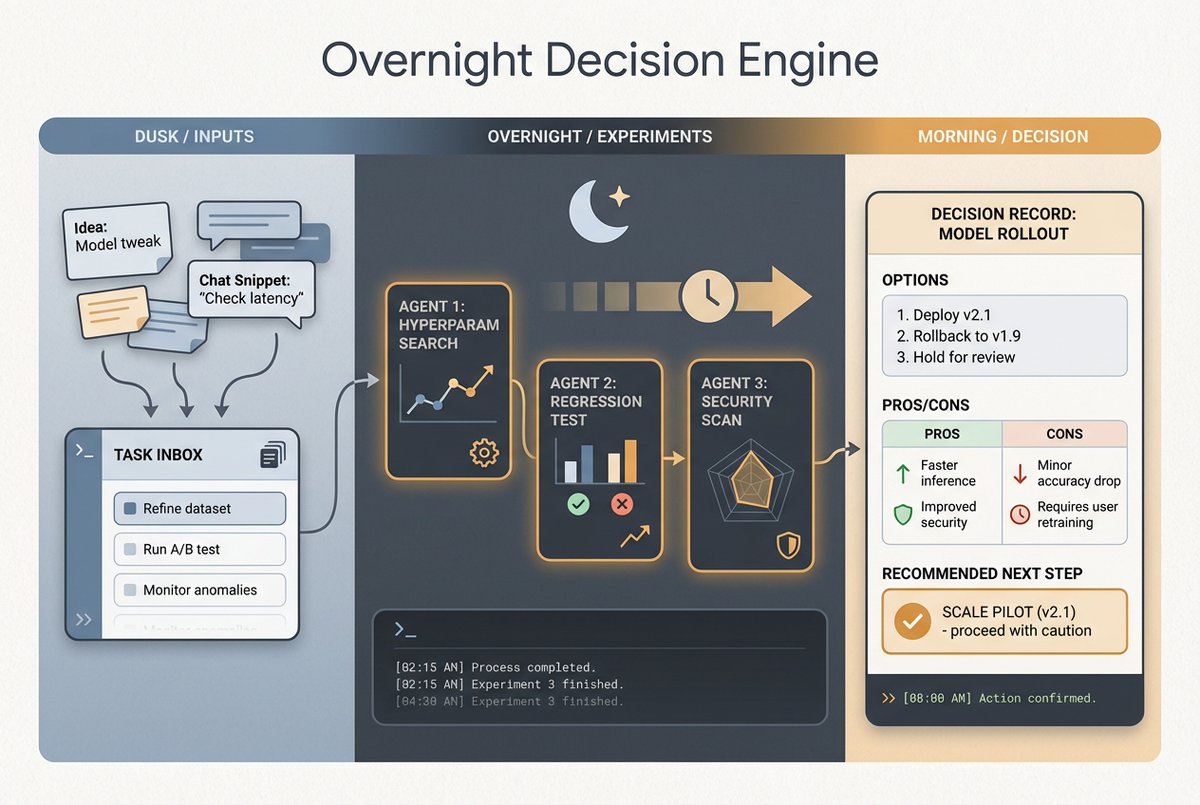
I found a setup this week that I liked more than the usual "AI assistant in my chat app" demo. The person built a simple log skill for OpenClaw, and every random thought, problem, or maybe-we-should-try-this idea goes into that log during the day as a task instead of disappearing into Slack history or notebook graveyard.
Then at night a cron job picks one task, spawns a few experiments around it, research, code, whatever makes sense, and by morning there is something more useful than a summary. There is a proposed direction, plus a decision record with the context, alternatives, pros, cons, and what the agent thinks should happen next. Kind of like giving your backlog insomnia.
I think this is one of the better business uses for OpenClaw because it is not pretending the agent is the decision-maker. It is doing the annoying middle part, turning half-formed thoughts into options you can actually review.
Announcing: Househunt - monopoly with real houses
3 years ago @nitinrajini and I became obsessed with a single stat
Zillow has 220M monthly active users but less 5M homes are sold every year
The vast majority of people browse houses because it's fun. Fun to dream about what you could buy if you had more money, or could live somewhere else
So we made a game where you can live out all your real estate fantasies
@playhousehunt is monopoly with real houses - guess house prices, buy, renovate, and sell homes to build your dream real estate empire
Best OpenClaw use case of the day: LinkedIn outreach agent with human review
I saw a post this week from Maxime Le Morillon about giving OpenClaw its own LinkedIn account for outreach. The setup was a 3-agent SDR flow, research, qualification, closing, and he says it turned high-intent LinkedIn demand into 12 demos in 7 days. I don't know how universal that number is, but the structure itself is interesting.
What I like is that this is not the usual cold DM machine dressed up as AI sales. It starts from intent, then hands the thread to separate agents that research the person, decide if they're worth talking to, and keep the conversation moving.
The part I keep thinking about is that OpenClaw actually fits this kind of workflow unusually well. It can work under its own delegated identity, attach to a signed-in browser session when that matters, and still keep approvals around risky actions so the whole thing doesn't turn into a spam cannon.
Best OpenClaw use case of the day: Slack ops copilot
I keep seeing the same OpenClaw pattern show up in different places, and it's not really a chatbot thing. It's more like giving a team an operator inside Slack that can watch threads, run scheduled checks, pull context from the right tools, and hand back something useful before anyone opens five tabs.
The interesting part is that the workflow is usually not one big magical agent. It's smaller pieces. Slack as the front door, cron jobs for the boring recurring checks, memory so the agent remembers what's already been decided, and isolated sessions when something needs to run in the background without polluting the main thread. Then a human still reviews the final answer when it matters.
That seems like a pretty good use case for support, ops, even internal on-call. Overnight summaries, unanswered customer threads, follow-up nudges, little approval gates before anything risky. Not very glamorous, but honestly that's why it feels real. It's close to how teams already work, just with less copy-paste and less stuff quietly getting dropped :)
We have about seven or eight agents running in our team workspace right now and each one does exactly one thing. One sends a traffic summary every morning. One monitors page speed. One tracks competitors. One handles ads. One manages content publishing. Each has one job.
What changed things was just being obsessive about the setup. Instructions files, clear guardrails, one job per agent. It's the obvious answer once you're on the other side of it. It really wasn't obvious at the time.
Had a call with someone who runs an AI consultancy for small and mid-sized companies. He goes in, audits their operations, sets up the implementation, manages it for them.
I hadn't framed our pricing from that angle before. We chose usage-based because it felt fair from our side as builders. Turns out it's also fair in a different way I hadn't quite articulated.
Best OpenClaw use case of the day: Event ops control tower
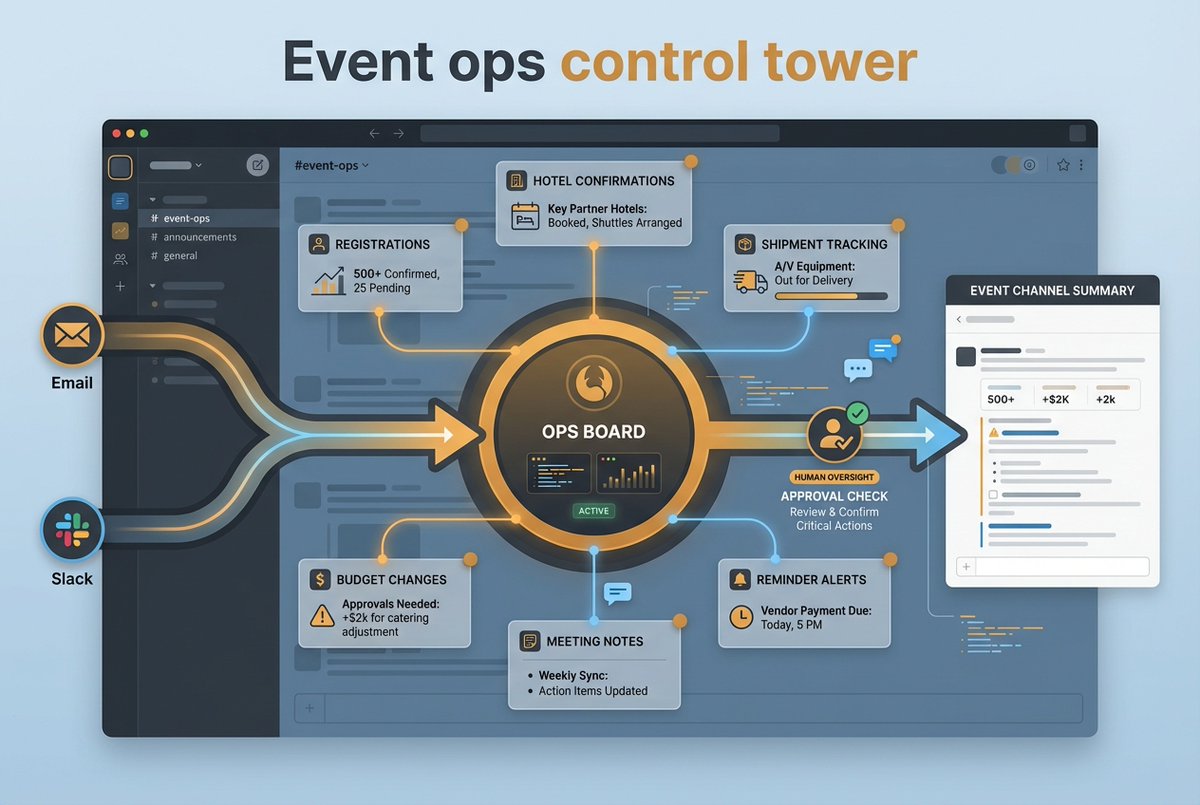
Saw someone use OpenClaw to run event ops from the middle of email + Slack: registrations, hotel confirmations, shipment tracking, budget changes, reminders, meeting notes, all the glamorous stuff.
cron does the check-ins, memory keeps vendor context, Slack stays the control room. Much more interesting than generic assistant demos because events are basically organized chaos :)
Best OpenClaw use case of the day: Overnight ops report in Slack
One setup I keep finding interesting is using OpenClaw less like a chatbot and more like the person who opens the office before everyone else. It runs overnight, checks the systems it has access to, pulls the few things that actually changed, and drops one clean brief into Slack by the time the team logs in.
I like this one because it fixes a very boring problem that eats a lot of time. Most teams already have dashboards, alerts, random tabs, and someone who half-remembers to check them in the morning. An OpenClaw agent can do that pass first, then only surface what needs eyes. New support spikes, a pipeline wobble, a weird site change, failed cron jobs, whatever fits the business.
That feels more useful to me than giving Slack another bot to chat with all day. The good version is quiet, specific, and slightly judgmental about what is actually worth interrupting people for. Which, honestly, is better than most morning standups :)
Best OpenClaw use case of the day: Specialist Slack teammates in one thread
A setup I found interesting uses OpenClaw to run multiple AI agents as actual Slack teammates, each with its own identity, but all working in the same thread.
So one agent analyzes the numbers, another picks up that thread and turns it into a messaging angle, and another proposes implementation steps. No constant copy-pasting, no re-briefing every step.
That is way more interesting than just putting a generic chatbot in Slack. It starts to make Slack feel like an operating layer for the team.
Best OpenClaw use case of the day: Support escalation queue with Slack approvals
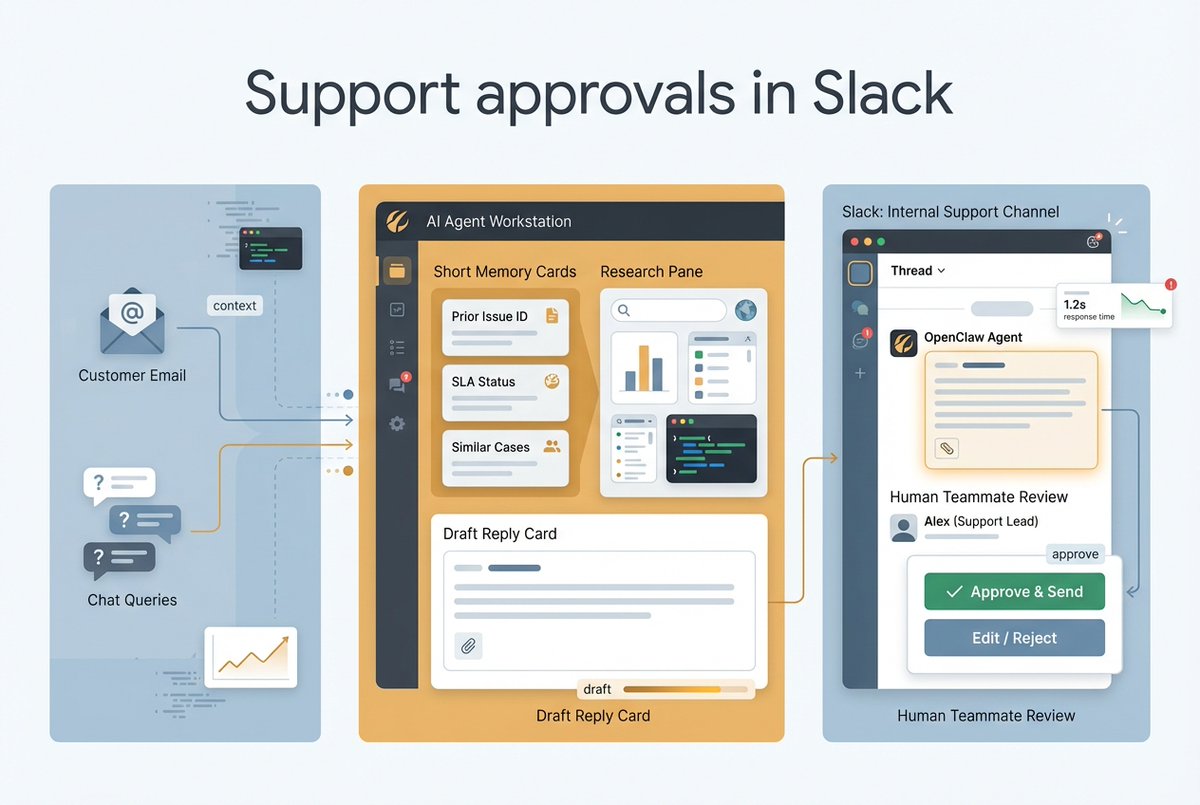
One OpenClaw pattern I keep finding interesting is using it as the layer between inbound support and the team itself.
Not a bot replying straight to customers, more like an internal escalation desk in Slack that pulls context from docs, tickets, and past threads, then drafts the reply for a human to approve.
That is the part I actually buy. The agent does the boring pass: research, summarize, draft, route. A real person still decides what gets sent. Much more believable than the usual "AI handles support" pitch.