A former MS egghead, a dirt-bike enthusiast, a PR drop-out + a Viking spouse. Shake, stir & voila: LiftOff, a cloud strategy firm that focuses on Microsoft 365.
Microsoft Teams channel backup is finally coming!
Microsoft is developing a new backup and recovery capability for Microsoft Teams that will allow organizations to recover team and channel data to a previously known good state.
It will support Teams, Standard, Private, and Public channels, including underlying data such as files and messages exchanged in channels.
The supported retention period is 30 days.
The rollout is currently planned to start in December 2026.
#Microsoft365 #Teams
Check out our latest guidance on blocking foreign logins into your #Microsoft365 tenant. This is critical information for commercial, GCC and GCC High tenancies! https://t.co/2zVvst6ASh
This is you reminder to turn off the ability for all users in your tenant to consent to applications.
This is now a Microsoft recommendation too.
See https://t.co/EeUjGVAkS2
Local Passkeys with Windows Hello increase protection using phish-resistant, multi-factor authentication for apps and websites. You can now use them without your phone or other hardware-based security keys in Windows 11, version 24H2. #Windows1124H2 https://t.co/SaRkvklNiN
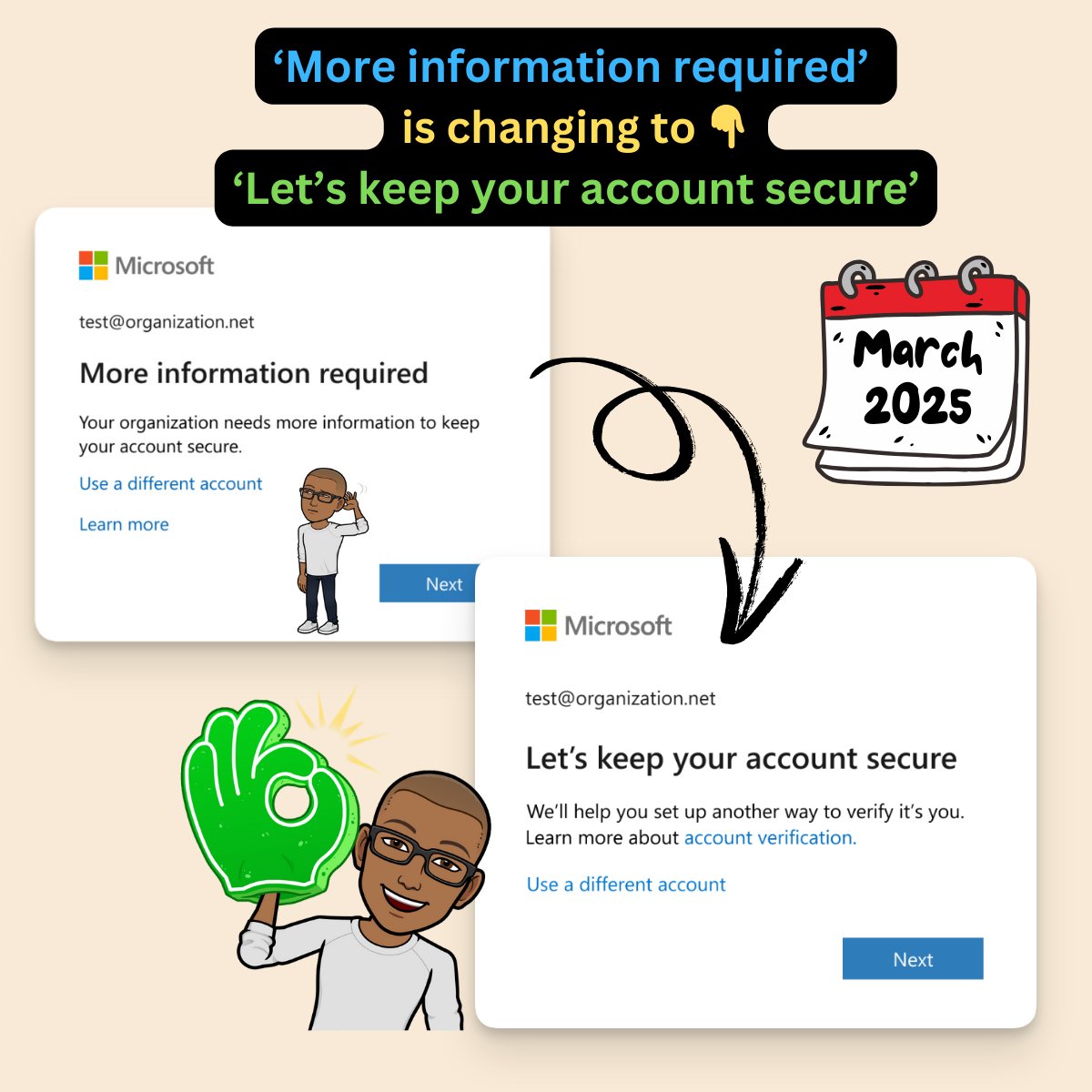
Did you know about the upcoming change to the Microsoft 365 login in page that prompts users to register for MFA?
Learn about this and other things that happened in the world of Microsoft Entra this week in the Entra newsletter 👇
https://t.co/qKXZRLn9sN
New shorter meeting URLs in Microsoft Teams!
Microsoft is reducing the length of Microsoft Teams meeting URLs for easier sharing. The new URL format will enhance security and usability.
This rollout applies to all Microsoft Teams platforms:
- Teams for Windows
- Teams for Mac
- Teams for iOS
- Teams for Android
- Teams devices
- Teams web
����𝐡𝐞𝐧 𝐭𝐡𝐢𝐬 𝐰𝐢𝐥𝐥 𝐡𝐚𝐩𝐩𝐞𝐧:
- Targeted Release: Mid to late February 2025
- General Availability (Worldwide, GCC): Mid to late April 2025
- GCC High, DoD: Early to late June 2025
𝐇𝐨𝐰 𝐭𝐡𝐢𝐬 𝐰𝐢𝐥𝐥 𝐚𝐟𝐟𝐞𝐜𝐭 𝐲𝐨𝐮𝐫 𝐨𝐫𝐠𝐚𝐧𝐢𝐳𝐚𝐭𝐢𝐨𝐧:
The new URL syntax is: https://t.co/YqjpPknWDg<meeting_id>?p=<HashedPasscode>
To make the meeting URL shorter, Microsoft is removing several parameters such as tenant ID, conversation ID, etc.
This change serves two main goals:
1. Improving usability of URL during sharing
2. Making the URL more secure and less susceptible to malicious attacks
How meeting links work and when they expire:
In case the meeting organizer gets removed from the tenant, the links to the meetings scheduled by them automatically expire. Every meeting link expires in 60 days after the scheduled event or in 8 hours, if it was created as Meet Now.
With the Short Meeting URL release, expiration limit will be applied to all newly created links.
Once the change to Short Meeting URL is released, all newly created meetings will expire: 60 days after meeting ends for scheduled meetings and 8 hours after creation for Meet Now. Once this expiry period is over, in case someone clicks the link, they will be unable to join the meeting.
Note: Old links created before short meeting URL release will continue working as it previously was (user will be able to join even after the documented expiry limits).
This adjustment is designed to enhance the security of Teams meeting links, thereby better safeguarding the customer tenant. It's not possible to keep the current behavior.
Recommendations in case the meeting link has expired:
For meeting organizer: Schedule a new meeting. If the meeting organizer got removed from the tenant someone else should reschedule their meetings from scratch.
For participant: Reach out to the meeting organizer and ask them to reschedule the meeting or send you an updated link.
𝐖𝐡𝐚𝐭 𝐲𝐨𝐮 𝐧𝐞𝐞𝐝 𝐭𝐨 𝐝𝐨 𝐭𝐨 𝐩𝐫𝐞𝐩𝐚𝐫𝐞:
You may want to check if you have any integrations that use parameters from the URL. After the rollout, the URL will only contain the meeting ID. Parameters such as tenant ID, organizer ID, conversation ID and message ID will not be in the URL.
You may inform meeting organizers from your tenant who use expired meeting links, or you may want to make a tenant-wide announcement about this change.
This rollout will happen automatically by the specified date with no admin action required. You may want to notify your users about this change and update any relevant documentation as appropriate.
#Microsoft365 #MicrosoftTeams
Popular Post and video by @WonderLaura: One of the coolest and most useful things in Microsoft 365 Copilot: Harness the Power of AI and Enhance Productivity with Copilot
🤖🤖🤖🤖
https://t.co/9PjUaIaPDY
#Microsoft365#Copilot
What are you thinking about the new version of #Outlook for #Microsoft365 ? We're not liking it here and suggest disabling it. Like Classic Coke, the original is better! https://t.co/tdB6dcJG6F
Friends, family, clients: thank you for another great year allowing us to serve you while working with some of the best people in the business. Happy 2025 from all of us here at LiftOff! We clean up nice, don't you think? #Microsoft365#GCC#GCCHigh
Moving from the #Microsoft365 Commercial Cloud to the #GCCHigh ? Here are some recommendations to make your cutover fast and efficient. https://t.co/8QI4Afk6BY
Are you in the correct #Microsoft365 cloud? U.S. State and Local Govs should verify they're in the Government Community Cloud #GCC . https://t.co/8QI4Afk6BY