yuk cobainn Prompt ChatGPT inii~
Create a split-screen poster.
Left:
original photo.
Right:
anime character version inspired by the person's appearance and vibe.
Add title:
"Your Anime Twin"
Include similarity score.
Professional anime magazine style.
Hey everyone! ✨
I was so excited to put Adobe Firefly to the test — the ultimate creative AI solution that lets you create and edit images with commercially safe generative models (plus the industry’s top partner models) right inside the app.
Starting with an image generated from my own photo of a classic British cottage in full spring blossom, I transformed it step-by-step into a magical fantasy movie scene straight out of a British fantasy story.
Watch the full video to see exactly how I did it:
—> Used Generative Expand (powered by the Firefly Fill & Expand model) to turn the vertical shot into a cinematic 16:9 frame
—> Generative Remove to clear distractions
—> Generative Fill to add a curious white rabbit and refine the cherry blossom tree.
—> The Prompt tool (with the latest partner models like Nano Banana 2) to bring in mystical mist, glowing nighttime magic, luminous ivy, warm light spilling from the windows, and enchanting fantasy flowers & mushrooms
Firefly made every change feel effortless and professional. It’s the perfect tool for turning real photos into stories!
If you love blending reality with imagination, try it yourself — I can’t wait to see your creations! 🔥
This post is sponsored by Adobe Firefly through a paid partnership, showcasing my experiences as a Brand Ambassador for their innovative platform. All opinions are my own.
#AdobeFireflyAmbassadors #Ad #HowToAdobeFirefly @Adobe@AdobeFirefly
ini lucu sihh
foto biasa bisa jadi kayak gini
kalau mau coba
- masukin foto kalian
- paste promptnya
(edit: username) jangan lupa diganti yaa
promptnya aku drop di komen
save dulu kalau mau coba nanti~
⚠️ EDIT DULU SEBELUM PAKAI:
(edit: username) → ganti dengan username kalian
Analyze the uploaded photo and preserve the original subject, face, pose, lighting, and overall composition. Do not alter the identity or structure of the person.
Transform the image into a soft scrapbook-style social media edit with a cute, aesthetic, and slightly dreamy vibe.
Add Instagram-style UI elements as SOLID overlay cards (clearly visible boxes, not blended into the background):
A rounded white rectangle box at the top for the username (edit: username), with soft shadow, clean edges, and solid fill (not transparent). The box must look like a real UI element, clearly separated from the background.
A caption box at the bottom in a white rounded rectangle, including:
(edit: username), small icons (like, comment, share), and a short caption.
The box must be solid, clean, and clearly visible with slight shadow, resembling a real Instagram post UI.
Ensure all UI elements look like layered design components, not painted or blended into the image.
Create a small inset photo (like a mini polaroid or photo frame) that highlights a relevant detail from the image (e.g. object, outfit, drink, background element). Place it naturally on one side.
Add decorative elements such as:
pastel stickers (e.g. flowers, hearts, stars, candy shapes, ribbons)
soft doodles or sparkles around the subject
Add ONE handwritten-style word or short phrase that matches the mood of the photo. The text must be generated dynamically based on the image context (do not use fixed text).
Use soft pastel tones, slightly warm color grading, and keep everything clean and aesthetic.
Maintain a balanced composition:
do not overcrowd the image, keep the subject as the main focus.
Final result should feel like a curated Instagram / Pinterest-style collage edit with clear layering, high resolution, and clean visual hierarchy.
🚫 NEGATIVE PROMPT:
do not change face, do not distort body, do not change pose, no blur on face, no cartoon face, no unrealistic anatomy, do not over-edit, do not cover the subject, no messy layout, no blended UI elements
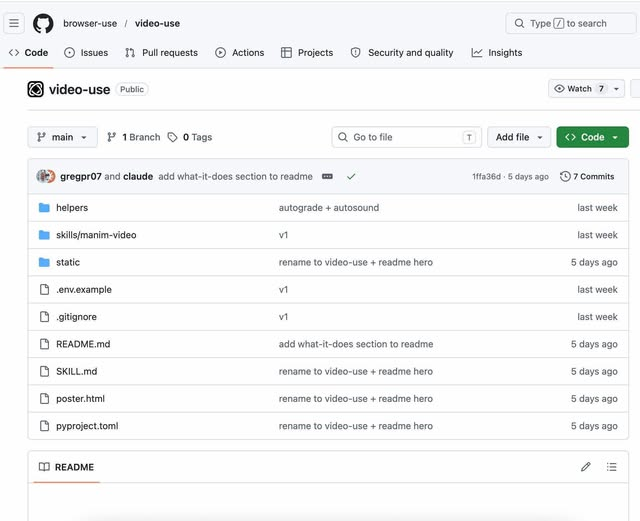
🚨 Goodbye Video editing
Someone just built a free video editing tool for Claude Code... and it’s wild.
You literally drop your raw footage + assets into a folder.
That’s it.
It takes care of everything:
- Cuts the clips
- Removes filler words
- Adds subtitles
- Applies color grading and filters
- Handles animations
- Renders the final video
No timeline. No manual editing. No back and forth.
Honestly, this goes beyond tools like Remotion.
It doesn’t just help you build videos… it does the editing for you.
The project is open-source on GitHub.
It’s called Video Use.
Edit this photo into a phone-in-hand 3D pop-out illusion. The main subject appears to come out of a smartphone screen being held by a hand. Keep the original environment and background consistent with the uploaded photo (do not change the setting).
Add supporting elements that match the scene and subject naturally (e.g., food, objects, or small props relevant to the context), with some elements partially inside and outside the screen to enhance the 3D effect.
Include subtle playful stickers or emojis that fit the theme without overpowering the image.
Use natural lighting and realistic shadows to create depth. Ensure perspective, scale, and color blending are cohesive and believable. Keep colors vibrant but balanced, not oversaturated.