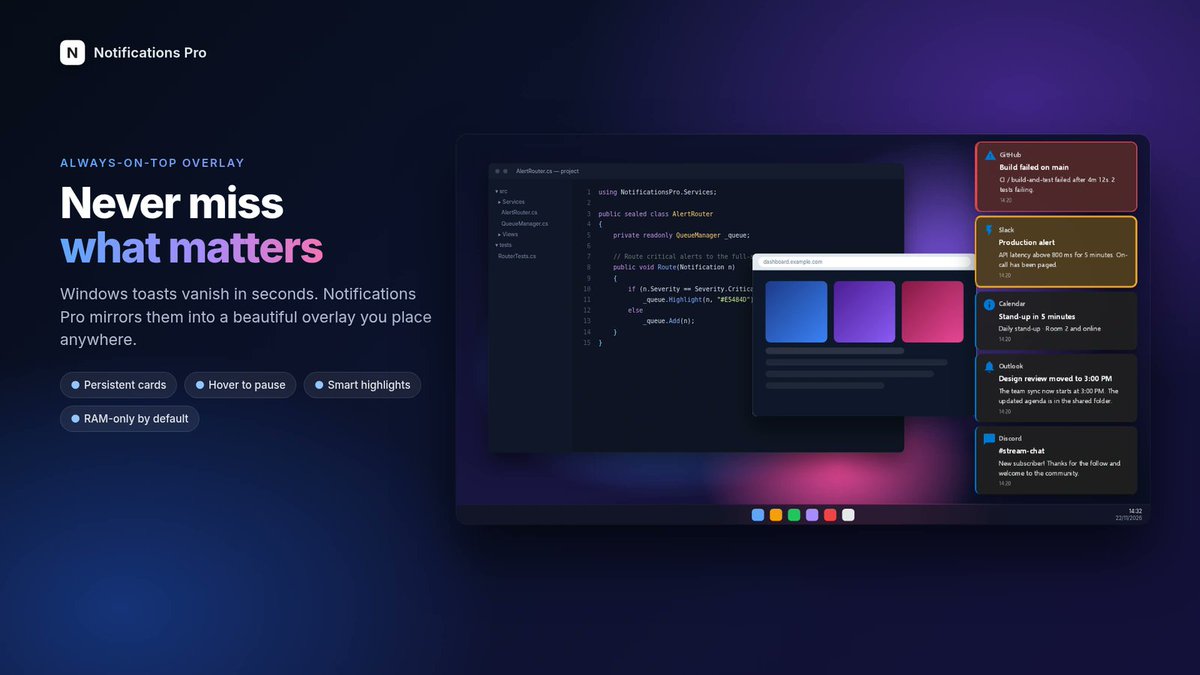
Default Windows toasts vanish in seconds. On a 4K, ultrawide or multi-monitor desk, they disappear into the corner.
Notifications Pro is a Windows 10 and 11 overlay I built to catch those toasts and put them in a workspace you actually control. Always on top, fully customisable, and privacy-first: notification text stays in RAM by default, with no telemetry and no network calls.
Open source, and I use it every day.
https://t.co/jWHDBGVKrL
10 tool updates you missed today 👇
The daily changelog rundown for the AI apps you actually use.
1. ChatGPT: Space is rolling out globally to Plus users (18+), replacing Library as the home for your pages, slides, images and files, with pages that can auto-update from your connected apps. Handy, but Free users can't open anything you share, so your free-tier mate still gets a screenshot.
2. Microsoft Copilot: GPT-6.2 Sol is rolling out worldwide to eligible users in Copilot Chat, Cowork, Studio, Word, Excel and PowerPoint, with Astra in Cowork and Studio. If your work Copilot suddenly got smarter, that's why. Your admin may still hold the switch.
3. Gemini: the app can now make GIFs, roughly three-second loops, rolling out in the US, UK, Canada, Japan, Korea, Australia, Germany and France. Group chat reaction game about to get very bespoke.
4. Claude: computer use is now in beta on Team and Enterprise plans, so Claude can see your screen and work in the desktop apps you allow. Rolling out gradually, so if you can't see it yet, it's not you.
5. Perplexity: Computer now works inside Chrome and other Chromium browsers through Perplexity's own extension. Hand it a task from the side panel and watch it click through your tabs. Fewer windows, same logins.
6. Google Antigravity: everyone's Gemini quota got reset, and Google's Antigravity lead says caching improvements mean you get about 22% more done per quota. A free top-up, rare enough to mention.
7. Claude: a refreshed mobile look is rolling out gradually, starting on iOS (needs iOS 26 or later). Chats, projects and plan all stay put, nothing to switch on. Just try not to panic when the buttons move.
8. ChatGPT: Pro users on the $200 plan can run GPT-6.2 Sol in Ultrafast mode in Codex, at up to 4.5x Standard speed. Great for quick back-and-forth, but it eats your allowance faster.
9. Codex CLI: version 0.171.0 adds GPT-6.2 Sol and Astra, with Sol as the default pick, and turns the workspace view on by default with document and image previews. Update before yours looks different to everyone's screenshots.
10. ElevenLabs: Ads Engine can now make new variants of your video ads (fresh hook or soundtrack) plus dubbed versions with translated captions, and now connects to TikTok too. Reshoots are expensive. This is less so.
Every item checked against official changelogs or reputable sources. Links in the first reply.
Which tool should I keep a closer eye on? New one every day.
👻 That image upload might be code in disguise.
Researchers turned crafted files into server command execution through Ghostscript (CVE-2026-125396) — shown across ~10 popular apps, from Roundcube webmail (no click, just opening the email) to CUPS print queues.
▸ Patched: Ghostscript 10.08.0
▸ But many Linux distros still lag
How it works ↓ https://t.co/oUFa7kmmau
Windows notifications are terrible if you actually rely on them.
If you use X, Discord, Slack, Reddit, email, build alerts, or browser apps on Windows, I just open-sourced Notifications Pro:
https://t.co/zNh1nqJtu4
It turns normal Windows toasts into a proper notification workspace:
- always-on-top overlay
- multi-monitor support
- per-app icons, sounds, and styling
- keyword highlight / mute rules
- narration / read-aloud controls
- focus mode, grouping, quiet hours, and more
I built it because default Windows toasts are too easy to miss on 4K, ultrawide, and multi-monitor setups, and they don’t give you much control over what actually matters.
It’s also privacy-first by design:
- notification text stays RAM-only by default
- no telemetry
- no network calls
- no disk history of notification content by default
If you want Windows notifications to be actually useful, give it a try! Enjoy 😀
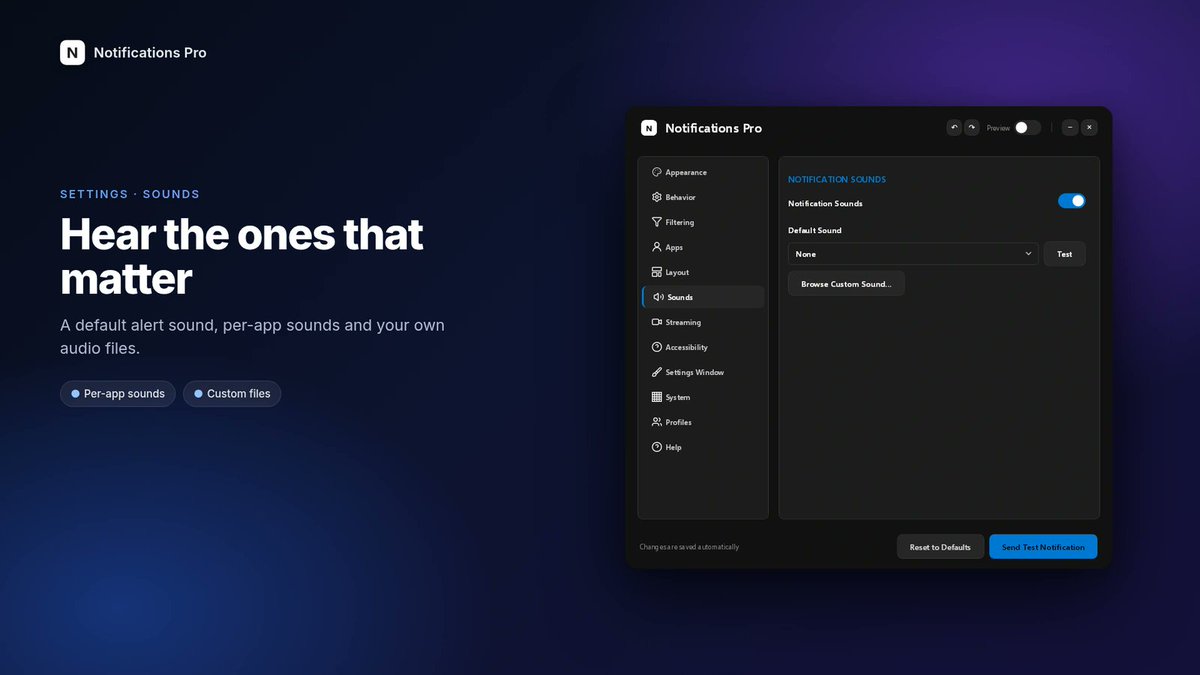
There's a Streaming tab for chroma-key and a fixed window size for OBS, built-in read-aloud and Voice Access labels, per-app sounds, and named profiles you can switch from the tray or import and export as JSON.
Still in active development. If you want Windows notifications to stay put and stay under your control, it's here:
https://t.co/jWHDBGVKrL
Default Windows toasts vanish in seconds. On a 4K, ultrawide or multi-monitor desk, they disappear into the corner.
Notifications Pro is a Windows 10 and 11 overlay I built to catch those toasts and put them in a workspace you actually control. Always on top, fully customisable, and privacy-first: notification text stays in RAM by default, with no telemetry and no network calls.
Open source, and I use it every day.
https://t.co/jWHDBGVKrL
Notification content stays off disk. Titles and bodies live in RAM only, there's no telemetry, and the app makes no network calls. No notification history is written to disk by default.
Session Archive is there if you want to review what came in during the current session. It's off by default, still RAM-only, and it clears when the app closes. That reduces persistence; it isn't a claim against software that can inspect the process on your machine.
It sits as a resizable, always-on-top overlay over whatever you're doing. Put it where you want, resize it, or turn on click-through so it never steals focus.
Cards can stay until you dismiss them, and hovering pauses the timer so you can finish reading. Long messages show in full, not cut off like a normal Windows toast.
Left-click dismisses a card; right-click gives you copy, mute app, or clear all.
‼️ OpenRouter just DROPPED 3 AI providers and stripped 125 endpoints of “Zero Data Retention” status.
Researchers uncovered months of AI prompt theft, including requests that were never supposed to be stored.
Here's how they caught it: https://t.co/ICI5tTmxK7