6. Editor de claridad y simplificación
“Revisa el siguiente contenido de presentación y reescríbelo para que funcione en slides. Reduce texto, afila los puntos clave, mejora la claridad y asegúrate de que cada slide comunique una sola idea clara. Contenido: [pega tu contenido].”
No entiendo por qué la gente aún no está usando agentes de IA.
La mayoría usa ChatGPT o Claude y se detiene ahí.
Aquí tienes 7 herramientas de IA que no usas y que son 10 veces más potentes:
Em vez de passar uma hora vendo Netflix, assista a esta aula de 2 horas de Stanford.
Ela vai te ensinar mais sobre como LLMs como ChatGPT e Claude são criados do que a maioria das pessoas que trabalham nas maiores empresas de IA aprende durante toda a carreira.
Stop summarising papers as your lit review strategy.
Summaries tell you what exists, not what's missing.
Find the research gap with this strategy instead:
👇
GOODBYE POWERPOINT. 🚨
Claude can now create a full presentation in just 120 seconds.
No slides. No stress. No design skills.
Just prompts.
Use these 12 prompts and watch the magic happen:
يا اخي هذا الشخص فناااان 🔥
كورس 5 ساعات مجانا عن بناء وكلاء الذكاء الاصطناعي.
صدقني اذا فهمت كل شيء في هدا الفيديو تصير انت من افضل 1% من الناس في العالم باستخدام الذكاء الاصطناعي.
Apple fired Steve Jobs.
He walked into MIT and gave the most honest 60-minute business lecture ever recorded.
No PR filter. No image to protect. Just raw thinking from the guy who built Apple once — and was about to do it again.
Watch this instead of Netflix tonight.
Bookmark it for later
People think learning AI takes months. It doesn't.
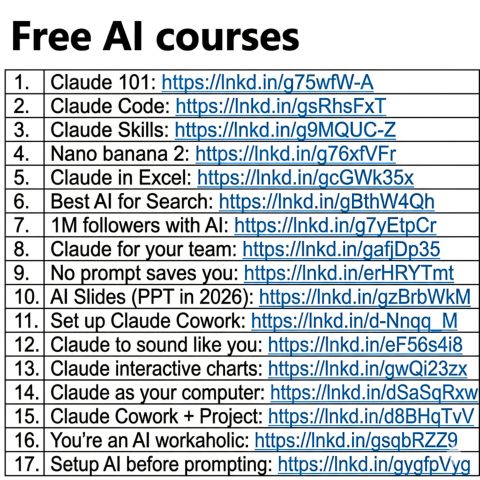
I wrote 17 free guides that teach it in hours:
Claude 101: https://t.co/3ZWD2IbdUn
Claude Code: https://t.co/GISSGAYEdo
Claude Skills: https://t.co/TBuwDWfRiw
Nano banana 2: https://t.co/r6ld7SeyRU
Claude in Excel: https://t.co/hPrcnTh2Hm
Best AI for Search: https://t.co/zVjm6lgO0t
1M followers with AI: https://t.co/F3aPOUXbfz
Claude for your team: https://t.co/p2Wvdx7ZuA
No prompt saves you: https://t.co/C2eG149SAU
AI Slides (PPT in 2026): https://t.co/7VKyUIIgNM
Set up Claude Cowork: https://t.co/9GEGg7bUrN
Claude to sound like you: https://t.co/bSdZ9RnpG8
Claude interactive charts: https://t.co/6SwyVkvx9W
Claude as your computer: https://t.co/fNS7HZwCFn
Claude Cowork + Project: https://t.co/m4XIUZ1xHj
You're an AI workaholic: https://t.co/o7F3HCKBk4
Setup AI before prompting: https://t.co/Qrl9nuWaYO
___
1. Save this list for later (three dots, top right).
2. Share it with a friend by ♻️ reposting this image
🚨 𝗕𝗥𝗘𝗔𝗞𝗜𝗡𝗚: Claude can now build your entire mobile app from a screenshot like a $350K senior developer at Apple. (for free)
Here are 8 insane Claude prompts replacing your entire mobile development team before they finish estimating the project cost:👇
(Save this 🔖 thread before it blows up.)
🚨 Breaking: Anthropic just launched 13 FREE AI courses with certificates
Here's every course, organized by who should take it
📌 For anyone starting with AI:
1. Claude 101
🔗 https://t.co/zTY7whSNm3
2. AI Fluency: Framework & Foundations
🔗 https://t.co/YzEZCwuSZL
📌 For developers:
3. Building With The Claude API
🔗 https://t.co/IOKtPOQLui
4. Introduction To Agent Skills
🔗 https://t.co/Rd4Y2Ud6I8
5. Claude Code In Action
🔗 https://t.co/znLRubgKzl
6. Introduction To Model Context Protocol
🔗 https://t.co/bhPvtHJrtl
7. Model Context Protocol: Advanced Topics
🔗 https://t.co/d0L3F3ZYig
8. Claude With Amazon Bedrock
🔗 https://t.co/RMor9JfGpr
9. Claude With Google Cloud's Vertex AI
🔗 https://t.co/Pt1eu83GZQ
📌 For educators & institutions:
10. Teaching AI Fluency
🔗 https://t.co/EWPDR3bXCn
11. AI Fluency For Educators
🔗 https://t.co/8oGHYaXnxB
12. AI Fluency For Students
🔗 https://t.co/kTAIEDdZt8
13. AI Fluency For Nonprofits
🔗 https://t.co/oQix3EfQIk
All self-paced
All free
And beyond Skilljar, Anthropic also has free Jupyter Notebook tutorials on GitHub :
API Fundamentals
→ Prompt Engineering
→ Real World Prompting
→ Evaluations
→ Tool Use
How to (finally) make AI presentations in PowerPoint.
Step 1: Open PowerPoint.
Step 2: Click Add-ins in the Home tab
Step 3: Search "Claude by Anthropic"
Step 4: Install it and open the sidebar
Step 5: Select Opus 4.6 (the latest model)
Step 6: Upload your data (Excel, CSV, anything)
Step 7: Prompt: "Turn this into a presentation"
Step 8: Wait ~2 minutes
Claude builds the deck.
If you want to refine something:
Just prompt Claude again from the sidebar.
P.S. Maybe PowerPoint isn't dead after all?
BREAKING: AI can now do market research like McKinsey (for free).
Here are 12 insane Claude Opus 4.6 prompts that replace $5,000 consultant: (Save for later)