the precondition is everything here: user input has to reach listRemote() or raw() options. a "paste your repo url" field passed straight through counts. worth a quick `npm ls simple-git` too, it's easy to ship it without ever installing it yourself
🔴 CRITICAL 9.2 · simple-git: command execution via argument injection in ls-remote (CVE-2026-134815)
Attackers who control arguments to listRemote() or raw() can run commands on the host by injecting the --exec option.
👉 Fix: 4.1.0, 3.0.0
https://t.co/fZXm7GlNDv
looks like the safe upsert until a double-submitted signup form hits it. no error, no row back, and the code after it has nothing to work with
the fix on the right isn't free either: a no-op update still writes a new row version and fires your update triggers
@Worshipperfx rollback reverts the code, not the data. if the new build already wrote rows or cache entries in a shape the old one can't parse, you just trade one crash for another. that's the whole case for expand/contract migrations
scrolling is the easy part. the job is clicking through to the actual changelog before repeating it in standup, because a lot of the "X just broke Y" screenshots turn out to be from a canary build
node's built-in env file flag covers most of what dotenv was doing. same default too: if the var is already exported in your shell, the file loses and nothing warns you
that's how an old export DATABASE_URL in a long-lived terminal points a migration at the wrong db
@0xkoji the lint half is usually where it stalls. any eslint plugin oxlint hasn't ported means running both for a while, and eslint-plugin-oxlint at least switches off the overlapping rules so CI isn't paying for them twice
the try/catch is right there and the fallback still never runs. reads fine in review, then the first real outage takes the whole request down with it.
one word fixes it. which one?
@ilia_gutu the place this usually leaks is platform files. once one package has a .web.tsx and a .native.tsx for the same screen, logic starts getting copied between the two and you get drift again, just inside one package
worth reading the PR before ripping out better-sqlite3. on main it's a docs-only change for now, making --experimental-sqlite a no-op got split into a separate semver-major PR. the real win is one less native addon to rebuild on every node upgrade
@embedsys JS has the opposite trap. node:assert never gets stripped, so the deepStrictEqual someone added "just for debugging" runs on every request in prod
force-with-lease is only as safe as your last fetch. if your editor auto-fetches in the background, the lease check passes and your teammate's commit just disappears, exit code 0
git 2.30 added the missing check. one config line: push.useForceIfIncludes true
@Arikalabs the part that stuck around is npm's unpublish policy. past 72 hours you can only pull a package if nothing depends on it, it had under 300 downloads last week and it has a single maintainer. left-pad wouldn't get past the first one
@hectorintech berktug, software engineer. I build web and mobile apps, mostly next.js and expo with supabase behind them, deployed on cloudflare. lately posting the small node and js gotchas I keep tripping over
jitter going into a major instead of a minor is the honest call. every open tab retrying at exactly 1s, 2s, 4s after an outage is a thundering herd you built yourself. dropping enabled for skipToken is the one I'd expect the comments to fight over
patched in 10.08.0, but ghostscript is rarely in anyone's package.json. it arrives with imagemagick, a pdf thumbnail worker or a base image nobody has rebuilt since spring, so "we don't use it" is the slowest answer to verify
Here it is... Upload2Shell. A reliably exploitable file-processing bug affecting almost every application with an upload box that I tested. It's so unbelievably widespread
https://t.co/MwY5wrNILr
Also on The New York Times homepage:
https://t.co/tRhTGFDNIn
@aidenybai the diff view is the only one that matters to me now. editor tabs show what the code is, the diff shows the rename three files away the agent never mentioned
@boristane the terminal wins partly because it's boring. one session, one scrollback, and when it goes sideways you can see which command did it instead of piecing it together from three dashboards
scripts chaining the tools beat one model round trip per call, mostly on latency. what I'd check first is what comes back when line 7 of its own script throws. a real stack trace it can fix, or just "tool failed"
Code Mode is an experimental new feature in Claude Code that can improve both speed and context efficiency when Claude needs to orchestrate multiple steps. Try it out and let us know what you think!
It enables Claude to perform multi-step tool calls by writing and running JavaScript. Rather than calling one tool at a time (e.g. Bash, Read, or Edit) and waiting to see the result before deciding what to do next, Code Mode allows Claude to write a simple script to run multiple commands in parallel, passing arguments and filtering outputs for subsequent tool calls to reduce context.
I'm excited about this work because Code Mode enables more efficient and streamlined multi-step coding flows. For example, rather than passing large amounts of raw search data into the context window or having to make a large number of sequential calls to perform the same refactoring across dozens of files, Claude can orchestrate these tasks programmatically in a single pass.
Still, you will be able to interact with Claude as normal through natural prompts. And if you ever need to see the exact JavaScript that Claude generated, you can always use Ctrl+O to expand the collapsed Code rows in the transcript viewer.
One of the most exciting practical improvements from Code Mode is its ability to perform long-running operations, like running test suites or complex builds, as background processes. When Code Mode is running in either auto or bypassPermissions mode, scripts can run in the background for up to two hours. You can continue to interact with Claude and perform other work within the same session. The /tasks command provides complete transparency and control over background scripts.
Each tool call that is generated within a script is still governed by your current deny and ask permission policies, sandbox constraints, and PreToolUse hooks. Hooks can even be defined specifically for the REPL tool to inspect the generated JavaScript before running, or redact sensitive tokens from the output before reading it into the context.
To enable Code Mode, just start your session with CLAUDE_CODE_EXPERIMENTAL_CODE_MODE=1 claude or set the environment variable in your ~/.claude/settings.json file.
Give it a try by running multi-file audits, batch edits, or any type of parallel search-and-filter operation. Code Mode is experimental and the team is actively iterating on it, so please run /feedback in your terminal to let us know what works well and where you hit any edges.
Hope it's helpful!
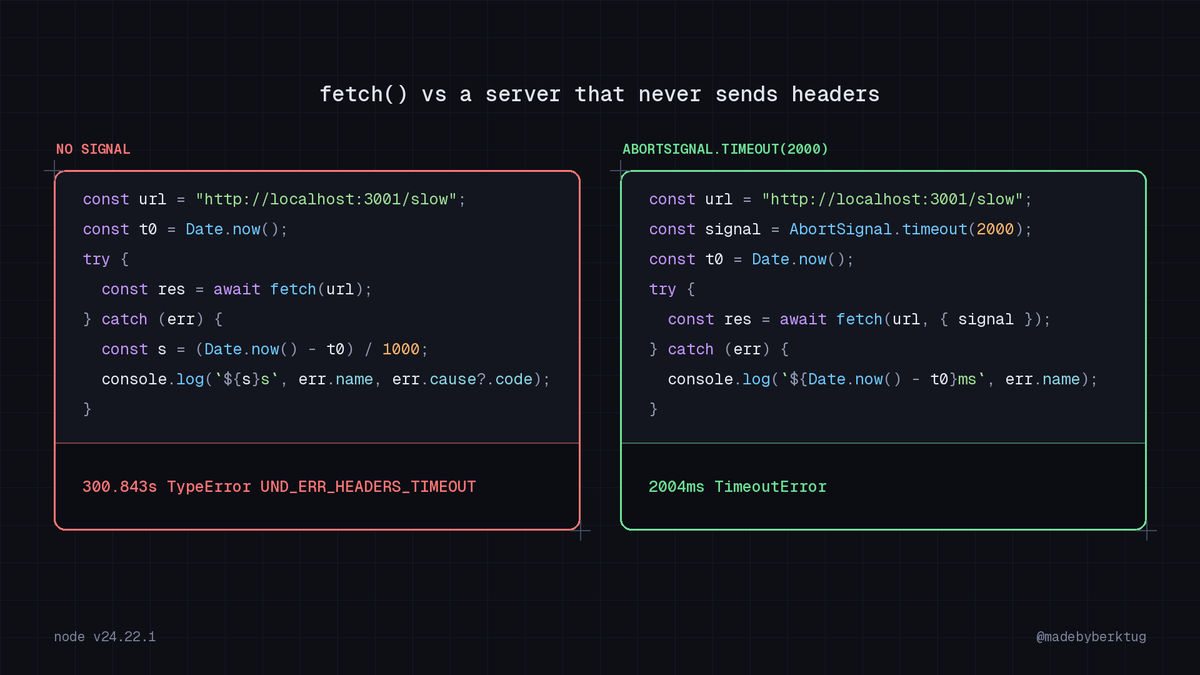
a dependency that's down is the easy case, it fails fast. one that accepts the connection and then hangs keeps your request, the socket and whatever else you were holding open the whole time. what timeout do you put on internal calls, or do you just trust them?
@thdxr the build-it-yourself phase usually lasts until the first timezone bug or password reset issue shows up on a sunday. then paying for software someone else already fixed looks cheap again