@luciacrabs Open "event viewer" on windows, click windows logs and check why it bluescreened specifically, then go from there (if you want to post the error i can maybe assist)
“Are there any characters you decide NOT to do?” Yup.
Here’s one that didn’t quite work out— Bingus.
Thought Bingus could be something, but ultimately chose not to pursue it.
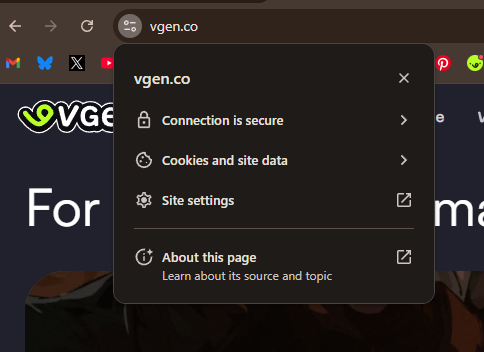
The connection secure thing is only referring to the data between you and the website being encrypted, it doesn't mean the website is trustworthy! but the link part is important, always make sure the link matches the website you are using/supposed to be in
Basics of Internet Safety to prevent things like this from happening, from an elder Millennial:
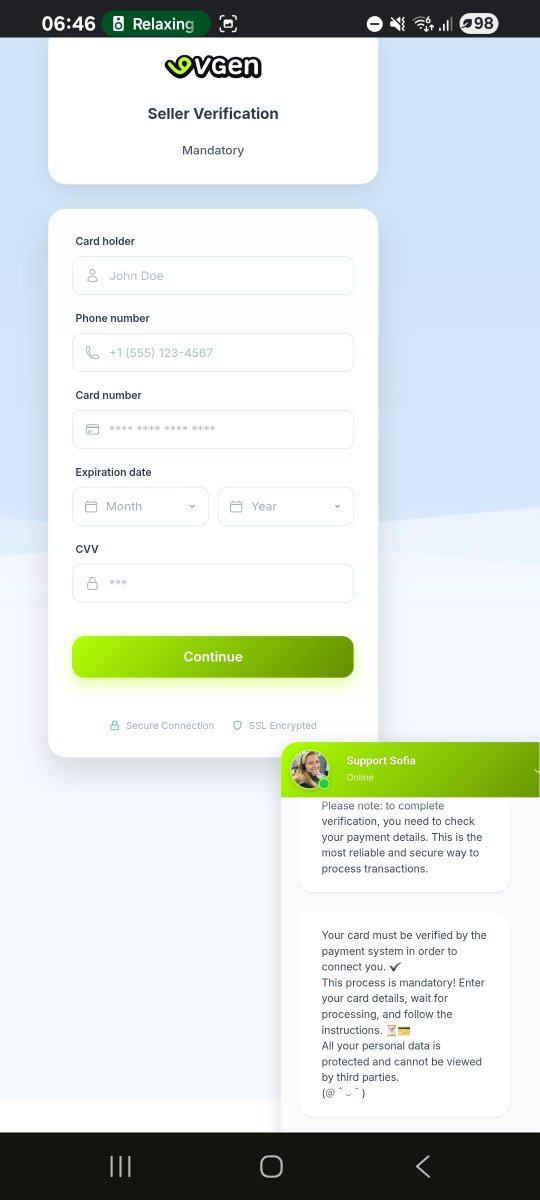
- Don't trust any links that are different from the domain you are on. In this case, VGen uses 'vgen . co'. Any links that differ from that should be considered a risk. If you are unsure, click on the icon to the left of the domain, make sure the connection is secure, and click on 'About this page' to see more information about the page itself. Everything should lead to the domain itself. In the example provided, we see the scam domain has a string of random numbers and it doesn't end in '.co'. Immediate red flag. Do not click on it.
- Any self-respecting company has official channels that they will use to contact you with. In VGen's case, they won't ever try to 'verify' you or contact you through your commission form. That is for clients only. It should immediately be a red flag that a supposed VGen staff will try to get you to click a link through a commission form. If it's not an official email from the official email address, it's probably a scam.
- Do not, and I repeat, DO NOT ever provide your contact information, bank information or credit card details manually. Even if it looks official, double and triple check before manually providing your information to ANYONE. In VGen's case, you only provide your payment details ONCE, and it's through the Payment section in the official Settings page. It should look like this 'https:// vgen. co / settings?section=payments'. Anything that is different from that link IS A SCAM.
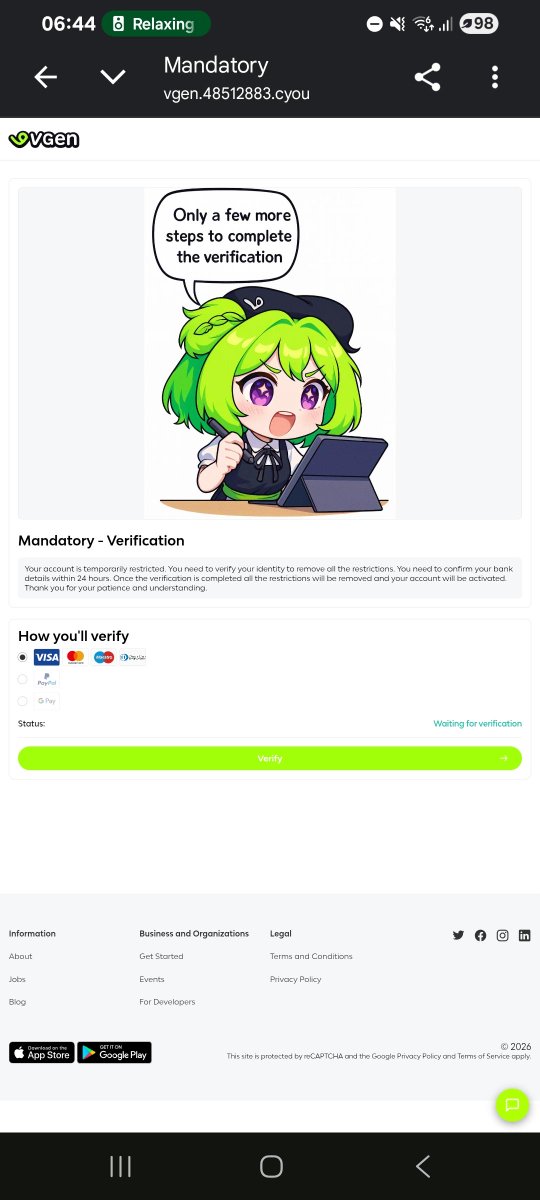
- VGen won't ask you for payment details verification of any kind. You only get verified once. Once you're in, you're in. There's no need to verify you again. Anyone that demands you verify yourself again after you're inside the platform as a Verified Artist is a scammer. There's only ONE verification process and it doesn't include your payment details or any sensitive information.
- It's better to be safe than sorry. Even if it looks official, deny the request. Don't click the link. Go to the official Discord and ask a staff member if it's something they need from you. Send an email to verify it's actual VGen staff. You never need to answer immediately, if you're not sure, wait until you have a proper answer. And if they are trying to rush you or tell you there's a time limit, that's a scam. An official company like VGen will never try to rush a reply from you.
- All in all, be very vigilant, and be very skeptic of anything that looks even remotely fishy. Do not trust people online easily, especially if you don't know them. Your payment information is a SECRET and you should keep it that way at all times.
And also, while it's frustrating, scammers exist everywhere on the internet. Every single website and platform has them. This is not VGen's fault exclusively, this could happen literally anywhere. I'm sure VGen will try to implement more security measures to prevent this, but it's also your own personal responsibility to protect yourself. Take care! 💕
@weuntaew Only links you should click are links from trusted websites (e.g: Google Drive), but in general always be cautious when someone random sends you a link or a file
So in general if someone you don't know sends you a link or a file, always double check.
The main way to avoid getting scammed on the internet is to be aware that there's scams everywhere and acting accordingly.
Weekly cybersec PSA
Always check that a link is legit before inputting sensitive information, it should match the website (vgen dot Com or whatever).
Another method that happens a lot too is that you are asked to download a pdf, which is used to hijack your cookies/accounts
so what happened to Neo is horrible
this is a new phishing scam specifically for Vgen (i got these from the Vgen reddit) a user will put a link in the reference section which leads to this and its basically asking you for "user verification"
do not give away your bank details
@berylberu honestly updating them wouldn't hurt anyways, windows tends to forget to update those sometimes, you can download them from your mother board manufacturer website, other than that it could be a messed up cable, is it a cat 6?