Business battle SUPER THREAD, covering:
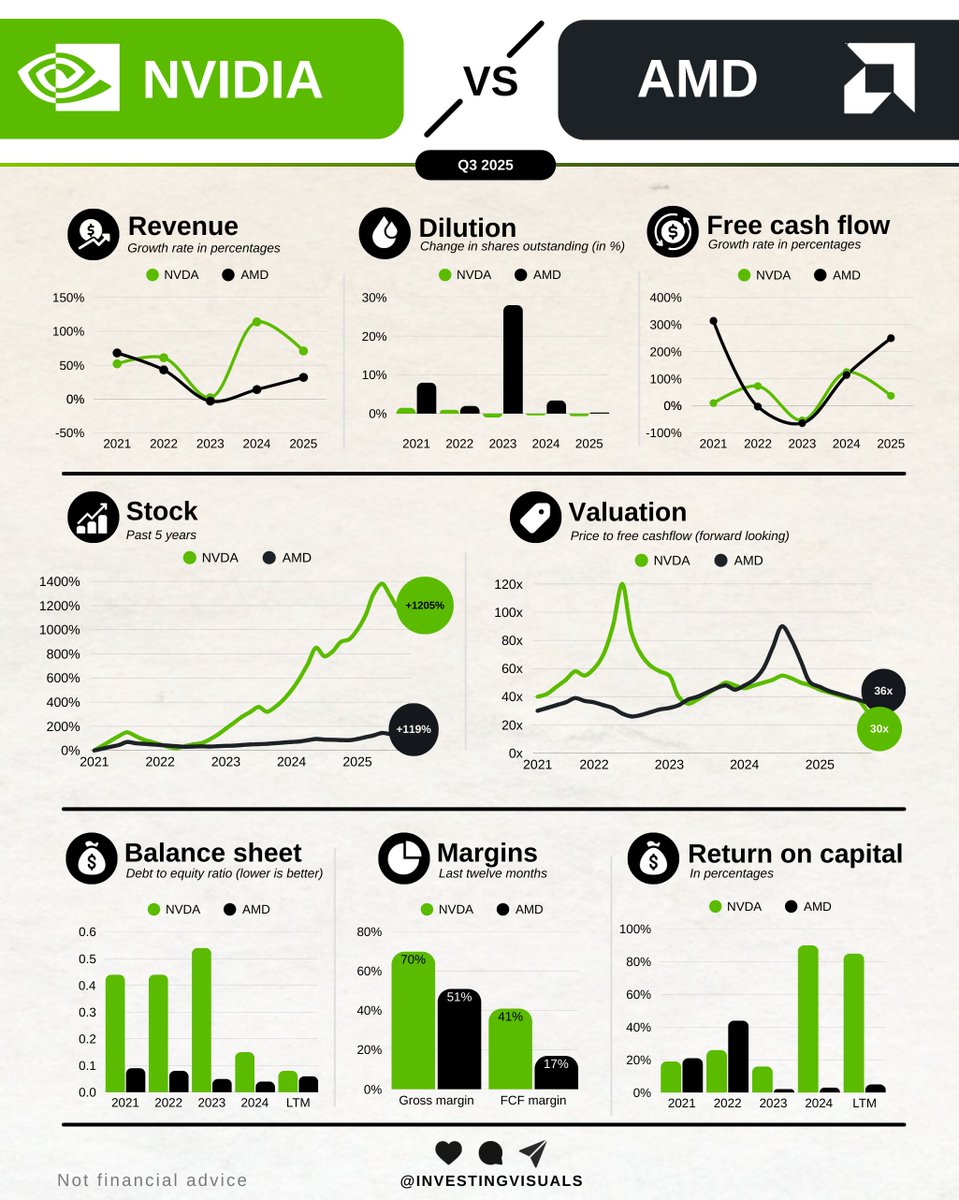
• $NVDA vs $AMD
• $ASML vs $TSM
• $GOOGL vs $MSFT
• $AMZN vs $MELI
• $V vs $MA
And many more. Let's dive in! 🧵👇
1/10 - $NVDA vs $AMD: Two AI powerhouses, both in a great position to do very well in the years to come.
ML/LLMOps 101: 𝗖𝗼𝗻𝘁𝗶𝗻𝘂𝗼𝘂𝘀 𝗧𝗿𝗮𝗶𝗻𝗶𝗻𝗴 (𝗖𝗧) and what steps are needed to achieve it.
CT is the process of automated ML Model retraining in Production Environments on a specific trigger. Let’s look into some prerequisites for this:
1) Automation of ML Pipelines.
- Pipelines are orchestrated.
- Each pipeline step is developed independently and is able to run on different technology stacks.
- Pipelines are treated as a code artifact.
✅ You deploy Pipelines instead of Model Artifacts allowing Continuous Training In production.
✅ Reuse of components allows for rapid experimentation.
2) Introduction of strict Data and Model Validation steps in the ML Pipeline.
- Data is validated before training the Model. If inconsistencies are found - Pipeline is aborted.
- Model is validated after training. Only after it passes the validation is it handed over for deployment.
✅ Short circuits of the Pipeline allow for safe CT in production.
3) Introduction of ML Metadata Store.
- Any Metadata related to ML artifact creation is tracked here.
- We also track performance of the ML Model.
✅ Experiments become reproducible and comparable between each other.
✅ Model Registry acts as glue between training and deployment pipelines.
4) Different Pipeline triggers in production.
- Ad-hoc.
- Cron.
- Reactive to Metrics produced in Model Monitoring System.
- Arrival of New Data.
✅ This is where the Continuous Training is actually triggered.
5) Introduction of Feature Store (Optional).
- Avoid work duplication when defining features.
- Reduce risk of Training/Serving Skew.
𝗠𝘆 𝘁𝗵𝗼𝘂𝗴𝗵𝘁𝘀 𝗼𝗻 𝗖𝗧:
➡️ Introduction of CT is not straightforward and you should approach it iteratively. The following could be good Quarterly Goals to set:
- Experiment Tracking is extremely important at any level of ML Maturity and the least invasive in the process of ML Model training - I would start with ML Metadata Store introduction.
- Orchestration of ML Pipelines is always a good idea, there are many tools supporting this (Airflow, Kubeflow, VertexAI etc.). If you are not doing it yet - grab this next, also make the validation steps part of this goal.
- The need for a Feature Store will wary on the types of Models you are deploying. I would prioritise it if you have Models that perform Online predictions as it will help with avoiding Training/Serving Skew.
- Don’t rush with Automated retraining. Ad-hoc and on-schedule will bring you a long way.
Let me know your thoughts! 👇
#LLM #MachineLearning #AI
10 Must Read Data Structures and Algorithms Books
1. Introduction to Algorithms 4th Edition by Thomas H. Corman - https://t.co/t3oUJUgvkm
2. Grokking Algorithms 2nd Edition by Aditya Bhargava - https://t.co/11au3L8lzT
3. Algorithms by Robert Sedgewick- https://t.co/hZEkRXVC3k
Popular interview question: how to diagnose a mysterious process that’s taking too much CPU, memory, IO, etc?
The diagram below illustrates helpful tools in a Linux system.
🔹‘vmstat’ - reports information about processes, memory, paging, block IO, traps, and CPU activity.
🔹‘iostat’ - reports CPU and input/output statistics of the system.
🔹‘netstat’ - displays statistical data related to IP, TCP, UDP, and ICMP protocols.
🔹‘lsof’ - lists open files of the current system.
🔹‘pidstat’ - monitors the utilization of system resources by all or specified processes, including CPU, memory, device IO, task switching, threads, etc.
Credit: Diagram by Brendan Gregg
--
Subscribe to our weekly newsletter to get a Free System Design PDF (158 pages): https://t.co/uc5M7CdXXC
Cookie Basics 🍪
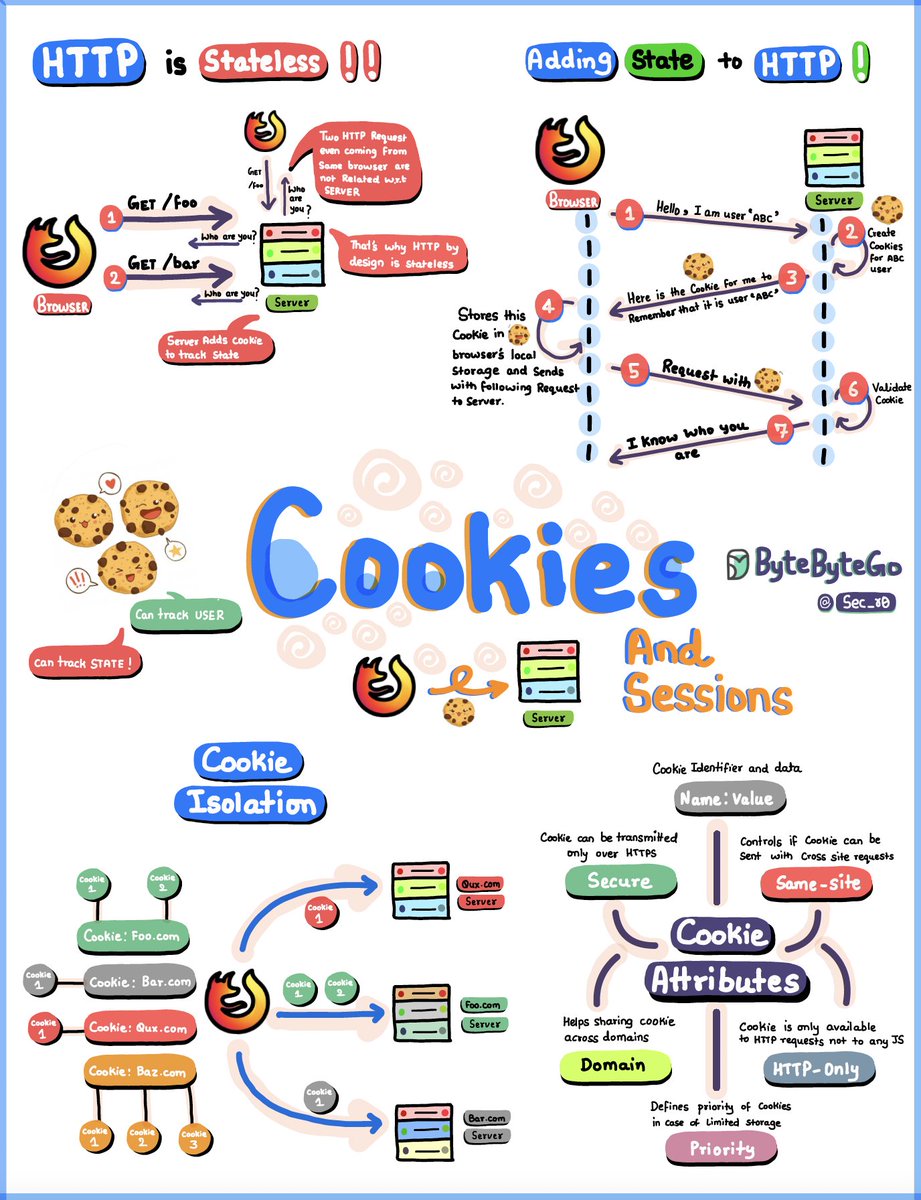
At its core, HTTP is stateless - each request/response cycle stands on its own, with the server forgetting everything after responding. But often we need to remember things between requests, like user logins or shopping carts. That's where cookies come in.
Cookies are tiny text files stored in your browser. When a server wants to remember something, it sends a "Set-Cookie" header telling your browser to create a cookie. From then on, your browser sends that cookie data back with each request to the server, allowing it to "remember" you.
But it goes further - cookies enable sessions, which are like personal data stores on the server tied to your specific interactions. The server gives you a unique "session ID" cookie, and when you send it back, the server recognizes you and accesses your session data.
There are some security and privacy controls baked in. Same-site cookies only get sent to the originating site to prevent cross-site attacks. Cookies are also isolated by domain and path to limit access. Secure cookies only transmit over encrypted HTTPS, while HttpOnly cookies are hidden from browser JavaScript code to stop cross-site scripting.
–
Subscribe to our weekly newsletter to get a Free System Design PDF (158 pages): https://t.co/6j06DUIbVn
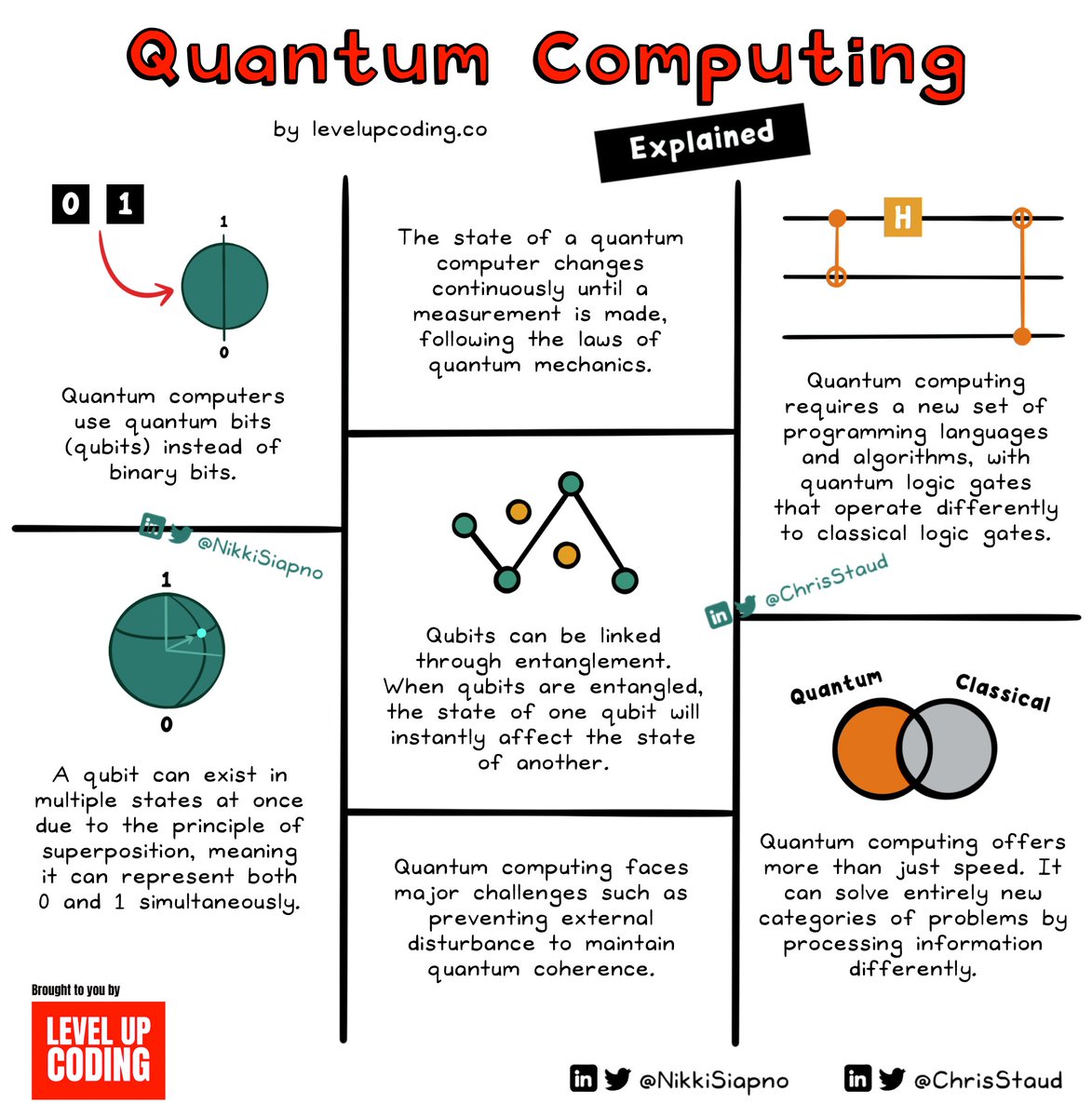
What is quantum computing, and how does it work?
Unlike classical computing, which operates on a binary system of 1s and 0s, a quantum bit (qubit) can exist in multiple states at the same time; this is called ‘superposition’.
‘Entanglement’ is another fundamental aspect of quantum computing. When qubits are entangled, the state of one qubit affects the state of the other.
Superposition and entanglement allow quantum computers to process information in a very different way from classical computers.
𝗤𝘂𝗯𝗶𝘁𝘀 can handle information that is far denser than the classical binary approach.
Quantum computers can perform multiple calculations simultaneously, which gives them much more processing power than classical computers.
Entanglement helps make computation shortcuts leading to algorithms that are far more efficient and powerful.
These benefits open up the possibility of solving problems that were previously unsolvable, from complex simulations to advanced modeling.
However, it comes with a fair set of challenges.
For example, interference from the environment makes it difficult for qubits to maintain superposition (known as decoherence).
Quantum computing is also inherently prone to errors which makes error correction a necessary component.
Quantum computing is not just a buzzword. It’s opening up the doors to an exciting new frontier where the world’s thorniest problems can be viewed through a new lens.
~~~
𝗔 𝗯𝗶𝗴 𝘁𝗵𝗮𝗻𝗸 𝘆𝗼𝘂 𝘁𝗼 𝗼𝘂𝗿 𝗽𝗮𝗿𝘁𝗻𝗲𝗿 𝗣𝗼𝘀𝘁𝗺𝗮𝗻 𝘄𝗵𝗼 ��𝗲𝗲𝗽𝘀 𝗼𝘂𝗿 𝗰𝗼𝗻𝘁𝗲𝗻𝘁 𝗳𝗿𝗲𝗲 𝘁𝗼 𝘁𝗵𝗲 𝗰𝗼𝗺𝗺𝘂𝗻𝗶𝘁𝘆.
Whether you’re working with HTTP, gRPC, GraphQL, WebSockets or even MQTT, Postman has you covered. Check it out: https://t.co/OQSBVFzVkn
1. AI for Beginners
Get a basic idea of what it is like to get into AI.
- Terminologies
- Basics of NLP
- Basics of Computer Vision
https://t.co/65K1ARTBG0
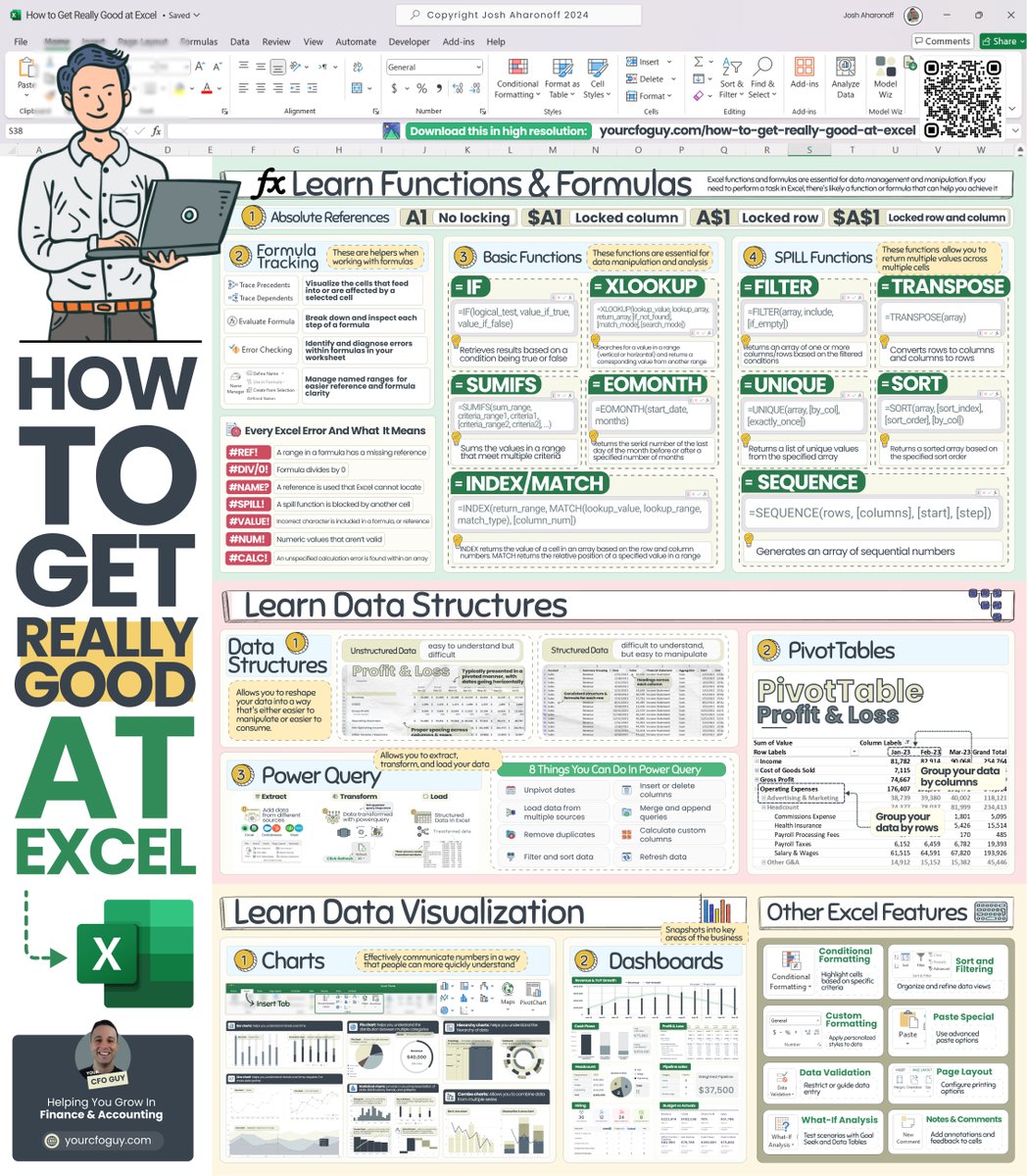
This post contains EVERYTHING you can do in excel 😱👇
Excel continues to be the #1 tool used for Finance & Accounting professionals…
and for good reason.
With excel, there are pretty much no limits to what you can accomplish.
Let’s do a walk through it all 👀 :
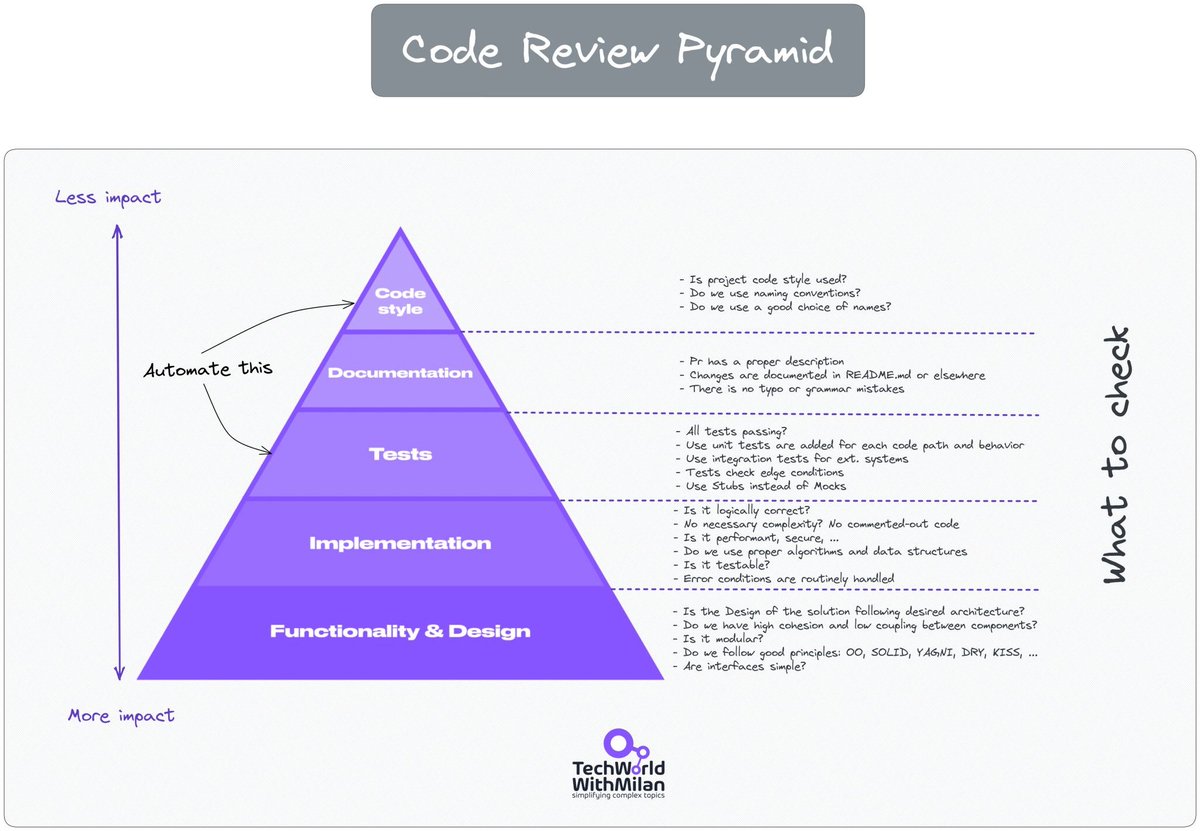
𝗛𝗼𝘄 𝘁𝗼 𝗱𝗼 𝗰𝗼𝗱𝗲 𝗿𝗲𝘃𝗶𝗲𝘄𝘀 𝗽𝗿𝗼𝗽𝗲𝗿𝗹𝘆
An essential step in the software development lifecycle is code review. It enables developers to enhance code quality significantly. It resembles the authoring of a book. The author writes the story, which is then edited to ensure no mistakes like mixing up "you're" with "yours." Code review in this context refers to examining and assessing other people's code.
There are different 𝗯𝗲𝗻𝗲𝗳𝗶𝘁𝘀 𝗼𝗳 𝗮 𝗰𝗼𝗱𝗲 𝗿𝗲𝘃𝗶𝗲𝘄: it ensures consistency in design and implementation, optimizes code for better performance, is an opportunity to learn, and knowledge sharing and mentoring, as well as promotes team cohesion.
What should you look for in a code review? Try to look for things such as:
🔹 𝗗𝗲𝘀𝗶𝗴𝗻 (does this integrate well with the rest of the system, and are interactions of different components make sense)
🔹 𝗗𝘂𝗻𝗰𝘁𝗶𝗼𝗻𝗮𝗹𝗶𝘁𝘆 (does this change is what the developer intended)
🔹 𝗗𝗼𝗺𝗽𝗹𝗲𝘅𝗶𝘁𝘆 (is this code more complex than it should be)
🔹 𝗡𝗮𝗺𝗶𝗻𝗴 (is naming good?)
🔹 𝗘𝗻𝗴. 𝗽𝗿𝗶𝗻𝗰��𝗽𝗹𝗲𝘀 (solid, kiss, dry)
🔹 𝗧𝗲𝘀𝘁𝘀 (are different kinds of tests used appropriately, code coverage),
🔹 𝗦𝘁𝘆𝗹𝗲 (does it follow style guidelines),
🔹 𝗗𝗼𝗰𝘂𝗺𝗲𝗻𝘁𝗮𝘁𝗶𝗼𝗻, etc.
Here are some good practices when doing a code review:
𝟭. 𝗧𝗿𝘆 𝘁𝗼 𝗿𝗲𝘃𝗶𝗲𝘄 𝘆𝗼𝘂𝗿 𝗼𝘄𝗻 𝗰𝗼𝗱𝗲 𝗳𝗶𝗿𝘀𝘁
Before sending a code to your colleagues, try to read and understand it first. Search for parts that confuse you.
𝟮. 𝗪𝗿𝗶𝘁𝗲 𝗮 𝘀𝗵𝗼𝗿𝘁 𝗱𝗲𝘀𝗰𝗿𝗶𝗽𝘁𝗶𝗼𝗻 𝗼𝗳 𝘄𝗵𝗮𝘁 𝗶𝘀 𝗰𝗵𝗮𝗻𝗴𝗲𝗱
This should explain what changes were at a high level and why those changes were made.
𝟯. 𝗔𝘂𝘁𝗼𝗺𝗮𝘁𝗲 𝘄𝗵𝗮𝘁 𝗰𝗮𝗻 𝗯𝗲 𝗮𝘂𝘁𝗼𝗺𝗮𝘁𝗲𝗱
Leave to the system everything that can be automated, such as checking for successful builds (CI), style changes (linters), automated tests, and some code smells and bugs (SonarQube).
𝟰. 𝗗𝗼𝗻'𝘁 𝗿𝘂𝘀𝗵
You need to understand what has changed. Every line of it. Read multiple times if needed, class by class.
𝟱. 𝗖𝗼𝗺𝗺𝗲𝗻𝘁 𝘄𝗶𝘁𝗵 𝗸𝗶𝗻𝗱𝗻𝗲𝘀𝘀
Never mention the person (you), always focus on changes as questions or suggestions, and leave at least one positive comment. Explain the "why" in your comments and suggest how to improve it.
𝟲. 𝗔𝗽𝗽𝗿𝗼𝘃𝗲 𝗣𝗥 𝘄𝗵𝗲𝗻 𝗶𝘁𝘀 𝗴𝗼𝗼𝗱 𝗲𝗻𝗼𝘂𝗴𝗵
Don't strive for perfection, but hold to high standards. Don't be a nitpicker.
𝟳. 𝗠𝗮𝗸𝗲 𝗿𝗲𝘃𝗶𝗲𝘄𝘀 𝗺𝗮𝗻𝗮𝗴𝗲𝗮𝗯𝗹𝗲 𝗶𝗻 𝘀𝗶𝘇𝗲
We should limit the number of lines of code for review in one sitting. Our brains cannot process so much information at once. The ideal number of LOC is 200 to 400 lines of the core at one time, which is usually 60 to 90 minutes.
Check the full text in the comments.
#softwareengineering #programming #systemdesign #developers #coding
Panama Canal Traffic by Shipment Category and Tonnage 🚢
📲 Want more content like this, along with daily insights from the world’s top creators? See it first on the @VoronoiApp.
https://t.co/fWyXEpKdS7





![invxsecurities's tweet photo. 🚀 แจกฟรี! Skill ลับบน Claude สำหรับสายการเงิน ยกระดับการลงทุน เสมือนมีนักวิเคราะห์จากสถาบันการเงินระดับโลกมาช่วยสรุปงบให้แบบส่วนตัว!
==============================
ยุคนี้ลงทุนทั้งทีต้องมี AI เป็นผู้ช่วย! 💡 สำหรับนักลงทุนท่านไหนที่ต้องคอยติดตามอ่านงบการเงิน หรืออยากได้บทวิเคราะห์ผลประกอบการแบบเจาะลึก แต่ไม่อยากเสียเวลามานั่งสรุปข้อมูลเอง วันนี้ InnovestX ขอแนะนำเครื่องมือเด็ดที่จะช่วยประหยัดเวลาให้คุณแบบสุดๆ ครับ
ขอแนะนำฟีเจอร์ "Earnings Analysis Skill" ปลั๊กอินส่วนเสริมที่จะเปลี่ยน Claude ธรรมดาให้กลายเป็นผู้ช่วยนักวิเคราะห์ทางการเงินระดับโปร 💼
ความเจ๋งคือ AI ตัวนี้จะไปรวบรวมข้อมูลงบการเงินล่าสุดที่เพิ่งประกาศออกมา นำมาวิเคราะห์ และสรุปจัดรูปแบบออกมาเป็นรายงานในไฟล์ Microsoft Word ให้เราพร้อมใช้งานทันที! ที่สำคัญคือ ใช้งานได้ฟรี! ไม่มีค่าใช้จ่ายรายเดือนแถมเมื่อติดตั้งเสร็จแล้ว ยังสามารถเรียกใช้ได้ตลอดเวลาผ่านทั้งเว็บไซต์และแอปพลิเคชันบนมือถือเลย
==============================
💻 วิธีติดตั้ง Earnings Analysis Skill ทำตามขั้นตอนนี้ได้เลย
(1) เข้าไปที่ลิงก์ https://t.co/8CcgY3IORk เพื่อดาวน์โหลดไฟล์
(2) กดดาวน์โหลดไฟล์แบบ Zip ลงมาที่คอมพิวเตอร์ แล้วทำการ แตกไฟล์ (Extract) ให้เรียบร้อย
(3) เข้าไปตามพาทโฟลเดอร์นี้: equity-research > skills > earnings-analysis
(4) เลือกโฟลเดอร์ที่ชื่อ "references" และไฟล์ "SKILL.md" แล้วจับ 2 อย่างนี้มาสร้างเป็นไฟล์ Zip ไฟล์ใหม่
(5) ตั้งชื่อไฟล์ Zip นี้ตามต้องการ (ชื่อนี้จะแสดงเป็นชื่อ Skill ใน Claude ครับ)
(6) เปิดเว็บเบราว์เซอร์เข้าไปที่ https://t.co/RONUgKEwcZ (อย่าลืมล็อกอินบัญชี Claude ให้เรียบร้อย)
(7) กดที่เครื่องหมาย “+” เพื่ออัปโหลดไฟล์ Zip ที่เราเพิ่งสร้างเมื่อสักครู่
😎 เสร็จเรียบร้อย! กลับไปที่หน้า Chat เพื่อทดลองเรียกใช้งาน Skill นี้ได้เลยครับ
==============================
💬 ตัวอย่างคำสั่ง (Prompt) สำหรับเรียกใช้งาน
เมื่อติดตั้งเสร็จแล้ว ลองพิมพ์คำสั่งง่ายๆ ตามนี้เพื่อวิเคราะห์หุ้นตัวที่สนใจได้เลยครับ
- "Create an earnings update for [ใส่ชื่อบริษัท] Q3 2024"
- "Analyze [ใส่ชื่อบ��ิษัท]'s quarterly results"
- "Post-earnings report for [ใส่ชื่อบริษัท]"
- "Q1/Q2/Q3/Q4 update for [ใส่ชื่อบริษัท]"
เพียงเท่านี้ Claude ก็จะจัดทำรายงานฉบับโปรมาให้เราวิเคราะห์ต่อยอดได้ทันที 📊
==============================
⚠️ ข้อควรระวังในการใช้งาน:
(1) ตรวจสอบข้อมูลเสมอ: แม้ AI จะเก่งและช่วยย่นระยะเวลาได้มาก แต่ในการลงทุน "ความแม่นยำของข้อมูล" คือสิ่งสำคัญที่สุด นักลงทุนควรตรวจสอบ��วามถูกต้องของตัวเลข และใช้ดุลยพินิจของตนเองประกอบการตัดสินใจลงทุนเสมอครับ
(2) ภาษาของรายงาน: เนื่องจากชุดคำสั่งและต้นฉบับ Skill ถูกออกแบบมาเป็นภาษาอังกฤษ ผลลัพธ์ในไฟล์ Word จึงจะเป็นภาษาอังกฤษ ซึ่งจะได้คำศัพท์เฉพาะทางทางการเงินที่เป็นมาตรฐานสากลครับ
นักลงทุนท่านไหนที่ลองติดตั้งและนำไปใช้วิเคราะห์ผลประกอบการหุ้นตัวไหนแล้วได้ผลลัพธ์น่าสนใจ มาคอมเมนต์แชร์ก��นได้เลยนะครับ! หรือถ้าติดปัญหาการติดตั้งตรงไหน พิมพ์ถามไว้ใต้โพสต์นี้ได้เลย
อ้างอิง:
1. Anthropics: https://t.co/8CcgY3IORk
2. ขอขอบคุณข้อมูลจาก อาจารย์ Kanis Saengchote: https://t.co/x0QHuWyV0z
#INVXAI #InnovestX #ClaudeAI #Investment #AIช่วยลงทุน](https://pbs.twimg.com/media/HD_twH1bEAAMzXp.jpg)