Is this on your PC too??
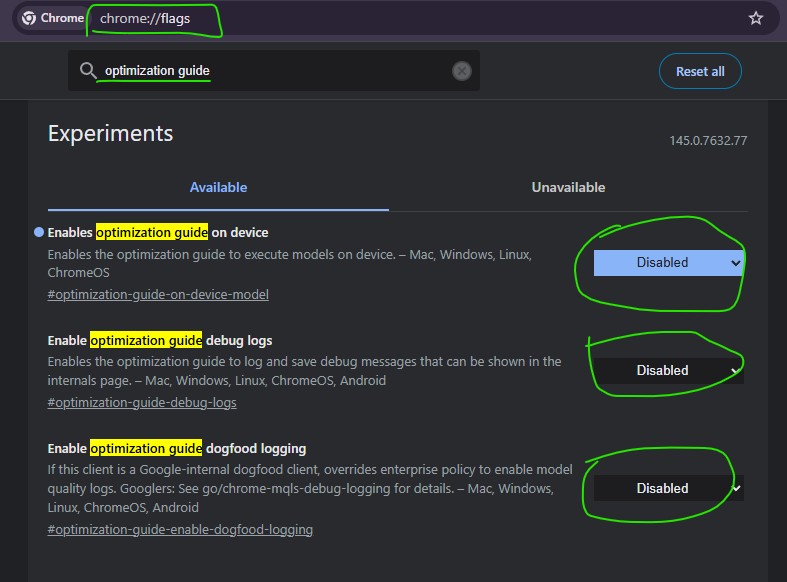
Finally found what kept filling up my C drive...a 4 GB "weights.bin" file. Looked it up, it's Google's Gemini Nano LLM that runs built-in AI APIs on your PC 😭
If you want it gone, after deleting the file, go to chrome://flags/ to disable these!
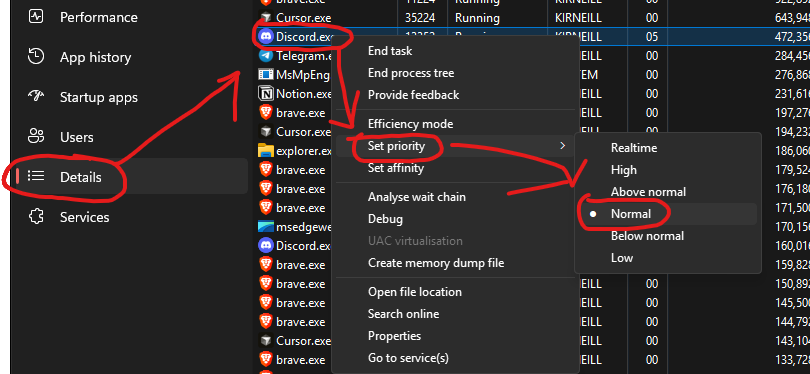
Discord is secretly running at Real Time priority on your PC.
This causes frametime spikes in CS2, Valorant, and basically every competitive game.
Fix: Task Manager → Details → Discord.exe → Set Priority → Normal
One change. Instant smoother gameplay.
Felt truly sexy for the first time in a while. Shall not delete later. New sets available on OF. Sorry to everyone who saw this and didn’t want to. I advertise like once a year.
Some advanced VLC tricks most people never use:
1. Play & Download YouTube Videos Inside VLC
VLC media player can stream YouTube videos directly.
How:
1Media → Open Network Stream
2Paste the YouTube link
3Click Play
You can even extract the direct media link and download it.
2. Increase Volume to 200%
VLC lets you boost audio up to 200% ; very useful for quiet recordings or forensic audio reviews.
3. Fix Broken or Corrupted Videos
VLC can attempt to repair damaged AVI files automatically when you open them.
Go to: Tools → Preferences → Input/Codecs → Set “Damaged or incomplete AVI file” to Always Fix
4. Record Your Screen (Without Extra Software)
1Media → Open Capture Device
2Select Desktop
3Choose frame rate
4Click Play → Record
Perfect for quick demos or capturing evidence during analysis.
5. Convert Audio/Video Formats
Media → Convert/Save You can convert:
•MP4 → MP3
•MKV → MP4
•WAV → FLAC
Great for preparing files for different devices.
6. Stream From CCTV / IP Cameras
You can open RTSP streams like:
rtsp://username:password@IP:port/stream
Very useful in network monitoring and digital forensics work.
7. Frame-by-Frame Analysis
Press E on your keyboard to move video one frame at a time.
Perfect for:
•Investigations
•Timestamp verification
•Motion analysis
8. Add Watermarks & Logos
Tools → Effects & Filters → Video Effects → Overlay You can add a logo or watermark during playback or recording.
9. Adjust Video Effects Like a Pro
You can tweak:
•Brightness
•Contrast
•Gamma
•Saturation
•Crop
•Rotate
Good for enhancing low-light footage.
10. Play ASCII Mode (Yes, Really 😂)
VLC can convert your video into ASCII art in real time. (It’s under Video Effects → Advanced → Color ASCII Art)