@Thomas_Live That's a shame. We have process to setup our privileged accounts and was hoping to automate the link in MDI for the two to better track risks
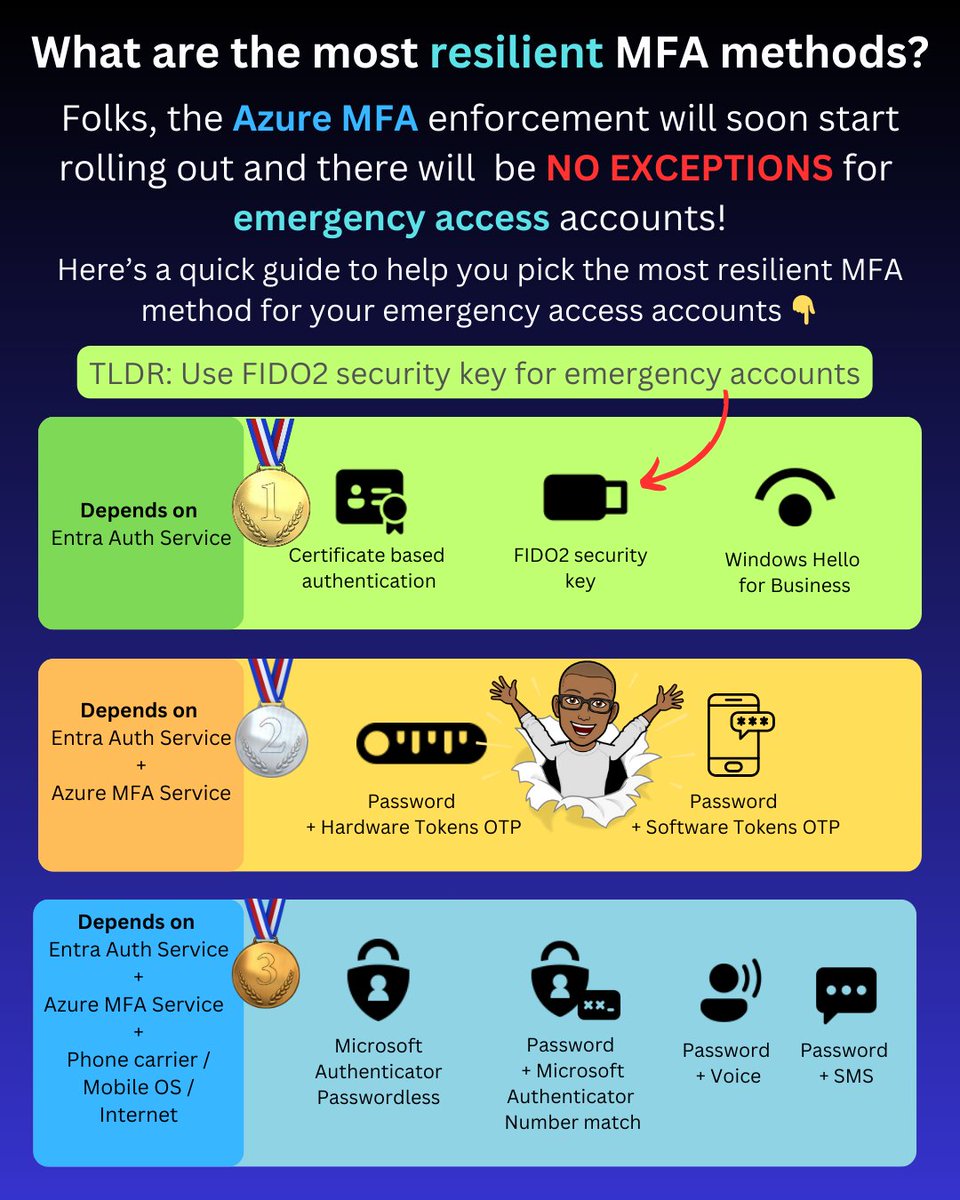
As part of the Azure MFA enforcement rollout, emergency accounts will now need to be registered for MFA.
You should typically avoid using MFA methods that have dependencies on other services, such as the Azure MFA service or your mobile carrier.
This leaves the following as the three most resilient MFA options:
✅ Certificate-based authentication
✅ Windows Hello for Business
✅ FIDO2 security keys
These three methods' only dependency is the core Entra authentication service, which is the same as password authentication that relies on the Entra auth service.
Now, when it comes to your emergency access account, the most likely option is to use FIDO2 security keys.
Here's why.
Windows Hello for Business (WHfB) for emergency access
Windows Hello for Business is not a viable option for emergency access accounts. It requires a device that must be frequently updated, constantly connected to the internet for the PRT to be renewed, and there are also the costs and operational overhead associated with the device.
Certificate-based authentication for emergency access
If you haven't deployed certificate-based authentication, you'll need to set it up and ensure that you use self-signed keys to avoid dependencies on external PKI/CRL infrastructure. Not to mention a smart card and card reader or some other hardware for storing the certificates.
FIDO2 security keys for emergency access
This essentially leaves FIDO2 security keys, which are simple to enable in Entra ID, require very low or no maintenance, take up little space, can be stored securely, and can be purchased for $25 retail.
PS: I've intentionally not included device-bound passkeys in Authenticator as they are currently in public preview, and you most likely don’t want to use them for your emergency access account yet.
-------------
Liked this post? Bookmark this and feel free to follow me for more tips on Microsoft Security and Microsoft Entra.
Remember to click the bell icon on my Twitter profile. This way Twitter will show you all my posts in your feed so you don't miss anything.
Please like, repost to share with others. Thanks!
We are hiring some brand new senior roles to support the digital services we provide across the MoJ 📲⚖️
📌 Senior Technical Architect
📌 Senior Problem Analyst
📌 Senior Business Relationship Manager
Explore all vacancies over on our careers site ⬇️
During our recent all-staff Summit, our teams had the chance to hear from Kiran, Jodie, & Alex, all part of the @MoJGovUK Lived Experience Panel.
The group shared their journeys through the justice system & ways we can make a difference for those interacting with it today. ⚖️
I'm #recruiting for a new #TechArch to come and work with me at @Justice_Digital to help shape and structure our unstructured data services. Good knowledge of #SharePoint and #Microsoft365 required. Want to know more - https://t.co/oPaBcn6awc
@IntuneSuppTeam Thanks. I know intune is enabled in business premium. But the apps for enterprise product is different to apps for business. Are there gaps in the baseline that would error /not apply in those scenarios
Updated my Retrieve Intune Primary user and logon history per device script (Added the serial number to the report)
#PowerShell#Intune#Report
https://t.co/0Lf8PrPFOs
[BLOG] Configure Azure file shares for Entra joined Windows devices and hybrid identities
Your devices are Entra joined, but still a file share is needed?
Read this blog post and move those shares to the cloud 👇
#MsIntune#Windows#ModernWorkplace
https://t.co/vIesjzPFlq