Suka banget sama kata-kata ini:
Jika stres mu disebabkan oleh dunia, maka dzikirmu La ilaha illallah.
Jika stres mu disebabkan oleh orang lain, maka dzikirmu La haula wala quwwata illa billah.
Jika stres mu disebabkan oleh dirimu sendiri, maka dzikirmu Astaghfirullah al-adzim innallaha ghofururahim.
Reminder untuk diriku sendiri🥹🥹🥹
Sebagai lelaki, saya sangat menyarankan buat baca buku robert greene terutama law of human nature sama art of seduction. Dan pelajari hukum 10 di law of power, avoid the unlucky and unhappy. Nanti kalian bakal bisa liat mana calon istri yang layak dan ga layak
Kubernetes is beautiful.
Every Concept Has a Story, you just don't know it yet.
In k8s, you run your app as a pod. It runs your container. Then it crashes, and nobody restarts it. It is just gone.
So you use a Deployment. One pod dies and another comes back. You want 3 running, it keeps 3 running.
Every pod gets a new IP when it restarts. Another service needs to talk to your app but the IPs keep changing. You cannot hardcode them at scale.
So you use a Service. One stable IP that always finds your pods using labels, not IPs. Pods die and come back. The Service does not care.
But now you have 10 services and 10 load balancers. Your cloud bill does not care that 6 of them handle almost no traffic.
So you use Ingress. One load balancer, all services behind it, smart routing. But Ingress is just rules and nobody executes them.
So you add an Ingress Controller. Nginx, Traefik, AWS Load Balancer Controller. Now the rules actually work.
Your app needs config so you hardcode it inside the container. Wrong database in staging. Wrong API key in production. You rebuild the image every time config changes.
So you use a ConfigMap. Config lives outside the container and gets injected at runtime. Same image runs in dev, staging and production with different configs.
But your database password is now sitting in a ConfigMap unencrypted. Anyone with basic kubectl access can read it. That is not a mistake. That is a security incident.
So you use a Secret. Sensitive data stored separately with its own access controls. Your image never sees it.
Some days 100 users, some days 10,000. You manually scale to 8 pods during the spike and watch them sit idle all night. You cannot babysit your cluster forever.
So you use HPA. CPU crosses 70 percent and pods are added automatically. Traffic drops and they scale back down. You are not woken up at 2am anymore.
But now your nodes are full and new pods sit in Pending state. HPA did its job. Your cluster had nowhere to put the pods.
So you use Karpenter. Pods stuck in Pending and a new node appears automatically. Load drops and the node is removed. You only pay for what you actually use.
One pod starts consuming 4GB of memory and nobody told Kubernetes it was not supposed to. It starves every other pod on that node and a cascade begins. One rogue pod with no limits takes down everything around it.
So you use Resource Requests and Limits. Requests tell Kubernetes the minimum your pod needs to be scheduled. Limits make sure no pod can steal from everything around it. Your cluster runs predictably.
Cybersecurity in 6 Weeks: Zero to Practical Skills 🔐
Week 1: Networking & Linux Fundamentals
Day 1: TCP/IP, OSI Model
Day 2: DNS, HTTP/HTTPS, SSH
Day 3: IP Addressing, Subnets, Ports
Day 4: Linux Commands & Permissions
Day 5: Firewalls, VPNs & Protocols
Day 6: Wireshark & Packet Analysis
Day 7: Hands-on Networking Lab
Week 2: Cybersecurity Fundamentals
Day 8: CIA Triad & Security Principles
Day 9: Common Cyberattacks & Threats
Day 10: Encryption, Hashing & PKI
Day 11: Authentication, MFA & IAM
Day 12: Vulnerabilities, CVEs & CVSS
Day 13: OWASP Top 10
Day 14: Security Assessment Lab
Week 3: Ethical Hacking & Penetration Testing
Day 15: Ethical Hacking Methodology
Day 16: Nmap & Network Scanning
Day 17: Vulnerability Assessment
Day 18: Burp Suite & Web Security
Day 19: SQL Injection & XSS Basics
Day 20: Metasploit Fundamentals
Day 21: Practice on Legal CTF Labs
Week 4: SOC & Defensive Security
Day 22: SOC Operations & Blue Team
Day 23: SIEM & Log Analysis
Day 24: Splunk / Wazuh Basics
Day 25: IDS, IPS & EDR
Day 26: MITRE ATT&CK Framework
Day 27: Threat Hunting & Detection
Day 28: Build a Mini SOC Lab
Week 5: Cloud Security & DevSecOps
Day 29: AWS / Azure Security Basics
Day 30: Cloud IAM & Least Privilege
Day 31: Cloud Logging & Monitoring
Day 32: Container & Kubernetes Security
Day 33: SAST, DAST & Dependency Scanning
Day 34: Secrets Management & Zero Trust
Day 35: Secure a Cloud Application
Week 6: Incident Response & Real Projects
Day 36: Incident Response Lifecycle
Day 37: Digital Forensics Fundamentals
Day 38: Malware Analysis Basics
Day 39: Security Automation with Python
Day 40: AI Security & Prompt Injection
Day 41: Cybersecurity Interview Scenarios
Day 42: Final Project + GitHub Portfolio
42 Days. 6 Weeks. 6 Practical Labs.
Don't just memorize security tools. Learn how attacks work, how to detect them, and how to defend real systems.
Save this roadmap and start building your cybersecurity skills. 🔖
Collect XP → Farm ELYSIUM Before TGE 🪂
📆 Mainnet - 9 November
Early Alpha - Still haven't started farming @Enter_Elysium? This is your reminder.
→ Cost: FREE
→ Do this daily for the next 8 days
→ Ecosystem: Hyperliquid L2 by Kinetiq
Here's my Elysium farming guide 👇
1. Get your test HYPE
Claim from available faucets:
• https://t.co/GV7AeCtygv
• https://t.co/TrSXD28cqw
• https://t.co/zjqxSL8H3f
2. Daily farming - don't skip this
🔗 https://t.co/qZtNGPb0ga
→ Connect your wallet
→ Complete all 3 daily quests
→ Bridge between HyperEVM and Elysium
→ Explore ecosystem and collect XP
→ Trade tokens on bonding curves
The mainnet date is getting closer, so this is a good time to explore the ecosystem properly.
No guaranteed airdrop or rewards. Treat it as testnet participation, not a guaranteed payout.
Elysium farmers, who's still grinding every day? 👇
How to become a hacker ethically.
1. Learn Networking - Understand IP addresses, ports, DNS, TCP/IP, and how networks work.
2. Master Linux - Get comfortable with the command line, especially Kali Linux.
3. Learn Programming - Start with Python, then explore Bash and basic JavaScript.
4. Understand Cybersecurity - Study vulnerabilities, web security, authentication, and common attacks.
5. Learn the Tools - Practice with Nmap, Wireshark, Burp Suite, and Metasploit.
6. Build a Home Lab - Practice safely using virtual machines and intentionally vulnerable applications.
7. Use Legal Platforms - Train on TryHackMe, Hack The Box, and PortSwigger Web Security Academy.
8. Build a Portfolio - Document your labs, write-ups, projects, and security findings.
9. Get Certified (if you’ve got the money) - Consider Security+, eJPT, or PNPT as you progress.
Stay Ethical & Never test systems without explicit authorization.
Sorry maybe this is a dumb question tpi aku penasaran
Klo perusahaan gede kyk gojek, grab, blibli, shopee, dll. yg aplikasinya dipakai banyak orang mereka handle deployment gimana ya?
Misalnya klo ada penambahan fitur atau perubahan sistem yang cukup critical, pasti ada step-
The Sovren Operator Pass is live.
→ Claim: https://t.co/mcHzzsWyIW
→ Join Discord & post why you'd run a node
→ Refer friends to climb the leaderboard
One operator wins a $3,000 Sovren node license. Top operators get Triton Cloud credits & ecosystem perks.
Ends 8th Nov.
Buat rekan-rekan yang nanya kenapa bisa dapat early.
DISCLAIMER
Ini murni subjektif dan cara saya pribadi. Diluar sana ada banyak banget methods, tinggal cocok-cocokan aja.
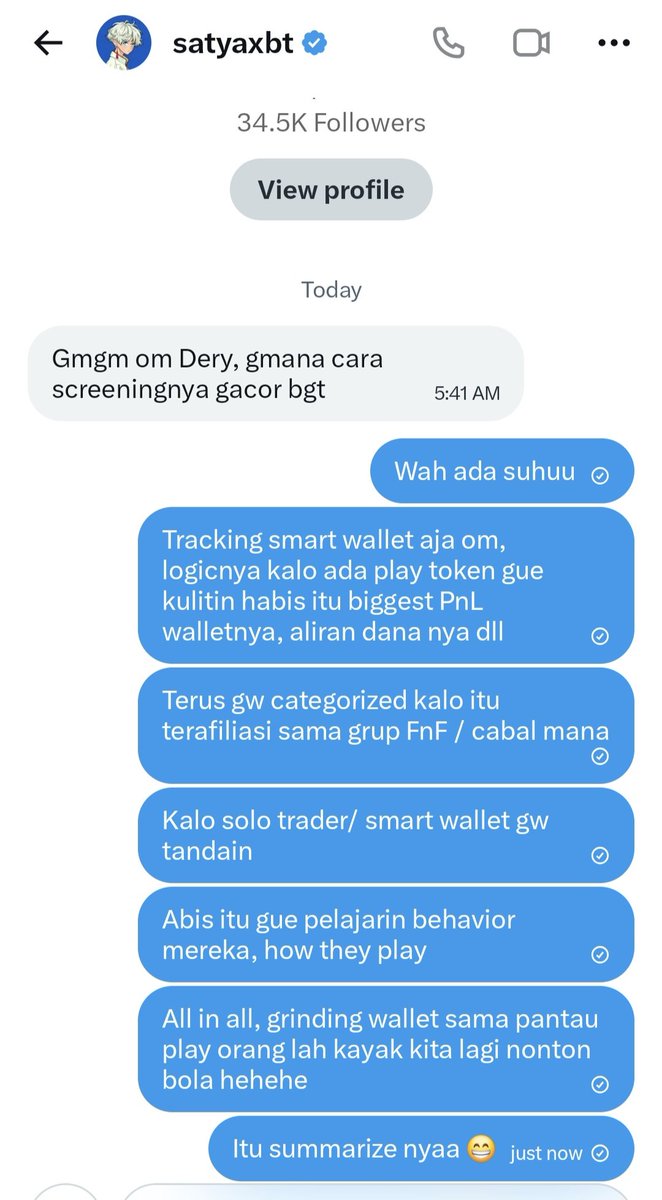
Kalo di stock market sih, istilahnya bandarmology. Bahasa kerennya follow big money & smart money 🤓
Izin ketua @satyaXBT
Lo tau gak, privilege orang tua itu bukan cuma soal kasih duit banyak atau sekolah mahal doang. Itu lebih gila.
Mereka bikin aturan main sendiri biar anaknya langsung jalan di jalur yang orang biasa bahkan gak bisa liat dari jauh. Mulai dari garis yang beda total.
Gue kasih sedikit gambaran,
nih, tutorial cara ngetrack wallet by @imSeonaa
jangan lupa follow beliau juga @imSeonaa (kalo followersnya dah banyak dan dia star syndrom, unfoll aja 😹)
intinya tinggal click aja candle awal sebelum/saat pump, nanti keliatan wallet yang tx di candle itu mana aj (disarankan pake TF kecil, 1 detik - 5 menitan)
nah setelah itu, kalian filter sendiri, mana wallet yang cocok buat ditrack,tinggal click addressnya ntar keliatan statistik dari wallet tersebut (seperti history trade, dll)
dan yang perlu diingat, sesuaiin sama style trade kalian, dan pahami style trade wallet yang kalian trade
btw ini pake GMGN, kalo platform lain gatau caranya sama atau beda
dan itu udh ada video tutorial dari beliau @imSeonaa , kalau kurang jelas bilang aja ke beliau, ntar ditutorin sampe paham 😁
sekian, terimakasih
Sedikit kontribusi buat project nya mas @0xyunss IZIIIN !!!
Cara setup @meridian_agent dari NOL BANGETT
Video ini buat lu yang blum pernah punya wallet, ga pernah nyentuh VPS, sampe AI AGENT beneran runing.
All req link cek di reply 👇
Btw thanks for this project mas @0xyunss
Aku bikin website buat temen-temen yang mau cari remote job tapi mostly Web3
kalo temen2 yang masih awam banget ntar disitu ada glossary, penjelasan role, skill yang dibutuhin, sama update loker terbaru
opportunity di web3 sebenernya gede, apalagi buat yang udah ada skill + bisa bahasa inggris
atau boleh follow aku, kadang suka update loker web3 kalo malem, kalo yang mau tanya-tanya juga boleh, sebarin ini ke semua handai tolan mu wkwkwk
websitenya ada disini: https://t.co/8kN2UjOukL