I'm exiting my $7M ARR agency to make the riskiest bet of my life.
I'm launching a unified API that lets any team run their entire GTM from inside Claude Code.
For three years we ran outbound for hundreds B2B clients and generated more than $50M in revenue for them.
Our best GTM engineers went from days to hours on the same campaigns just by writing a few lines to a coding agent.
If you really think about it, any tool is a login screen wrapped around an API that does the actual work.
Once you can call that API directly, a small team runs the plays that used to take a whole ops department.
But a coding agent is only as good as what you feed it: the right GTM skills, real outbound best practices, your keys across a dozen tools, your internal context, and every SOP, winning angle, and past result you have.
So we packaged all of it into one subscription that gives Claude Code the skills, the context, and the tools it needs.
Inside Claude Code, you type one line:
"Build a list of software CEOs in London, flag who's in buying mode, write three angles, and load it into my sequencer."
That's it.
1. It pulls the list from the right database
2. Enriches emails and phone numbers
3. Reads buying intent across several APIs
4. Writes the angles with ColdIQ's own skills
5. And drops it all into your sequencing tool.
One prompt, 40+ tools, each job routed to whoever does it best.
I don't say "riskiest bet" lightly. But I've trusted this instinct before, and it's the reason any of this exists. Before ColdIQ I got fired from four jobs and failed at seven startups in a row, and lost $40,000 of my own savings.
People still ask how I knew LinkedIn would be our channel. I didn't. I posted for a month and a half with zero leads, then one post booked me 25 meetings.
I eventually got the whole team on it, and LinkedIn has since added $5M in ARR.
The same instinct that made me double down on LinkedIn early tells me now that GTM is moving into the terminal, and I want to be the one building that layer.
We're opening private beta today and hand-picking a small group of design partners.
Once you're in, you get:
- a three-hour onboarding with our GTM engineers
- one of those sessions with me directly
- access to our private community with the team on hand for your questions
- a weekly live session where I build GTM campaigns alongside you.
Everything we can do to help you stand up your own GTM operating system.
If you're a GTM engineer, an agency, a B2B operator, or a data provider, I'd love to chat with you.
Comment 'GTM' below, send me a DM, or book a call with me, and I'll show you what we've built.
You can double the leads you generate from the lists you already have, without buying a bigger one.
A provider that finds emails for 40% of your leads leaves 6 in 10 people unreachable. A waterfall that finds 80% doubles the leads that same list can produce.
That's the first of the 5 workflows in this article. The other four run on the same logic. Each one goes after an asset you already own: your CRM, your posts, your traffic, the TAM you mapped.
All 5 run from Claude Code through the ColdIQ MCP, so the setup is one connection plus a CLAUDE.md holding your ICP and your suppression rules.
1. Fix the list you already have (every list build)
→ When I build a waterfall by hand: cheapest provider first, priciest last, so the expensive one only touches the names nobody else could find.
→ Verified stops the waterfall. Catch-all, risky and unknown get stored with their status, and stay out of live sequences.
2. Rank the TAM you already mapped (weekly)
A single run pulled 25 funding events out of PredictLeads. 18 weren't real funding rounds.
The real ones get crowded fast, because every competitor watching that feed sees the same round on the same day.
Claude Code still found buyers at 5 of those companies. The waterfall came back 5 of 5 found and 4 verified, and the whole run cost 91 credits.
→ Closer signal, higher intent. More matching signals, higher intent. The accounts that already know you or your partners and show several at once get contacted ASAP.
3. Work the posts you already published (within a day of a post that performs)
The LinkedIn post this article came from had 164 reactions and 99 comments when we pulled it.
Those are people who raised their hand, in public, on this exact topic, and on your own posts they've already seen you at least once.
→ Pull and enrich in the same run. ColdIQ's extracted engagement data expires 12 hours after the task.
→ Know the trade-off: LinkedIn's User Agreement prohibits scraping and automated activity, and LinkedIn says accounts using such tools risk restriction.
4. Mine the CRM you already pay for (every Monday)
In a 2023 UserGems study of vendors with strong NPS scores, 91% of past champions still hadn't come back on their own 3 months after starting a new job.
It's the smallest list you own and the warmest, and most teams never run it at all.
Export the people who had a good experience with you. Match them on LinkedIn URL, because names in the feed are masked for GDPR. Only act on moves from the last 14-45 days.
→ "Congrats on [NewCo]. Remember when we helped you at [OldCo]?" Send that only to people your team actually helped, and keep account details like usage data or contract terms out of the email.
5. Put a pixel on the traffic you already buy (daily)
You pay for that traffic with content, ads and SEO, and most of it leaves without filling anything in. HockeyStack Labs looked at 31M visitors across 80 B2B SaaS sites: pricing pages converted to form fills at 3.8%, against 1.1% site-wide.
→ Update your privacy policy and consent setup before the pixel goes live. That part comes first.
→ Outside the US you get the company and not the person. Knock2 names people for US visitors, Warm AI for the US and Canada. Plan it company-level everywhere else.
→ Run the first day in dry-run and read what it would have sent. That's where you catch existing customers slipping into the sequence.
→ The decision maker you find may not be the person who visited, which is one more reason the copy never mentions the visit.
Keep approvals on for anything that sends, and start with the first 100 contacts so you can inspect the result before any of it scales.
Full build and the prompts are in the article.
(bookmark for later)
Some of the outbound campaigns you can build in Claude Code sound ridiculous until you see how they work.
You can demonstrate a data product in the subject line, send the first piece of work before a prospect becomes a client, or find buyers through what they're already engaging with and hiring for.
Here are 5 plays, with the targeting, tools and instructions to build each one.
For the prompts below, give Claude your ICP, offer and relevant campaign examples first. Connect the data and outreach tools each play needs, and review the output before sending.
1. Put the product's proof inside the email
FullEnrich sells phone data. One of its campaigns puts the recipient's own phone number in the subject line.
The prospect can recognise whether the data is correct before opening the email. It demonstrates the product and creates a pattern interrupt in the same line.
The targeting matters just as much. A company hiring people to make cold calls is a more relevant prospect for phone data than a company that never calls anyone.
A starting prompt:
"Find B2B companies with open roles mentioning cold calling, Nooks or Orum. Identify their sales leaders, enrich their phone numbers, and use the ColdIQ copywriting skills to draft relevant emails with each recipient's number in the subject line."
2. Turn social engagement into warm outbound
At ColdIQ, we get 1M+ impressions a month. Some people engaging with our content fit our ICP but never sign up or book a meeting.
We use the topic they engaged with alongside what's happening at their company to make the follow-up relevant.
The workflow runs from post engagement to contact enrichment, ICP qualification and a lemlist sequence.
A starting prompt:
"Pull the people who engaged with [post] and enrich their contact details through GetLeads + ColdIQ. Qualify them against [ICP]. Research their companies and draft outreach using the post's topic and relevant company context. Prepare tier 1 prospects for a lemlist multichannel sequence."
3. Send the work before asking for the project
A designer can send a redesigned LinkedIn banner. A ghostwriter can send an improved version of a prospect's post. An outbound agency can send an enriched list of potential customers.
Start with the first useful deliverable you'd produce if that prospect hired you. If you can make a worthwhile sample now, send it with the email.
The prospect gets to judge the work directly. Choose something small enough to deliver upfront and specific enough that they could actually use it.
4. Send campaign ideas backed by relevant results
An outbound agency can send a prospect 3 campaign ideas based on what worked for a similar business.
Give Claude your successful campaigns, the results behind them and the knowledge you use to judge an opportunity. Then have it research companies where that experience could apply.
A starting prompt:
"Use ColdIQ's MCP to find companies similar to [client]. Read their websites and case studies, and check relevant PredictLeads signals. Using our successful campaigns and the guidance I've provided, develop 3 campaign ideas for each company. Explain how the ideas connect to our work for a comparable business."
In the email, show the relevant result and the ideas themselves. A reader should understand what you're suggesting before you ask for a call.
Only include results you can substantiate. If the previous client isn't comparable, find a better example.
5. Write the dream-account emails yourself first
Choose 25-100 companies you'd most want as customers. Take the time to research each one and write an email you'd be comfortable sending personally.
Working through them helps you notice which details change the offer, which examples fit, and which parts of the message keep repeating.
Keep those examples and your edits. Use them to teach Claude how you make those decisions when you expand the campaign. The useful input is the reasoning that made each email relevant to that particular account.
Full breakdown of each play in the article below. Bookmark for later.
My SaaS crossed $10M ARR helping 10,000+ agencies run LinkedIn outreach.
Along the way we wrote 12+ playbooks on everything that actually books calls:
• 25 prospecting message templates
• the cold message delivery blueprint
• 4 simple lead generation systems
• 30+ LinkedIn growth hacks
• top 6 outreach frameworks
(+7 more)
Agencies used these to book 100+ calls a month and land $50K contracts.
Free for 48 hours.
👉 Follow + comment "PLAYBOOKS" and I'll DM you the full library.
You can build a client's entire cold email campaign without opening Clay.
Give Claude Code the client's sales calls, a prospect CSV, and access to your enrichment and sending tools. It can qualify the list, find verified emails, write the sequence, and load it into Instantly for review.
Soheil walked me through the workflow. Here's how to set it up for your own clients:
1. Give Claude the conversations behind the brief.
Create a folder for the client. Add the onboarding form, sales-call transcripts, product details, and an ICP matrix covering the people and companies you want to reach.
Have Claude research the market, competitors, positioning, and customer reviews. Save that research in the folder so it can use it on every campaign.
The call transcripts matter more than people think. If a client mentions a claim they never want to make, that instruction should survive all the way into the copy review. Keep adding new calls and updating the context as the relationship develops.
2. Qualify the list before paying to find everyone's email.
Soheil started with an event-attendee list. The target was spice exporters. He needed to exclude businesses selling products the client didn't cover.
Ask Claude to find the company websites, check what each business sells, and qualify it against the client's product and ICP. Rank the qualified contacts so you can prioritize the strongest matches.
Have it return separate files for qualified contacts, excluded contacts, and matches that need your review. If it's unsure it found the right company, keep that uncertainty visible.
Start with the first 100 contacts and inspect the result. Deduplicate before enrichment. In the demo, Soheil spotted a duplicate and said he should have asked for deduplication first.
3. Run the email waterfall on the people worth contacting.
Connect your enrichment providers through their APIs. Soheil's sequence was Prospeo, then LeadMagic, then Findymail. He asked for validation through LeadMagic and a deliverability check through BounceBan.
Stop the waterfall when you have a valid result. He limited the waterfall to tier 1 and tier 2 contacts to save credits.
Keep the provider and verification result beside each contact. You want to see where an address came from before uploading it to a campaign.
4. Write from campaign history and your qualified list.
Set up a copywriting skill with your previous campaigns, the replies they generated, and the rules you use to judge good copy.
Our skill draws on hundreds of campaigns across different industries. It uses that history alongside the client's research to choose an angle, offer, and CTA.
For the spice exporters, it suggested offering to find buyers for the commodity they sell in a market they want to enter. The offer came directly from what the client's product could do.
Finish the list before finalizing the copy. If the email mentions the prospect's commodity, that field needs to exist in the export. Writing both in parallel left that gap in the demo.
5. Give each reviewer a different job.
Install the review agents and have the copywriter send its draft through them.
The prospect reviewer checks whether the email deserves attention. Give the client reviewer a specific instruction: find any lines that conflict with the call transcripts and explain which client instruction they break.
The copywriting reviewer checks the offer, CTA, and our writing standards. The research reviewer looks for useful market context we've missed. The quality reviewer checks whether the whole email reads clearly.
Have the writer revise against their feedback. Then check which reviewers actually ran. One was skipped during the demo.
6. Make your edits, then give them back to the system.
Soheil still edits the output. He can do it in the terminal or export the draft, change it, and ask Claude to compare the versions and save what it should do differently next time.
Once you're happy with the copy, have Claude create the campaign in Instantly or lemlist and upload the contacts through their APIs.
Review the settings, contact list, and personalization fields yourself before launching.
On the next campaign, you can reuse the client folder, copywriting skill, and review agents, with your corrections already saved.
I recorded the full walkthrough with Soheil, covering the prompts, folder structure, enrichment workflow, and copy reviews. Watch it here to build the whole thing for your own clients:
https://t.co/96zRx0n7jB
A 500-prospect cold email list gets 10x the reply rate of a 100,000-contact blast.
We saw it across 1M+ emails analyzed in Instantly: 20-30% replies on micro-lists, 2-3% on blasts.
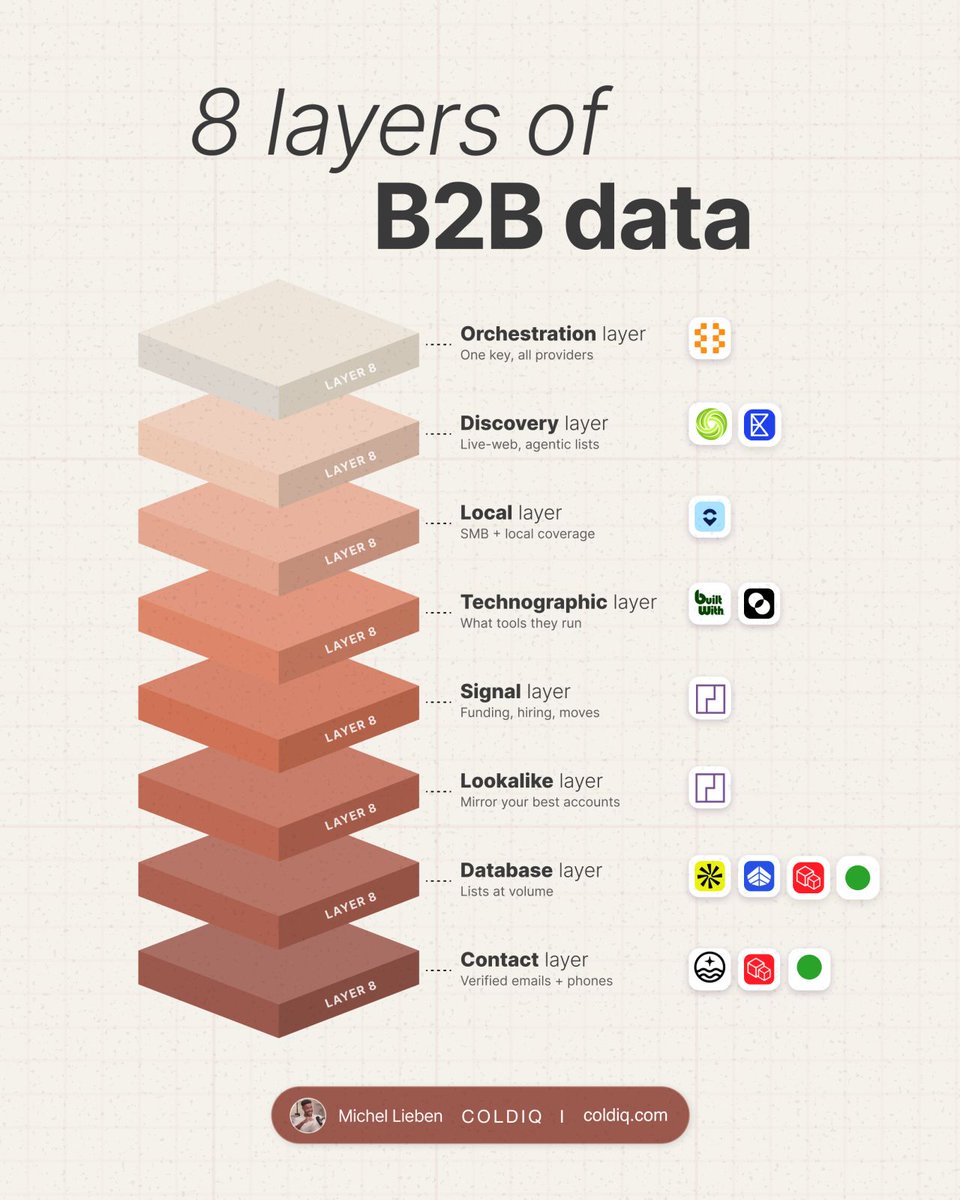
But small lists only work when every row is right, and that comes down to the data Claude Code can pull. Here are the 12 providers to connect & the rule for each:
1. Sizing the market you can actually reach
Before you open Apollo or Prospeo, write the ICP down: industry, geo, headcount, buyer titles, and who you exclude.
Then pull 50 rows and check them by hand. If fewer than 70% fit, tighten the filters and rerun. Scale the segment only after it clears that bar.
2. Finding more accounts like your best clients
Pick 3-10 customers with the cleanest results and write down why each one counts as a best customer. Then feed them to PredictLeads or DiscoLike, which return companies that look like them.
→ Strip existing customers, holding companies & obvious non-fits from the first 50 before anyone reaches out.
3. Selling to local businesses
Most B2B databases focus on companies with a web presence, so a lot of small local businesses barely show up in them. Openmart is where we go for them, with 200M+ local business records.
Define the territory first (city, radius, category), then dedupe on domain, phone, address & parent brand.
4. Getting a contact you can actually use
Run FullEnrich, Prospeo & GetLeads as a waterfall, and stop the second a verified email or mobile comes back. (we've found 2M+ emails with Prospeo at ColdIQ)
→ Keep verified, risky & unknown as separate states. Unknown emails never go into a live sequence.
→ On verified-email campaigns, aim for bounces under 2%.
5. Knowing who to reach this week
Only count recent funding, hiring & job changes from PredictLeads & TheirStack: job changes from the last 14-45 days, funding from the last 2-4 weeks, hiring from the last 1-2 weeks.
An account with 2 signals is high priority. At 3+, someone reviews it the same day.
6. Filtering by tech stack
Before you query BuiltWith & TheirStack, decide what you're looking for on your targets' websites: a tool you integrate with, one they're missing, or a competitor.
Tracking picks up a lot of normal noise. If a recent stack change is your trigger, watch it for 90 days before you launch anything off it.
7. Covering companies no database has yet
When a company is too new for B2B databases, Limadata, Exa & Serper fetch the data live.
→ Save the source URL & the date you pulled it with every fact.
→ Put strong matches in a 7-day review queue.
8. Running it all from one prompt
Connected one by one, that's a separate API key for every provider above... and each one sends data back in its own format. So before a list reaches a rep, every response needs the same fields: account, person, evidence, status, provider, date.
This is exactly why we launched ColdIQ's unified API. Most of the providers above already sit behind it, next to ~30 others: one key, 40+ providers & 700+ endpoints.
Ask Claude Code to "find 50 VP Sales at funded SaaS companies that look like our best customers, use tools we integrate with, and are hiring this quarter" and it routes each step to the provider that does that job best.
Companies are offering up to $230K/year for GTM Engineers.
After helping ramp up 100+ of them, I can see why: a good one can take on the prospecting work of 5+ people.
These are the 4 skills I'd master to become that person:
1. Map and score the entire market
Build the account list in Apollo. Use PredictLeads to add hiring and technology signals, then Prospeo or FullEnrich for contact details.
Keep company fit and buying signals separate. A company can match your ICP perfectly and still have no reason to buy today.
For a recruiting campaign, for example, I'd look for companies hiring in the roles we specialise in. Then check whether those openings are still live before putting them into outreach.
Score the accounts against criteria that matter for your offer. Keep the evidence behind the score in the same table so the sales team can see why an account was prioritised.
2. Build a usable memory of what already sells
Bring together your CRM history, call transcripts and past outreach results. Match the records to the same account so you can follow what happened from first contact to closed deal.
Extract the problem that started the conversation and what finally made the buyer act. Keep their actual words alongside your notes.
Then use that context to build the next campaign.
If buyers repeatedly mention a problem with their current software, find other companies using it. Your message can speak to that specific problem, with an offer informed by what existing customers needed.
Record the objections from deals you lost, too. They help you recognise accounts you should exclude or approach differently.
3. Get agents to research accounts before outreach
Give the agent specific questions to answer from the website, LinkedIn, job listings, news and relevant filings.
For a company expanding abroad, for example: where are they expanding, what are they hiring for, and does your offer help with that move?
Have it return the finding and source URL together. If the answer isn't available, leave it unknown. Keep the date checked so an old announcement doesn't keep triggering new campaigns.
Start with individual accounts and check the research yourself. Once the output is useful, connect it to the list so the findings update the account's priority and outreach angle.
This is where I'd learn API integrations. You need the research to move into the CRM and campaign tools without someone copying it between tabs.
4. Turn the research into an outbound campaign
Use the account context to write the message and load the campaign into Instantly or lemlist.
Before sending, check the contact data and sending setup. Exclude existing customers and accounts already in an active sales conversation.
When someone is interested, route the reply with the research attached. The rep should know what triggered the outreach and which offer the buyer responded to.
Track those conversations through to opportunities. Compare results by segment and angle so you know which part of the campaign to change.
Then write the results back into the customer history you started with. The next campaign should use what you learned from this one.
If you're learning GTM engineering, run these plays for a business whose product you understand. Save the workflows, document what you changed, and measure the pipeline they produce.
Turn your closed-won CSV into a live outbound campaign with Claude Code.
Give Claude Code your targeting rules and copy skills. Connect it to 40+ data providers through ColdIQ's MCP.
We built our playbooks running outbound for 275+ companies. I've condensed the setup into these 4 pages.
1. Build the client brief from the deals you've won.
Export your closed-won accounts and ask Claude to identify recurring company traits and buyer roles. Add the problems those customers hired you to solve from your deal notes.
Review those patterns before turning them into targeting rules. Save the ICP, offer and personas in brain.md, then put the qualification criteria in scoring.md. If old campaign notes contradict the closed-won data, use the customer data as the starting point.
Put standing instructions in CLAUDE.md: which client this is, where outputs go and what Claude must never do. Reference @brain.md and @scoring.md when briefing a campaign.
2. Connect the data tools and check what Claude can call.
Add ColdIQ's MCP to the client project. It gives Claude access to company search, buying signals, decision makers and contact enrichment through one API key.
Open /mcp and inspect the connection and available tools. Ask Claude to find a company matching your criteria before requesting a full list. If that lookup fails, fix the connection before building the campaign around it.
The setup command is on page 2. Keep the live key out of shared files and prompts. Configure your Instantly or lemlist connection separately for campaign uploads.
3. Give Claude the procedures you want it to repeat.
Create a skill for each recurring job: researching signals, building lists or writing outreach. Each skill gets a SKILL.md file inside .claude/skills/.
Be specific about the work. A signal-research skill should keep the source and date. A copy skill should read the client brief and apply the buyer's copy framework. Set first-email rules: under 90 words, plain text, no links, a verifiable observation and a useful offer.
Build those instructions from your own campaigns and reply data. Keep separate copy rules for each persona so a sales leader and a RevOps buyer don't get the same email.
4. Brief one campaign with a clear stopping point.
For example, target SaaS companies hiring SDRs. Specify the region, company size and account count, then ask Claude to find dated job posts and score each company against @scoring.md.
Request a list with the company, signal source, date, tier and qualification reason. Have Claude show you its plan first, then stop after the account list for review.
Check the evidence. An SDR vacancy can support a hiring signal; it doesn't establish that the company needs your offer. The account still has to fit the ICP.
5. Decide which accounts deserve contact enrichment.
Tier 1: strong fit with an active signal. Find the right decision maker, validate their email and write account-specific copy. Look up a phone number only if you intend to call.
Tier 2: strong fit without an active signal. Use an email-led approach with the approved persona template and a relevant account variable. Don't manufacture a reason they're buying now.
Tier 3: adjacent fit. Keep it on a watchlist and requalify it before spending on contacts.
Review the tiers before approving enrichment. Catching a bad targeting rule here keeps it from being applied across the rest of the list.
6. Make the signal explain why you're writing.
For a prospect-data offer, an SDR vacancy can give you a reason to help the new reps find accounts. If the job post names a target market, build a sample list for that segment.
Once you've built it, an opening could be:
"Saw you're hiring SDRs to sell into [market]. I put together a sample of companies matching that segment. Want me to send it over?"
Use the market the job post actually names. If you can't connect the hiring event to a need your offer addresses, leave it out of the email.
Check the copy against its source before approving the campaign. Then route it through your connected sequencer: lemlist for Tier 1 multichannel, Instantly for Tier 2 email. Require approval before launch.
7. Save the corrections before starting another campaign.
Store the reviewed list and copy in data/output/. When results come back, update brain.md with what you learned, scoring.md with any targeting changes and the relevant skill with the procedure worth repeating.
If the wrong companies keep passing, revise the qualification rules. If one persona needs different messaging, update its copy framework.
For the first run, choose one client folder and one buying signal. Work in 100-row batches and inspect the output between batches before expanding.
I'm open sourcing our Claude Code list-building skill with Prospeo.
And you get 111 ICP filter combinations to build your next prospect list.
Tell it who you sell to. It finds matching prospects in Prospeo and pulls their verified contact data.
Say you're targeting heads of sales at UK software companies.
Claude searches by role, location and company criteria, then enriches matching profiles with work emails, mobile numbers and company data.
Already have the names? Start with a name and company, or a LinkedIn URL, and pull the missing contact details.
With your CRM connected too, you can send the results there from the same conversation.
We used Prospeo to find 2M+ email addresses while building ColdIQ. Its MCP now lets Claude Code search the database directly.
We partnered with Prospeo to put the setup together:
→ Our list-building skill, installed with one command
→ The MCP setup guide
→ 111 ICP filter combinations to adapt to your market
They've also included 50% off an annual Prospeo plan.
Reply "yes" and I'll send you the pack.


![MichLieben's tweet photo. Turn your closed-won CSV into a live outbound campaign with Claude Code.
Give Claude Code your targeting rules and copy skills. Connect it to 40+ data providers through ColdIQ's MCP.
We built our playbooks running outbound for 275+ companies. I've condensed the setup into these 4 pages.
1. Build the client brief from the deals you've won.
Export your closed-won accounts and ask Claude to identify recurring company traits and buyer roles. Add the problems those customers hired you to solve from your deal notes.
Review those patterns before turning them into targeting rules. Save the ICP, offer and personas in brain.md, then put the qualification criteria in scoring.md. If old campaign notes contradict the closed-won data, use the customer data as the starting point.
Put standing instructions in CLAUDE.md: which client this is, where outputs go and what Claude must never do. Reference @brain.md and @scoring.md when briefing a campaign.
2. Connect the data tools and check what Claude can call.
Add ColdIQ's MCP to the client project. It gives Claude access to company search, buying signals, decision makers and contact enrichment through one API key.
Open /mcp and inspect the connection and available tools. Ask Claude to find a company matching your criteria before requesting a full list. If that lookup fails, fix the connection before building the campaign around it.
The setup command is on page 2. Keep the live key out of shared files and prompts. Configure your Instantly or lemlist connection separately for campaign uploads.
3. Give Claude the procedures you want it to repeat.
Create a skill for each recurring job: researching signals, building lists or writing outreach. Each skill gets a SKILL.md file inside .claude/skills/.
Be specific about the work. A signal-research skill should keep the source and date. A copy skill should read the client brief and apply the buyer's copy framework. Set first-email rules: under 90 words, plain text, no links, a verifiable observation and a useful offer.
Build those instructions from your own campaigns and reply data. Keep separate copy rules for each persona so a sales leader and a RevOps buyer don't get the same email.
4. Brief one campaign with a clear stopping point.
For example, target SaaS companies hiring SDRs. Specify the region, company size and account count, then ask Claude to find dated job posts and score each company against @scoring.md.
Request a list with the company, signal source, date, tier and qualification reason. Have Claude show you its plan first, then stop after the account list for review.
Check the evidence. An SDR vacancy can support a hiring signal; it doesn't establish that the company needs your offer. The account still has to fit the ICP.
5. Decide which accounts deserve contact enrichment.
Tier 1: strong fit with an active signal. Find the right decision maker, validate their email and write account-specific copy. Look up a phone number only if you intend to call.
Tier 2: strong fit without an active signal. Use an email-led approach with the approved persona template and a relevant account variable. Don't manufacture a reason they're buying now.
Tier 3: adjacent fit. Keep it on a watchlist and requalify it before spending on contacts.
Review the tiers before approving enrichment. Catching a bad targeting rule here keeps it from being applied across the rest of the list.
6. Make the signal explain why you're writing.
For a prospect-data offer, an SDR vacancy can give you a reason to help the new reps find accounts. If the job post names a target market, build a sample list for that segment.
Once you've built it, an opening could be:
"Saw you're hiring SDRs to sell into [market]. I put together a sample of companies matching that segment. Want me to send it over?"
Use the market the job post actually names. If you can't connect the hiring event to a need your offer addresses, leave it out of the email.
Check the copy against its source before approving the campaign. Then route it through your connected sequencer: lemlist for Tier 1 multichannel, Instantly for Tier 2 email. Require approval before launch.
7. Save the corrections before starting another campaign.
Store the reviewed list and copy in data/output/. When results come back, update brain.md with what you learned, scoring.md with any targeting changes and the relevant skill with the procedure worth repeating.
If the wrong companies keep passing, revise the qualification rules. If one persona needs different messaging, update its copy framework.
For the first run, choose one client folder and one buying signal. Work in 100-row batches and inspect the output between batches before expanding.](https://pbs.twimg.com/media/HR3LH8WbwAA7kEz.jpg)
![MichLieben's tweet photo. Turn your closed-won CSV into a live outbound campaign with Claude Code.
Give Claude Code your targeting rules and copy skills. Connect it to 40+ data providers through ColdIQ's MCP.
We built our playbooks running outbound for 275+ companies. I've condensed the setup into these 4 pages.
1. Build the client brief from the deals you've won.
Export your closed-won accounts and ask Claude to identify recurring company traits and buyer roles. Add the problems those customers hired you to solve from your deal notes.
Review those patterns before turning them into targeting rules. Save the ICP, offer and personas in brain.md, then put the qualification criteria in scoring.md. If old campaign notes contradict the closed-won data, use the customer data as the starting point.
Put standing instructions in CLAUDE.md: which client this is, where outputs go and what Claude must never do. Reference @brain.md and @scoring.md when briefing a campaign.
2. Connect the data tools and check what Claude can call.
Add ColdIQ's MCP to the client project. It gives Claude access to company search, buying signals, decision makers and contact enrichment through one API key.
Open /mcp and inspect the connection and available tools. Ask Claude to find a company matching your criteria before requesting a full list. If that lookup fails, fix the connection before building the campaign around it.
The setup command is on page 2. Keep the live key out of shared files and prompts. Configure your Instantly or lemlist connection separately for campaign uploads.
3. Give Claude the procedures you want it to repeat.
Create a skill for each recurring job: researching signals, building lists or writing outreach. Each skill gets a SKILL.md file inside .claude/skills/.
Be specific about the work. A signal-research skill should keep the source and date. A copy skill should read the client brief and apply the buyer's copy framework. Set first-email rules: under 90 words, plain text, no links, a verifiable observation and a useful offer.
Build those instructions from your own campaigns and reply data. Keep separate copy rules for each persona so a sales leader and a RevOps buyer don't get the same email.
4. Brief one campaign with a clear stopping point.
For example, target SaaS companies hiring SDRs. Specify the region, company size and account count, then ask Claude to find dated job posts and score each company against @scoring.md.
Request a list with the company, signal source, date, tier and qualification reason. Have Claude show you its plan first, then stop after the account list for review.
Check the evidence. An SDR vacancy can support a hiring signal; it doesn't establish that the company needs your offer. The account still has to fit the ICP.
5. Decide which accounts deserve contact enrichment.
Tier 1: strong fit with an active signal. Find the right decision maker, validate their email and write account-specific copy. Look up a phone number only if you intend to call.
Tier 2: strong fit without an active signal. Use an email-led approach with the approved persona template and a relevant account variable. Don't manufacture a reason they're buying now.
Tier 3: adjacent fit. Keep it on a watchlist and requalify it before spending on contacts.
Review the tiers before approving enrichment. Catching a bad targeting rule here keeps it from being applied across the rest of the list.
6. Make the signal explain why you're writing.
For a prospect-data offer, an SDR vacancy can give you a reason to help the new reps find accounts. If the job post names a target market, build a sample list for that segment.
Once you've built it, an opening could be:
"Saw you're hiring SDRs to sell into [market]. I put together a sample of companies matching that segment. Want me to send it over?"
Use the market the job post actually names. If you can't connect the hiring event to a need your offer addresses, leave it out of the email.
Check the copy against its source before approving the campaign. Then route it through your connected sequencer: lemlist for Tier 1 multichannel, Instantly for Tier 2 email. Require approval before launch.
7. Save the corrections before starting another campaign.
Store the reviewed list and copy in data/output/. When results come back, update brain.md with what you learned, scoring.md with any targeting changes and the relevant skill with the procedure worth repeating.
If the wrong companies keep passing, revise the qualification rules. If one persona needs different messaging, update its copy framework.
For the first run, choose one client folder and one buying signal. Work in 100-row batches and inspect the output between batches before expanding.](https://pbs.twimg.com/media/HR3LH8SaAAImZlv.jpg)
![MichLieben's tweet photo. Turn your closed-won CSV into a live outbound campaign with Claude Code.
Give Claude Code your targeting rules and copy skills. Connect it to 40+ data providers through ColdIQ's MCP.
We built our playbooks running outbound for 275+ companies. I've condensed the setup into these 4 pages.
1. Build the client brief from the deals you've won.
Export your closed-won accounts and ask Claude to identify recurring company traits and buyer roles. Add the problems those customers hired you to solve from your deal notes.
Review those patterns before turning them into targeting rules. Save the ICP, offer and personas in brain.md, then put the qualification criteria in scoring.md. If old campaign notes contradict the closed-won data, use the customer data as the starting point.
Put standing instructions in CLAUDE.md: which client this is, where outputs go and what Claude must never do. Reference @brain.md and @scoring.md when briefing a campaign.
2. Connect the data tools and check what Claude can call.
Add ColdIQ's MCP to the client project. It gives Claude access to company search, buying signals, decision makers and contact enrichment through one API key.
Open /mcp and inspect the connection and available tools. Ask Claude to find a company matching your criteria before requesting a full list. If that lookup fails, fix the connection before building the campaign around it.
The setup command is on page 2. Keep the live key out of shared files and prompts. Configure your Instantly or lemlist connection separately for campaign uploads.
3. Give Claude the procedures you want it to repeat.
Create a skill for each recurring job: researching signals, building lists or writing outreach. Each skill gets a SKILL.md file inside .claude/skills/.
Be specific about the work. A signal-research skill should keep the source and date. A copy skill should read the client brief and apply the buyer's copy framework. Set first-email rules: under 90 words, plain text, no links, a verifiable observation and a useful offer.
Build those instructions from your own campaigns and reply data. Keep separate copy rules for each persona so a sales leader and a RevOps buyer don't get the same email.
4. Brief one campaign with a clear stopping point.
For example, target SaaS companies hiring SDRs. Specify the region, company size and account count, then ask Claude to find dated job posts and score each company against @scoring.md.
Request a list with the company, signal source, date, tier and qualification reason. Have Claude show you its plan first, then stop after the account list for review.
Check the evidence. An SDR vacancy can support a hiring signal; it doesn't establish that the company needs your offer. The account still has to fit the ICP.
5. Decide which accounts deserve contact enrichment.
Tier 1: strong fit with an active signal. Find the right decision maker, validate their email and write account-specific copy. Look up a phone number only if you intend to call.
Tier 2: strong fit without an active signal. Use an email-led approach with the approved persona template and a relevant account variable. Don't manufacture a reason they're buying now.
Tier 3: adjacent fit. Keep it on a watchlist and requalify it before spending on contacts.
Review the tiers before approving enrichment. Catching a bad targeting rule here keeps it from being applied across the rest of the list.
6. Make the signal explain why you're writing.
For a prospect-data offer, an SDR vacancy can give you a reason to help the new reps find accounts. If the job post names a target market, build a sample list for that segment.
Once you've built it, an opening could be:
"Saw you're hiring SDRs to sell into [market]. I put together a sample of companies matching that segment. Want me to send it over?"
Use the market the job post actually names. If you can't connect the hiring event to a need your offer addresses, leave it out of the email.
Check the copy against its source before approving the campaign. Then route it through your connected sequencer: lemlist for Tier 1 multichannel, Instantly for Tier 2 email. Require approval before launch.
7. Save the corrections before starting another campaign.
Store the reviewed list and copy in data/output/. When results come back, update brain.md with what you learned, scoring.md with any targeting changes and the relevant skill with the procedure worth repeating.
If the wrong companies keep passing, revise the qualification rules. If one persona needs different messaging, update its copy framework.
For the first run, choose one client folder and one buying signal. Work in 100-row batches and inspect the output between batches before expanding.](https://pbs.twimg.com/media/HR3LH8BaoAA8hWg.jpg)




![MichLieben's tweet photo. Some of the outbound campaigns you can build in Claude Code sound ridiculous until you see how they work.
You can demonstrate a data product in the subject line, send the first piece of work before a prospect becomes a client, or find buyers through what they're already engaging with and hiring for.
Here are 5 plays, with the targeting, tools and instructions to build each one.
For the prompts below, give Claude your ICP, offer and relevant campaign examples first. Connect the data and outreach tools each play needs, and review the output before sending.
1. Put the product's proof inside the email
FullEnrich sells phone data. One of its campaigns puts the recipient's own phone number in the subject line.
The prospect can recognise whether the data is correct before opening the email. It demonstrates the product and creates a pattern interrupt in the same line.
The targeting matters just as much. A company hiring people to make cold calls is a more relevant prospect for phone data than a company that never calls anyone.
A starting prompt:
"Find B2B companies with open roles mentioning cold calling, Nooks or Orum. Identify their sales leaders, enrich their phone numbers, and use the ColdIQ copywriting skills to draft relevant emails with each recipient's number in the subject line."
2. Turn social engagement into warm outbound
At ColdIQ, we get 1M+ impressions a month. Some people engaging with our content fit our ICP but never sign up or book a meeting.
We use the topic they engaged with alongside what's happening at their company to make the follow-up relevant.
The workflow runs from post engagement to contact enrichment, ICP qualification and a lemlist sequence.
A starting prompt:
"Pull the people who engaged with [post] and enrich their contact details through GetLeads + ColdIQ. Qualify them against [ICP]. Research their companies and draft outreach using the post's topic and relevant company context. Prepare tier 1 prospects for a lemlist multichannel sequence."
3. Send the work before asking for the project
A designer can send a redesigned LinkedIn banner. A ghostwriter can send an improved version of a prospect's post. An outbound agency can send an enriched list of potential customers.
Start with the first useful deliverable you'd produce if that prospect hired you. If you can make a worthwhile sample now, send it with the email.
The prospect gets to judge the work directly. Choose something small enough to deliver upfront and specific enough that they could actually use it.
4. Send campaign ideas backed by relevant results
An outbound agency can send a prospect 3 campaign ideas based on what worked for a similar business.
Give Claude your successful campaigns, the results behind them and the knowledge you use to judge an opportunity. Then have it research companies where that experience could apply.
A starting prompt:
"Use ColdIQ's MCP to find companies similar to [client]. Read their websites and case studies, and check relevant PredictLeads signals. Using our successful campaigns and the guidance I've provided, develop 3 campaign ideas for each company. Explain how the ideas connect to our work for a comparable business."
In the email, show the relevant result and the ideas themselves. A reader should understand what you're suggesting before you ask for a call.
Only include results you can substantiate. If the previous client isn't comparable, find a better example.
5. Write the dream-account emails yourself first
Choose 25-100 companies you'd most want as customers. Take the time to research each one and write an email you'd be comfortable sending personally.
Working through them helps you notice which details change the offer, which examples fit, and which parts of the message keep repeating.
Keep those examples and your edits. Use them to teach Claude how you make those decisions when you expand the campaign. The useful input is the reasoning that made each email relevant to that particular account.
Full breakdown of each play in the article below. Bookmark for later.](https://pbs.twimg.com/media/HSVhom8bgAAidyr.jpg)

![MichLieben's tweet photo. Turn your closed-won CSV into a live outbound campaign with Claude Code.
Give Claude Code your targeting rules and copy skills. Connect it to 40+ data providers through ColdIQ's MCP.
We built our playbooks running outbound for 275+ companies. I've condensed the setup into these 4 pages.
1. Build the client brief from the deals you've won.
Export your closed-won accounts and ask Claude to identify recurring company traits and buyer roles. Add the problems those customers hired you to solve from your deal notes.
Review those patterns before turning them into targeting rules. Save the ICP, offer and personas in brain.md, then put the qualification criteria in scoring.md. If old campaign notes contradict the closed-won data, use the customer data as the starting point.
Put standing instructions in CLAUDE.md: which client this is, where outputs go and what Claude must never do. Reference @brain.md and @scoring.md when briefing a campaign.
2. Connect the data tools and check what Claude can call.
Add ColdIQ's MCP to the client project. It gives Claude access to company search, buying signals, decision makers and contact enrichment through one API key.
Open /mcp and inspect the connection and available tools. Ask Claude to find a company matching your criteria before requesting a full list. If that lookup fails, fix the connection before building the campaign around it.
The setup command is on page 2. Keep the live key out of shared files and prompts. Configure your Instantly or lemlist connection separately for campaign uploads.
3. Give Claude the procedures you want it to repeat.
Create a skill for each recurring job: researching signals, building lists or writing outreach. Each skill gets a SKILL.md file inside .claude/skills/.
Be specific about the work. A signal-research skill should keep the source and date. A copy skill should read the client brief and apply the buyer's copy framework. Set first-email rules: under 90 words, plain text, no links, a verifiable observation and a useful offer.
Build those instructions from your own campaigns and reply data. Keep separate copy rules for each persona so a sales leader and a RevOps buyer don't get the same email.
4. Brief one campaign with a clear stopping point.
For example, target SaaS companies hiring SDRs. Specify the region, company size and account count, then ask Claude to find dated job posts and score each company against @scoring.md.
Request a list with the company, signal source, date, tier and qualification reason. Have Claude show you its plan first, then stop after the account list for review.
Check the evidence. An SDR vacancy can support a hiring signal; it doesn't establish that the company needs your offer. The account still has to fit the ICP.
5. Decide which accounts deserve contact enrichment.
Tier 1: strong fit with an active signal. Find the right decision maker, validate their email and write account-specific copy. Look up a phone number only if you intend to call.
Tier 2: strong fit without an active signal. Use an email-led approach with the approved persona template and a relevant account variable. Don't manufacture a reason they're buying now.
Tier 3: adjacent fit. Keep it on a watchlist and requalify it before spending on contacts.
Review the tiers before approving enrichment. Catching a bad targeting rule here keeps it from being applied across the rest of the list.
6. Make the signal explain why you're writing.
For a prospect-data offer, an SDR vacancy can give you a reason to help the new reps find accounts. If the job post names a target market, build a sample list for that segment.
Once you've built it, an opening could be:
"Saw you're hiring SDRs to sell into [market]. I put together a sample of companies matching that segment. Want me to send it over?"
Use the market the job post actually names. If you can't connect the hiring event to a need your offer addresses, leave it out of the email.
Check the copy against its source before approving the campaign. Then route it through your connected sequencer: lemlist for Tier 1 multichannel, Instantly for Tier 2 email. Require approval before launch.
7. Save the corrections before starting another campaign.
Store the reviewed list and copy in data/output/. When results come back, update brain.md with what you learned, scoring.md with any targeting changes and the relevant skill with the procedure worth repeating.
If the wrong companies keep passing, revise the qualification rules. If one persona needs different messaging, update its copy framework.
For the first run, choose one client folder and one buying signal. Work in 100-row batches and inspect the output between batches before expanding.](https://pbs.twimg.com/media/HR3LH8masAADnj9.jpg)


