You're using Claude like it's 2024.
Here's the full 2026 setup (one cheatsheet to save):
1. Get the Claude app (claude .com/download).
2. You need a Pro plan ($20/mo). Worth every cent.
3. You'll see 4 tabs: Chat, Cowork, Code & Projects.
-----
✦ Cowork = Claude works inside your computer.
Pick a folder. Add 3 files: about-me .md, anti-ai-style .md, my-company .md.
Go to https://t.co/psB7XxB2Y4 to my .md files.
Don't pay anything, get it in the welcome email.
Set Global Instructions so it reads before tasks.
Claude generates clickable forms. Click & answer.
✦ Projects = persistent context for your team.
Go to claude .ai → Click "Projects" in the sidebar.
Upload your brand docs, writing samples & data.
Set custom instructions. Chat inside the Project.
Every conversation remembers everything.
✦ Skills = slash commands that fire automatically.
Open Cowork → prompt: "Use the skill-creator to build a skill for [your task]."
Claude interviews you. Builds the Skill. You upload it once. Now type /brief anywhere. It just works.
Browse plugins: Customize → Personal plugins → +.
✦ Code = a junior developer for $0.66/day.
Go to the Code. Connect your free GitHub account.
Type what you want in English. Attach a screenshot.
Claude builds it. Pushes it live. You edit with words.
Install VS Code + bypass permissions to go 10x fast.
-----
Pro tip: Select Opus 4.6 + Extended thinking for complex tasks. Use Sonnet for quick ones.
Help others be better at Claude ♻️ repost this.
PS: I write a newsletter to 484,000+ readers.
↳ Join us for free at https://t.co/psB7XxB2Y4.
↳ Open the welcome email after subscring.
↳ Download all of my infographics, also for free.
Transforma PDF a Markdown en segundos.
Esta biblioteca lo hace y es rapidísima.
✓ Extrae tablas y fórmulas matemáticas
✓ Disponible en Node.js, Python y Rust
Perfecto para fine tuning y extraer información:
→ https://t.co/YC6kLIFFFi
Make Claude Code 10x more powerful 🚀
Your biggest bottleneck?
Claude forgets everything between sessions.
That’s now solved.
Claude-Mem is a free plugin that gives Claude persistent memory across chats.
No more repeating context. No more wasted tokens.
Here’s why it’s a game-changer 👇
• Remembers your past sessions
• Captures tool usage automatically
• Lets you resume work instantly
• Reduces token usage by up to 10x
• Uses a production-ready 3-layer retrieval system
And the best part?
It’s 100% open-source.
Once you use it, going back feels broken.
🔖 Save this before you forget it exists
Stop watching 45-minute Claude tutorials.
Everything you need is in this one image (save this):
1. Cowork Setup (Tips 1–10)
☑ Download the desktop app. Not the browser.
☑ Create one folder on your PC called 'COWORK'.
☑ 4 subfolders: About me, project, template, output
☑ Download anti-ai-style here: https://t.co/psB7XxB2Y4.
☑ Subscribe for free. Open my welcome email.
☑ Hit the automatic reply button inside.
☑ Download anti-ai & my about me from my Notion.
2. Pick the Right Model (Tips 11–20)
☑ Opus 4.6 + Extended Thinking for complex tasks.
☑ Sonnet = quick edits. Haiku = scanning files.
☑ The model matters less than the prompt.
☑ Bad prompt on Opus > Great prompt on Haiku.
3. Prompting (Tips 21–30)
☑ Stop writing long prompts. Files > prompts.
☑ One task per prompt. One. Not five.
☑ Say "Does NOT sound like" to kill the AI voice.
☑ Give the task, not the method. Let it figure it out.
4. AskUserQuestion Tool (Tips 31–40)
☑ "Start with AskUserQuestion" in all 1st prompts.
☑ Claude builds you a clickable form. Click answers.
☑ It asks the right questions so you don't have to.
☑ If the direction is wrong, say it. It rebuilds.
5. Connectors (Tips 41–50)
☑ Settings → Connectors → Browse → Click "Add."
☑ Slack, Google Drive, Notion, Gmail. 50+ tools.
☑ Claude reads your actual files. No copy-pasting.
☑ Free on all plans. No extra cost. Just connect.
6. Plugins (Tips 51–60)
☑ Cowork → Customize → Browse → Install.
☑ Marketing, Legal, Sales, Data — pick your role.
☑ Type / to trigger any plugin command instantly.
☑ Customize to match your company and voice.
7. Claude in Excel (Tips 61–70)
☑ Install "Claude by Anthropic" from Microsoft Marketplace.
☑ It reads every tab. Explains formulas in English.
☑ Drop a PDF in. Claude extracts the tables for you.
☑ No macros. Claude highlights what it touches.
8. Projects & Teams (Tips 71–80)
☑ One Project per deliverable. Not per client.
☑ Upload a great example. It matches the standard.
☑ Convert one person first. Then scale to the team.
☑ Use the 15-minute demo. Show, don't tell.
9. Artifacts (Tips 81–90)
☑ Charts, dashboards, trackers - inside the chat.
☑ They work automatically in Cowork.
☑ Preview before you export. Edit it live. Then copy.
☑ Share with non-Claude users as HTML.
10. Advanced Mastery (Tips 91–100)
☑ Keep your files under 200 lines. Shorter is better.
☑ 80% of your file should be what you're NOT.
☑ Review outputs. Especially financial work.
☑ Claude does 80% busywork. You do the 20%.
---
To download all of my other Claude infographics:
Step 1. Go to https://t.co/psB7XxB2Y4.
Step 2. Subscribe for free. Don't pay anything.
Step 3. Open my welcome email (most skip this).
Step 4. Hit the automatic reply button inside.
Step 5. Download my infographics from my Notion.
Bonus. Enjoy my best copy-paste prompts, too.
♻️ Repost this to save someone 6 months of trial.
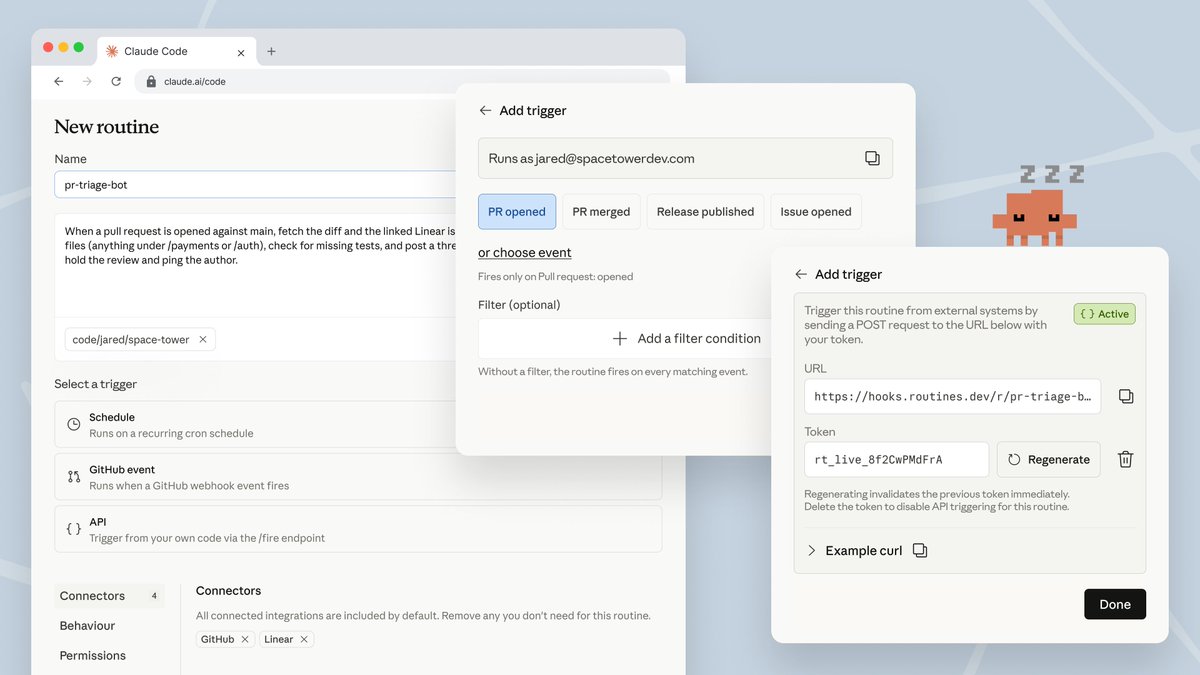
Now in research preview: routines in Claude Code.
Configure a routine once (a prompt, a repo, and your connectors), and it can run on a schedule, from an API call, or in response to an event.
Routines run on our web infrastructure, so you don't have to keep your laptop open.
once you grasp CSS counters, then you can leverage the cascade 🧑🍳
content: counters(section, '.', pad) var(--t, ' ');
need a certain section to start at a different number?
use scoped custom properties 🫡
BIG NEWS for #PHP devs! ✨
Tired of finding only Python or TypeScript tools for building an MCP server?
Introducing PHP MCP Server v1.0.0 🚀, a core, framework-agnostic Model Context Protocol implementation in PHP.
Let’s dive in 🧵
The HTTP client CLI tool is now available in Homebrew, for free!
To install it, launch the `brew install ijhttp` command in the terminal.
🧵 Check out the thread below for more details! 🧵
Узнал в Мастодоне, что ЕС собирается заставить производителей техники явно говорить насколько она ремонтопригодная.
https://t.co/1S7RtCv6z0
Ситуация с одноразовой техникой реально зашла не туда.
Introducing Customizable Responsive Breakpoints for Divi 5. 🥳
Divi 5 now comes with seven pre-defined breakpoints that cover every type of device, and you can customize the width of each breakpoint to control your design at every size. 👇
Introducing Customizable Responsive Breakpoints for Divi 5. 🥳
Divi 5 now comes with seven pre-defined breakpoints that cover every type of device, and you can customize the width of each breakpoint to control your design at every size. 👇


![rubenhassid's tweet photo. You're using Claude like it's 2024.
Here's the full 2026 setup (one cheatsheet to save):
1. Get the Claude app (claude .com/download).
2. You need a Pro plan ($20/mo). Worth every cent.
3. You'll see 4 tabs: Chat, Cowork, Code & Projects.
-----
✦ Cowork = Claude works inside your computer.
Pick a folder. Add 3 files: about-me .md, anti-ai-style .md, my-company .md.
Go to https://t.co/psB7XxB2Y4 to my .md files.
Don't pay anything, get it in the welcome email.
Set Global Instructions so it reads before tasks.
Claude generates clickable forms. Click & answer.
✦ Projects = persistent context for your team.
Go to claude .ai → Click "Projects" in the sidebar.
Upload your brand docs, writing samples & data.
Set custom instructions. Chat inside the Project.
Every conversation remembers everything.
✦ Skills = slash commands that fire automatically.
Open Cowork → prompt: "Use the skill-creator to build a skill for [your task]."
Claude interviews you. Builds the Skill. You upload it once. Now type /brief anywhere. It just works.
Browse plugins: Customize → Personal plugins → +.
✦ Code = a junior developer for $0.66/day.
Go to the Code. Connect your free GitHub account.
Type what you want in English. Attach a screenshot.
Claude builds it. Pushes it live. You edit with words.
Install VS Code + bypass permissions to go 10x fast.
-----
Pro tip: Select Opus 4.6 + Extended thinking for complex tasks. Use Sonnet for quick ones.
Help others be better at Claude ♻️ repost this.
PS: I write a newsletter to 484,000+ readers.
↳ Join us for free at https://t.co/psB7XxB2Y4.
↳ Open the welcome email after subscring.
↳ Download all of my infographics, also for free.](https://pbs.twimg.com/media/HGBaL38aIAAL1iA.jpg)