clai — natural language → shell command, right on your prompt.
$ ai kill process on port 8001
$ lsof -ti:8001 | xargs kill -9
Context-aware. Any LLM. Local Ollama = free. `ai fix` for typos. Ctrl-G transforms in place.
Install:
$ npm i -g mohocp/clai
https://t.co/c4cpNVSXM6
try https://t.co/aXzPADy0vL Publish any file or folder to a live, edge-served URL in seconds — no account, no sign-up — using ordinary HTTP. Plus private, versioned cloud Drives for agent memory, context, and handoff
Fellow terminal dwellers:
What's the ONE command you always end up Googling?
- Find files larger than X?
- sed to replace across a directory?
- git undo?
- An ffmpeg incantation?
Curious what to tune the next clai release for.
$ npm i -g mohocp/clai
https://t.co/c4cpNVSXM6
"AI agent for your terminal" scares me too.
clai is not that. It writes the command onto your input line and does nothing else. You review. You edit. You press Enter.
If you can hit Ctrl-C, you can cancel any suggestion.
$ npm i -g mohocp/clai
https://t.co/c4cpNVSXM6
clai watches your edits.
You always change `kill -9` to `kill -15`? Next time it suggests `-15`.
You never use `--force`? It stops suggesting it.
All local, in `~/.config/clai/edits.tsv`. Delete the file to forget.
$ npm i -g mohocp/clai
https://t.co/c4cpNVSXM6
Every "AI in your terminal" tool wants a subscription.
clai runs on your local Ollama daemon for free. It auto-discovers your models.
Zero subscription. Zero API bill. Your commands never leave your machine.
$ npm i -g mohocp/clai
https://t.co/c4cpNVSXM6
clai runs on any of:
- Claude (Opus / Sonnet / Haiku / Fable)
- GPT-5.1
- Gemini 2.5
- Anything on OpenRouter
- Local Ollama (free, offline)
- Any OpenAI-compatible endpoint
One tool. Your keys. Your choice.
"deploy" is not a command. But every project has one.
clai knows yours because it quietly sees your Makefile targets, your npm scripts, and your git status.
$ ai deploy to staging
$ make deploy STAGE=staging
Never sends file contents. Just structure.
The best feature I've added to clai:
Type plain English right on your zsh/bash prompt, press Ctrl-G, watch the line transform into a real command in place.
$ delete all node_modules older than a week
↑ Ctrl-G
$ find . -name node_modules -mtime +7 -exec rm -rf {} +
Everyone has done this:
$ git pusj
zsh: command not found: git pusj
$ ai fix
$ git push
Two characters and the shell repairs itself.
`ai fix` is the feature in clai I use 30 times a day.
I got tired of copy-pasting commands from ChatGPT to my terminal.
So I built clai:
$ ai kill process on port 8001
$ lsof -ti:8001 | xargs kill -9
The command lands on your prompt. YOU press Enter.
No pasting. No agent running behind your back.
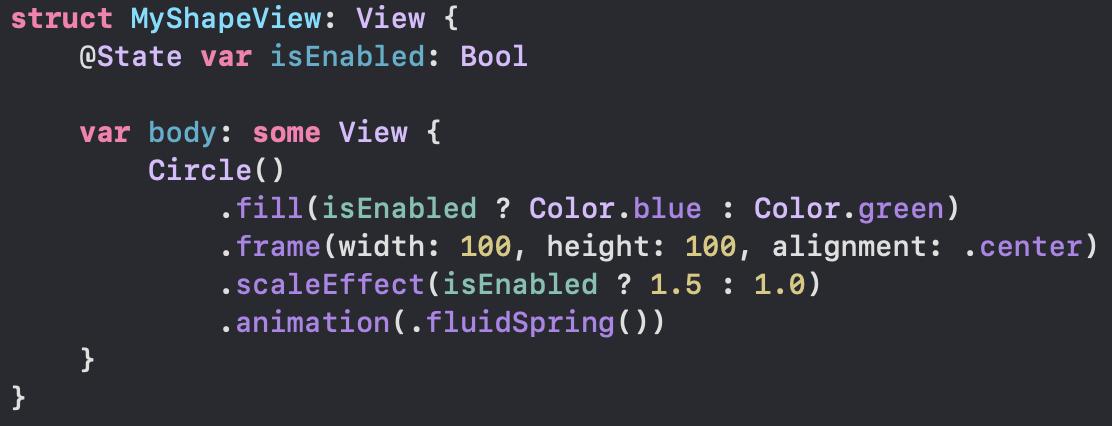
Remember all those awesome UX #WWDC talks about interruptible animations, and how they make your app feel far more responsive? Getting it right used to be incredibly hard. #SwiftUI does it all for you with One. Line. Of. Code.
Hot damn this is beautiful: https://t.co/L2PqVTxRmN – regardless of whether this kind of thing gets bundled into Xcode, Apple should hire these devs just for their smarts. (Ironic that it's called Sherlock!)
The attack by Chinese spies reached almost 30 U.S. companies, including Amazon and Apple, by compromising America’s technology supply chain, according to extensive interviews with government and corporate sources.
An interesting idea on proximity feedback. As the user moves towards “Register” button, highlight the input fields that aren’t completed yet.
↬ Proximity Feedback Ideas
https://t.co/IpsZv632aT