Get the Last Record of the Sales Person Based on Name from the Data in Excel - XLOOKUP
=XLOOKUP(B5,data[Names],data[Region],,,-1)
search_mode - [optional] -1 = search from last-to-first
Dear Data Analyst.
EXCEL MADE EASY course will be launched on Thursday.
The First 3 people to get the correct price of the course will have it for free🔥
Must be following me, like and retweet.
Dear Cyber Security Wannabe, Here are 67 Cyber Security Courses w/ Labs that will give a complete base of knowledge to Land a Job in Cyber.
Hands on training is the best way that I learned over the years. Someone could tell me something 10 times, but it wouldn't sync in unless I did it myself. People come to me every single day wondering the best way to learn.
I'm not affiliated with TryHackMe in any way, shape or form, but I send people their way all the time because of the structured learning. When I learned, I had to buy expensive hardware and make it all work.
If you are struggling on what to learn, Here are 67 well structured modules that will make you dive right in to learning Cyber Security and what it's all about. Before you dive in, bookmark 📚 this so you have it for reference.
It's true that building your own labs gives you experience, but many times you end up spending time fiddling focusing on hardware instead of what you are actually trying to learn. Their labs are at https://t.co/p6RWKQsFPw.
1. Metasploit
2. Phishing
3. Burp Suite
4. Network Security
5. Web Hacking
6. Nmap
7. Initial Access
8. Red Team Fundamentals
9. Introduction to Offensive Security
10. Introduction to Defensive Security
11. Recent Threats
12. Compromising Active Directory
13. Host Evasions
14. Introduction to AWS
15. Introduction to IAM
16. Introduction to Pentesting
17. How the Web Works
18. Linux Fundamentals
19. Privilege Escalation
20. Network Security Evasion
21. Post Compromise
22. Cyber Defense Frameworks
23. Digital Forensics & Incident Response
24. Wireshark
25. Endpoint Security Monitoring
26. Software Security
27. Log Analysis
28. Advanced Splunk
29. Advanced ELK
30. Threat Hunting
31. Threat Emulation
32 Incident Response
33. Malware Analysis
34. Security Software Development
35. Network Exploitation Basics
36. Vulnerability Research
37. Cyber Security Awareness
38. Cyber Threat Intelligence
39. Network Security and Traffic
40. SIEM
41. Attacking and Defensing Core Services
42. Threat and Risks
43. Network and System Security
44. Managing Incidents
45. Web Hacking Fundamentals
46. Attacking and Defensing Core Services
47. Cryptography
48. Introduction to Cyber Security
49. IAM Privilege Escalation
50. Intro to Security Engineering
51. Windows Exploitation Basics
52. Tools and Code Analysis
53. Planning and Scoping
54. Information Gathering and Vuln Scanning
55. Attacks and Exploits
56. Shells and Privilege Escalation
57. Basic Computer Exploitation
58. Detection Engineering
59. Threat and Vuln Management
60. Security Operations and Monitoring
61. Threat Emulation
62. Incident Response and Forensics
63. Snort
64. Malware Analysis
65. Network Fundamentals
66. Windows Fundamentals
67. Scripting for Pentesters
Did you bookmark? 📚
These are actual hands on labs that will get you familiar with the tools that we use in the industry every single day.
This list will seem overwhelming. No, you don't have to learn every single one of these, but the more widespread your knowledge is, the more chance you have of landing a job.
If you liked this post, you'll love my newsletter. My goal for each email is to steer you in the right direction to you can land that next Cyber job.
➡ Join 10,000 others at https://t.co/GcdJet8jHq and instantly get an email about jobs you probably aren't seeing.
p.s. do you all think I should at least get some swag from TryHackMe? Maybe even just a shirt? (XL) 😊
#cybersecurity #informationsecurity #infosec #leadershipbyexample
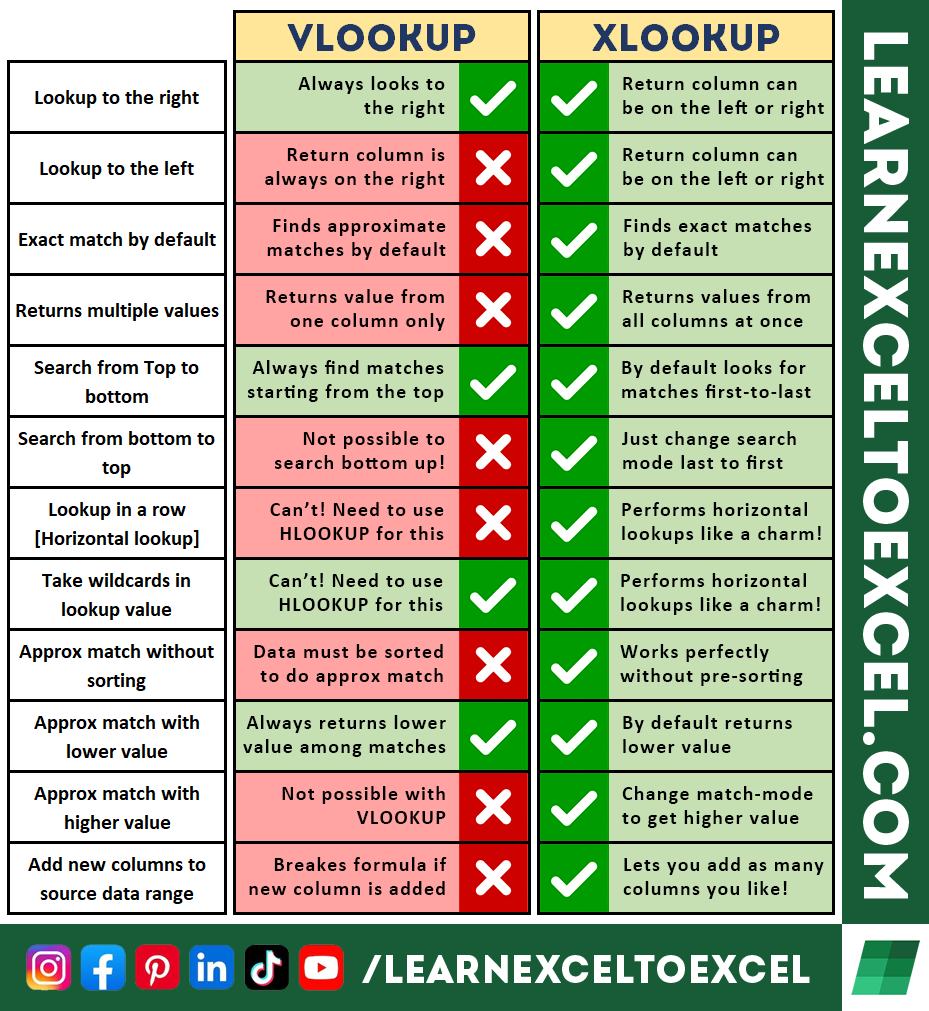
#Excel XLOOKUP vs VLOOKUP
Latest Excel videos: https://t.co/IYYn9k5rgT
XLOOKUP is one of many amazing upgrades we have recently in Excel!
Following is a summary of how XLOOKUP hulk-smashes VLOOKUP black and blue!
❤ + RT + Follow!
Lookup Multiple Values from an Array | #Excel 365 Version
Unique List of EMP ID: =UNIQUE(Data[Emp ID])
Lookup EMP Names: =XLOOKUP(B24,Data[Emp ID],Data[Name])
Fetch Multiple Values from an Array:
=TEXTJOIN(", ",TRUE,IF($B24&D$23=Data[Emp ID]&Data[Date],Data[Groups],""))
النصر حقيقة لا يتعلق بمجرد العدد والعدة، وإنما بتأييد الله تعالى وعونه ﴿وَاللهُ يُؤَيِّدُ بِنَصرِهِ مَن يَشاءُ إِنَّ في ذلِكَ لَعِبرَةً لِأُولِي الأَبصارِ﴾.
تلاوة فضيلة الشيخ د.#ماهر_المعيقلي من صلاة العشاء 3 ربيع الآخر 1445هـ.