Run several Claude Code / Codex sessions side by side — and see which one needs you. A browser terminal, tmux-backed, MIT. From receptron (GraphAI, MulmoCast).
Running Claude Code and Codex side by side? MulmoTerminal shows you which one is waiting — color, a chime, and a push to your phone.
A browser terminal, tmux-backed, so sessions survive a closed tab or a server restart.
npx mulmoterminal@latest
MIT / https://t.co/b2FnQRJmEX
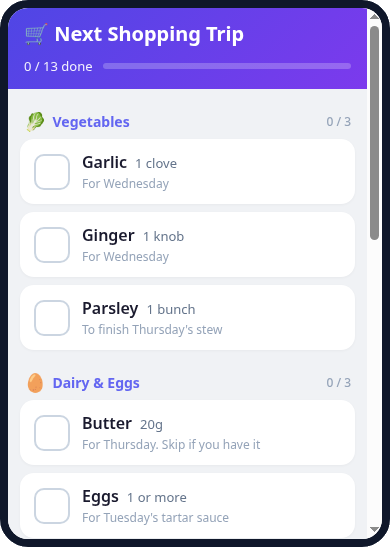
A shopping list doesn't need a shared workspace.
Keep it as a one-person collection in MulmoTerminal or MulmoClaude. It stays with you until you share it.
On your phone, open Shopping mode to check things off.
#MulmoTerminal#MulmoClaude
When running tasks in parallel, it's easy to lose track of what's waiting on you.
In MulmoTerminal, those cells turn amber in the grid.
You can triage by color without hopping tabs.
Open one grid and instantly spot what needs your attention.
#MulmoTerminal
Not everyone on your team or at home needs their own AI.
Build and publish in MulmoTerminal. Everyone else just opens it in a browser.
Start by publishing one.
#MulmoTerminal
How to post to Shape Gallery
In MulmoTerminal, build the 3D, publish from Canvas, and it lands in the gallery.
Works with Claude as well as Codex.
https://t.co/IwdkQmIPtS
* Google sign-in required to publish
* Attached: the upload walkthrough
#MulmoTerminal#ShapeGallery
Vibe coding ships fast, but "vibe debt" hits when no one can explain the code.
What we're trying: Collections → Shared Apps. Build alone, then share—humans and LLMs, same UI and records. Our marketing board already runs this way.
#MulmoTerminal#MulmoClaude#MulmoCast
Built a marketing co-work board with MulmoTerminal Shared Apps.
AI runs the daily loop (create → prep → reflect). Humans just review and post to X, note, and YouTube.
Not AI waiting on tickets—an agent iterating on its own in real ops.
#MulmoTerminal#AIAgents
Ask about the table while you are still looking at it.
New in 4.19.0: a chat started from a collection docks under it, and the table stays where it is — so you read the answer against those rows. Start another and it opens as a second tab.
npx mulmoterminal@latest
#ClaudeCode
Edit the deck where your project keeps it.
Change a slide title in the Canvas, and git diff shows the one line that changed in the deck's own file. New in 4.20.0: a deck kept in a repository saves back to it.
npx mulmoterminal@latest
#ClaudeCode
New in 4.18.0: an agent can look at the 3D model it wrote.
renderShapeScript draws it from four angles into one image the agent reads itself — so it can check its own work before showing it to you.
npx mulmoterminal@latest
#ClaudeCode
Which worktree is each cell on? Put it on the header.
This chip shows the worktree name, so a cell started from an issue opens already labelled. To add a chip, press a button in Settings: a new terminal opens and an agent sets it up.
npx mulmoterminal@latest
#ClaudeCode
@kartikb753@DanKornas Neither — the colour comes from the agent's own lifecycle events (turn started, turn ended), never from terminal activity. So "working but not progressing" still reads as working, and nothing detects that automatically. What tips you off when one of yours gets stuck?
@DanKornas Thank you for introducing our product, Multiterminal!!
Using it has allowed us to dramatically boost our productivity.
We would love for every user who engages in "vibe coding" via the terminal to give it a try.
Running several coding agents is easy. Knowing which one needs you is the hard part.
MulmoTerminal is a browser terminal for builders running multiple Claude Code and Codex sessions in parallel.
It helps you triage agent work from one grid by color-coding session states, so you can spot what is working, waiting for input, finished, or idle without hunting through terminal panes.
Key features:
• Live session grid – view several agent sessions side by side in browser-based terminals
• Attention states – color cues and an attention chime flag sessions that need you
• Cockpit roster – see each session’s summary, latest prompt/reply, and PR phase while focused on one terminal
• tmux persistence – sessions can survive a server restart or browser reload when tmux is installed
• Git worktrees + PRs – isolate agent work in worktrees and use built-in diff, commit, push, and PR actions
It’s open-source (MIT license).
Link in the reply 👇
You leave one cell for another, and come back. Where was it?
MulmoTerminal ends every session's reply with what you asked, what it did, and what it did not — three lines to read, instead of scrolling back through the session.
npx mulmoterminal@latest
#ClaudeCode
Keep a deck in the repository it belongs to.
Right-click it in the file tree and it opens in the Canvas — still the same file in that repository, no copy. New in 4.17.0: this works from any directory where you launch a cell.
npx mulmoterminal@latest
#ClaudeCode
The collections you open all day, on the toolbar.
Star the ones you reach for, then tick them in Settings under Toolbar pins. Up to five sit beside Grid and Collections, one click away from anywhere in the app.
npx mulmoterminal@latest
#ClaudeCode
Need the tests run, but the agent is mid-thought?
The Run menu starts your script in the next free cell — the conversation keeps going, and the results are one glance away.
npx mulmoterminal@latest
#ClaudeCode
Your dev server, your logs, your editor — in the same grid as the agents.
Launch commands are yours to add: Settings, a label, a command line. The chip then waits in the launcher.
npx mulmoterminal@latest
#ClaudeCode
A cell doesn't have to be an agent.
Pick Shell in the launcher and you get a plain terminal in the same grid. Agents and ordinary shells, side by side in one tab.
npx mulmoterminal@latest
#ClaudeCode