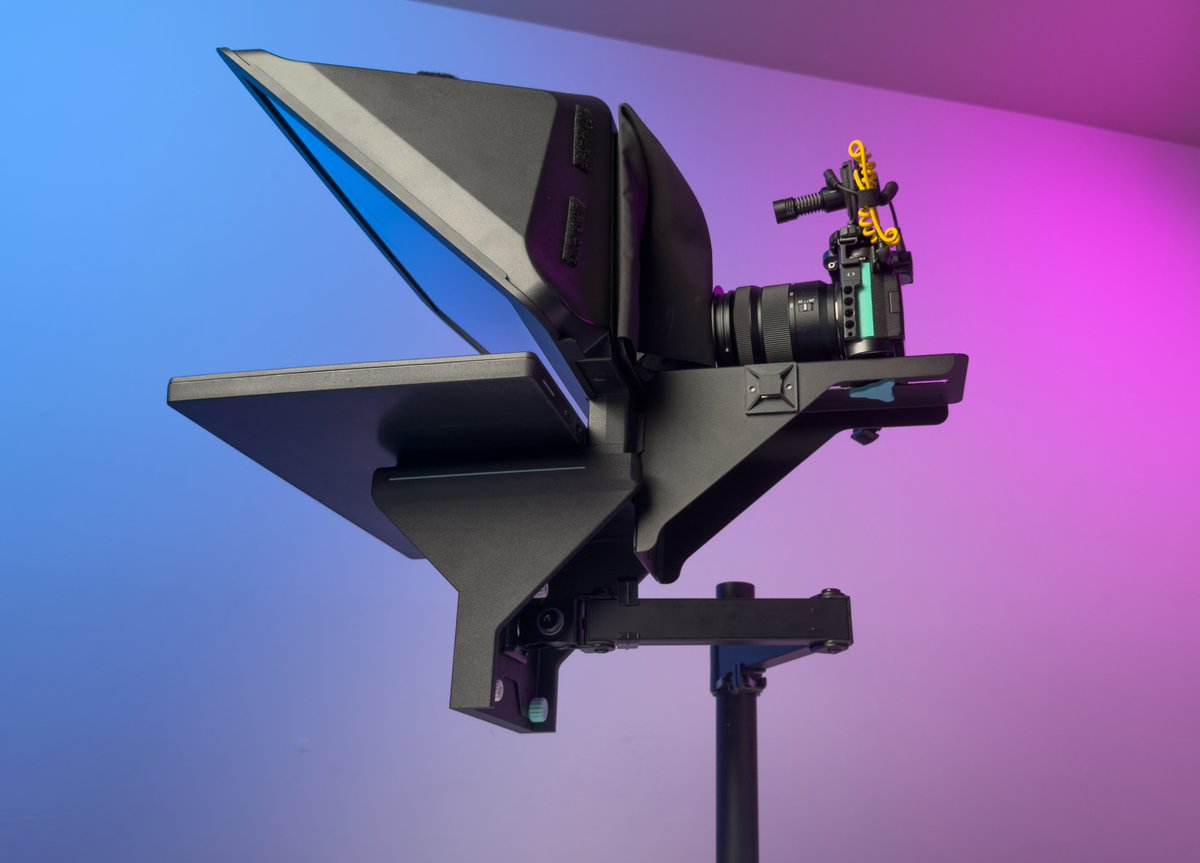
VESA adapters for the @elgato PrompterXL are now available!
Throw that massive tripod out the window and mount your PrompterXL on any 75/100mm VESA arm and reclaim that corner or desk space. To celebrate the launch, kits are 15% off in the store ↓
@shanselman@theo Scott I hope you can understand that suggesting a 3rd party tool as a fix is exactly the problem XD ear trumpet is great.... because native is useless
Not to mention combining the network + audio icons into a single button and giving you a grand total of 0 network options
@Frenck You all have gone absolutely bonkers and I can't thank you enough for it. I love love love love my home assistant and don't know what I would do without it. Thank you everyone!
I finally got around to trying "agent video editing", via OpenClaw + Claude Code. Here is what I did, how it's setup, what it cost, and my thoughts. My setup is different than most of the tests I've seen. TL;dr? Shheeeeeiiiiiiiiiitttt
The initial goal
Pop the SD card into my dedicated AI miniPC, copy footage to a root folder, have the AI PC via OpenClaw + ClaudeCode take all that footage, put it all in it's own folders, cut silences/repeats/mistakes, and give me as many rough cuts of videos as possible. All this would be done in synced folders that are accessible on my mac, so when it was done I could just open DaVinci on my mac and pickup where it left off. (Btw my dearest @Game_Dev_Carto here is another example of having a dedicated media PC for content workflows.) The sync is not necessary to edit form the mac, I could easily
The setup + talk
- 40 minutes of talking head footage, single cam, across 5 video files. 60gb footage. I had rough talking points, and figured I could get 6-8 videos out of all of them. I did not provide the talking points to open claw. They were offloaded from SD to to my Ubuntu 24 AI pc (the @Nimo_PC 4L, provided as a gift btw) That ingest folder is setup to auto sync everything over to my mac as well for backups.
- OpenClaw runs on that Ubuntu machine, and I have a single session that exclusively uses the opus 5.5 model via claude code. This way it's all non-api billing and very cost effective. I chat with open claw on my mac and phone remotely.
- Before staring this project, I built my normal DaVinci project folder structure, and instructed openclaw to repeat this same folder structure for every video it cuts together. That template folder example stays on the network for it to reference. All audio, video, photo stuff in it's correct folders. It also exports a .drb for every timeline it creates. I ended up with 6 videos, 6 timelines, in 1 project.
- When I film with my S9, I use two mics. The Deity D4 and a wireless LAV. the Deity is awesome because it's a mini shotgun mic that has an additional 3.5mm input on it. Which means you can put one mic in the left mic channel, and one mic in the right. So I said "for every video clip, duplicate the audio into a second track, set track to mono, track 1 uses left mono, track 2 uses right mono" and then I can go in and choose what mic I want to use based on if I'm sitting near camera or up and walking around. It did that perfectly, and I have two mics to choose from for every video.
What it was able to do without me touching it:
- Ingest all footage, organize the footage into folders following my folder structure, and sync all that to my Mac
- I told it "based on my rough notes for these videos, cut these together to make enough videos to cover each subject matter. Take your best shot at guessing what videos I want made" and it gave me 7 for sure videos from start to finish and 4 that were maybe good enough to be videos. These were not full edits, it was just cutting out repeats, mistakes, silences, etc. It gave me 6 videos. Based on my other workflows and previous tasks, my OpenClone knows that I prefer my videos to be in between 1 minute and 2 minutes and 30 seconds, so it automatically assumed my videos were going to be close to that and aimed for that length.
- Generated captions (which I could easily auto export as .srt files too)
- It exported drafts of each one so I could watch it before I went in and finished the edit.
What it didn't do because I didn't ask and what I did after
- Create proxies
- Color grade
- choose audio tracks
- audio mastering (didn't ask but I could templatize this so easy. They're already davinci presets)
- Zooms, broll, effects, on screen text, etc.
The bad:
- It removed a LOT of talking head to try and cut it down for short form. There was a good amount of going back in and grabbing things I said that were important to keep in the video.
- Audio/Video clips were not linked on the timeline, so going back and making additional edits was a little tedious. I hate this.
- I'm lucky enough to have a $3500 mini PC with 64gb ram and 64gb of other ram dedicated to the GPU that handled all this while I worked on my mac. So I wasn't impacted by the workload at all. If you weren't using a dedicated machine, you probably couldn't use your main machine while this was happening. That's a big
Cost:
-1h46m
-Just under 10 millions tokes
= 8% of my weekly usage on $20/month plan, which means I could run this same task 50 times before the month was over. For $20. Shheeeeeeeesh.
Summary:
I rank this a 9/10. I would likely spend 30 minutes to an hour on each of these shorts to finalize them, and even that could be shortened. I don't have any plans to edit full videos via AI. I still want that personal touch and interaction before it becomes content online. But automating all this before I even sit down for the first time? Why the fuck wouldn't I? That's 2 hours I worked on something else, not impacted by the workload because it was on another PC. And the minute the files were copied from the SD card, they were backed up. Extremely valuable, will absolutely continue to test. I could easily pipe this into my other automations so it would
1. create a new database entry in my content database for each video
2. generate the hashtags, seo, descriptions
3. create the thumbnails based on my templates
4. schedule them to post once a day
5. collect all the analytics after 7 days of posting.
At some point when it becomes financially possible i'd love to have an editor for some things. And if I could provide a single folder with 6 project files, all the RAW videos and my outlines/scripts for them to polish up, that turnaround time would be so faster compared to them raw dogging it from scratch. Seems like a no brainer.
Anyways thanks for reading okay bye bye now
@saradietschy I'm with you. I do not use sign in with google ever, and I only ever use sign in with apple on iOS for apps that i want to check out but not quite sure if they're fishy or not lol
@NotChaQuille For sure. And from what i've seen, this doesn't work with every type of content. Static yap-heavy talking head? It's great. A documentary? probably not great at all lol.
Overall my experience with the new M5 Max Mac Studio has been great but the number of bugs I've already experience with Golden Gate is quite astonishing.
Fresh install on a brand new machine with no time machine restore:
@Big_E Remove the name "capcut" from the workflow and I agree that it's a dope workflow too.
but using it means "You grant a worldwide, perpetual, royalty-free license" to anything you make is a harrrdddd turn off for me. But again, I'm not the person this is for. I used to love it.
I'll link a post that's a few years old but still 100% relevant, and add some more context.
SHOULD you have to do something else? No, but unfortunately the networking hardware provided by ISP is usually bottom of the barrel garbage. That, plus it's also a tiny single device trying to do the jobs that 5 different devices normally do, and stays on 24/7. If you have a model/router combo unit, it's working overtime.
First: Call ISP tech support, just tell them that you have to power cycle the modem a few times a day to get the internet to come back. Ask them if they can remotely access the device to check it's logs for bad signal to noise ratios, overheating alerts, or if it needs a firmware update. Hopefully that fixes it or they find it to be worth replacing. If it is over heating, a small fan pointed at it 24/7 would do wonders.
Best case scenario is you replace the model/router with a dedicated modem and dedicated wireless router that you own. (Modem needs to be on ISP's compatibility list). But, that takes someone with the technical know how and then you're network and wifi is going to change. It can be a lot.
https://t.co/83W4iJfiNW
Hello, Roberto.
The most common issues with the part of your internet that you can't control is interference or noise in the line that is coming off the pole, and into your house. You have to be able to get into the modem itself and check it's stats to report issues to the ISP, which can be a hurdle as it takes some technical knowledge. This is where device age (your "new" device is most likely refurbished) power status, signal to noise ration, device temperature, upstream/down streams stats can all be found. If the technician is saying everything up to that point is reading fine, the most you can do is make sure it stays cool and has good airflow. You can also call the ISP and have them look at the noise levels in the line, and ask them to check and make sure the device has the most up to date firmware.
The best things people can do to increase the uptime and reliability of their home network is take all of the roles and responsibilities of all-in-one wireless gateways provided to you, and separate them into different devices. The all in one devices that you get from ISP are doing so many different things, run 24x7, and are a single point of failure.
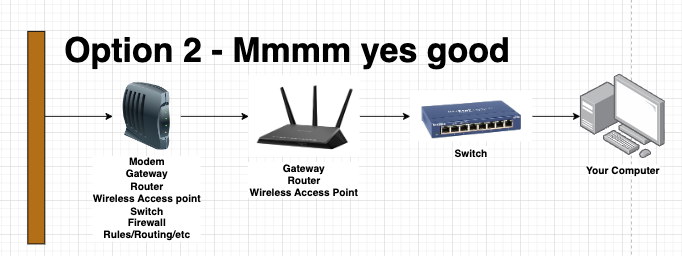
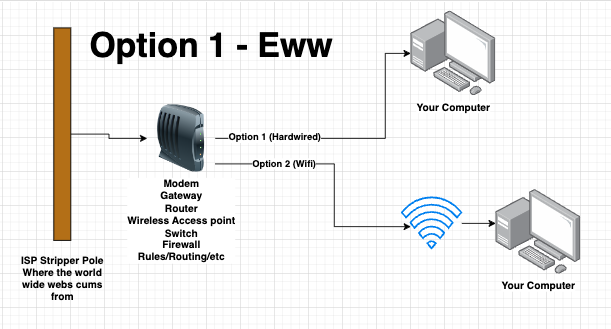
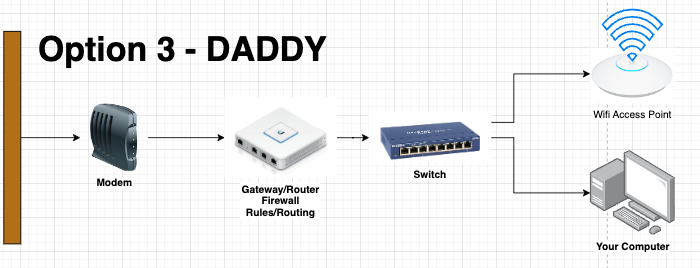
Some ISP's require you to use their equipment, and sometimes the all in one gateways have to be used. But, like mine with AT&T, that doesn't mean you can turn everything off except the "modem" part of it and use your own hardware for everything else. I'll put what I think your setup is now, and two options for which I think you could improve. If you're connected via Wifi, you could do something as simple as turn off the wifi on the router you have, and buy a device that is JUST a wireless access point. You'll have a much better time. But if it's not the wifi that's dropping and causing you to restart your gateway, you'll be in the same boat.
Let me know if you have any other questions. God speed.
You did, or you didn't because "you can only cram so much in a tweet?"
And in your original post, you posted a screenshot of it saying "we automatically handle your backups" and you saying "okay". Only now did you just add a reply saying "but I still had backups", and your other replies are asking Grok what a good backup is.
Seems like your kink is contradiction. Bye bye now.
Grok Bot is cooked. Done.
This is not hyperbole.
Many people including myself report it deleting weeks / months of work .
That’s it.
My usage goes to zero starting today.
As much as I absolutely loved it this is 100% unacceptable until I get my data back and they fix it.
As I prep for the @NackHabitat launch of the Spoosa and Zenny, I've also refreshed my designs for all of my portable monitor VESA adapters. I've also added 3 new designs.
(Keep your eyes open for @CORSAIR Xeneon edge giveaway+launch sometime next week)
Thread of whats new ⬇
@jayclouse Technically I read less because a year ago each newsletter sent one or two a week and now almost all of them send multiple a day and it's quite outrageous
It's tied for me
RE320
or
Lewitt Ray
The lewitt has some cool tech that allows for some off-axis speaking but it attempts to maintain the tone and volume. Has some cool motion sensors in it that can also mute when you bring your face away. Lewitt mics in general just sound so good for spoken word. Even the lct 240 is amazing for the price.