@ICCCBengaluru
Main drainage problem which is persistent and happens every week or alternate week, upon complaining to concerned BWSSB authorities they take more time to resolve. need help here. Addrs: 3rd cross LN colony Yeshwantpur blr. Old aged and young ppl r suffering
Virtualization vs Containerization
𝗩𝗶𝗿𝘁𝘂𝗮𝗹𝗶𝘇𝗮𝘁𝗶𝗼𝗻 (VMs) gives each workload its own full machine with its own guest OS and kernel. Great for isolation and OS flexibility, but you’re paying the cost of booting and managing entire operating systems for every workload.
𝗖𝗼𝗻𝘁𝗮𝗶𝗻𝗲𝗿𝗶𝘇𝗮𝘁𝗶𝗼𝗻 runs workloads as isolated processes on a shared OS. It’s fast and efficient; but with weaker isolation and more constraints around security and OS compatibility.
VMs give you strong boundaries and full environments. Containers give you speed and efficient delivery.
If you’ve used VMs, you know the pain isn’t the VM; it’s everything around it: provisioning, networking, exposure, and persistence.
That’s where exe[.]dev comes in.
It gives you instant VMs over SSH, with:
• Built-in HTTPS exposure
• Persistent environments
• Zero cloud config overhead
• Safe sandbox execution layer for agents (with secure credential injection via Integrations)
When infra is this fast to spin up, you stop hesitating and start testing.
Check it out → https://t.co/nVBacHNkdX
What else would you add?
——
♻️ Repost to help others learn and grow.
🙏 Thanks to @ssh_exe_dev for sponsoring this post.
➕ Follow me ( Nikki Siapno ) to become good at system design.
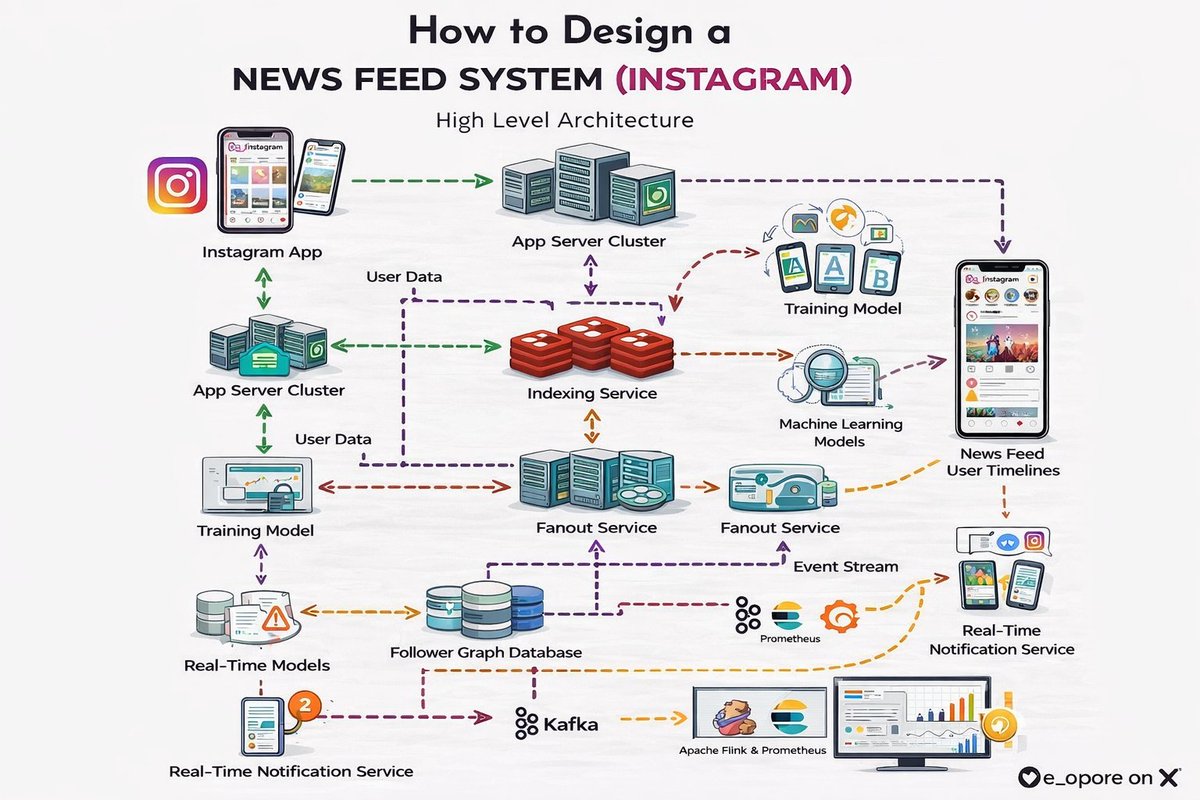
𝗛𝗼𝘄 𝘁𝗼 𝗗𝗲𝘀𝗶𝗴𝗻 𝗮 𝗡𝗲𝘄𝘀 𝗙𝗲𝗲𝗱 𝗦𝘆𝘀𝘁𝗲𝗺 (𝗜𝗻𝘀𝘁𝗮𝗴𝗿𝗮𝗺)
Design a 𝗵𝗶𝗴𝗵𝗹𝘆 𝗽𝗲𝗿𝘀𝗼𝗻𝗮𝗹𝗶𝘇𝗲𝗱, 𝗹𝗼𝘄-𝗹𝗮𝘁𝗲𝗻𝗰𝘆 𝗻𝗲𝘄𝘀 𝗳𝗲𝗲𝗱 𝘀𝘆𝘀𝘁𝗲𝗺 that aggregates content from followed users and recommended sources, ranks it by relevance using machine learning, and delivers it in a paginated, infinitely scrolling format to millions of concurrent users.
The system operates on a 𝗽𝘂𝘀𝗵-𝗽𝘂𝗹𝗹 𝗵𝘆𝗯𝗿𝗶𝗱 𝗮𝗿𝗰𝗵𝗶𝘁𝗲𝗰𝘁𝘂𝗿𝗲 that balances write amplification with read latency. When a user posts content, it is "fanned out" (pushed) to the feeds of active followers via a Feed Write Service. For users with millions of followers (celebrities), the system switches to a pull-based model where the feed is generated on-demand, avoiding the massive write overhead.
When a user opens the app, a Feed Read Service retrieves their personalized feed from a distributed cache. The feed is a pre-computed list of post IDs, ranked by the Ranking Service based on factors like recency, engagement, relationship with the author, and machine learning signals. Thumbnails and media are then fetched from a CDN for fast rendering.
The platform's core consists of 𝗵𝗶𝗴𝗵𝗹𝘆 𝗼𝗽𝘁𝗶𝗺𝗶𝘇𝗲𝗱, 𝗲𝘃𝗲𝗻𝘁-𝗱𝗿𝗶𝘃𝗲𝗻 𝘀𝗲𝗿𝘃𝗶𝗰𝗲𝘀:
- Feed Write Service: Handles fan-out of new posts to follower feed caches.
- Feed Read Service: Retrieves and paginates the ranked feed for users.
- Ranking Service: The ML-powered brain that scores and orders posts for personalization.
- Post Storage Service: Manages post metadata, captions, and comments.
- Media Service: Handles image/video upload, processing, and CDN delivery.
- Timeline Cache**: Distributed in-memory store (Redis) holding the pre-computed feed for each user.
Behind the scenes, an 𝗮𝘀𝘆𝗻𝗰𝗵𝗿𝗼𝗻𝗼𝘂𝘀 𝗲𝘃𝗲𝗻𝘁-𝘀𝘁𝗿𝗲𝗮𝗺𝗶𝗻𝗴 𝗽𝗶𝗽𝗲𝗹𝗶𝗻𝗲 powers personalization. Every view, like, and follow generates an event consumed by the Ranking Service, which continuously updates user embeddings and refines scoring models offline. Batch jobs pre-compute recommendations for cold-start users and generate the "Explore" feed.
This scale demands 𝗮𝗴𝗴𝗿𝗲𝘀𝘀𝗶𝘃𝗲 𝗰𝗮𝗰𝗵𝗶𝗻𝗴 𝗮𝗻𝗱 𝗶𝗻𝘁𝗲𝗹𝗹𝗶𝗴𝗲𝗻𝘁 𝗳𝗮𝗻𝗼𝘂𝘁 𝘀𝘁𝗿𝗮𝘁𝗲𝗴𝗶𝗲𝘀. Active users have their feed pre-computed and cached. Inactive users have their feed generated on-demand. The fan-out process is sharded by follower ID and processed asynchronously via message queues to absorb write spikes.
𝗖𝗿𝗶𝘁𝗶𝗰𝗮𝗹 𝗗𝗲𝘀𝗶𝗴𝗻 𝗣𝗿𝗶𝗻𝗰𝗶𝗽𝗹𝗲𝘀: 𝟭) 𝗛𝘆𝗯𝗿𝗶𝗱 𝗣𝘂𝘀𝗵/𝗣𝘂𝗹𝗹 𝗔𝗿𝗰𝗵𝗶𝘁𝗲𝗰𝘁𝘂𝗿𝗲 to handle celebrity users, 𝟮) 𝗠𝗟-𝗣𝗼𝘄𝗲𝗿𝗲𝗱 𝗥𝗮𝗻𝗸𝗶𝗻𝗴 for personalization, 𝟯) 𝗠𝘂𝗹𝘁𝗶-𝗧𝗶𝗲𝗿 𝗖𝗮𝗰𝗵𝗶𝗻𝗴 (feed IDs → post metadata → media), 𝟰) 𝗔𝘀𝘆𝗻𝗰𝗵𝗿𝗼𝗻𝗼𝘂𝘀 𝗙𝗮𝗻𝗼𝘂𝘁 with queue-based processing, 𝟱) 𝗘𝘃𝗲𝗻𝘁-𝗗𝗿𝗶𝘃𝗲𝗻 𝗣𝗲𝗿𝘀𝗼𝗻𝗮𝗹𝗶𝘇𝗮𝘁𝗶𝗼𝗻 for continuous model updates.
𝗧𝗲𝗰𝗵𝗻𝗶𝗰𝗮𝗹 𝗔𝗿𝗰𝗵𝗶𝘁𝗲𝗰𝘁𝘂𝗿𝗲 𝗦𝘁𝗮𝗰𝗸:
- 𝗙𝗿𝗼𝗻𝘁𝗲𝗻𝗱: React, React Native, Swift (iOS), Kotlin (Android)
- 𝗕𝗮𝗰𝗸𝗲𝗻𝗱 𝗦𝗲𝗿𝘃𝗶𝗰𝗲𝘀: Python (Django), Java, Go, Node.js
- 𝗗𝗮𝘁𝗮𝗯𝗮𝘀𝗲𝘀: PostgreSQL, Cassandra, DynamoDB
- 𝗙𝗲𝗲𝗱 𝗖𝗮𝗰𝗵𝗲: Redis, Memcached (for pre-computed timeline IDs)
- 𝗠𝗲𝗱𝗶𝗮 𝗦𝘁𝗼𝗿𝗮𝗴𝗲: AWS S3 + Global CDN (CloudFront, Akamai)
- 𝗠𝗲𝘀𝘀𝗮𝗴𝗶𝗻𝗴 & 𝗦𝘁𝗿𝗲𝗮𝗺𝘀: Apache Kafka, AWS Kinesis
- 𝗠𝗮𝗰𝗵𝗶𝗻𝗲 𝗟𝗲𝗮𝗿𝗻𝗶𝗻𝗴: PyTorch, TensorFlow (for ranking and recommendation models)
- 𝗢𝗿𝗰𝗵𝗲𝘀𝘁𝗿𝗮𝘁𝗶𝗼𝗻: Kubernetes, Docker, AWS EKS
- 𝗠𝗼𝗻𝗶𝘁𝗼𝗿𝗶𝗻𝗴: Prometheus, Grafana, ELK Stack
👉 Learn more in The Modern System Design Handbook: https://t.co/2LauJpfJ9C
👉 Grab the Master System Design Case Studies: https://t.co/ujlZXVdJPO
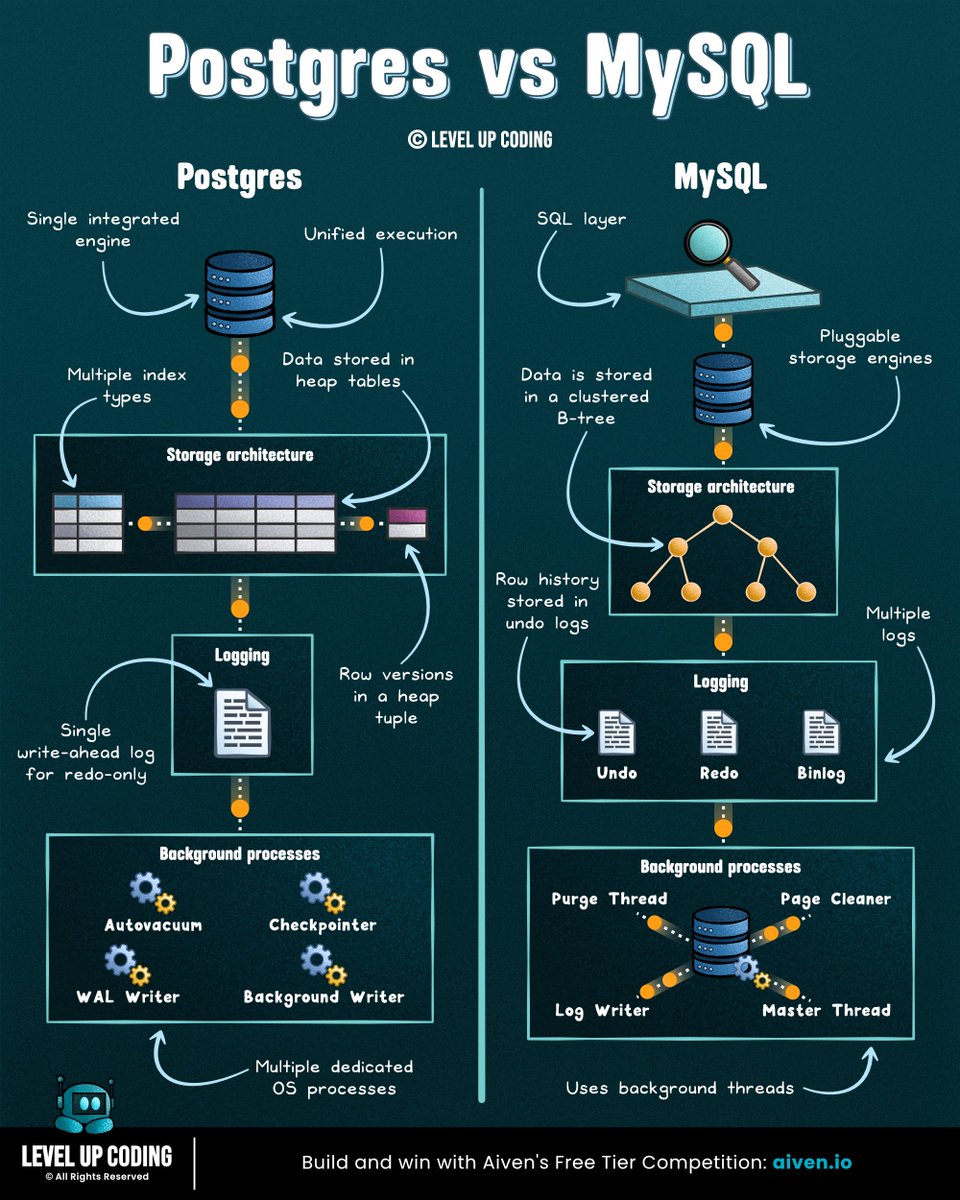
Postgres vs MySQL
(explained in under 2 mins):
First, do you know about the Aiven Free Tier Competition? They’re offering prize money for the best project built using their free tiers (including Postgres, MySQL, and more).
If you’re building with Postgres or MySQL, check it out → https://t.co/D0HLzi5Afq
𝗣𝗼𝘀𝘁𝗴𝗿𝗲𝘀 is built as a single, integrated system, and that design choice shapes how everything else works.
Data is stored in heap tables, where multiple row versions coexist. Updates create new versions, while old ones remain until cleaned up (VACUUM). MVCC is built into the data model, enabling advanced indexing and extensibility.
𝗠𝘆𝗦𝗤𝗟 is built around a pluggable storage engine architecture.
The SQL layer sits on top, while InnoDB handles storage. Old row versions are kept in undo logs and reconstructed when needed. Data is organised as a clustered index, with the primary key defining physical layout.
Which database do you prefer?
——
♻️ Repost to help others learn databases.
🙏 Thanks to @Aiven for sponsoring this post.
Stop watching Docker tutorials. ❌
If you want to actually learn Docker, don’t just watch tutorials. Build things.
Here’s a simple hands-on roadmap:
1⃣ Your First Container:
- Install Docker
- Run an Nginx container
- Map your ports to localhost
2⃣ Build Your Own Image:
- Write a clean Dockerfile
- Build your custom image
- Run your app inside the container
3⃣ Persist Data with Volumes:
- Create Docker volumes
- Run MySQL with persistent storage
- Test data survival after container deletion
4⃣ Connect Containers:
- Create a custom bridge network
- Connect your app to the database
- Resolve services using container DNS
5⃣ Multi-Container with Compose:
- Write a docker-compose.yml
- Define services, volumes, and env vars
- Spin up the full stack with one command
6⃣ The Registry Hub:
- Tag your custom images
- Push them to Docker Hub
- Pull and run them on another machine
7⃣ Multi-Stage Builds:
- Implement builder stages
- Drastically reduce your image size
- Ship production-ready, lean images
8⃣ Automate with CI/CD:
- Write a GitHub Actions workflow
- Build your image automatically on push
- Push the artifact directly to the registry
Build this, and you won't need another tutorial. 🚢
🔍 What is Observability?
Most people think it’s just monitoring.
It’s not.
Observability = knowing what’s happening inside your system without guessing.
It answers 3 simple questions:
1. What is happening?
2. Why is it happening?
3. How is it happening?
1. Metrics:
→ What’s happening
(CPU, memory, latency, traffic)
2. Logs
→ Why it happened
(Errors, events, debug info)
3. Traces
→ How it happened
(Request flow across services)
Metrics = What
Logs = Why
Traces = How
If you don’t have observability,
you’re just guessing in production.
Certainly one of the BEST channels for System Design:
https://t.co/6LJuJnIu3m
1. API Design
https://t.co/AUx3IzQkir
2. Sharding
https://t.co/sKObv3NN9H
3. Caching
https://t.co/zQr7bzsZm2
4. Concurrency
https://t.co/WcxW2fAyCZ
5. Data Modeling
https://t.co/zX2R66k7NK
6. Rate Limitter
https://t.co/zX2R66k7NK
7. DB Indexing
https://t.co/q35bD2BMiw
8. CAP Theorem
https://t.co/qAzsSi7Ej7
9. Kafka
https://t.co/PoAMbsnFOF
10. Redis
https://t.co/vbQqwgpZTw
11. System Design of Uber, WhatsApp, Bitly, etc.
https://t.co/mmUw8tamPk
Stop burning tokens on Claude Code.
Use this instead 👇
A free GitHub repo (80K⭐) that turns your CLI into a high-performance AI coding system.
Link → https://t.co/XVvfJvrJvE
Why it’s different:
→ Token optimization
Smart model selection + lean prompts = lower cost
→ Memory persistence
Auto-save/load context across sessions
(No more losing the thread)
→ Continuous learning
Turns your past work into reusable skills
→ Verification loops
Built-in evals to make sure code actually works
→ Subagent orchestration
Handles large codebases with iterative retrieval
Most people think Claude struggles with complex repos.
It doesn’t.
They’re just not using the right setup.
This fixes that.
Bookmark this for your AI stack. ♻️
#AI #Claude #AIAgents #LLM #GenAI #DevTools
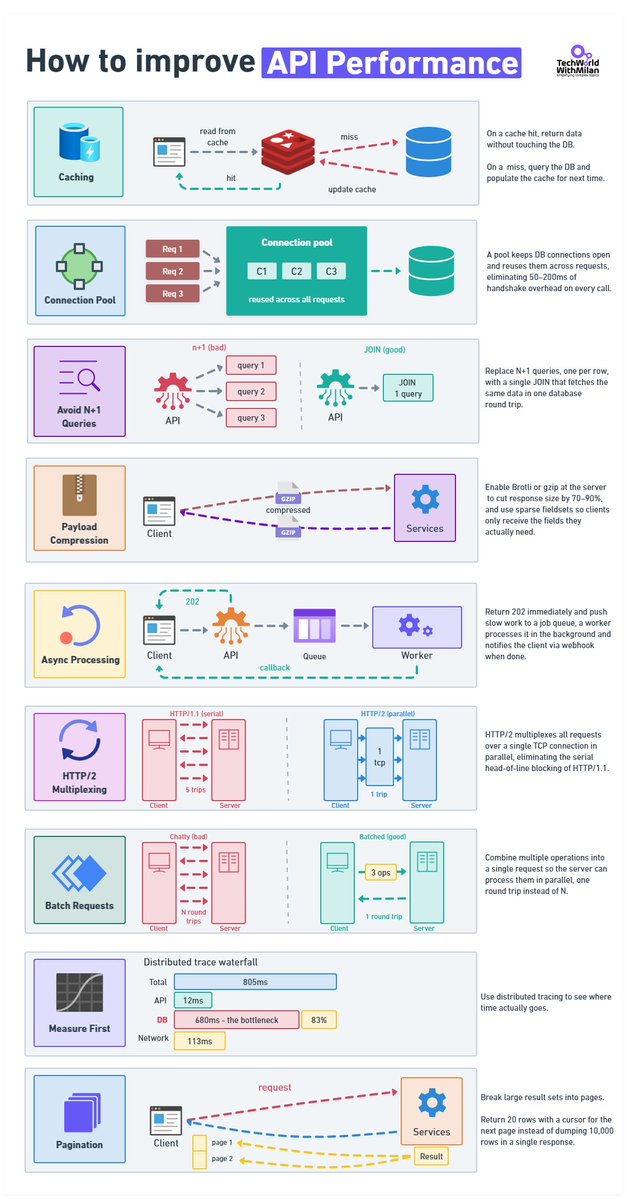
𝗧𝗼𝗽 𝗦𝘁𝗿𝗮𝘁𝗲𝗴𝗶𝗲𝘀 𝘁𝗼 𝗜𝗺𝗽𝗿𝗼𝘃𝗲 𝗔𝗣𝗜 𝗣𝗲𝗿𝗳𝗼𝗿𝗺𝗮𝗻𝗰𝗲
𝟭. 𝗖𝗮𝗰𝗵𝗶𝗻𝗴
A cache hit never touches the database. On a miss, you query the DB and write to cache so the next caller doesn't pay the same cost.
The part that engineers usually get wrong is invalidation. TTL is easy to implement and will absolutely serve stale data at the worst moment. Event-driven invalidation is accurate, but now you have a new thing that can break.
𝟮. 𝗖𝗼𝗻𝗻𝗲𝗰𝘁𝗶𝗼𝗻 𝗣𝗼𝗼𝗹𝗶𝗻𝗴
When you open a new connection, for each request, a few things happen: TCP handshake, TLS, Auth, etc. This takes 50–200ms, or even more. Pool your connections.
𝟯. 𝗔𝘃𝗼𝗶𝗱 𝗡+𝟭 𝗤𝘂𝗲𝗿𝗶𝗲𝘀
Every slow codebase I've worked in had this problem. You fetch a list of records, then loop through them and query related data for each. And it works fine locally with 10 rows, but in production with 2,000, it's 2,001 database round-trips per request.
We can fix this with one JOIN. Also, we need to index the columns in your WHERE clause.
Before you change anything, run a profiler and verify this is actually the problem. I've assumed N+1 before and been wrong.
𝟰. 𝗣𝗮𝘆𝗹𝗼𝗮𝗱 𝗖𝗼𝗺𝗽𝗿𝗲𝘀𝘀𝗶𝗼𝗻
This is something usually forgotten. A 120 KB JSON response becomes roughly 18 KB. If you're not doing this, you're sending the client unnecessary work.
You can choose Brotli or gzip.
𝟱. 𝗔𝘀𝘆𝗻𝗰 𝗣𝗿𝗼𝗰𝗲𝘀𝘀𝗶𝗻𝗴
Operations that take seconds don't belong inside an HTTP response. Return 202, put the job on a queue, process it in the background, fire a webhook when it's done. Your p99 will thank you.
𝟲. 𝗛𝗧𝗧𝗣/𝟮
HTTP/1.1 runs one request at a time per connection. That made sense in 1997. HTTP/2 multiplexes everything over a single TCP connection, allowing all requests to be in flight at once, with header compression on top. If your infrastructure supports it and you haven't switched, worth looking at why not.
𝟳. 𝗕𝗮𝘁𝗰𝗵𝗶𝗻𝗴
Ten API calls are 10 round-trips, but also 10 times the latency cost. Let clients bundle operations into one request and process them in parallel on the server.
In REST: POST /batch or GET /users?ids=1,2,3.
GraphQL handles this without you having to think about it.
𝟴. 𝗠𝗲𝗮𝘀𝘂𝗿𝗲 𝗙𝗶𝗿𝘀𝘁
Set up OpenTelemetry and look at actual traces before touching anything. I've watched teams spend weeks optimizing the wrong layer.
Here is a real example: API handler: 12ms, network: 113ms, DB query: 680ms. Everyone was looking at the API layer, but the problem was that it was sitting in the database the whole time.
An afternoon of instrumentation would have shown them that almost immediately.
𝟵. 𝗣𝗮𝗴𝗶𝗻𝗮𝘁𝗶𝗼𝗻
Never return 10,000 rows. Return 20 with a cursor for the next page.
Offset pagination scans and discards rows on every call, at page 500 you're scanning 10,000 rows to show 20. Cursor-based picks up exactly where it left off.
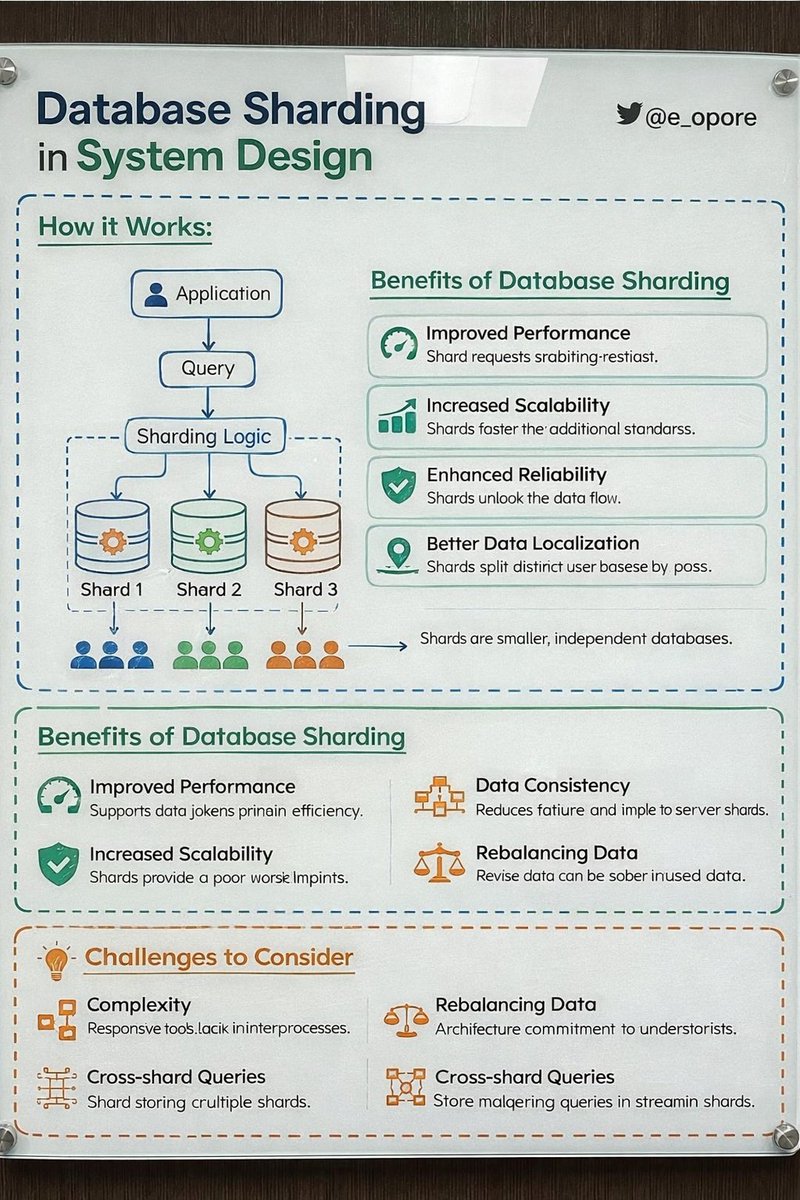
DATABASE SHARDING IN SYSTEM DESIGN
→ Database Sharding is a technique used to split a large database into smaller, independent databases called shards.
→ Each shard stores a portion of the data, allowing systems to scale horizontally and handle large volumes of traffic and data.
→ WHY DATABASE SHARDING IS IMPORTANT
→ Handles massive datasets efficiently
→ Improves query performance
→ Enables horizontal scaling across servers
→ Reduces load on a single database
→ Essential for high-traffic applications
→ HOW DATABASE SHARDING WORKS
→ Client Request → Application Server
→ Application Server → Sharding Logic determines shard
→ Request → Routed to correct database shard
→ Shard → Processes query and returns result
Example:
→ Users with IDs 1–1M → Shard A
→ Users with IDs 1M–2M → Shard B
→ Users with IDs 2M–3M → Shard C
→ TYPES OF SHARDING
→ 1. RANGE-BASED SHARDING
→ Data divided by ranges of values
Example:
→ UserID 1–1000 → Shard A
→ UserID 1001–2000 → Shard B
Pros
→ Simple to implement
Cons
→ Risk of uneven data distribution
→ 2. HASH-BASED SHARDING
→ Hash function determines shard location
Example:
→ Hash(UserID) % Number_of_Shards
Pros
→ Even data distribution
Cons
→ Harder to rebalance shards
→ 3. DIRECTORY-BASED SHARDING
→ Lookup table maps keys to shards
Pros
→ Flexible data placement
Cons
→ Requires maintaining shard mapping
→ SHARDING IN SYSTEM DESIGN ARCHITECTURE
→ Client → API Server
→ API Server → Shard Router / Middleware
→ Router → Determines correct shard
→ Query → Sent to specific shard database
Often combined with:
→ Load Balancers
→ Caching systems (Redis)
→ Replication for high availability
→ SHARDING BENEFITS
→ Horizontal scalability
→ Faster queries on smaller datasets
→ Improved fault isolation
→ Supports massive user growth
→ SHARDING CHALLENGES
→ Complex application logic
→ Difficult cross-shard queries
→ Rebalancing shards can be expensive
→ Requires careful shard key selection
→ SHARD KEY SELECTION
A good shard key should:
→ Distribute data evenly
→ Avoid hotspots
→ Support common query patterns
→ Maintain predictable routing
Examples
→ User ID
→ Geographic region
→ Customer ID
→ SHARDING VS REPLICATION
→ Replication → Copies same data across nodes for availability
→ Sharding → Splits data across nodes for scalability
Large-scale systems usually combine both:
→ Sharding for scaling data
→ Replication for reliability
→ REAL-WORLD SYSTEMS USING SHARDING
→ Social media platforms
→ E-commerce systems
→ Financial transaction systems
→ Large-scale SaaS platforms
→ TIP
→ Database sharding distributes data across multiple servers
→ Enables horizontal scalability and high performance
→ Requires careful shard key design and system architecture
→ Essential for modern large-scale distributed systems
📘 Grab the System Design Handbook:
https://t.co/2LauJpfbk4
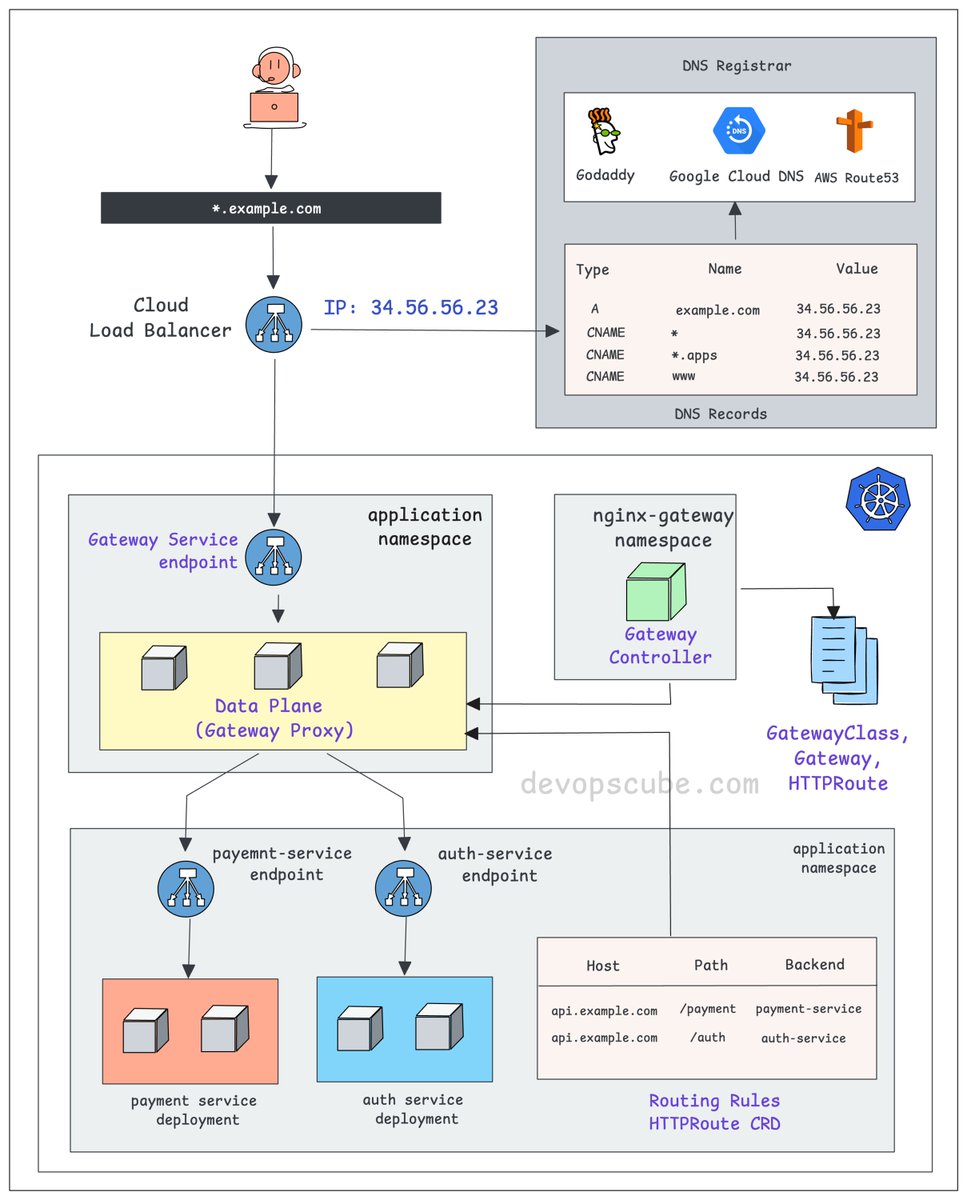
From DNS to Pod: How k8s Gateway API actually works.
- You create a DNS record pointing to your cloud Load Balancer IP.
- The Load Balancer forwards traffic to a Kubernetes Service, specifically the Gateway Service endpoint.
- This Service points to the gateway proxy pods. These could be nginx, Envoy, or any compatible proxy.
- The Gateway Controller (Ex: Nginx Fabric) watches for HTTPRoute, GRPCRoute, and similar resources.
- When you apply these routes, the controller automatically configures the gateway proxy with the right configuration.
- The HTTPRoute resource is what decides where your traffic actually goes. For example, /payment to payment-service, /auth to auth-service
So the full traffic flow looks like this 👇
DNS to Cloud LB to Gateway Service to Gateway Proxy to your backend Service and finally to your Pod.
If you understand the Ingress flow well, relating it to the Gateway API is very easy.
A key difference is that in the classic Ingress model, the controller itself acts as the proxy.
In the Gateway API, the controller configures and manages dedicated proxy instances (Gateways), creating a clear separation of concerns.
We share such DevOps/MLOps concepts and deep dives in my newsletter.
𝗥𝗲𝗮𝗱 𝗶𝘁 𝗵𝗲𝗿𝗲 (𝟭𝟬𝟬% 𝗳𝗿𝗲𝗲): https://t.co/CE4L4ioJQS
Over to you…
Are you using Gateway API in production?
If yes, would love to hear your experience with it.
♻️ If this helped, repost it so others can learn too.
#kubernetes
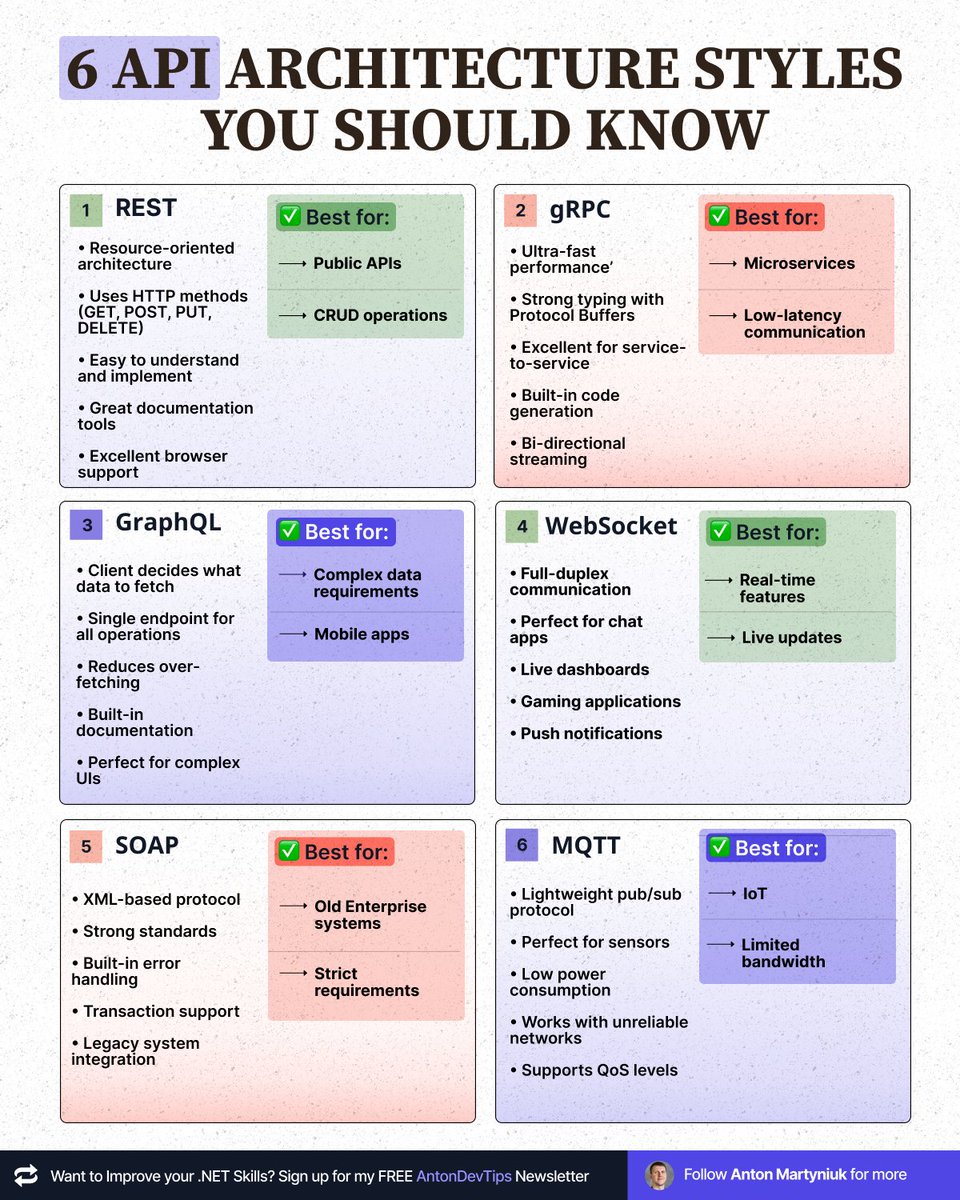
𝟲 𝗔𝗣𝗜 𝗔𝗿𝗰𝗵𝗶𝘁𝗲𝗰𝘁𝘂𝗿𝗲 𝗦𝘁𝘆𝗹𝗲𝘀 𝗬𝗼𝘂 𝗦𝗵𝗼𝘂𝗹𝗱 𝗞𝗻𝗼𝘄
Choosing the wrong API style can cost you months of development.
Here's when to use each one 👇
𝟭. 𝗥𝗘𝗦𝗧
✅ Best for: Public APIs, CRUD operations
• Resource-oriented architecture
• Uses HTTP methods (GET, POST, PUT, DELETE)
• Easy to understand and implement
• Great documentation tools
• Excellent browser support
𝟮. 𝗴𝗥𝗣𝗖
✅ Best for: Microservices, low-latency communication
• Ultra-fast performance
• Strong typing with Protocol Buffers
• Excellent for service-to-service
• Built-in code generation
• Bi-directional streaming
𝟯. 𝗚𝗿𝗮𝗽𝗵𝗤𝗟
✅ Best for: Complex data requirements, mobile apps
• Client decides what data to fetch
• Single endpoint for all operations
• Reduces over-fetching
• Built-in documentation
• Perfect for complex UIs
• Can act as a single endpoint instead of a BFF for each frontend
• For .NET the best implementation is provided by open-source "HotChocolate GraphQL"
𝟰. 𝗪𝗲𝗯𝗦𝗼𝗰𝗸𝗲𝘁
✅ Best for: Real-time features, live updates
• Full-duplex communication
• Perfect for chat apps
• Live dashboards
• Gaming applications
• Push notifications
𝟱. 𝗦𝗢𝗔𝗣
✅ Used in old Enterprise systems, strict requirements
• XML-based protocol
• Strong standards
• Built-in error handling
• Transaction support
• Legacy system integration
𝟲. 𝗠𝗤𝗧𝗧
✅ Best for: IoT, limited bandwidth
• Lightweight pub/sub protocol
• Perfect for sensors
• Low power consumption
• Works with unreliable networks
• Supports QoS levels
𝗤𝘂𝗶𝗰𝗸 𝗗𝗲𝗰𝗶𝘀𝗶𝗼𝗻 𝗚𝘂𝗶𝗱𝗲:
Need real-time? → WebSocket/MQTT
Need speed? → gRPC
Need flexibility? → GraphQL
Need simplicity? → REST
Need IoT support? → MQTT
Need enterprise features? → REST. Don't use SOAP, it's legacy.
The key? Pick based on your actual needs, not hype.
📌 Save this post for future reference!
——
♻️ Repost to help others choose the right API architecture
➕ Follow me ( @AntonMartyniuk ) to improve your .NET and Architecture
Skills
BREAKING: AI can now research stocks like a senior hedge fund analyst (for free)
No more $2,000/month Bloomberg Terminal
Here are 10 Claude prompts I use every day that replaced hours of manual research
(Save this for later)







![NikkiSiapno's tweet photo. Virtualization vs Containerization
𝗩𝗶𝗿𝘁𝘂𝗮𝗹𝗶𝘇𝗮𝘁𝗶𝗼𝗻 (VMs) gives each workload its own full machine with its own guest OS and kernel. Great for isolation and OS flexibility, but you’re paying the cost of booting and managing entire operating systems for every workload.
𝗖𝗼𝗻𝘁𝗮𝗶𝗻𝗲𝗿𝗶𝘇𝗮𝘁𝗶𝗼𝗻 runs workloads as isolated processes on a shared OS. It’s fast and efficient; but with weaker isolation and more constraints around security and OS compatibility.
VMs give you strong boundaries and full environments. Containers give you speed and efficient delivery.
If you’ve used VMs, you know the pain isn’t the VM; it’s everything around it: provisioning, networking, exposure, and persistence.
That’s where exe[.]dev comes in.
It gives you instant VMs over SSH, with:
• Built-in HTTPS exposure
• Persistent environments
• Zero cloud config overhead
• Safe sandbox execution layer for agents (with secure credential injection via Integrations)
When infra is this fast to spin up, you stop hesitating and start testing.
Check it out → https://t.co/nVBacHNkdX
What else would you add?
——
♻️ Repost to help others learn and grow.
🙏 Thanks to @ssh_exe_dev for sponsoring this post.
➕ Follow me ( Nikki Siapno ) to become good at system design.](https://pbs.twimg.com/media/HFiwvBRbsAAioK-.jpg)