Why: I noticed I'd buy a "new" black blazer when I already had two.
The problem wasn't taste, it was memory. So Vestia checks every candidate against what you actually own.
3/ Other bits:
• Semantic search: "a jacket for a rainy commute"
• Daily outfits from your own clothes
• Log what you wear, see what gathers dust
My closet was packed, yet every morning: "nothing to wear."
And I kept buying things I already owned.
So I built Vestia, an AI wardrobe assistant:
📸 one outfit photo → every piece in your closet
🛍️ before you buy, it shows what it pairs with & if it's a duplicate
Web beta is free. What would you ask your closet?
Try it here (free during beta): https://t.co/DzEqHbUQ12
Your photos only build your own wardrobe, never used for training.
Mobile app is in progress.
I read every reply, and brutal feedback is welcome 🙏
That image-editing flow has grown into something much bigger.
Mavelyx now has a Skills system built on top of in-note image generation. AI chat can invoke these skills to generate, edit, and work with images directly inside your notes.
I’ve also integrated RunningHub workflows, opening up far more flexible ways to generate images and videos.
Everything is BYOK—you use your own provider keys and stay in control of both cost and privacy.
Notes are becoming a workspace where AI can actually create, not just chat. ✨
I keep finding great image-editing prompts on X, so I built them into Mavelyx.
Save a prompt as a card. Drag it onto a photo in a note. Confirm—and the edit runs in the background.
Less than a minute later, compare the result side by side and return to your note. ✨
Prompts shouldn’t just sit there. They should work.
I keep finding great image-editing prompts on X, so I built them into Mavelyx.
Save a prompt as a card. Drag it onto a photo in a note. Confirm—and the edit runs in the background.
Less than a minute later, compare the result side by side and return to your note. ✨
Prompts shouldn’t just sit there. They should work.
The next step after scoped MCP access: scoped AI editing.
Mavelyx can now help edit the note you’re currently working on—rewrite, format, insert, and delete through undoable commands.
No library-wide access. No editing other notes. Bring your own model key; it stays on your device.
The next step after scoped MCP access: scoped AI editing.
Mavelyx can now help edit the note you’re currently working on—rewrite, format, insert, and delete through undoable commands.
No library-wide access. No editing other notes. Bring your own model key; it stays on your device.
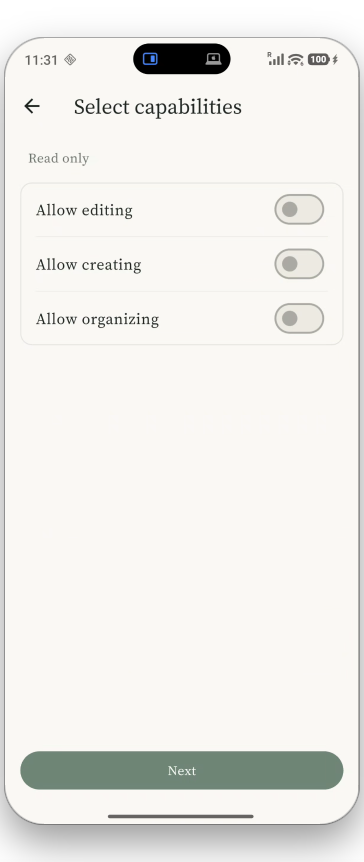
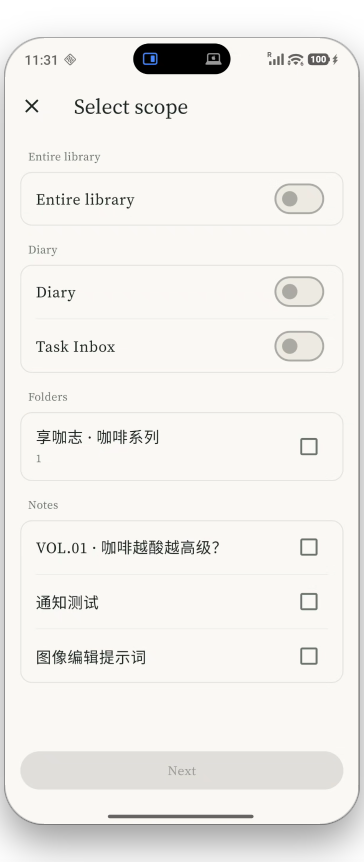
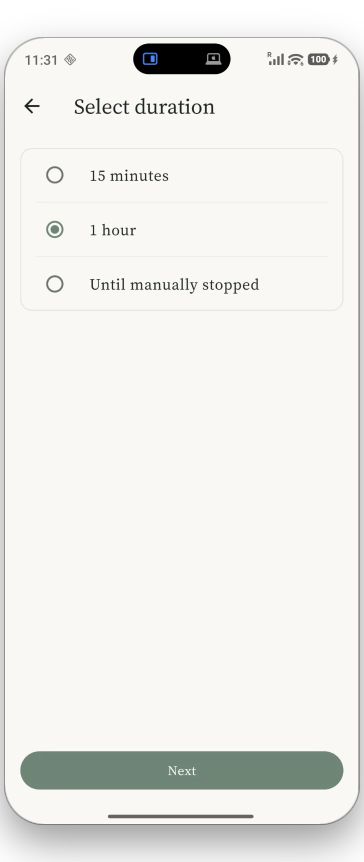
One detail I care about deeply in Mavelyx: MCP access is no longer all-or-nothing.
You can now:
• Grant access to a specific note or folder
• Revoke access at any time
• Scope permissions to the current session
• Keep AI access explicitly under your control
Your AI agent should be useful—but it should never have more access than you intend.
This is what privacy-first, local-first AI looks like in practice.