This guy literally broke down how to use Claude Code like an expert:
1:40 - Code vs Cowork vs OpenClaw
6:51 - Setting up context status line
12:03 - Sub-agents
17:49 - Creating skills
23:58 - Ask user questions tool
33:33 - Tool-powered skills: Tavily
36:57 - CLI vs MCP vs API hierarchy
39:30 - Make slides skill w/ Puppeteer
43:32 - Auto-invoking skills with hooks
46:49 - Jupyter notebooks for data trust
55:09 - The operating system file structure
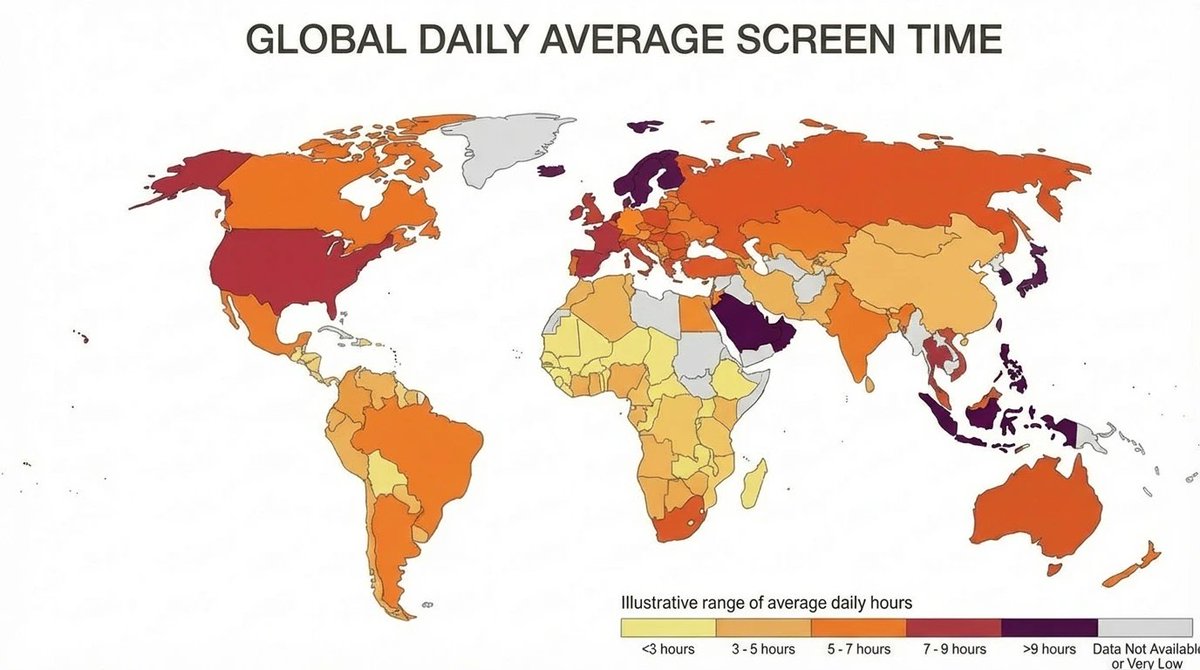
Nano Banana 2 makes amazing infographics - but IMO, there's a much cooler feature I haven't seen anyone try
You can ask it to research Web data and then display it in a very specific format (not a general graphic)
Ex. a heatmap of the world by global daily screen time 👇
@AlexFinn TBH I spent several hours troubleshooting errors with ReactJS and building the app on Xcode but was able to resolve it all eventually with Claude Code.
App Challenge Revisted: While I was able to produce a working version of a Fitness App, I didn't like where it ended and was limited to what I could do. I recently followed a tutorial by @AlexFinn on his Youtube and was able to finish the app with Claude Code
1.Users liked the cleaner interface and visual clarity
2.The login step needed more context--added a prompt
https://t.co/iH4ySCfcbK design was functional but not discoverable
Takeaway: Even 15 minutes of observation beats guessing
App Challenge Day 16: Real user feedback reveals what nothing else can.
Today I put the app in front of a few early testers.
Watching how people (thanks to wife!) used it revealed UI issues I hadn’t seen—and confirmed what was working.
1.Used Firebase’s built-in Email auth
2.Automatically creates user on first login
3.Stores UID for check-in and streak association
Takeaway: You can keep auth lightweight and still move forward.
App Challenge Day 15: Authentication can slow you down—but it doesn’t have to
Today I decided to add a email authentication login flow using Firebase. Frictionless authentication with email instead of passwords.
1.Saved check-ins as timestamped entries in Firestore.
2.Pulled and sorted check-in data to show consecutive days.
3.Handled time zone adjustments for streak accuracy.
Takeaway: Even “simple” data like streaks requires solid structure.
1.Set up a hamburger menu
2.Designed the streak history layout for user's to reference
3.Considered calendar vs. timeline formats--went minimal for now
Takeaway: A simple menu creates space for future growth.
App Challenge Day 13: Tracking habits is only useful if you can see your progress.
Today’s goal: build a clean navigation menu and start designing a streak history view to show check-in patterns over time.
App Challenge Day 12: Today I focused on refining the look and feel: gradients, better spacing, and more inviting visuals.
Small changes made the app feel noticeably more polished
Here’s how I upgraded the interface without overcomplicating it:
Day 10: Built a button animation - Created a joyful tap interaction to reinforce momentum. Delight earns repeat use.
Next 5-day goal:
Add login, show streak history, and set up daily reminders.
#v0
App Challenge Day 11: Ten days ago, this was just an idea. The path to a working prototype was uncertain. Still feels like a blackbox with AI assisted programming.
Today, I have a functional (rough!) prototype. Seeing it actually work is a huge boost.
Day 7: Built streak tracking. Streaks = more storage states
Day 8: Wrestled with timezones
Day 9: Made it motivating - Added a “time left today” countdown to inspire action. Subtle UX nudges can change behavior.
#cursor