History of United States Presidents
🇺🇸 George Washington — 1789–1797
🇺🇸 John Adams — 1797–1801
🇺🇸 Thomas Jefferson — 1801–1809
🇺🇸 James Madison — 1809–1817
🇺🇸 James Monroe — 1817–1825
🇺🇸 John Quincy Adams — 1825–1829
🇺🇸 Andrew Jackson — 1829–1837
🇺🇸 Martin Van Buren — 1837–1841
🇺🇸 William Henry Harrison — 1841
🇺🇸 John Tyler — 1841–1845
🇺🇸 James K. Polk — 1845–1849
🇺🇸 Zachary Taylor — 1849–1850
🇺🇸 Millard Fillmore — 1850–1853
🇺🇸 Franklin Pierce — 1853–1857
🇺🇸 James Buchanan — 1857–1861
🇺🇸 Abraham Lincoln — 1861–1865
🇺🇸 Andrew Johnson — 1865–1869
🇺🇸 Ulysses S. Grant — 1869–1877
🇺🇸 Rutherford B. Hayes — 1877–1881
🇺🇸 James A. Garfield — 1881
🇺🇸 Chester A. Arthur — 1881–1885
🇺🇸 Grover Cleveland — 1885–1889
🇺🇸 Benjamin Harrison — 1889–1893
🇺🇸 Grover Cleveland — 1893–1897
🇺🇸 William McKinley — 1897–1901
🇺🇸 Theodore Roosevelt — 1901–1909
🇺🇸 William Howard Taft — 1909–1913
🇺🇸 Woodrow Wilson — 1913–1921
🇺🇸 Warren G. Harding — 1921–1923
🇺🇸 Calvin Coolidge — 1923–1929
🇺🇸 Herbert Hoover — 1929–1933
🇺🇸 Franklin D. Roosevelt — 1933–1945
🇺🇸 Harry S. Truman — 1945–1953
🇺🇸 Dwight D. Eisenhower — 1953–1961
🇺🇸 John F. Kennedy — 1961–1963
🇺🇸 Lyndon B. Johnson — 1963–1969
🇺🇸 Richard Nixon — 1969–1974
🇺🇸 Gerald Ford — 1974–1977
🇺🇸 Jimmy Carter — 1977–1981
🇺🇸 Ronald Reagan — 1981–1989
🇺🇸 George H. W. Bush — 1989–1993
🇺🇸 Bill Clinton — 1993–2001
🇺🇸 George W. Bush — 2001–2009
🇺🇸 Barack Obama — 2009–2017
🇺🇸 Donald Trump — 2017–2021
🇺🇸 Joe Biden — 2021–2025
🇺🇸 Donald Trump — 2025–Present
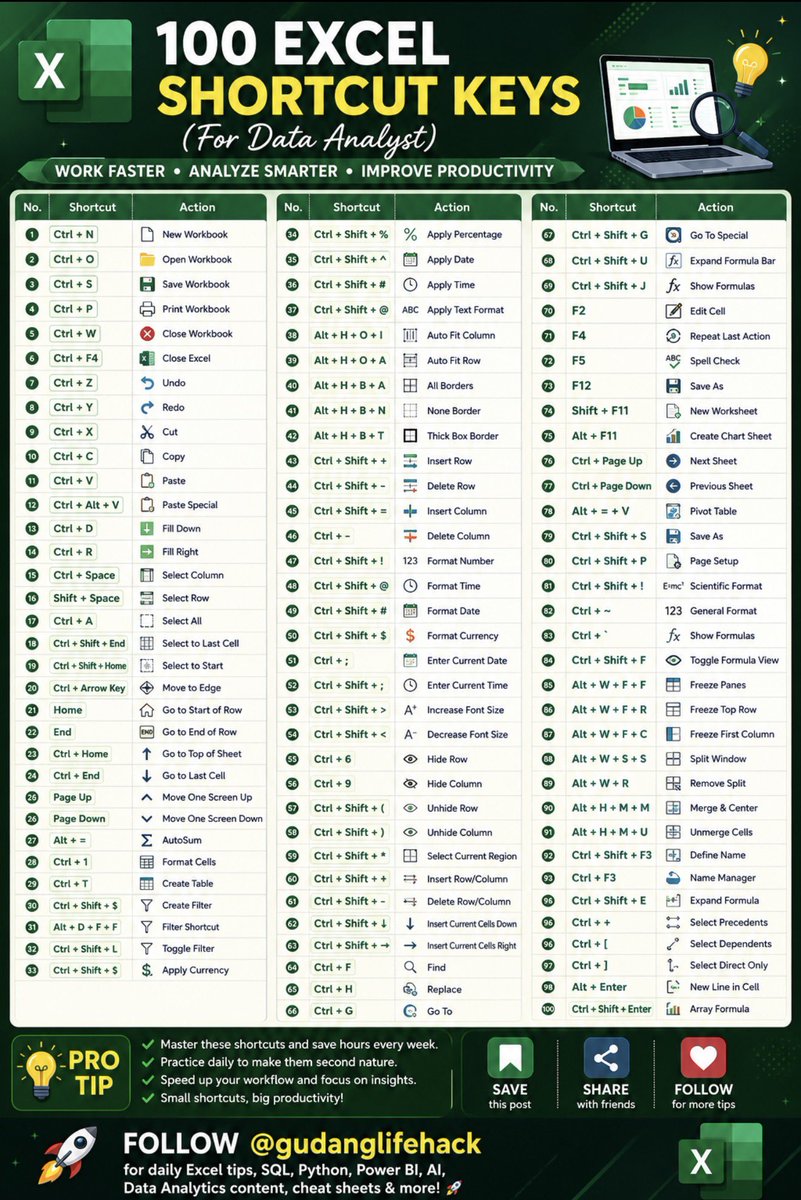
⌨️ Excel keyboard shortcuts are one of the fastest ways to boost your productivity and become a more efficient Data Analyst. While many users rely on their mouse for almost every task, professionals know that mastering keyboard shortcuts can save hours of repetitive work every week.
This collection of 100 essential Excel shortcuts covers everything you need from workbook navigation and data entry to formatting, formulas, PivotTables, filtering, chart creation, and advanced worksheet management. Whether you’re cleaning datasets, building dashboards, preparing reports, or analyzing millions of rows of data, these shortcuts will help you work faster with fewer clicks.
Learning shortcuts isn’t just about speed. It’s about developing a smoother workflow, reducing repetitive strain, minimizing mistakes, and keeping your focus on solving business problems instead of searching through menus.
🇫🇷 Top 20 Most Handsome Men of France
🇫🇷 Alain Delon
🇫🇷 Gaspard Ulliel
🇫🇷 François Arnaud
🇫🇷 Pierre Niney
🇫🇷 Louis Garrel
🇫🇷 Tahar Rahim
🇫🇷 Olivier Martinez
🇫🇷 Vincent Cassel
🇫🇷 Guillaume Canet
🇫🇷 Jean Dujardin
🇫🇷 Kylian Mbappé
🇫🇷 Olivier Giroud
🇫🇷 Antoine Griezmann
🇫🇷 Theo Hernandez
🇫🇷 Raphaël Varane
🇫🇷 Tomer Sisley
🇫🇷 Pio Marmaï
🇫🇷 Niels Schneider
🇫🇷 Hugo Becker
🇫🇷 Jean Dujardin