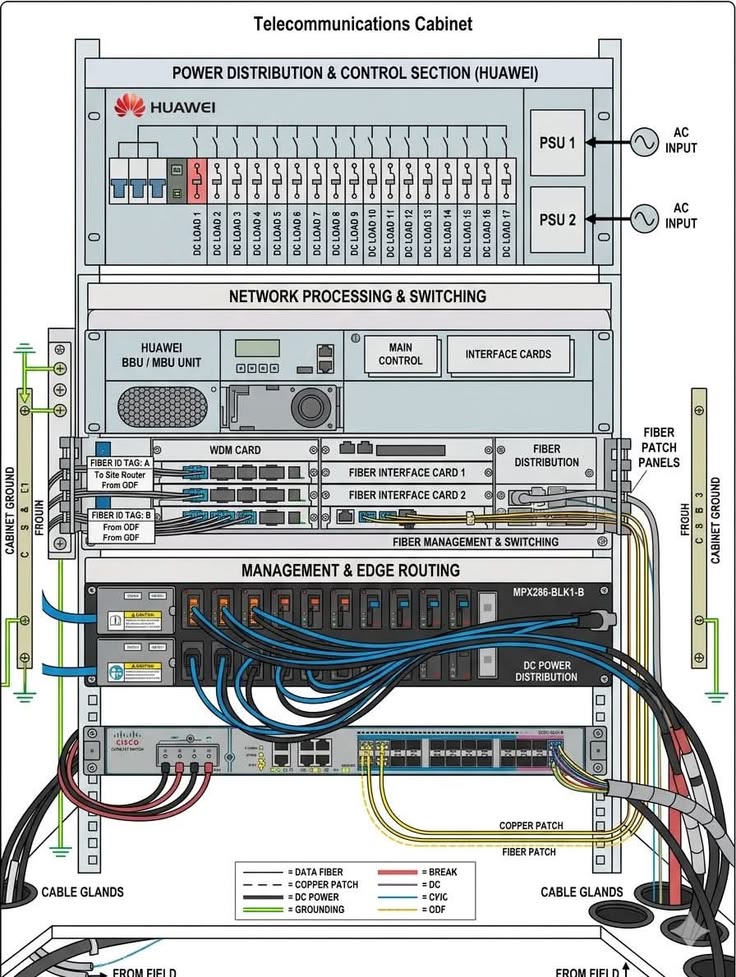
ROUTER-ON-A-STICK is a method used to allow devices on different VLANs to communicate using a single physical connection between a router and a switch.
Instead of using a separate router interface for every VLAN, the router creates multiple subinterfaces on one interface. Each subinterface is assigned to a VLAN and acts as that VLAN's default gateway.
The switch port connected to the router is configured as a trunk, carrying traffic from multiple VLANs over the same cable.
It's a simple and cost-effective way to enable inter-VLAN routing, especially in smaller networks, though it can become a bottleneck as traffic grows because all VLAN traffic shares a single link.
People think learning Claude takes days. It doesn't.
I wrote 17 free guides that teach it in hours:
Claude 101: https://t.co/QQDmzBAoH5
Claude Code: https://t.co/o782qegoKu
Claude Skills: https://t.co/RgQUCNMqzQ
Claude Connectors: https://t.co/cSPMBUNmRG
Claude for Excel: https://t.co/ZgmUFXd0Iw
How to Prompt: https://t.co/Sw2tg2PMMc
Claude Certificates: https://t.co/LyV7fegv4c
Claude for your team: https://t.co/NakViTGCAL
Stop Prompting Claude: https://t.co/45xPLDRB6Y
AI Slides (PPT in 2026): https://t.co/OY7cHDTV7l
Claude Design: https://t.co/FhlRSlH0aD
Set up Claude Cowork: https://t.co/4jygw4M1RO
Claude to sound like you: https://t.co/LyV7fegv4c
Stop writing like AI: https://t.co/JXKAVP6hdS
Claude as your computer: https://t.co/tQDrcs8drQ
Claude Cowork + Project: https://t.co/xU97EpdrEe
Stop hitting Claude limits: https://t.co/Yu24rPQafQ
___
1. Save this list for later (three dots, top right).
2. Share it with a friend by ♻️ reposting this image.
3. Subscribe to my free newsletter: https://t.co/psB7XxAv8w.
NADIE te explica cómo usar Gemini Pro 3.1 bien.
Reuní +300 Prompts para convertirlo en una máquina de automatización.
(LISTA ACTUALIZADA PARA JUNIO 2026)
Like + RT + sígueme
Comenta “IA” y te los envío por DM.
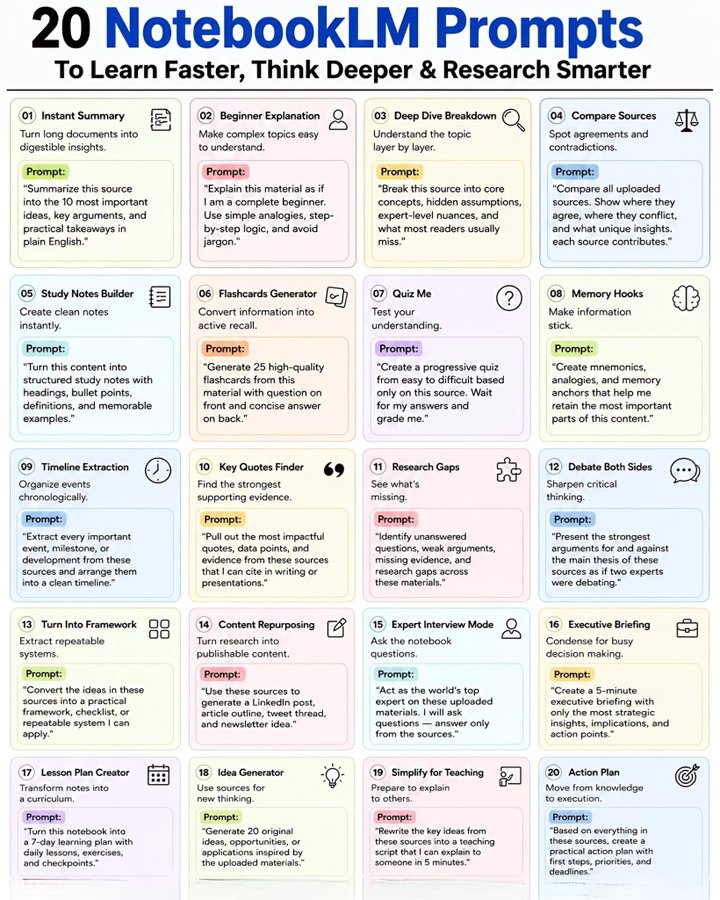
20 Powerful NotebookLM Prompts
To Learn Faster ⚡ Think Smarter 🧠 & Research Like a Pro 🔍
0️⃣1️⃣ Instant Summary
Turn massive documents into quick, clear insights.
👉 Prompt:
“Summarize this source into the 10 most important ideas, key arguments, and practical takeaways in plain English.”
0️⃣2️⃣ Beginner-Friendly Explanation
Understand even the hardest topics easily.
👉 Prompt:
“Explain this material as if I am a complete beginner. Use simple analogies, step-by-step logic, and avoid jargon.”
0️⃣3️⃣ Deep Dive Analysis
Go beyond surface-level understanding.
👉 Prompt:
“Break this source into core concepts, hidden assumptions, expert-level nuances, and what most readers usually miss.”
0️⃣4️⃣ Compare Multiple Sources
Find patterns, contradictions & unique insights.
👉 Prompt:
“Compare all uploaded sources. Show where they agree, where they conflict, and what unique insights each source contributes.”
0️⃣5️⃣ Smart Study Notes
Create organized notes instantly.
👉 Prompt:
“Turn this content into structured study notes with headings, bullet points, definitions, and memorable examples.”
0️⃣6️⃣ Flashcards Generator
Learn faster with active recall.
👉 Prompt:
“Generate 25 high-quality flashcards from this material with question on front and concise answer on back.”
0️⃣7️⃣ Quiz Me Mode
Test your knowledge step-by-step.
👉 Prompt:
“Create a progressive quiz from easy to difficult based only on this source. Wait for my answers and grade me.”
0️⃣8️⃣ Memory Hacks
Make important ideas unforgettable.
👉 Prompt:
“Create mnemonics, analogies, and memory anchors that help me retain the most important parts of this content.”
0️⃣9️⃣ Timeline Builder
Organize events with clarity.
👉 Prompt:
“Extract every important event, milestone, or development from these sources and arrange them into a clean timeline.”
🔟 Powerful Quotes Finder
Pull out the best evidence instantly.
👉 Prompt:
“Pull out the most impactful quotes, data points, and evidence from these sources that I can cite in writing or presentations.”
1️⃣1️⃣ Research Gaps Detector
Discover what others missed.
👉 Prompt:
“Identify unanswered questions, weak arguments, missing evidence, and research gaps across these materials.”
1️⃣2️⃣ Debate Both Sides
Train your critical thinking.
👉 Prompt:
“Present the strongest arguments for and against the main thesis of these sources as if two experts were debating.”
1️⃣3️⃣ Framework Creator
Turn ideas into repeatable systems.
👉 Prompt:
“Convert the ideas in these sources into a practical framework, checklist, or repeatable system I can apply.”
1️⃣4️⃣ Content Repurposing Machine
Transform research into content.
👉 Prompt:
“Use these sources to generate a LinkedIn post, article outline, tweet thread, and newsletter idea.”
1️⃣5️⃣ Expert Interview Mode
Talk to your notebook like an expert.
👉 Prompt:
“Act as the world’s top expert on these uploaded materials. I will ask questions answer only from the sources.”
1️⃣6️⃣ Executive Briefing
Get only the highest-value insights.
👉 Prompt:
“Create a 5-minute executive briefing with only the most strategic insights, implications, and action points.”
1️⃣7️⃣ 7-Day Learning Plan
Turn information into a curriculum.
👉 Prompt:
“Turn this notebook into a 7-day learning plan with daily lessons, exercises, and checkpoints.”
1️⃣8️⃣ Idea Generator
Unlock creative opportunities.
👉 Prompt:
“Generate 20 original ideas, opportunities, or applications inspired by the uploaded materials.”
1️⃣9️⃣ Teach It Simply
Master ideas by explaining them clearly.
👉 Prompt:
“Rewrite the key ideas from these sources into a teaching script that I can explain to someone in 5 minutes.”
2️⃣0️⃣ Action Plan Builder
Convert knowledge into execution.
👉 Prompt:
“Based on everything in these sources, create a practical action plan with first steps, priorities, and deadlines.”
🔥 Save this list.
One great prompt can replace hours of confusion.
❤️ Like
🔁 Retweet
🔖 Bookmark
Follow @MeenakshiYACS for more AI Posts
#AI #ArtificialIntelligence #AISkills #AIAgents #RAG #LLM #PromptEngineering
After 3 years of using Claude, I can say it’s one of the few technologies that truly changed my daily life.
Here are 10 prompts I use daily that have transformed my day to day; they could do the same for you:
(Save this before it disappears)
One way to create a transposed table with each cell referencing the value from the corresponding cell in the source data is to use the INDEX function. The trick is to reference the row number argument to the column number of the data, and vice versa. When copying, this formula will extract all the required cells in transposed form. All that's left to do is remove erroneous values if you accidentally captured extra data while dragging.