@2whazzuup Yes but I think the $200 “sauce” might have been buying upvotes and comments (he said he didn’t do any link building)… so be careful, if doing that!
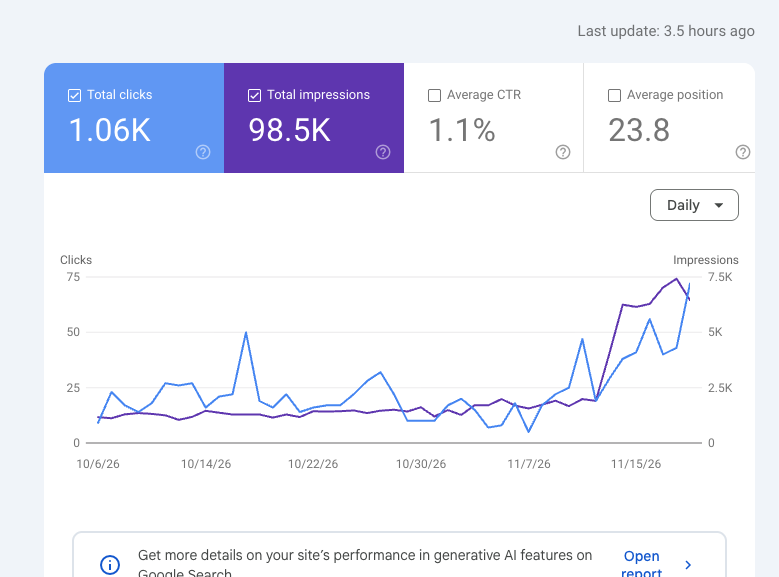
This is the quickest win you can have now in SEO:
Do this every 28 days
1/ go to google search console
2/ select the last 28 days
3/ export the archive with the data
4/ go to claude and attach the data, and use this prompt:
I have attached a Google Search Console (GSC) export for my website covering the past 28 days.
Analyze the data and identify keywords ranking between positions 10–30 that are not adequately covered in the content of my existing pages.
For each keyword:
* Identify the best existing page to target (URL).
* Check the actual page content to confirm the keyword or topic is missing or insufficiently covered.
* Suggest where and how to incorporate it (H2, paragraph, FAQ, etc.).
* Provide a short example of content that could be added.
Avoid keyword cannibalization, group related keywords targeting the same page, and prioritize opportunities based on impressions, relevance, and potential to reach the top 10.
Deliverable: Export a CSV with these columns:
Keyword | Position | Impressions | Clicks | Target Page URL | Content Recommendation | Suggested Content | Priority
Only include relevant opportunities. Do not invent data or recommend adding keywords that are already adequately covered.
5/ implement these changes to your articles
6/ reindex
do this for your sites, every 28 days and see your clicks go up
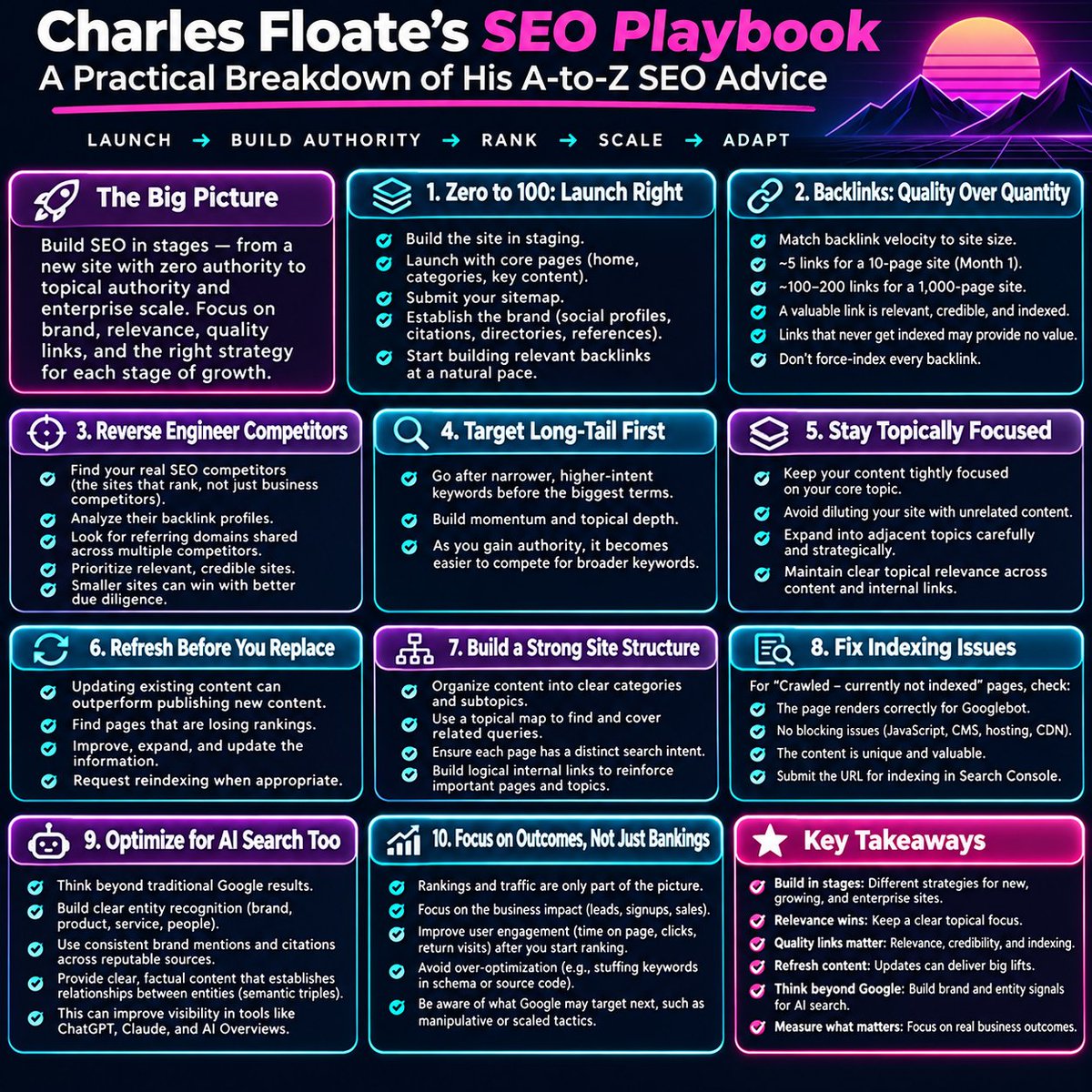
I recently watched an interview with @Charles_SEO where he broke down his entire SEO strategy, from launching a brand-new site to scaling an established one.
He covered everything from building topical authority and acquiring backlinks to keyword research, site structure, and optimizing for AI search.
There were some really interesting takeaways, so I turned his 90+ minute interview into one infographic.
Here's Charles Floate's SEO playbook, broken down into 10 actionable lessons 👇
I'll also include the YouTube video in the comments
45 types of apps you can build using ONLY the Cloudflare free plan.
$0 a month. No credit card. No server.
Here's the full starter list, bookmark and read to the end, I'll get you started!
SITES 👇
1. Marketing site. Astro + Pages, unlimited bandwidth.
2. Blog. Markdown in a repo, deploys on push.
3. Docs site. Astro Starlight.
4. Portfolio.
5. Link-in-bio page.
6. Knowledge base or changelog.
7. Coming-soon page with a waitlist. D1 + Turnstile.
8. Directory or listings site. Astro + D1.
9. Job board.
10. Status page. A cron Worker + D1.
BACKENDS
11. A JSON API. Workers + D1.
12. Contact form backend. No form SaaS.
13. URL shortener. KV.
14. Webhook receiver. Workers + Queues.
15. Scheduled jobs and scrapers. Cron Triggers.
16. Internal admin tool behind a login. Access, free up to 50 users.
17. Feature flags and remote config. KV.
18. API proxy that hides your keys.
19. File and image host. R2, zero egress fees.
20. Pastebin.
21. Newsletter signup with your own subscriber table.
22. Cookie-free analytics you own. Workers + Analytics Engine.
23. Uptime monitor with email alerts.
24. RSS reader.
25. Redirects and A/B tests at the edge.
26. Comments for a static site. D1 + Turnstile.
27. Polls, surveys and quizzes.
28. Booking or RSVP form.
29. A small store. Stripe checkout links + a webhook Worker.
30. Digital downloads behind a purchase. R2.
REALTIME
31. Chat room. Durable Objects + WebSockets.
32. Multiplayer game.
33. Collaborative whiteboard with live cursors.
34. Video and audio calls. Realtime.
AI
35. Chatbot. Workers AI.
36. Search over your own docs. Vectorize + Workers AI.
37. An agent that remembers. Agents SDK + Durable Objects.
38. A remote MCP server for your own tools.
39. Audio transcription.
40. Screenshot, PDF and social-image generator. Browser Rendering.
AND SO MUCH MORE!
41. An email bot. Email Workers read incoming mail in code.
42. Discord, Slack or Telegram bot.
43. Your home server on the internet, no open ports. Tunnel.
44. Personal notes, todo or CRM app.
45. Podcast host. R2 + an RSS feed.
⚠The limits are real: 100,000 requests a day, 10 ms of CPU per request, 5 GB of database. Fear not, the $5 plan on CF explodes that usage...
Most side projects never touch all these, and most builders have no idea all of this is free at their finger tips!
Want me to get your first project started for you?
Like, RT and:
✴Comment what you've been dreaming about building, I'll hand you a custom mini prompt to get started on the project in Cloudflare
@dniightt Basically finding the questions people ask Google and putting them in the FAQ section of your page. PAA SEO strategy is explained here: https://t.co/VyrG3uz7mU