Claude Code kept adding a repository pattern I never asked for.
I would ask for one endpoint in a .NET API. I would get back a repository interface, an AutoMapper profile, and a folder layout from someone else's project. Reasonable code. Just not my code.
That's not a knowledge problem. Claude starts every session knowing nothing about your repo, so it fills the gaps with the most common .NET answer it has seen. Controllers, repositories, AutoMapper.
I kept paying for that gap in review time. Same corrections, session after session, because nothing I said survived into the next one.
The fix is one markdown file at the repo root. Claude Code loads it automatically at the start of every session, before your first prompt.
Mine tells it five things. The stack with exact versions. The folder map and what each layer owns. The build, test, and migration commands. The patterns I use, like records for DTOs and a Result type for errors. And the patterns it should never suggest.
That last section carries the whole file. "Never suggest AutoMapper, write explicit mappings" sounds petty until you notice what it does: it blocks the wrong default before Claude walks down that path. Blocking a bad default is much cheaper than reviewing and reverting it after.
Now the same one-line prompt produces a command, a validator, and a handler in the folders where they belong. It even runs the tests before telling me it's done.
The file on the image is the starter I drop into every new .NET project. Copy it, swap the stack section for yours, delete anything you disagree with. It only works if it describes how YOU build, not how I build.
The full version, with scoped rules and imports for bigger codebases, is in the comments.
Every service you add comes with extra work.
One service needs to call another.
Another needs to publish events.
Soon you are setting up:
→ Service discovery
→ Retries
→ Message brokers
→ Secret stores
→ Tracing
→ State management
And your business logic starts getting buried under infrastructure code.
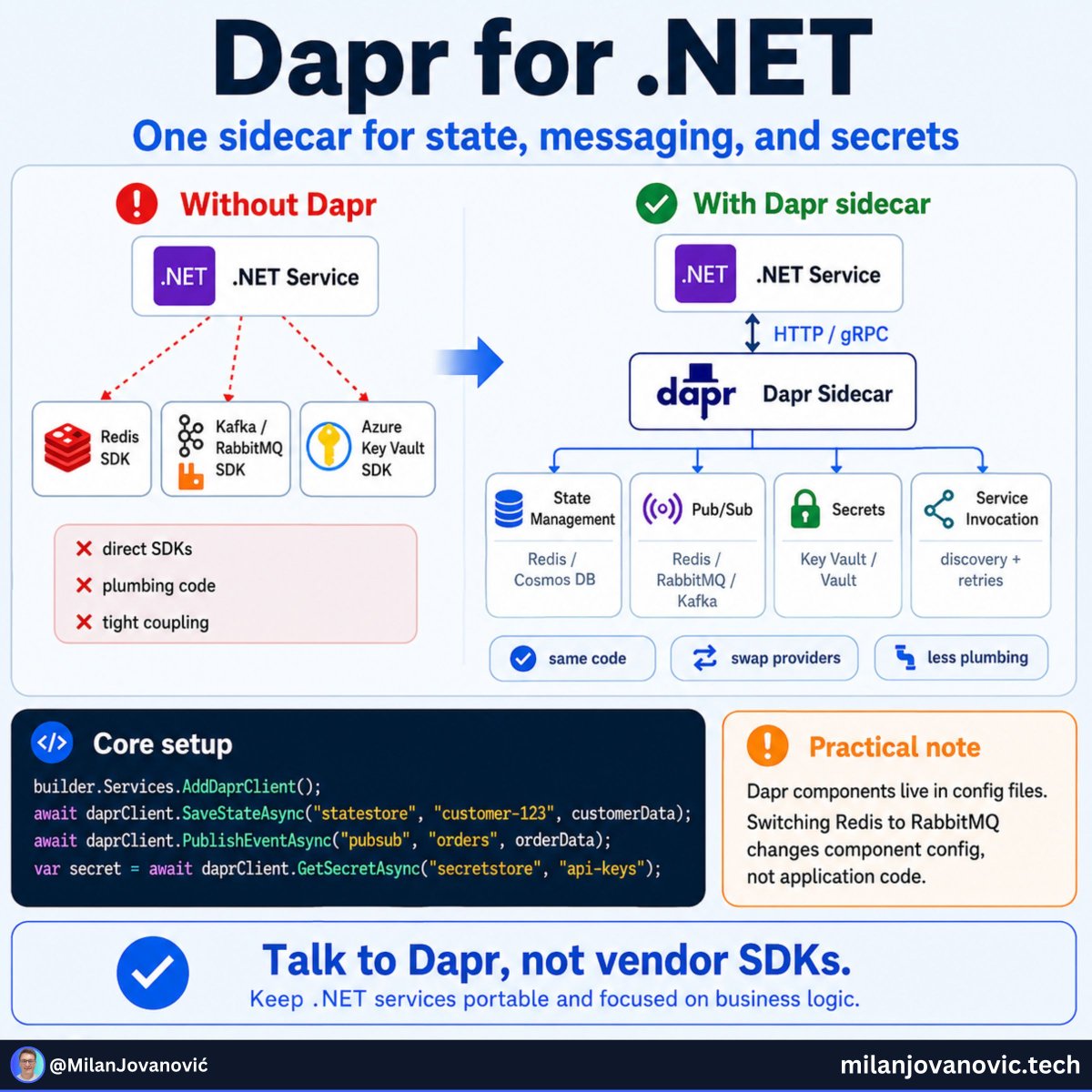
This is the problem Dapr tries to solve.
Dapr runs next to your .NET app and gives you simple building blocks for common distributed system needs.
Your app can ask Dapr to:
→ Call another service
→ Publish an event
→ Save state
→ Read a secret
The useful part is that your app does not need to know every detail of the tool behind it.
You may use Redis today.
RabbitMQ tomorrow.
A cloud service later.
The Dapr setup changes.
Your core app code can stay much closer to the same.
This is not something every .NET app needs.
But once you are building several services, it is worth knowing what problems Dapr can remove from your code.
Especially when you combine it with Aspire for local development and tracing.
I put together a practical introduction to Dapr for .NET developers, with service calls, pub/sub messaging, and Aspire integration: https://t.co/175fCms4ir
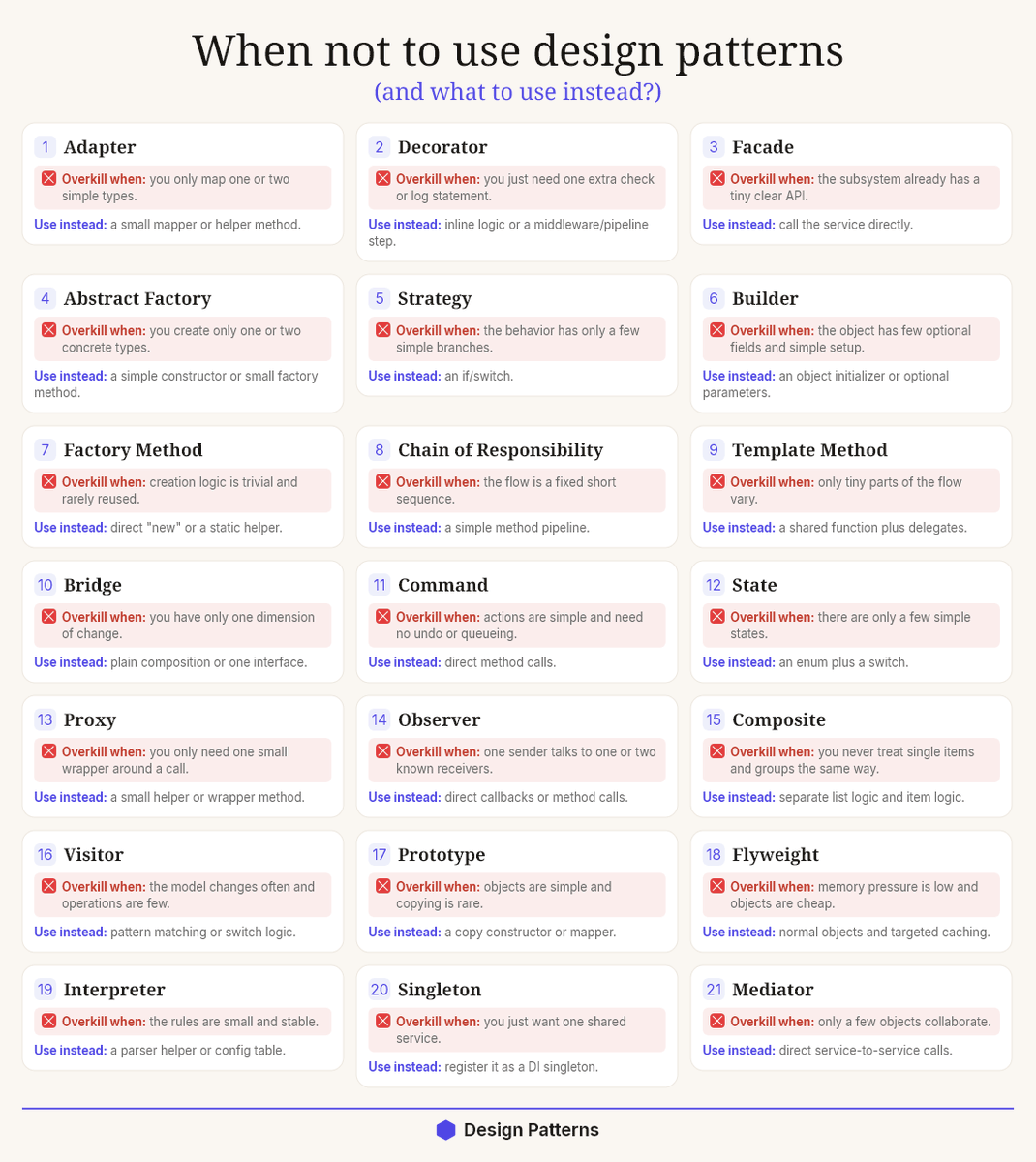
🔥 After 13 years as a .NET developer, I realized Design Patterns are overused.
We were taught that patterns are the mark of a "real" engineer.
So we add them everywhere → even where a simple method or a class without an interface would do the job.
And that's exactly the problem.
A pattern is a tool to solve a problem.
But too often we add the pattern first, then look for a problem to justify it.
This slowly makes code harder to understand and maintain.
👉 Here is where patterns hurt more than they help:
❌ A Factory that creates one object, with no variation
↳ A simple "new" call is clearer and easier to read (or just register it in DI).
❌ A Strategy with a single strategy
↳ You built an interface and 3 classes to wrap one "if" statement.
❌ A Repository wrapping EF Core that already is a repository
↳ You add an extra abstraction layer and gain nothing in return.
❌ A Mediator passing every call through extra layers
↳ Now a junior needs 4 files to find where the logic lives.
📌 So what to use instead?
→ A plain method when you just need to run logic.
→ A simple class when you need to group behavior.
→ A direct call when there is no real variation to handle.
Boring code is often the best code.
It's easy to read, easy to test, and easy to maintain.
✅ Now, when should you actually reach for a pattern?
Use a pattern when these are true:
1. You have a real, repeating problem (not an imagined future one).
2. The pattern removes complexity instead of adding it.
3. The next developer understands the code faster.
A Strategy makes sense when you truly have many swappable behaviors.
A Factory shines when object creation is complex or conditional.
A Decorator is great when you add behavior without touching existing code.
The pattern earns its place by solving a problem you actually have today.
Here is the rule I follow now:
Write code the next person can understand in 30 seconds.
Patterns are powerful.
But the goal was never patterns.
The goal was simple, clear software that solves real problems.
Start simple.
Add a pattern only when the problem is real.
Which design pattern do you see overused the most? Share below 👇
——
♻️ Repost to help others write simpler, cleaner code
➕ Follow me ( @AntonMartyniuk ) to improve your .NET and Architecture Skills
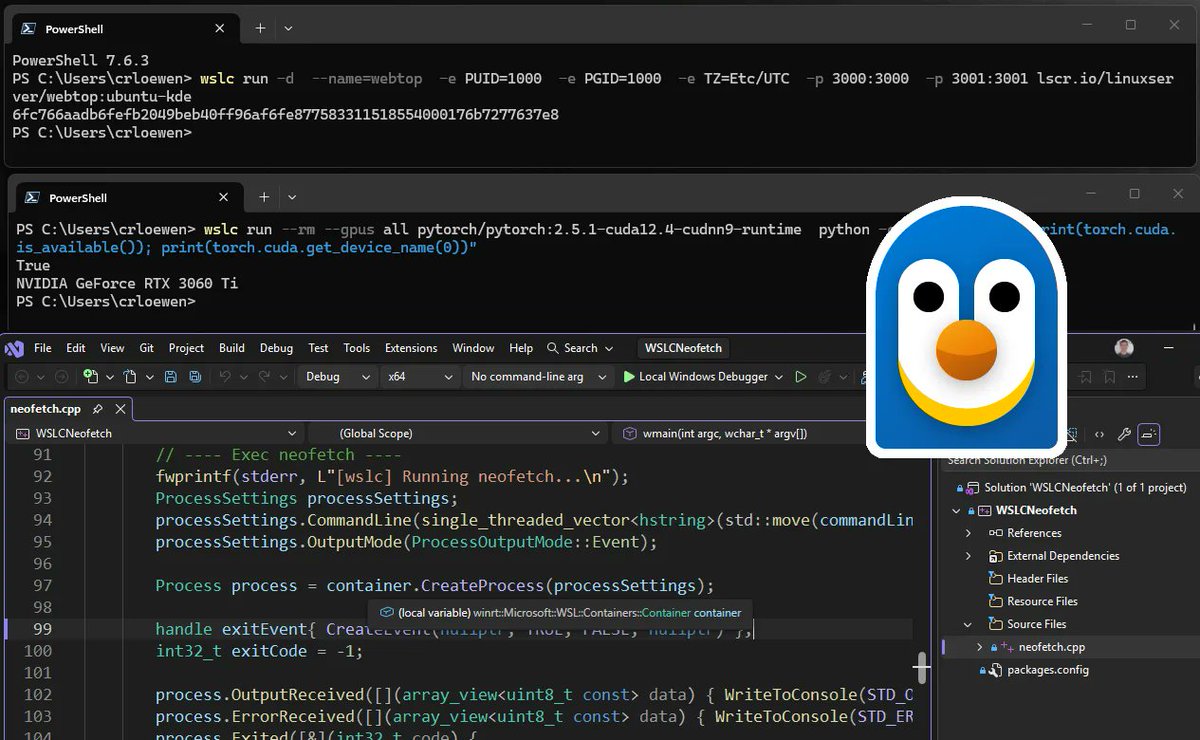
WSL container is now available for public preview.
That means you can create, run, test, and debug Linux containers directly through WSL on Windows.
Here’s how to get started + a few ways to try it 🧵
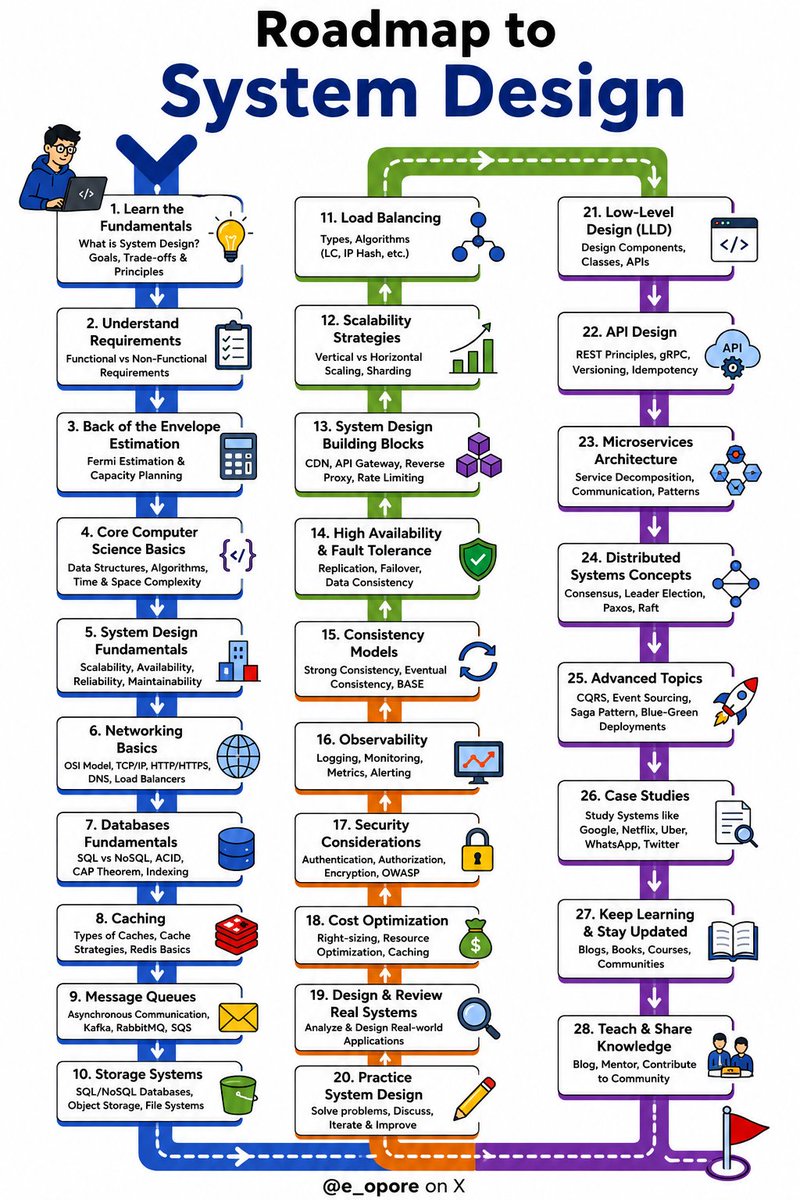
Sysem Design fundamentals Day 16...
Latency vs Throughput: Two Metrics Every System Designer Must Understand
Imagine two APIs.
API A responds in 20 ms.
API B responds in 200 ms.
Which one is better?
Most developers would immediately say API A.
But what if:
- API A handles 500 requests/second
- API B handles 50,000 requests/second
Now the answer isn't so obvious.
That's why every system designer needs to understand Latency and Throughput.
--
What is Latency?
Latency is the time it takes for one request to complete.
Example:
Client
│
│ 120 ms
▼ Server
Lower latency means users get faster responses.
Examples:
- Opening Instagram
- Loading a webpage
- Searching on Google
Users notice latency immediately.
---
What is Throughput?
Throughput is how much work a system can do in a given time.
Examples:
- 5,000 requests/second
- 100 MB/second
- 1 million messages/hour
Higher throughput means the system can serve more users simultaneously.
---
Simple Analogy
Imagine a supermarket.
- Latency
How long one customer waits before checking out.
- Throughput
How many customers the supermarket can serve every minute.
Adding more checkout counters may increase throughput.
Speeding up one cashier reduces latency.
They're related—but not the same.
---
Real Example
Banking App
- You want your balance in 100 ms.
👉 Low latency matters.
- Ticket Booking During a Concert
Millions of users click Book Now at the same time.
👉 High throughput matters.
- Netflix
Starting a movie quickly requires low latency.
Serving millions of viewers worldwide requires high throughput.
Netflix optimizes for both.
---
Can You Improve One Without the Other?
Yes.
Examples:
Increase throughput by adding more servers.
Latency for an individual request may stay the same.
Or...
Optimize database queries.
Latency decreases.
Throughput may remain unchanged.
Great systems balance both.
---
Key Takeaway
Latency answers:
How fast is one request?
Throughput answers:
How many requests can the system handle?
Understanding the difference is the first step toward designing systems that scale.
Tomorrow we will explore Scalability and learn the difference between Vertical Scaling and Horizontal Scaling.
𝗧𝗼𝗽 𝟮𝟬 𝗠𝗶𝘀𝘁𝗮𝗸𝗲𝘀 .𝗡𝗘𝗧 𝗗𝗲𝘃𝗲𝗹𝗼𝗽𝗲𝗿𝘀 𝗠𝗮𝗸𝗲
1. Not Using Dependency Injection
2. Not Using Validation
3. Not Using Logging and OpenTelemetry
4. Reinventing the Wheel (Not Using Libraries)
5. Ignoring EF Core
6. Not Disposing Resources
7. Ignoring async/await
8. Not Writing Tests
9. Using Mapping Libraries
10. Using Exceptions for Control Flow
11. Organizing Code by Technology Folders
12. Over-Engineering Solutions
13. Using Only Traditional N-Layered Architecture
14. Ignoring Minimal APIs
15. Ignoring Clean Code
16. Starting with microservices
17. Leaking IQueryable from Repositories
18. Hardcoding Secrets or Configuration
19. Ignoring Nullable Reference Types
20. Ignoring Health Checks
Have you made any of these mistakes? Share your experience in the comments below 👇
——
♻️ Repost to help others avoid these mistakes
➕ Follow me ( @AntonMartyniuk ) to improve your .NET and Architecture Skills
EF Core 10 ships 7 interceptors. Everyone only knows one. Here's the full map 👇
An interceptor is just a hook EF Core calls at a specific moment - saving, running a query, opening a connection - where your own code gets to run.
Most teams wire up exactly one of these and never touch the rest.
1. ISaveChangesInterceptor
The famous one. Runs right around SaveChanges. This is where audit fields like CreatedOn and UpdatedOn live, plus soft deletes and the outbox pattern.
2. IDbCommandInterceptor
Sees the real SQL before it runs. Log a slow query, add a query hint, or tweak the command on its way to the database.
3. IDbConnectionInterceptor
Fires when EF opens the connection. Swap the connection string per tenant, or fetch a fresh access token for the database. Genuinely underrated for multi-tenant apps.
4. IDbTransactionInterceptor
Hooks commit and rollback. Useful when you want custom logging or behaviour around the transaction itself.
5. IMaterializationInterceptor
Runs as EF turns a database row into an entity object. Set a property that isn't mapped to a column, or hand the entity a service as it's built.
6. IQueryExpressionInterceptor
Rewrites the query before EF translates it to SQL. Inject a default ordering or a filter into every query you run.
7. IIdentityResolutionInterceptor
Decides what happens when two tracked instances share the same primary key. Instead of EF throwing, you get to merge them.
The last three were added quietly over the recent releases, and most of them never make it past a tutorial.
If #1 is the only one you've ever wired up, you've got six more sitting unused in the version you already shipped.
Which one past SaveChanges have you actually used in a real project?
If you already knew all 25 hacks, unfollow me.
Almost nobody makes it past .NET hack 11:
(#23 surprised even me):
1. async all the way down. One blocking .Result deadlocks the chain.
2. ConfigureAwait(false) belongs in libraries. Not in your app code.
3. Return the Task directly when you don't await it. Skip the state machine.
4. ValueTask for hot paths that usually finish synchronously. Not everywhere.
5. IEnumerable is lazy. Enumerate it twice, you run the query twice.
6. Here's where most people stop reading. IQueryable runs on the database. IEnumerable drags it all into memory first.
7. .ToList() too early kills your filters. Push Where before you materialize.
8. The N+1 problem is silent. Turn on EF Core query logging and watch it happen.
9. AsNoTracking() for reads. Change tracking isn't free.
10. Project to DTOs with Select. Never pull your whole entity.
11. Scoped inside a Singleton is a captured-dependency bug waiting to happen.
12. Don't new up HttpClient per request. Use IHttpClientFactory.
13. Span<T> and stackalloc parse without allocating. Zero GC pressure.
14. StringBuilder over += in loops. Every concat is a brand new string.
15. Prefer string.Create and pooled buffers over hidden allocations.
16. Records for immutable data. with gives you free non-destructive copies.
17. Pattern matching beats if/else ladders. Switch expressions read cleaner.
18. Nullable reference types on, day one. The warnings are bugs you haven't hit yet.
19. The Options pattern over IConfiguration injection. Strongly typed and validated.
20. CancellationToken everywhere async. Pass it down, don't swallow it.
21. BackgroundService, not a rogue Task[.]Run. Let the host own the lifetime.
22. Measure before you optimize. BenchmarkDotNet, not gut feeling.
23. This is the one that got me: sealed your classes by default. It's a free JIT optimization.
24. Native AOT for fast startup and a tiny footprint. Trim what you don't need.
25. Last one, and the only rule that matters: read the SQL EF Core generates. The abstraction lies until you look.
——
♻️ Repost to help others write faster, cleaner .NET
➕ Follow me ( @AntonMartyniuk ) to improve your .NET and Architecture Skills
One of the most important distributed systems concepts:
→ Idempotency
It's also crucial when designing REST APIs.
You can repeat an idempotent operation multiple times without changing the system's state after the first API request. This is especially important in distributed systems. Network failures or timeouts can lead to repeated requests. Your system should be able to handle transient errors like this.
Example flow for implementing idempotency:
1. The client generates a unique key for each operation and sends it in a custom header.
2. The server checks if it has seen this key before
- For a new key, process the request and store the result
- For a known key, return the stored result without reprocessing
Are you handling idempotency in your APIs?
How do you implement event-driven architecture?
An order is placed.
Now what?
You may need to:
→ Reserve stock
→ Send a confirmation email
→ Update analytics
→ Start shipping
→ Notify another system
A simple app may call each service one by one.
But as the system grows, this gets harder to manage.
What happens if the email service is down?
Should the order fail because analytics is slow?
Does the order service need to know every new action that happens after checkout?
Event-driven architecture gives you another option.
The ordering service publishes one event:
An order was placed.
Other parts of the system can react to it on their own.
With RabbitMQ, you can choose how that event is handled:
→ One queue with many workers when you want to share the load
→ One queue per service when every service needs its own copy
This keeps the sender separate from the work that happens next.
It also gives you more room to scale and handle failures.
Of course, a message broker does not make a system reliable by itself.
You still need to think about message storage, acknowledgments, retries, and failed messages.
But the first step is simple: stop making one service responsible for calling everything else.
I wrote a practical .NET guide to RabbitMQ producers, consumers, queues, and fanout exchanges: https://t.co/VMKnZHa0Nq
🚀 API Headers Cheat Sheet
API headers carry the metadata that powers secure and efficient communication.
📌 Authorization – Send access tokens securely
📌 Content-Type – Define the request body format
📌 Accept – Specify the expected response format
📌 User-Agent – Identify the client application
📌 Cache-Control – Manage caching behavior
📌 Origin – Support CORS validation
📌 Cookie – Send session information
📌 Accept-Language – Set language preferences
Understanding API headers helps you build faster, safer, and more reliable applications.
#API #WebDevelopment #BackendDevelopment #FullStackDevelopment #DeveloperTips
DAY 8 of 20 Days Series of #SQL Basics for Beginners.
Most SQL beginners confuse WHERE and HAVING.
The difference is simple:
🔹 WHERE filters rows before grouping.
🔹 HAVING filters groups after aggregation.
Master this one concept, and your SQL reports become much more powerful.
📌 Save this cheat sheet for your SQL journey.








![AntonMartyniuk's tweet photo. If you already knew all 25 hacks, unfollow me.
Almost nobody makes it past .NET hack 11:
(#23 surprised even me):
1. async all the way down. One blocking .Result deadlocks the chain.
2. ConfigureAwait(false) belongs in libraries. Not in your app code.
3. Return the Task directly when you don't await it. Skip the state machine.
4. ValueTask for hot paths that usually finish synchronously. Not everywhere.
5. IEnumerable is lazy. Enumerate it twice, you run the query twice.
6. Here's where most people stop reading. IQueryable runs on the database. IEnumerable drags it all into memory first.
7. .ToList() too early kills your filters. Push Where before you materialize.
8. The N+1 problem is silent. Turn on EF Core query logging and watch it happen.
9. AsNoTracking() for reads. Change tracking isn't free.
10. Project to DTOs with Select. Never pull your whole entity.
11. Scoped inside a Singleton is a captured-dependency bug waiting to happen.
12. Don't new up HttpClient per request. Use IHttpClientFactory.
13. Span<T> and stackalloc parse without allocating. Zero GC pressure.
14. StringBuilder over += in loops. Every concat is a brand new string.
15. Prefer string.Create and pooled buffers over hidden allocations.
16. Records for immutable data. with gives you free non-destructive copies.
17. Pattern matching beats if/else ladders. Switch expressions read cleaner.
18. Nullable reference types on, day one. The warnings are bugs you haven't hit yet.
19. The Options pattern over IConfiguration injection. Strongly typed and validated.
20. CancellationToken everywhere async. Pass it down, don't swallow it.
21. BackgroundService, not a rogue Task[.]Run. Let the host own the lifetime.
22. Measure before you optimize. BenchmarkDotNet, not gut feeling.
23. This is the one that got me: sealed your classes by default. It's a free JIT optimization.
24. Native AOT for fast startup and a tiny footprint. Trim what you don't need.
25. Last one, and the only rule that matters: read the SQL EF Core generates. The abstraction lies until you look.
——
♻️ Repost to help others write faster, cleaner .NET
➕ Follow me ( @AntonMartyniuk ) to improve your .NET and Architecture Skills](https://pbs.twimg.com/media/HMCqrT-XYAAh-mm.jpg)


