AMD Adrenalin 26.5.1 is now available🚀
Adds support for PRAGMATA, Honor of Kings: World, INDUSTRIA 2, Tides of Tomorrow and MONGIL: STAR DIVE 🎮
Fixes include:
• Stuttering in Resident Evil Requiem (Raccoon City) on RX 9000 series
• Visual corruption in God of War on RX 9000 series
Download link in the comments👇
Current recommended GPU drivers:
🟢 NVIDIA 596.36 - April 28, 2026
🔴 AMD Adrenalin 26.3.1 - March 19, 2026
Best options right now for performance and stability 🎮
AMD Adrenalin 26.3.1 📢
Looks very solid so far, tested on RX 9070 XT + 7800X3D (No OC), Warzone at 1440p is running around 340 FPS with very good consistency 💣
Use FSR 4 in game on Performance or Balanced for best results ✔️
Download link in the comments 👇
HIDUSBF (USB "Overclock") - Read this first! ⚠️
Plug your controller/mice directly into rear motherboard USB ports (prefer CPU-direct / low-latency ports) ❗️
Polling rate:
8K → high-end CPUs only (AM5 X3D / Intel 13th gen i7–i9+)
1K → recommended for everything else
Setting 8K on weaker CPUs can cause frame drops and instability ⚠️
Higher isn’t always better, match it to your hardware ❗️
Download in the comments 👇
NVIDIA Driver 595.79 (March 10) 📢
Right now these are the best drivers in terms of performance and smoothness, across all RTX GPUs.
If you’re looking for the most consistent gameplay, this is the version to use.
Download link in the comments👇
Quick Windows tips 📝
Disable unnecessary visual effects to keep your system more responsive ✅
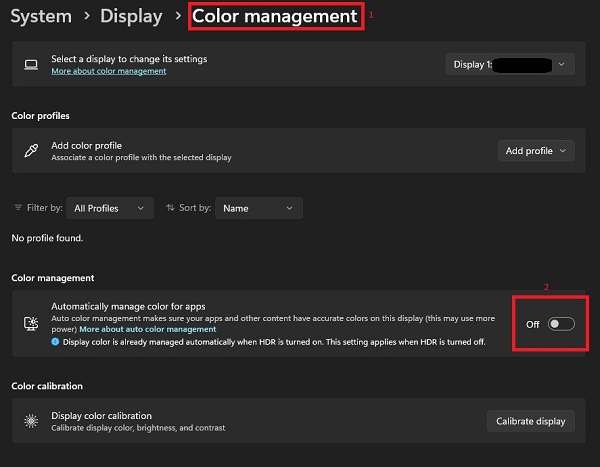
Turning off animations, transparency and auto color management can improve overall system performance ✅
Steps in the images 👇
Warzone - Black Ops 7 🎮
Example gameplay from a single-PC setup 🖥
Game running at 2560×1440 with 300+ FPS while recording ✨
DLSS Transformer ✅️
Proper optimization makes the difference 💣
NVIDIA Driver 595.71 is now available 📢
Game Ready support for MARATHON (launching March 5).
If you’re planning to play at release, this is the driver you want installed ✅
Update properly, use a clean install method for best stability and performance.
Download link in the comments👇
Did you know you can choose the exact NVIDIA driver version you want using NVCleanstall, instead of relying on the NVIDIA App?👀
We always recommend avoiding automatic driver updates❌
Best practice for a proper driver update:
1️⃣ Use DDU to completely remove your current driver
2️⃣ Use NVCleanstall to install the specific driver version you prefer
The best settings for a proper driver installation are in the comments👇
COD PLAYERS 🎮
RTX 5080 / 5090 — Profile Inspector 👇
For these GPUs, DLSS 4.5 is the optimal choice for image quality while maintaining strong performance.
Recommended driver: 591.86
COD PLAYERS 🎮
RTX 5070 Ti and below - Profile Inspector👇
For these GPUs, DLSS 4.0 remains the most balanced choice for performance and stability.
Recommended driver: 591.44
RTX 2000 / 3000 users⚠️
Do NOT configure the DLSS-related entries in Profile Inspector, leave them at default.