Cost just $400, got 500 MILLION views, AI short film 'Huo Qubing' broke the internet!🔥
成本仅3000元,全网5亿播放量,AI短片《霍去病》引爆网络!🔥
Want the English version? Just one click with Cutrix 👇
cutrix一键翻译成英语或其他版本
https://t.co/LOSUmKlDgu
คลิปนี้เป็นวิดีโอจาก Alex Finn (@AlexFinn) ที่พูดถึง "OpenClaw บอกว่ามันคือเทคโนโลยี AI ที่ดีที่สุดเท่าที่เคยเห็นมา แต่คนส่วนใหญ่ใช้แค่เหมือน ChatGPT เท่านั้น
เขาจะแชร์ 6 วิธีใช้ OpenClaw ที่จะเปลี่ยนชีวิตคุณได้ แม้คุณจะเป็นมือใหม่หัดใช้ AI ก็ตาม (วิดีโอยาวประมาณ 19 นาที)
สรุป 6 วิธีใช้ OpenClaw ที่เขาแนะนำ:
1. Second Brain (สมองสำรอง): สร้างระบบบันทึกทุกอย่างที่คุณคิด/เจอ (เช่น ลิงก์หนังสือไอเดีย) ผ่านข้อความเท่านั้น OpenClaw จำได้ทุกอย่าง แล้วค้นหาได้ง่าย ๆ ไม่ต้องใช้ Notion ที่ยุ่งยาก. วิธีเซ็ตอัพ: บอก OpenClaw ว่า "Build a second brain system where I can review all our notes, conversations, and memories using Next.js" แล้วมันจะสร้างให้เลย.
2. Custom Morning Brief (สรุปรายการเช้าแบบส่วนตัว): ทุกเช้า 8 โมง OpenClaw ส่งสรุปข่าวสำคัญ ไอเดียวิดีโอ (พร้อมสคริปต์เต็ม) รายการงานที่ต้องทำ และงานที่มันช่วยทำแทนคุณ ผ่าน Telegram. วิธีเซ็ตอัพ: บอก OpenClaw ว่า "Set up a regular morning brief every morning... include [รายการที่อยากได้ เช่น ข่าว AI, ไอเดียธุรกิจ]" แล้วกำหนดเวลาส่ง.
3. Content Factory (โรงงานผลิตคอนเทนต์อัตโนมัติ): ใช้ Discord สร้าง agent ย่อย ๆ (เช่น Henry สำหรับวิจัย Quill สำหรับเขียนสคริปต์ Pixel สำหรับทำ thumbnail) ผลิตคอนเทนต์ทุกวันอัตโนมัติ. วิธีเซ็ตอัพ: บอก OpenClaw ว่า "Build me a content factory inside Discord... with channels for different agents" แล้วมันจะเซ็ตอัพให้ทั้งหมด.
4. Last 30 Day Skill (วิจัยปัญหาล่าสุด 30 วัน): ติดตั้ง skill นี้เพื่อให้ OpenClaw ค้น X และ Reddit ว่าคนกำลังเจอปัญหาอะไรในหัวข้อที่คุณสนใจ (เช่น ปัญหา OpenClaw) แล้วหาไอเดียธุรกิจแก้ปัญหานั้น จากนั้นให้มัน vibe code แอปแก้ปัญหาให้เลย. วิธีเซ็ตอัพ: คัดลอก skill จากลิงก์ในวิดีโอ แล้วบอก "Install this skill" จากนั้นถาม "Research challenges with OpenClaw over the last 30 days".
5. Autonomous Tasks (งานอัตโนมัติสู่เป้าหมาย): บอกเป้าหมายชีวิตคุณให้ OpenClaw แล้วมันจะคิดงาน 4-5 อย่างที่ทำได้ทุกเช้าเพื่อช่วยให้คุณเข้าใกล้เป้าหมาย (เช่น วิจัย ทำสคริปต์) และ track ผ่าน Kanban board. วิธีเซ็ตอัพ: Brain dump เป้าหมายทั้งหมด แล้วบอก "Every morning at 8am, come up with 4-5 tasks you can do on my computer that bring me closer to these goals".
6. Mission Control (คอนโทรลเซ็นเตอร์ส่วนตัว): สร้างแอปทดแทนซอฟต์แวร์เก่า ๆ (เช่น Calendar แทน Google Calendar) ที่เชื่อมกับความจำ OpenClaw ทั้งหมด ฟรีและ customize ได้. วิธีเซ็ตอัพ: บอก "I'm tired of using Google Calendar, build our own version using Next.js" แล้วรันได้เลย.
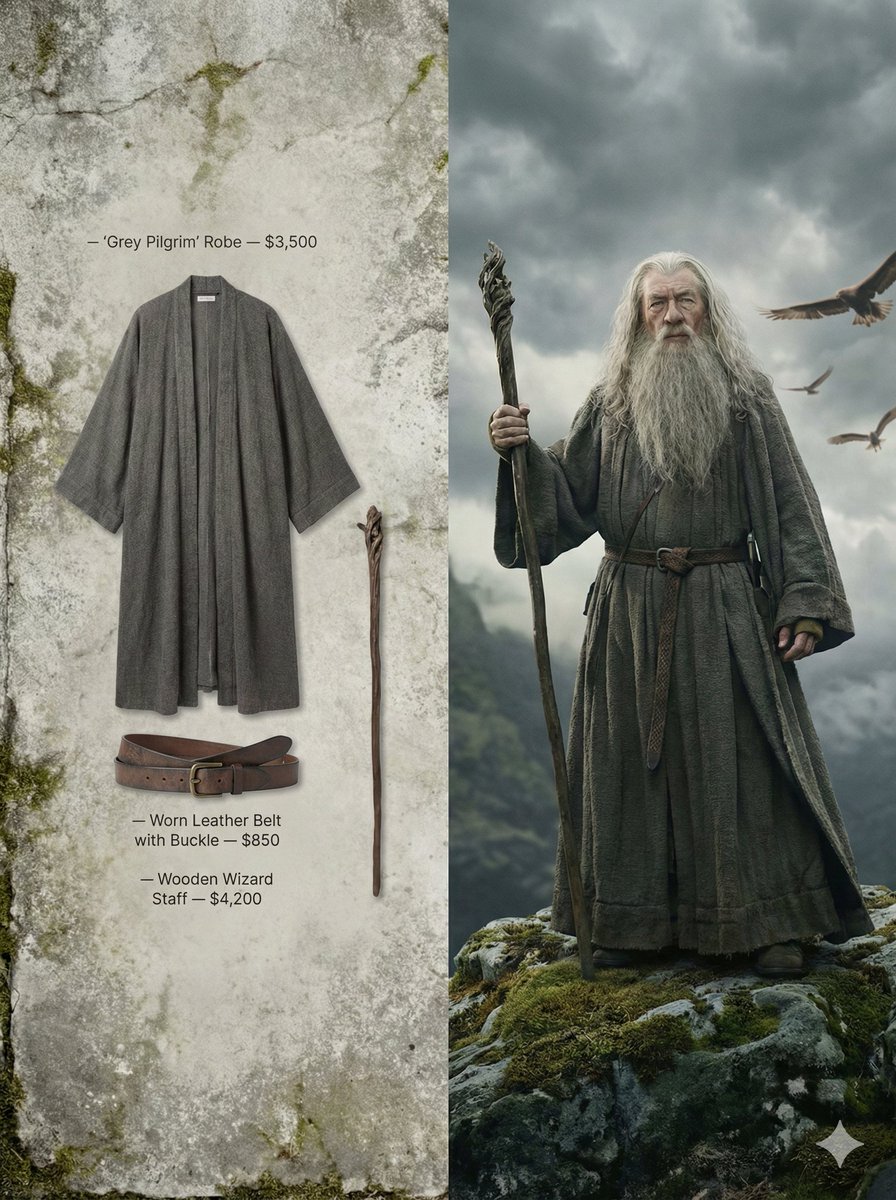
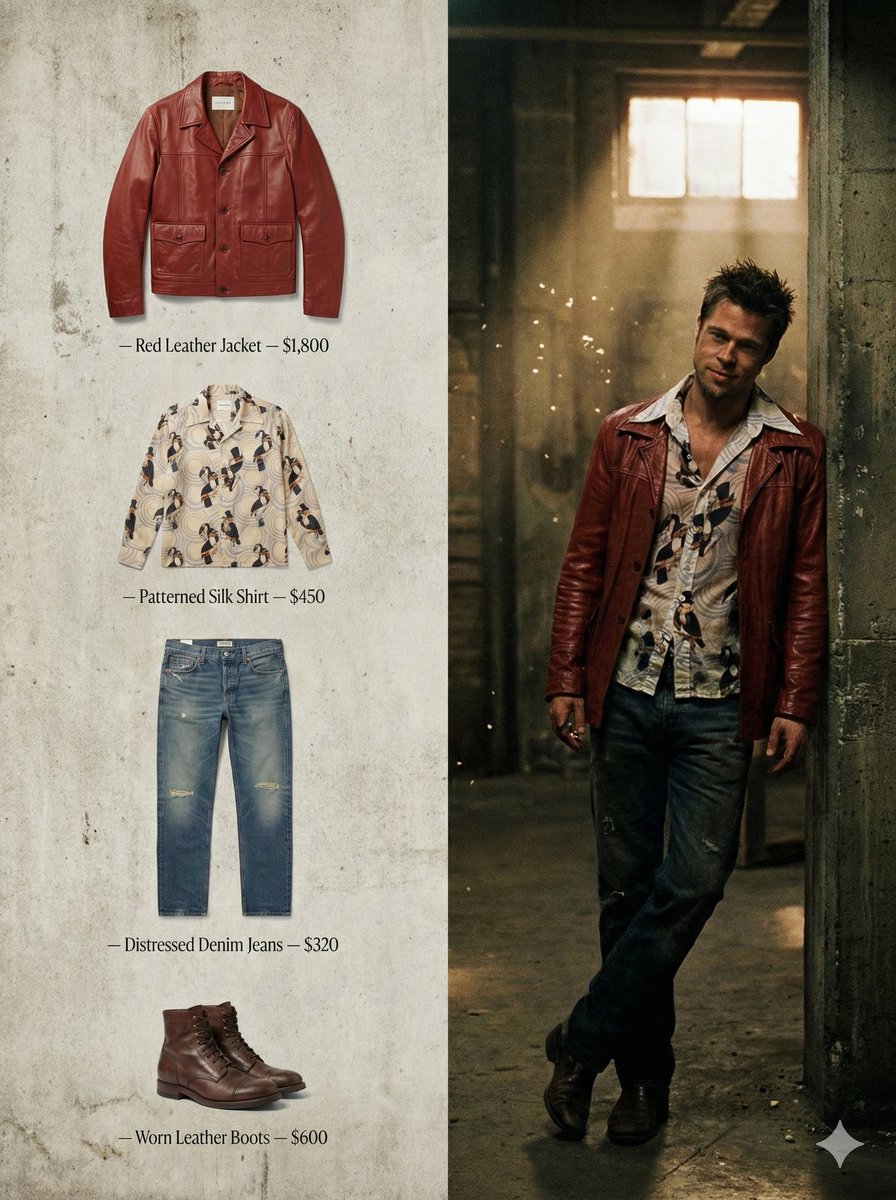
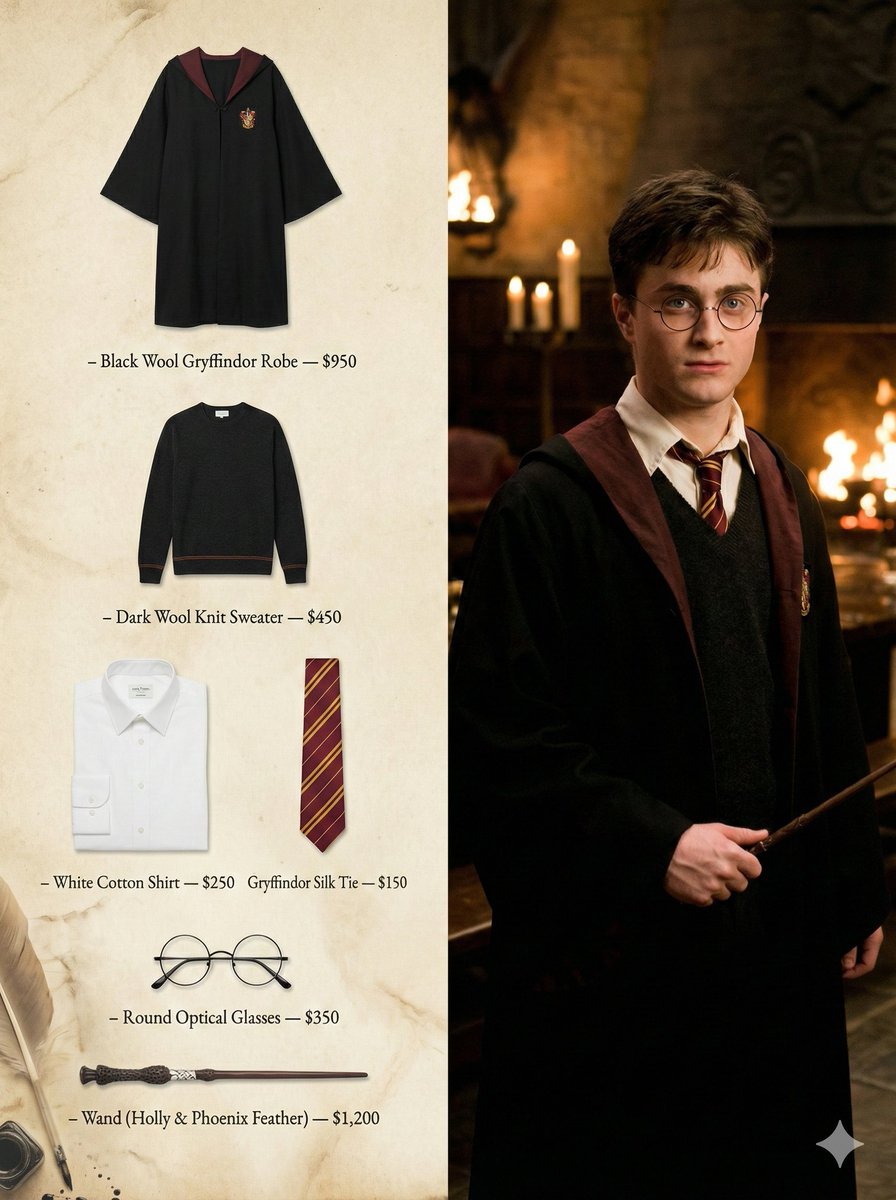
Nano Banana Pro | Cinema to Fashion
A high-fashion creative director campaign image with a 3:4 aspect ratio, split into two clean vertical sections.
Use the provided image as the sole reference. Analyze the scene’s mood, lighting, environment, character posture, and emotional tone, and reinterpret it through a high-fashion editorial lens.
RIGHT SIDE:
Recreate the image as a cinematic film still. Preserve the natural body language, expression, and atmosphere. No fashion posing. Clothing should feel lived-in and story-driven. Filmic lighting, shallow depth of field, restrained color grading. The frame should feel like a paused moment from a moving narrative.
LEFT SIDE:
Translate the outfit worn in the scene into a minimalist luxury wardrobe breakdown. No people, no mannequins. Display each item separately on a background inspired by the scene’s world and textures. Add small, discreet labels with item names and prices, integrated subtly into the composition.
Overall feel: narrative-first fashion campaign, creative director vision, editorial restraint, non-commercial tone.
Lighting: cinematic natural light, filmic contrast, ultra-high resolution.
Negative prompt: e-commerce layout, influencer posing, oversized text, flashy branding, modern UI, studio lighting, plastic skin, clutter, watermark.
this guy made >5 Million views with AI basic long-form videos
here is how i’ve copied the channel with CalliopeLabs:
1- took 5 screenshots
2- sent them to gemini asking for a JSON
3- pasted this into the Visual Style lab:
{
“general_visual_style”:
“art style of 19th-century Realism, classic oil painting on textured canvas, heavy impasto technique with visible thick paint and palette knife ridges, expressive and loose brushwork similar to Ilya Repin and John Singer Sargent”,
“atmosphere”:
“atmospheric volumetric lighting with dramatic light shafts and floating dust particles, deep chiaroscuro contrasts, historical color palette with muted tones and rich earth colors, tactile surface detail, museum masterpiece quality, cinematic composition, highly detailed but painterly finish, aged varnish look.”
}
the video u see below is a snippet from a vid automatically generated by Calliope
nobody listened to me a month ago, but there is still an opportunity: he/she keeps posting, getting views and monetizing
meaning that the niche is still hot
I made a FREE tutorial, step by step on how to i replicated it with my own tool⬇️
follow me and drop a comment asking for it and i’ll send it to you :)
Massive news: I was commissioned by @xai to create a short film in 2 days using only Grok Imagine 1.0 (stills and video).
So in honor of Groundhog Day, here it is: "Routine" a film about a man in a time loop in suburbia.
Thank you so much to the xAI team and @elonmusk for this opportunity!
If you're an AI video creator, you may notice that I've cracked character consistency in Grok Imagine with this project (check out the kitchen scene). I will do a follow up post explaining exactly how I did that (it was not just prompting).
🤖 Draw Things Script to automate your Multi-Angle generation!
🛠️ Our community creators have built some excellent automation scripts that make multi-angle generation much easier.
📐 Just select the distance and angle you want, then run the script.
🧩 The script is highly flexible — reference image of any size can be placed in the Draw Things Moodboard, and the output canvas size can be freely customized.
🍄 This makes multi-angle image creation in DT especially fun and efficient.
📥 Download links and more details are available in the comments below.
🎭 Face swap is effortless using Flux.2 Klein 9B in Draw Things!
🖼️ Place your base image on the Canvas, then drop a reference image into the Moodboard.
⚙️ Copy the prompt into the box, apply the Klein 9B parameter settings, and run!
✨ Boom — the results are fantastic!
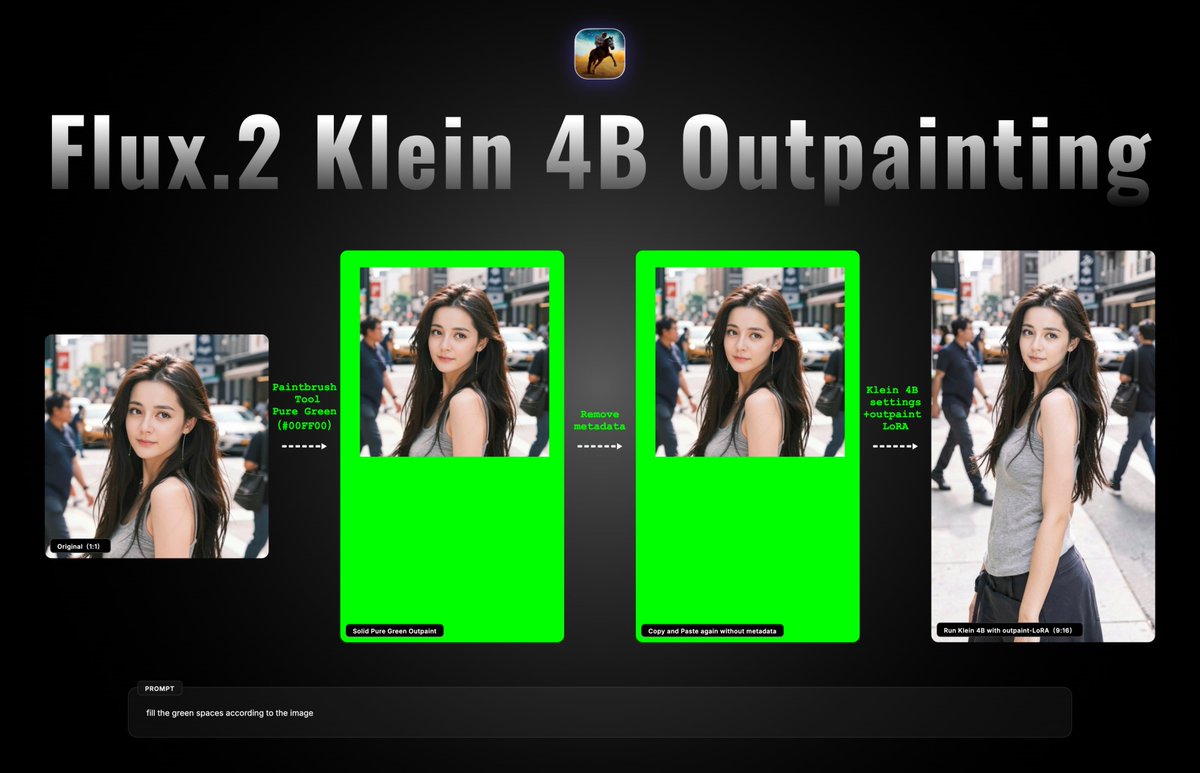
🚨 A Great Outpainting Workflow Using Flux.2 Klein 4B in Draw Things!
🛠️ Because Klein is a very capable image editing model,
✨ its outpainting results are outstanding.
📖 Open this post and check the comments for a detailed step-by-step guide.
🎯 The right way to outpaint your images seamlessly.
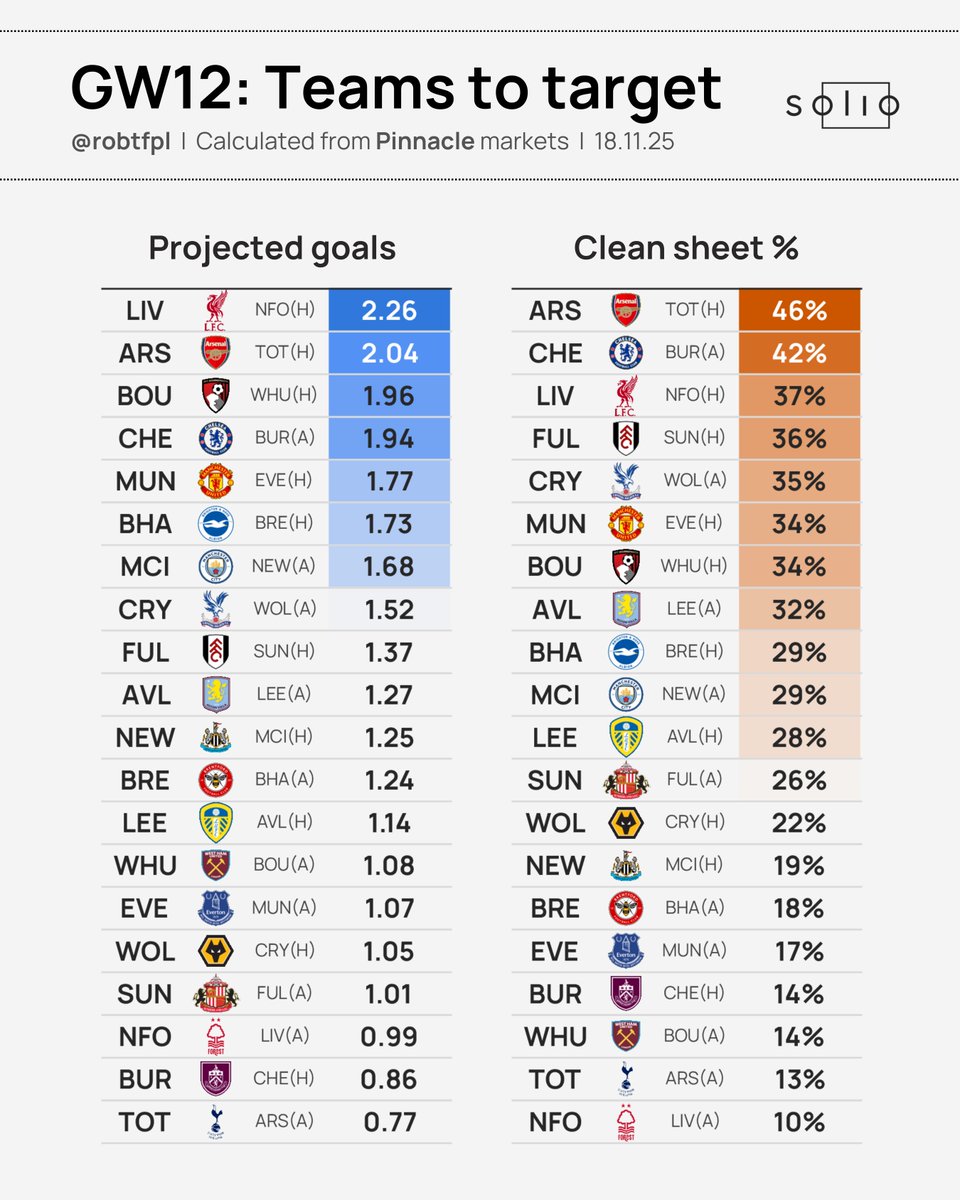
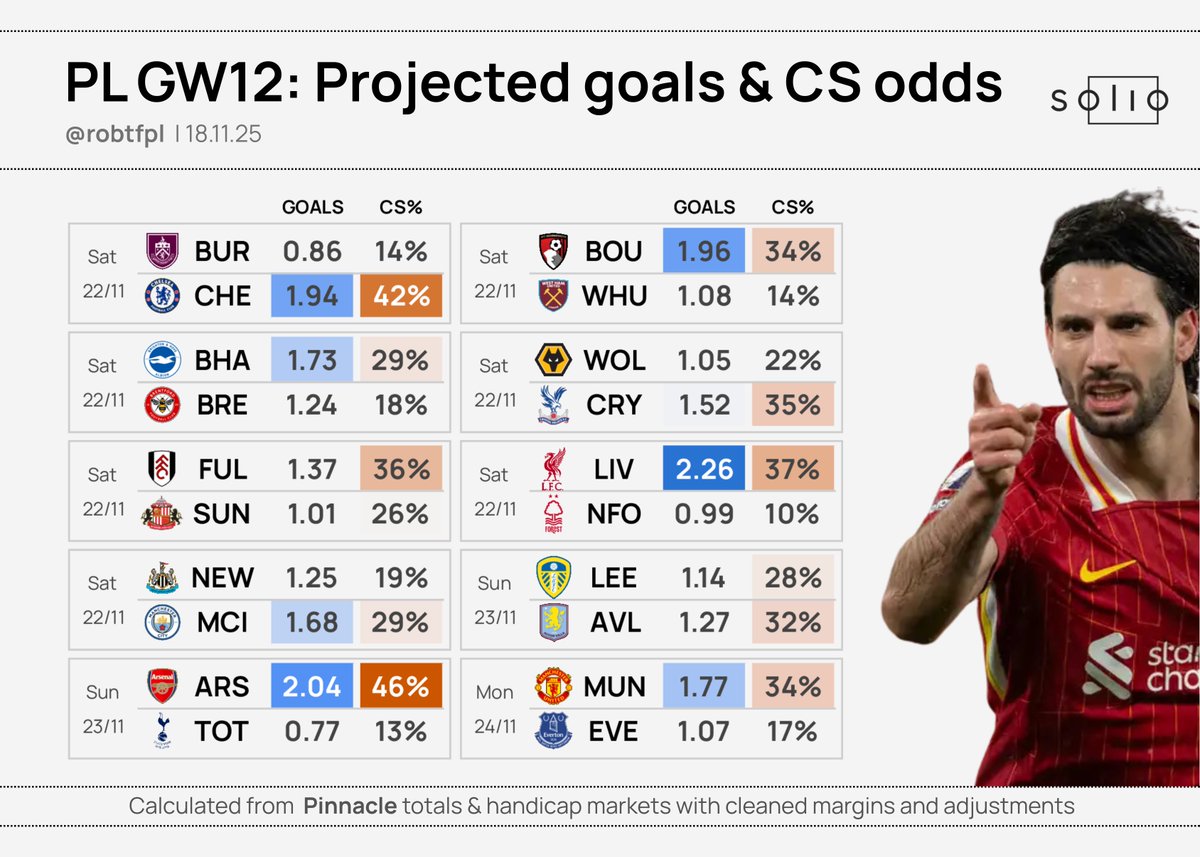
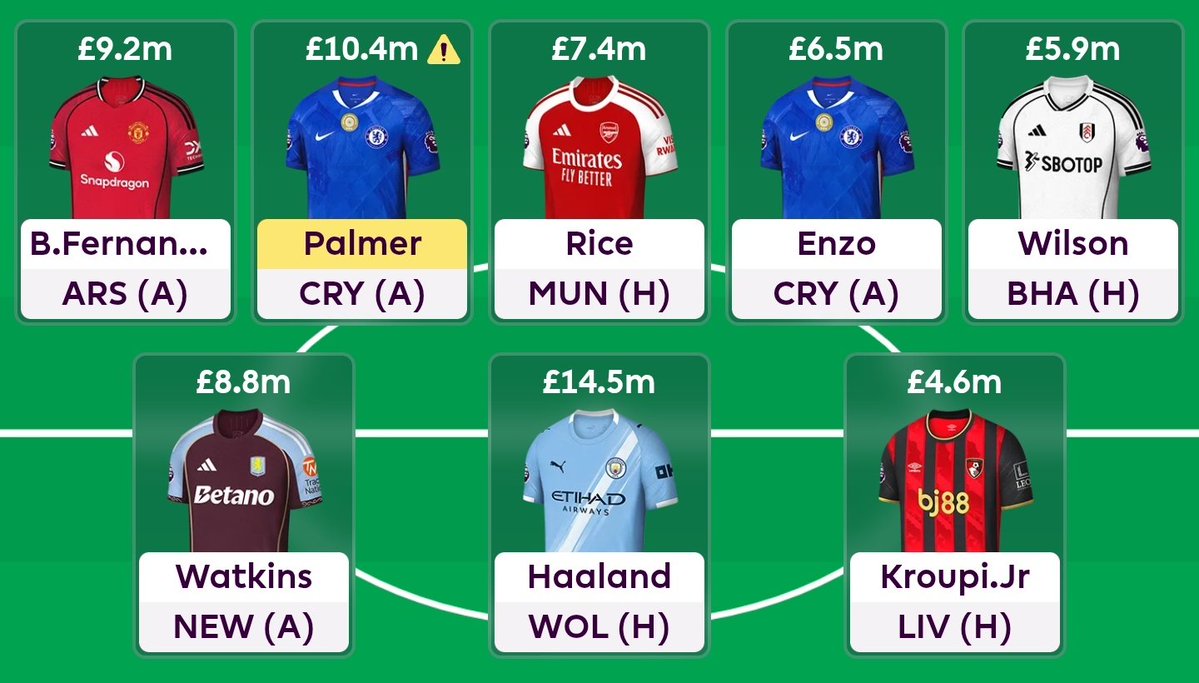
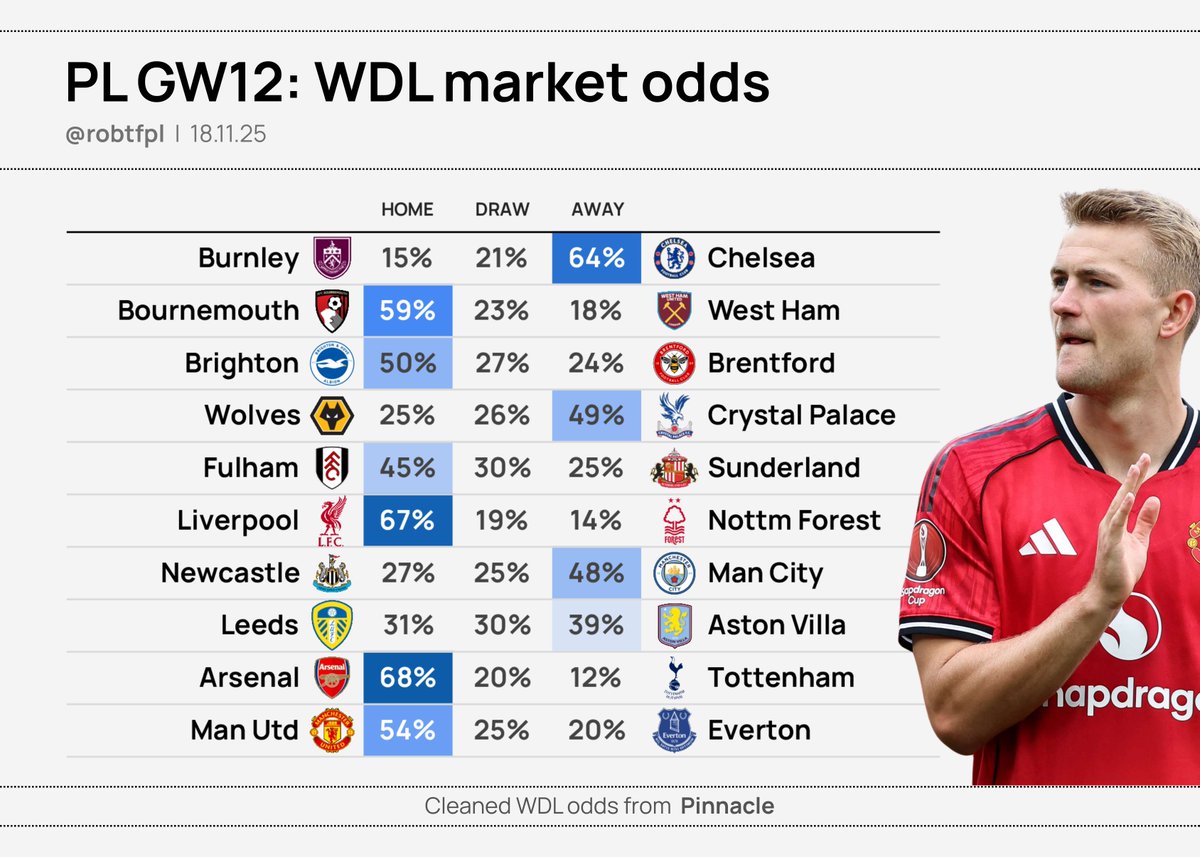
The best front 8 from GW24 ✅
- Bruno, Rice, Enzo and Watkins are locks for us
- Palmer to take advantage of Chelsea's fixtures as he tends to get rested mid week. West Ham could be a tricky game though - he might get benched
- Double Arsenal defence to go with this
AI filmmakers just got their first cinematographer.
invideo Vision turns one sentence into a full cinematic storyboard.
9 connected shots, same world, same characters, real continuity.
Check these great examples 👇🏻
𝙼𝚒𝚗𝚒-𝚛𝚎𝚜𝚎𝚊𝚛𝚌𝚑🧵 𝚘𝚗 𝙳𝚎𝚏𝙲𝚘𝚗𝚜.
The below chart looks at the top 30 FPL defenders through GW11.
#⃣ DefCon pts on avg contribute 13% of total pts
#⃣ 2 of the top 4 defenders don't have a single DC pt (but yeah, they're ARS defenders)