🥊5 months into development
Motion fluidity still not quit there yet, but at least head movement, hands movement and footwork are all procedurally generated by the system in real time according to player input, and they are all works together now, as you can see in the video below when control our guy with keyboard & mouse
Next, will add physics component, so this guy can finally hit something
#gamedev #indiegame #boxing
If modern AI video tools can "generate a video" in minutes, why did our recent World Cup hype piece take about 7 hours of work across the team?
Because "generate a video" and "make a video someone wants to watch" are different jobs. Every layer of those 7 hours has a human approval step baked in. Script, prompts, image gen, video gen, editor review. Quality comes from humans saying "yes, this one" at each stage, not from any single model.
Hour 1: scripting. A custom
@AnthropicAI agent with prompts tuned for @GoogleAIStudio AI Studio and @Kling_ai wrote the storyboard and pre-built base prompts for every shot. Approve, forward.
Next ~3 hours: the image layer. @freepik Spaces as the canvas, Nano Banana Pro (Google's image model) at 2K to save $$ then @Magnific_AI AI pushing detail. Sequential shots (frame A → B → C) need a completely different prompt structure than one-off or b roll shots. Treating them the same is where most AI pipelines break.
Another ~2 hours: video generation. Kling AI 3.0, Google Veo 3.1, Seedance 2.0. Different strengths, so you pick per shot. @topazlabs Labs for the final upscale.
Biggest hurdle: World Cup jersey patterns. Detailed, pixel-hungry, hard to nail at every frame. We could've burned another 5 hours chasing pixel perfection. Instead we used @higgsfield AI's mixed-media feature to layer effects that masked the weak spots, and moved on.
The last hour was the editor. Cuts, words, sound design, speed ramps, plus review cycles with notes and fixes. That loop is what makes it watchable.
The reframe: AI production doesn't collapse to one "make me a video" button. It collapses to a stack of specialized models, stitched together by a workflow, with a human approval layer at every step. We're optimizing for ship velocity, not pixel perfection. Google will probably release a model in two weeks that handles jersey patterns better than anything we have today. That's the bet.
If any of this interests you, or you're building something similar, let's chat it up.
@jamesclift Durable please build me a business that is the same model as yours but better. Use all the things you learned making Durable and use that to make my company, Purable, the better Durable
👒My One Piece fan game:
"One Piece: The Sky Runner" is completed!
Let's just say "Nothing Happened" if you know what I meant😎
▶️See video below for 3 minutes full gameplay
🎮You can also play it here yourself: https://t.co/AfqrQju6FF
@strawhats@onepiece_games@onepiecedaiIys
How to turn a single picture into a Vogue Editorial Fashion Shoot using @freepik@NanoBanana
Add an image in the comments and ill DM you the workflow and your high fashion catalogue
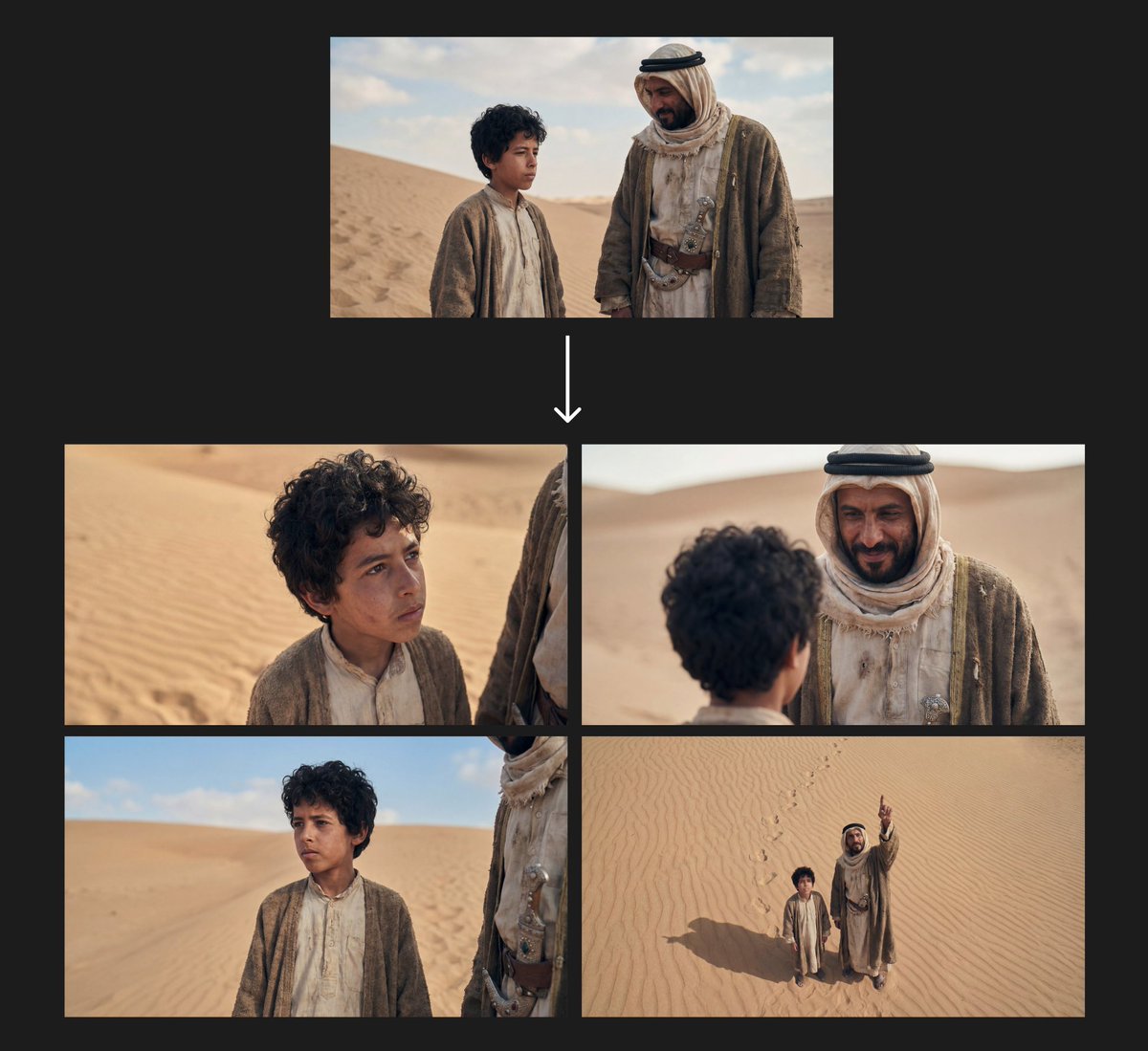
Analyze the original scene and the first 3×3 storyboard grid. Identify the natural next actions the characters would take. Keep the same characters, outfits, lighting, and environment. Maintain a unified anime art style and cinematic consistency. Generate a NEW 3×3 “Anime Storyboard Sheet — Sequence 2” showing the next beats in the scene. All shots should reflect progression, movement, or emotional shift. ROW 1 — Wider Progression Shots ELS (Next Beat): Characters now moved or in mid-action within the environment. LS (Transition): Full-body showing the next physical step—walking, turning, reacting. MLS / 3-4: Knees-up shot capturing a shift in posture or blocking. ROW 2 — Character Acting Continuation 4. MS: Waist-up shot showing the next gesture, reaction, or interaction. 5. MCU: Chest-up emphasizing the next emotional change. 6. CU: Close-up on the updated expression or key moment. ROW 3 — Detail & Dynamic Angles 7. ECU: Extreme detail of the next micro-action (eyes, hands, object movement). 8. Low Angle: Upward shot emphasizing rising momentum or movement. 9. High Angle: Overhead view showing updated character positions or scene layout. Requirements for Sequence 2: Must clearly progress from the previous 9 panels. Anime art style, consistent character models, environment, and lighting. Realistic anime depth of field (wide = deep, close = bokeh). Presented as a clean 3×3 storyboard grid, frames 10–18 of the same scene. @img1
I wanted to have to try something similar to @Alibaba_Qwen next scene but this is for a @NanoBanana and makes a grid with diffrent camera angles
Prompt in comments
Want to master your angle, character, and background setup in Nano Banana Pro?
I put together a PDF showing how you actually get this model to obey you.
It includes:
- How to shift angles
- How to control background
- Prompt examples
Reply “NANO” + RT, and I’ll DM it (must follow).
EAT IT — a kinetic experiment in ComfyUI -- @VisualFrisson automated image sequences that react to the beat, generating rhythmic motion directly inside ComfyUI.
From folders to flow — pure procedural animation with total control.
We’ll dive into the workflow live this Friday!