Introducing SuperCmd v2 🚀 - Completely rebuilt in Swift for native performance. Raycast alternative.
3x less memory usage compared to Raycast ⚡️
50mb on disk, completely local, full privacy!
All the features from SuperCmd v1 including Raycast extensions support!
And here's what's new in v2 ✨
• CleanShotX styled screenshot tool
• Windows styled alt + tab tile manager
• Widgets in main launcher
• Login via ChatGPT (no need to pay for AI subs)
• AI Agents with harness (directory aware)
• Voice based AI agents powered by @OpenAI GPT realtime (just like clicky)
• Execute terminal commands from launcher
• Double tap as hotkey support
• Dedicated AI chat window with web search
• Translate command
• Browser search with history & profiles
• Custom paths for file search
https://t.co/ybENG3sGNL
Released SuperCmd 2.0 🚀
Now with Liquid Glass, a better Window Switcher, an improved Dictation experience, and so many more enhancements... Here are some key details:
1. Liquid Glass 🍸
A new option to choose your panel style alongside Frosty. On macOS 27, the transparency slider works on top of OS-level transparency.
2. Window Switcher ⚡️
Get a bird's-eye view of all open windows across all spaces and desktops, and switch instantly with zero animation.
3. Dictation 🎙️
Added chime sound effects at the start and end of dictation, with an option to copy text to the clipboard.
4. Check for Updates: Raycast Extensions 🧩
A new "Store: Check for Updates" command checks whether new versions are available for any of your installed extensions, and you can bulk update them.
5. Custom Fonts 🎠
Choose the font for your launcher that fits your vibe!!
More key updates
> When you press back, the text gets selected so you can quickly clear the launcher
> Define Word now does fuzzy matching if the word doesn't match exactly
> New "Toggle Hide Notes" command to hide notes if they obstruct your view
> Open files with an app, and share files / clipboard contents from within the launcher
> Option to use Spotlight for file search (for privacy-focused users)
> Improved Notes with support for nested numbering and translucent scroll at the top and bottom
> Improved translucency around the edges throughout the launcher
> Ability to configure Esc key behaviour
> Copying an item from the clipboard history moves it to the top
And many more bug fixes 🐞
2.0 is the continuation of 1.0.9, since people were confusing the Swift version with SuperCmd v1.
Here's the complete changelog: https://t.co/WAJ2HwpPTf
Download: https://t.co/7YENgSWX3y
@cojonesnaut can you elaborate on your usecase.
It does support browser search, you can import history from individual chrome profile or multiple browsers.
also supports custom serach engine
🚀 Released SuperCmd 1.0.9
SuperCmd now supports Custom Window Management!
Highlights ✨
🪟 Create Custom Layout & Create Custom Window Size commands
📔 Improved markdown notes with new markdown engine and revamped UI
🎨 Color History Command
📖 Define Word command for quick dictionary lookup
⌨️ Support for excluding "Shift" from Hyperkey
❎ Auto-Quit all applications now supports exclude list
🎤 MAI-Transcribe 2 and Deepgram Nova-3 support in OpenRouter for dictation
Custom window management commands sync via iCloud, adding support for importing from Raycast for the same
try it out: https://t.co/7YENgSWX3y
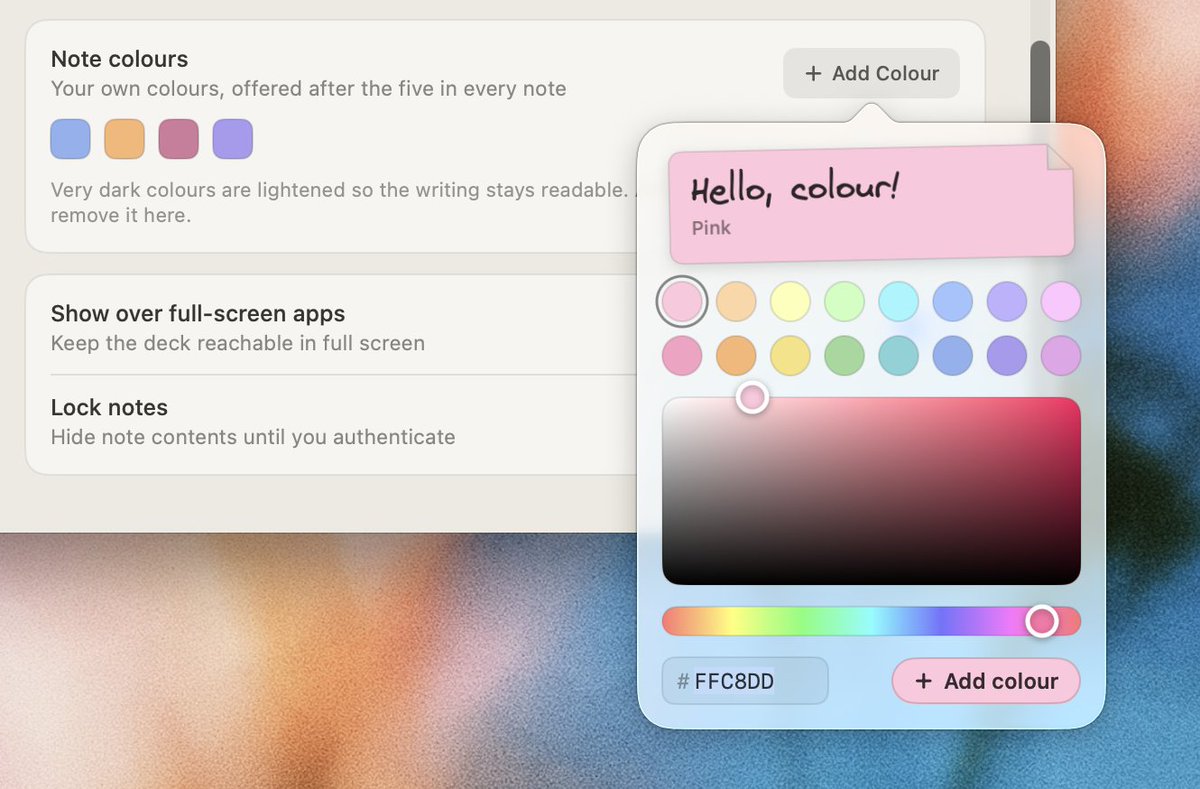
Released Hold My Notes 1.2.0 📚
what's new ✨
- Custom color palette support
- Swipe gesture on trackpad docks the note
- Markdown table support
- Auto-hide toolbar when inactive
- Emoji in title for better visual scanning
download: https://t.co/cP4cvTteA9
Released beta version for SuperCmd 2.0 🍃
You can now remove your default ⌘ + Tab
SuperCmd Window Switcher is now more powerful, It can show windows from all displays and switch to any window from any desktop with 0 animation!! ⚡️
More cool stuff: Liquid Glass, Custom Fonts
Starting the new version from 2.0 as 1.xx for SuperCmd v2 was getting confusing for users :D
Beta is a complete different app, you will get the update notification on main app after the main release.
Beta Release: https://t.co/de8z5zr2n0
https://t.co/7YENgSWX3y
Released Hold My Notes 1.2.0 📚
what's new ✨
- Custom color palette support
- Swipe gesture on trackpad docks the note
- Markdown table support
- Auto-hide toolbar when inactive
- Emoji in title for better visual scanning
download: https://t.co/cP4cvTteA9